
1. Introduction
Thank you for choosing the ECOGREAT OSCAL PowerMax 3600 SE Portable Power Station. This manual provides essential information for the safe and efficient operation of your device. Please read it thoroughly before use and retain it for future reference.
The PowerMax 3600 SE is a high-capacity portable power station designed to provide reliable power for various applications, including home backup, outdoor activities, and emergencies. Featuring a 3600Wh LiFePO4 battery and 3600W (7200W surge) AC output, it supports a wide range of electronic devices and appliances.
2. Safety Instructions
Always follow these basic safety precautions to reduce the risk of fire, electric shock, or injury:
- Do not disassemble, repair, or modify the unit.
- Keep the unit away from heat sources, direct sunlight, and flammable materials.
- Do not expose the unit to water or other liquids.
- Ensure proper ventilation during use to prevent overheating.
- Use only original or certified accessories.
- Keep out of reach of children.
- In case of fire, use a dry powder fire extinguisher.
- The unit features a UL94V-0 rated flame-retardant casing for fire prevention.
- A loud low battery beeping alarm provides timely alerts during emergencies.
3. Package Contents
Verify that all items are present in your package:
- PowerMax 3600 SE Portable Power Station
- 400W Solar Panel (if included in your bundle)
- AC Charging Cable
- Car Charging Cable
- Solar Charging Cable
- User Manual
4. Product Overview
4.1. Control Panel and Display
The PowerMax 3600 SE features a user-friendly control panel with large buttons and an intuitive LED display for easy operation and monitoring of battery information.

Image: The PowerMax 3600 SE control panel showing various output ports and the digital display. It highlights 14 multi-function sockets for powering diverse devices.
4.2. Output Ports
The unit is equipped with 14 versatile output ports to support a wide range of electronics and appliances:
- 4 x AC Output (Pure Sine Wave, 3600W total, 7200W surge)
- 1 x TT-30 (RV Ready)
- 2 x USB-C (100W Max each)
- 4 x USB-A (18W Max each)
- 1 x Car Charger (12V-10A, 120W Max)
- 2 x DC5521 Output (Shared 120W)
- 1 x Anderson Output (Shared 120W)
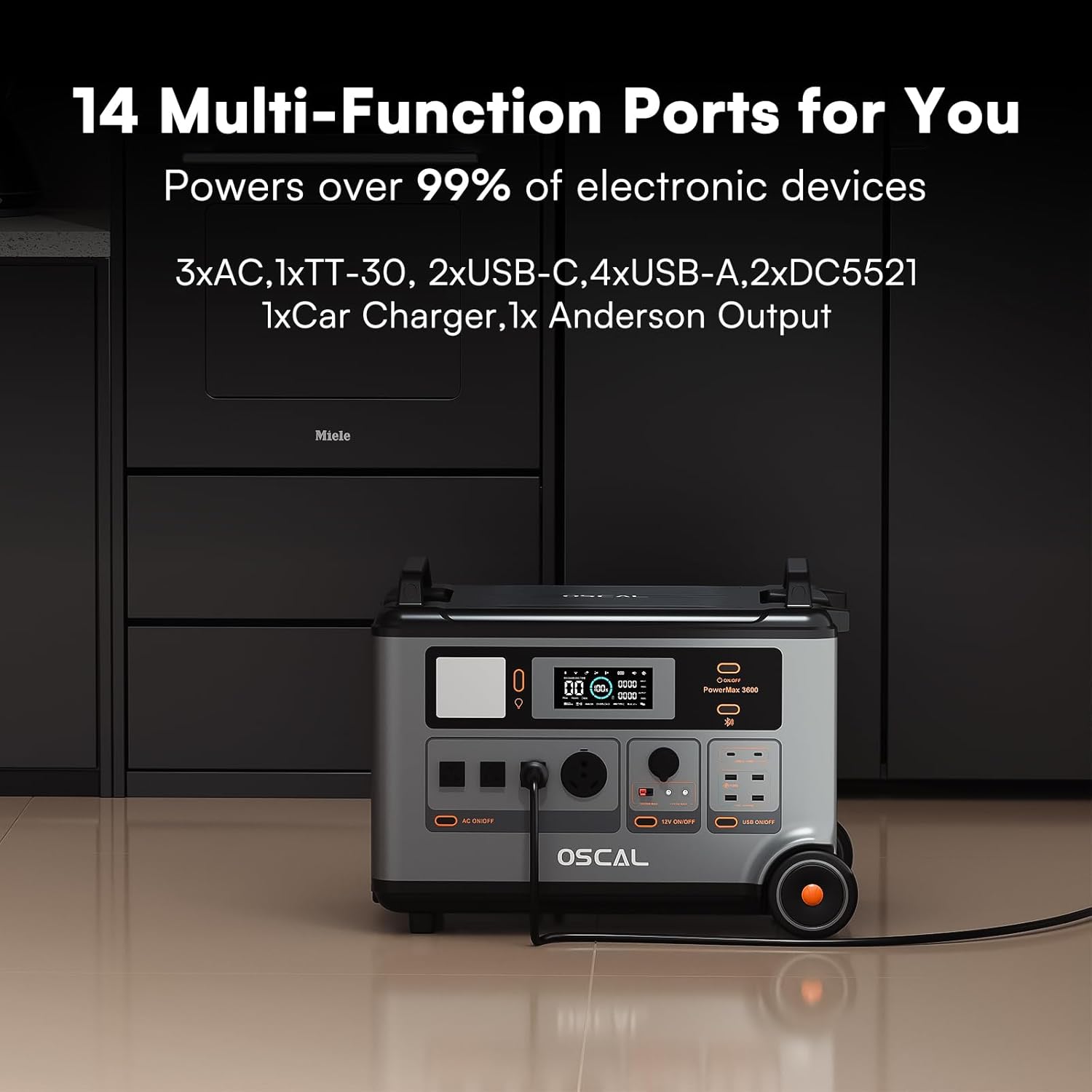
Image: Close-up view of the PowerMax 3600 SE's various output ports, including AC, USB-C, USB-A, car charger, DC5521, and Anderson outputs, illustrating its versatility.
4.3. Portability
Designed for convenience, the PowerMax 3600 SE features smooth wheels and telescopic handles, allowing for easy transport like a trolley case.

Image: A person pulling the PowerMax 3600 SE portable power station using its integrated wheels and telescopic handle on a paved path, demonstrating its portability.
5. Setup
5.1. Initial Charge
Before first use, fully charge the PowerMax 3600 SE. Connect the AC charging cable to a wall outlet. The display will show the charging status. A full charge from 0-100% can be achieved in approximately 1.44 hours with combined AC and solar input (1800W AC + 1600W solar).
5.2. Solar Panel Connection (Optional)
If using the optional 400W solar panel, connect it to the solar input port on the power station using the provided solar charging cable. Position the solar panel in direct sunlight for optimal charging efficiency.

Image: The PowerMax 3600 SE power station positioned outdoors with multiple solar panels connected, illustrating its fast charging capabilities via solar and AC input.
6. Operating Instructions
6.1. Turning On/Off
Press and hold the main power button to turn the unit on or off. Individual AC, DC, and USB output sections have their own power buttons.
6.2. Charging Devices
Connect your devices to the appropriate output ports (AC, USB-A, USB-C, Car Charger, DC5521, Anderson). Ensure the corresponding output section is turned on. The PowerMax 3600 SE can power up to 99% of essential devices, including microwaves, refrigerators, power tools, and more.

Image: An illustration showing the PowerMax 3600 SE powering various household appliances simultaneously, such as a space heater, microwave, double-door fridge, heated blanket, sump pump, and LED bulb.

Image: The PowerMax 3600 SE connected to and powering a variety of essential devices like a coffee maker, electric lawn mower, toaster, and washing machine, indicating their respective run times.
6.3. EPS (Emergency Power Supply) Function
The PowerMax 3600 SE is equipped with an EPS uninterruptible power supply. In the event of a power outage, it automatically switches to battery power within 5-8 milliseconds, ensuring continuous operation for connected equipment. This is ideal for home emergencies, network equipment, and critical outdoor tasks.

Image: A woman opening a refrigerator in a dimly lit kitchen, with the PowerMax 3600 SE providing power, illustrating its ultra-fast EPS auto-switch feature during a power interruption.
6.4. Smart App Control
Download the OSCAL application on your smartphone to remotely monitor and control the power station via Bluetooth or Wi-Fi. The app allows you to manage power usage, check real-time stats, and execute commands with ease.

Image: A person holding a smartphone displaying the OSCAL app interface, showing battery status and control options for the PowerMax 3600 SE, emphasizing smart app control.

Image: A man using a smartphone app to control the PowerMax 3600 SE power station while camping with a rooftop tent, demonstrating remote control capabilities.
6.5. Usage Scenarios
The PowerMax 3600 SE is versatile for various environments:
- Outdoor Camping: Power mini-fridges, electric grills, and lighting.
- Working Electricity: Operate power tools like electric routers and lawnmowers.
- Home Backup Power: Keep essential appliances running during outages.

Image: A collage showing the PowerMax 3600 SE being used in three different scenarios: outdoor camping with an RV, powering a chainsaw for outdoor work, and providing home backup power in a living room setting.
6.6. Official Product Videos
Video: An official product video showcasing the OSCAL 3600Wh 3600W Power Station PowerMax 3600 SE, highlighting its features and applications.
Video: A detailed official product video demonstrating the OSCAL Portable Power Station 3600Wh PowerMax 3600 SE, covering its design, functionality, and benefits.
7. Maintenance
7.1. Cleaning
Wipe the unit with a dry, soft cloth. Do not use abrasive cleaners or solvents. Ensure all ports are free of dust and debris.
7.2. Storage
Store the PowerMax 3600 SE in a cool, dry place, away from direct sunlight and extreme temperatures. For long-term storage, charge the unit to approximately 50-80% every 3-6 months to prolong battery life.
7.3. Battery Care
The unit uses durable LiFePO4 batteries with an advanced eight-layer safety BMS (Battery Management System). This system provides protection against overcharge, over-discharge, over-voltage, over-current, short-circuit, and temperature fluctuations, ensuring a service life of up to 25 years with 3500+ charge cycles.

Image: A detailed diagram illustrating the OSCAL Intelligent Battery Management System (BMS) chip, emphasizing its role in delivering over 40 protection features for current, voltage, temperature, and thermal runaway.
8. Troubleshooting
| Problem | Possible Cause | Solution |
|---|---|---|
| Unit not turning on | Battery is completely drained. | Connect to AC power and charge for at least 30 minutes. |
| Device not charging | Output port not activated or device requires more power than available. | Ensure the specific output port is turned on. Check device power requirements against power station output. |
| Slow charging via solar | Insufficient sunlight or incorrect panel angle. | Reposition solar panels for direct sunlight exposure. Clean panels if dirty. |
| Overload warning | Connected devices exceed the unit's output capacity. | Disconnect some devices to reduce the load. The unit will automatically reset after a few seconds. |
9. Specifications
| Feature | Detail |
|---|---|
| Brand | ECOGREAT |
| Model Name | PowerMax 3600 SE |
| Battery Capacity | 3600Wh |
| AC Output | 3600W (7200W Surge) |
| Battery Type | LiFePO4 |
| Charge Cycles | 3500+ to 80% capacity |
| Fast Charging | 0-100% in 1.44h (1800W AC + 1600W Solar) |
| EPS Switchover Time | 5-8 ms |
| Total Power Outlets | 14 |
| Operating Temperature | -20°C to 55°C |
| Casing Material | High-strength ABS (UL94V-0 rated flame-retardant) |
| Dimensions (L x W x H) | 11.5"L x 13"W x 16.5"H (23.2 x 13.8 x 17.5 inches) |
| Net Weight | Approximately 97 lb / 44.45 kg |
| Special Features | Smart App Control, Overload Protection, Super Quiet, USB Port, Lighthouse-like Signal Light (Morse Code) |
10. Warranty & Support
The PowerMax 3600 SE comes with a 5-year warranty, ensuring your satisfaction and peace of mind. For technical support, warranty claims, or further assistance, please contact ECOGREAT customer service through their official channels or refer to the contact information provided in your product packaging.
For more information, visit the ECOGREAT Store on Amazon.