
Introduction
This manual provides detailed instructions for the Skechers Warner SR1200 Analog-Digital Watch. Please read this manual thoroughly to understand the functions and proper use of your watch. Keep this manual for future reference.
Product Features
- Durable Construction: Features a lightweight polycarbonate case and a durable black nylon strap.
- Dual Display: Combines traditional analog hands with a clear digital display.
- Comfortable Fit: Equipped with an easy-to-adjust velcro closure for a secure and comfortable fit.
- Scratch-Resistant: Protected by an acrylic crystal designed to resist scratches.
- Water Resistance: Water resistant up to 50 meters (5 ATM), suitable for short periods of recreational swimming and showering. Not suitable for diving or snorkeling.
- Case Dimensions: 46 mm case diameter with a 26 mm band width.
Setup and Initial Use
Wearing the Watch
The Skechers Warner SR1200 watch features a nylon strap with a velcro closure for easy adjustment. To wear the watch:
- Wrap the strap around your wrist.
- Secure the velcro closure to achieve a comfortable and snug fit.

Image: The Skechers Warner SR1200 watch displayed on a wrist, illustrating how the watch appears when worn and the fit of the black nylon strap.
Setting the Time (Analog Display)
The analog display shows the current time using traditional hour and minute hands.
- Locate the crown on the right side of the watch case.
- Gently pull the crown out to the first position.
- Rotate the crown clockwise or counter-clockwise to adjust the hour and minute hands to the correct time.
- Once the time is set, push the crown back in to its original position to start the analog movement.
Setting the Time and Date (Digital Display)
The digital display provides additional functions including precise time, date, and other modes. The watch typically has four buttons: LIGHT, MODE, START, and RESET.
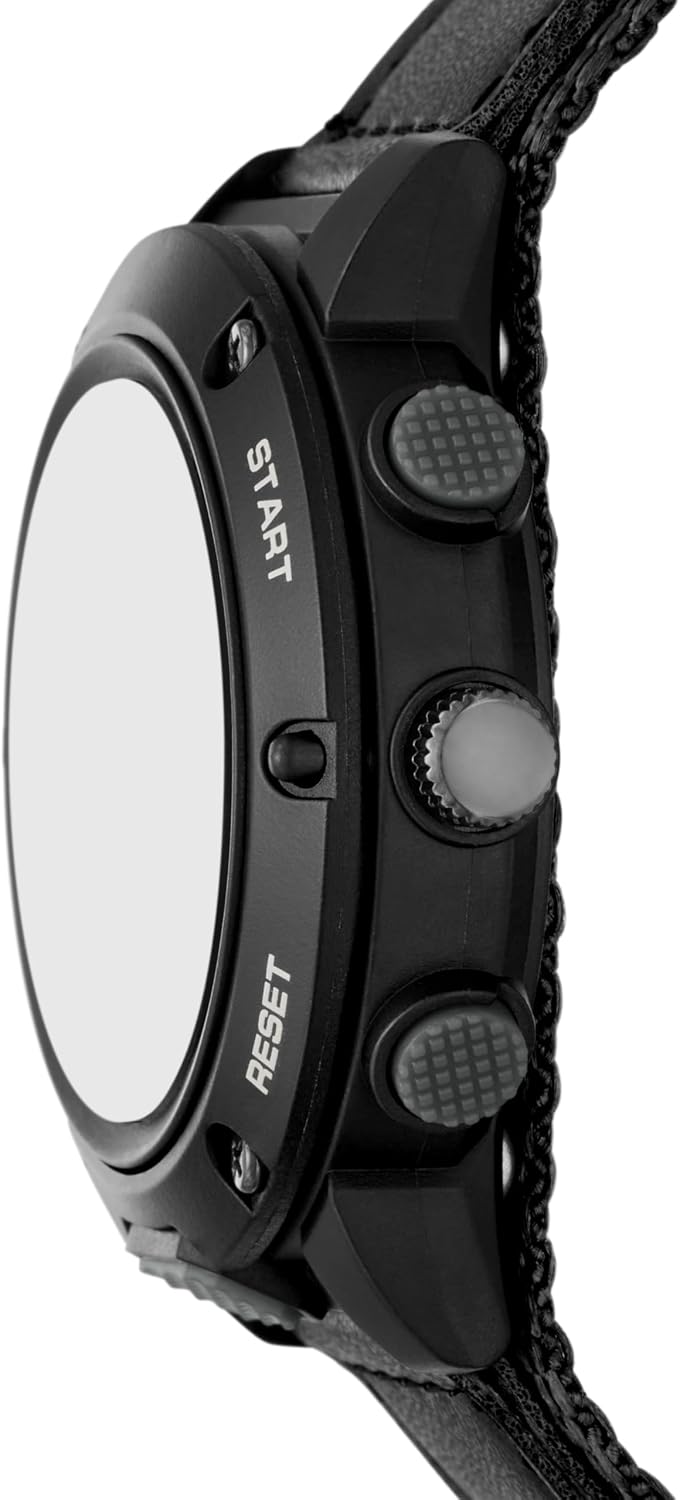
Image: A side view of the Skechers Warner SR1200 watch, highlighting the four control buttons on the case, typically used for digital display functions.
- Press the MODE button repeatedly until the digital display shows the time setting mode (often indicated by flashing digits).
- Use the RESET button to select the digit or setting you wish to adjust (e.g., hours, minutes, year, month, day).
- Use the START button to increase the selected value. Hold START to advance rapidly.
- Continue this process until all time and date parameters are correctly set.
- Press the MODE button to exit the setting mode and return to the normal time display.
Operating the Digital Functions

Image: A detailed view of the Skechers Warner SR1200 watch face, illustrating the combined analog and digital time displays.
Digital Display Modes
Press the MODE button to cycle through the available digital functions:
- Time/Date Display: Shows the current digital time (hour, minute, second) and date (month, day, day of week).
- Stopwatch Function:
- Press START to begin timing.
- Press START again to pause.
- Press RESET to clear the stopwatch to zero.
- Alarm Function:
- In Alarm mode, use RESET and START buttons to set the desired alarm time.
- A combination of buttons (refer to specific watch model instructions if available) is typically used to activate or deactivate the alarm.
Backlight
Press the LIGHT button to illuminate the digital display for better visibility in low-light conditions.
Water Resistance
This watch is water resistant up to 50 meters (5 ATM). This means it can withstand splashes, rain, and short periods of recreational swimming or showering. It is not suitable for diving, snorkeling, or high-pressure water activities. Avoid operating buttons while the watch is wet to prevent water ingress.
Maintenance
Cleaning
To maintain the appearance of your watch:
- Wipe the watch case and strap with a soft, dry cloth.
- For stubborn dirt, a slightly damp cloth can be used, followed by immediate drying.
- Avoid using harsh chemicals, solvents, or abrasive cleaners, as these can damage the watch's finish or materials.
Battery Replacement
The Skechers Warner SR1200 watch uses a Quartz movement, which is powered by a battery. When the watch stops or the digital display becomes dim, the battery may need replacement. It is recommended to have the battery replaced by a qualified watch technician to ensure proper sealing and water resistance.
Troubleshooting
- Watch Not Running: Check if the crown is pushed in completely. If the watch still does not run, the battery may need replacement.
- Incorrect Time/Date: Follow the instructions in the "Setup" section to reset the analog and digital time and date.
- Digital Display Dim/Blank: This usually indicates a low battery. Replace the battery.
- Water Inside Watch: If you notice condensation or water inside the watch, stop using it immediately and contact customer support. Do not attempt to open the watch yourself.
Specifications
| Model Number | SR1200 |
| Brand | Skechers |
| Display Format | Analog-Digital |
| Movement Type | Quartz |
| Power Source | Battery |
| Water Resistance Depth | 50 Meters (5 ATM) |
| Clasp Type | Velcro |
| Strap Material | Nylon |
| Case Material | Plastic |
| Crystal Type | Acrylic |
| Case Diameter | 46 Millimeters |
| Strap Width | 26 Millimeters |
| Case Thickness | 15 Millimeters |
| Band Length | 210 Millimeters |
| Weight | 170 Grams |
| UPC | 807320029748 |
Warranty and Support
Warranty Information
This Skechers watch comes with a limited warranty. Please refer to the warranty card included with your purchase for specific terms and conditions, or visit the official Skechers website for detailed warranty information.
Customer Support
For any questions, technical assistance, or service requests, please contact Skechers customer support. Contact information can typically be found on the official Skechers website or on your product packaging.