
1. Introduction
The ATK RS7 Air Esports Hall Effect Keyboard is engineered for competitive gamers requiring rapid response and precise control. This 75% layout keyboard features advanced Hall Effect magnetic switch technology, allowing for an adjustable rapid-trigger range from 0.001 mm to 3.3 mm. This enables users to customize actuation distances to their exact preferences. With an ultra-low 0.08 ms latency, keystrokes are registered quickly and accurately, crucial for high-intensity gaming. Its compact 81-key design optimizes desk space for mouse movement without compromising essential functionality. The keyboard is constructed with an aluminum positioning plate and a mecha-style ABS housing, ensuring structural stability and a consistent typing experience. Frosted translucent Cherry-profile PC keycaps enhance backlight diffusion while providing durability for extended use.

Image 1.1: The ATK RS7 Air Esports Hall Effect Keyboard, showcasing its compact 75% layout and RGB backlighting.
2. Setup Guide
2.1. Package Contents
Verify that all items are present in the package:
- ATK RS7 Air Esports Hall Effect Keyboard
- USB-C to USB-A Cable
- Keycap Puller
- Switch Puller
- User Manual (this document)
2.2. Connecting the Keyboard
Connect the provided USB-C cable to the keyboard's USB-C port and the other end to an available USB-A port on your computer. The keyboard is plug-and-play and should be recognized automatically by your operating system.
2.3. Software Installation (ATK HUB 3.0)
For full customization options, including rapid trigger adjustment, RGB lighting effects, and key remapping, download and install the ATK HUB 3.0 software from the official ATK website. The software is compatible with Windows 11 and Mac OS 14 Sonoma or newer.

Image 2.1: The ATK HUB 3.0 software interface, showing options for managing ATK devices.
3. Operating Instructions
3.1. Key Features
- Hall Effect Magnetic Switches: Offers adjustable actuation points from 0.001 mm to 3.3 mm for personalized responsiveness.
- 75% Compact Layout: An 81-key design that saves desk space while retaining essential function keys and arrow keys.
- Ultra-Low Latency: Achieves 0.08 ms input latency for immediate in-game response.
- Durable Construction: Features an aluminum positioning plate and mecha-style ABS housing for enhanced stability.
- Frosted PC Keycaps: Cherry-profile keycaps designed for improved backlight diffusion and long-term durability.

Image 3.1: Visual representation of the keyboard's core performance metrics, including latency, polling rate, and RT precision.

Image 3.2: Illustration of ATK's flagship switches (Ice Blade and Lucid Blade) and the keyboard's 5-layer firm gasket structure.
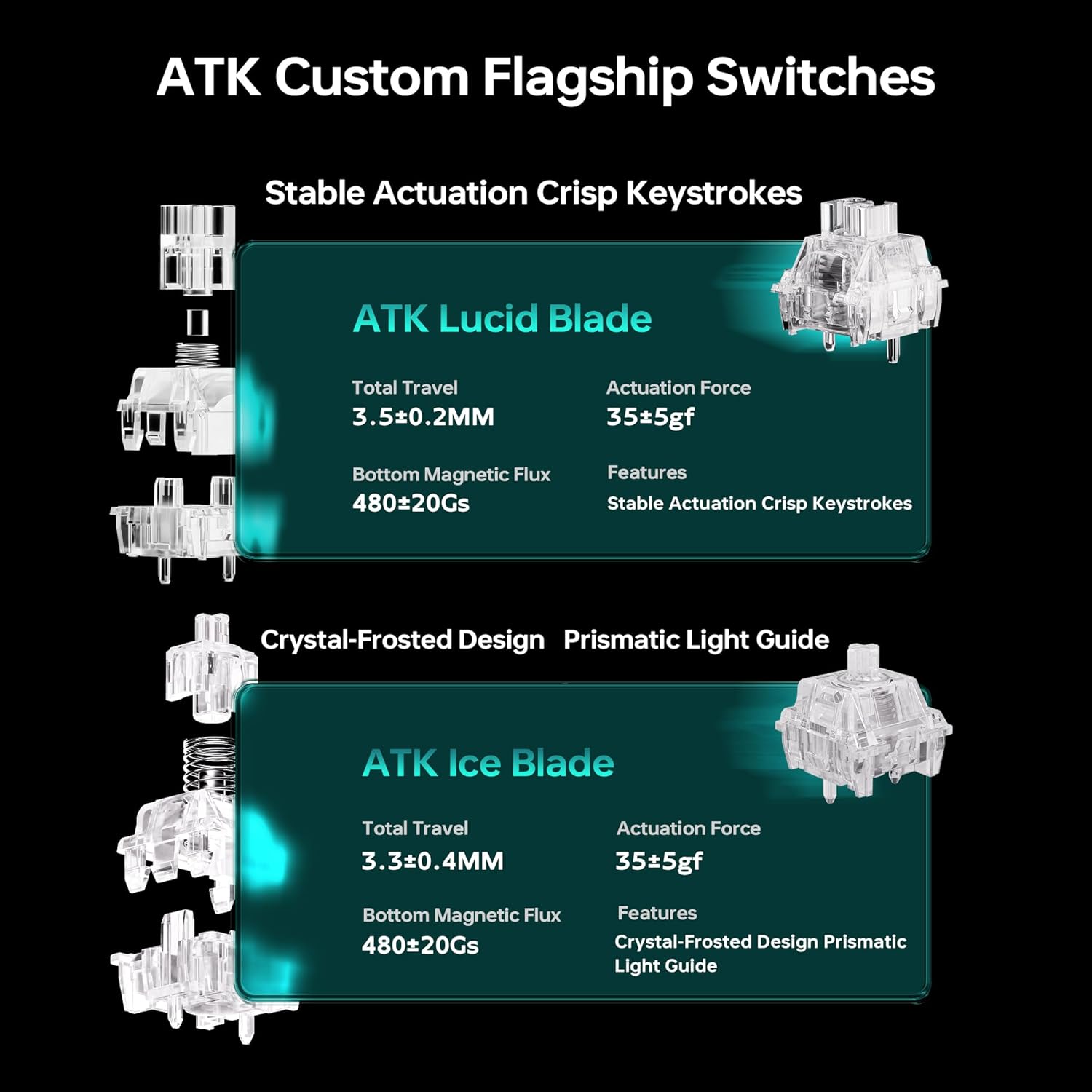
Image 3.3: Detailed specifications for ATK Lucid Blade and Ice Blade switches, including total travel, actuation force, and magnetic flux.
3.2. Customization
The ATK RS7 Air offers extensive customization through the ATK HUB 3.0 software:
- Rapid Trigger Adjustment: Fine-tune the actuation and reset points of each key for competitive advantage.
- RGB Lighting: Customize per-key RGB backlighting with various effects and colors.
- Programmable Keys: Remap keys, create macros, and assign custom functions to enhance workflow or gaming performance.

Image 3.4: Close-up views of the frosted PC keycaps, dynamic RGB lighting, and the 2-level adjustable ergonomic keyboard stand.
3.3. Ergonomics and Design
The keyboard features a 2-level adjustable ergonomic stand to provide comfortable typing angles, reducing fatigue during prolonged use. The frosted translucent keycaps not only enhance the aesthetic with improved backlight diffusion but also contribute to a consistent key feel.

Image 3.5: Side view of the keyboard highlighting the "Mecha Wings" design element, LOGO indicator light, and frosted translucent keycaps.
4. Maintenance
4.1. Cleaning the Keyboard
To maintain optimal performance and appearance, regularly clean your keyboard:
- Disconnect the keyboard from your computer before cleaning.
- Use a soft, lint-free cloth slightly dampened with water or a mild cleaning solution to wipe the keycaps and chassis.
- For dust and debris between keys, use compressed air.
- Avoid using harsh chemicals or abrasive materials.
4.2. Keycap and Switch Replacement
The ATK RS7 Air features hot-swappable switches, allowing for easy replacement or customization without soldering. Use the provided keycap and switch pullers:
- Gently use the keycap puller to remove keycaps.
- Use the switch puller to carefully extract switches from the PCB.
- Align new switches with the sockets and press firmly until they click into place.
- Reattach keycaps.

Image 4.1: An exploded view illustrating the multi-layer gasket structure and components of the keyboard, indicating ease of access for maintenance.
5. Troubleshooting
If you encounter issues with your ATK RS7 Air keyboard, refer to the following common solutions:
- Keyboard Not Responding:
- Ensure the USB-C cable is securely connected to both the keyboard and the computer.
- Try connecting the keyboard to a different USB port on your computer.
- Test the keyboard on another computer to rule out system-specific issues.
- Keys Not Registering:
- Check if the specific keycap or switch is properly seated. Use the switch puller to reseat the switch if necessary.
- Clean any debris around the affected switch.
- If using ATK HUB 3.0, ensure no key remapping or macros are interfering with the key's function.
- RGB Lighting Issues:
- Ensure ATK HUB 3.0 software is running and updated.
- Check lighting settings within the software.
- Verify that the keyboard's firmware is up to date.
- Software Not Detecting Keyboard:
- Restart your computer and the ATK HUB 3.0 software.
- Ensure the keyboard is directly connected to the computer, not through a USB hub.
- Reinstall the ATK HUB 3.0 software.
If these steps do not resolve the issue, please contact ATK customer support for further assistance.
6. Specifications
| Feature | Detail |
|---|---|
| Brand | ATK |
| Model Name | RS7 Air |
| Connectivity Technology | USB-C |
| Keyboard Description | Gaming |
| Recommended Uses | Gaming |
| Special Features | Backlit, Hot-Swappable, Programmable Keys |
| Color | Black/Lucidblade (Note: Other color variants available) |
| Keyboard Backlighting | RGB |
| Material | Polybutylene Terephthalate (Keycaps), Polycarbonate (Housing), Aluminum (Positioning Plate) |
| Power Source | USB Powered |
| Switch Type | Hall Effect Magnetic (Mechanical) |
| Keyboard Layout | QWERTY (75% Layout) |
| Number of Keys | 81 |
| Compatible Operating Systems | Windows, Mac OS 14 Sonoma or newer |
| Latency | 0.08 ms |
| Rapid Trigger Range | 0.001 mm to 3.3 mm |
7. Warranty and Support
7.1. Warranty Information
The ATK RS7 Air Esports Hall Effect Keyboard comes with a 6-month warranty from the date of purchase. This warranty covers manufacturing defects and malfunctions under normal use. It does not cover damage caused by misuse, accidents, unauthorized modifications, or normal wear and tear.
Please retain your proof of purchase for warranty claims.
7.2. Customer Support
For technical support, warranty claims, or any other inquiries regarding your ATK RS7 Air keyboard, please visit the official ATK website or contact ATK customer service through the contact information provided on their website. You can also refer to the ATK Store on Amazon for additional resources.


