
1. Introduction
Thank you for choosing the ALLPOWERS R2500 Portable Power Station and SE200 Solar Panel. This manual provides essential information for the safe and efficient operation of your device. The R2500 is a high-capacity portable power station designed to provide reliable power for various applications, from outdoor adventures to emergency home backup. It features a 2016Wh LiFePO4 battery, delivering a continuous output of 2500W (4000W peak) and supports multiple charging methods, including ultra-fast AC charging and efficient solar charging with the included SE200 solar panel.
Package Contents:
- 1 x ALLPOWERS R2500 2016Wh 2500W Portable Power Station
- 1 x ALLPOWERS SE200 200W Solar Panel
- 1 x AC Charging Cable
- 1 x Quick Start Guide
- 1 x 6-Year Warranty Card
2. Safety Instructions
Please read and understand all safety instructions before operating the ALLPOWERS R2500 and SE200. Failure to follow these instructions may result in electric shock, fire, or serious injury.
- Do not disassemble, repair, or modify the unit.
- Do not place the unit near heat sources or in direct sunlight for extended periods.
- Avoid exposure to rain or moisture. Keep the unit dry.
- Use only original or certified charging cables and accessories.
- Ensure proper ventilation during use and charging. Do not block ventilation openings.
- Keep out of reach of children and pets.
- In case of fire, use a dry powder fire extinguisher. Do not use water.
- Dispose of the product according to local regulations.
3. Product Overview
The ALLPOWERS R2500 Portable Power Station is equipped with various output ports and a clear display to monitor its status. The SE200 Solar Panel is designed for efficient solar energy conversion.
R2500 Power Station Components:
- AC Outlets: 4 x 230V AC outlets for household appliances.
- USB-C Ports: 2 x 100W USB-C ports for fast charging compatible devices.
- USB-A Ports: 4 x USB-A ports (12W/18W) for standard USB devices.
- DC5525 Ports: 2 x DC5525 (120W) outputs.
- Car Outlet: 1 x 120W car outlet.
- Input Ports: Dedicated ports for AC, Solar (MPPT 1000W), and Car charging.
- LCD Display: Shows battery level, input/output wattage, and status indicators.
- Control Buttons: Power on/off, AC/DC/USB output control, UltraFast mode activation.

Figure 3.1: Front view of the ALLPOWERS R2500 Portable Power Station, highlighting its various output ports and digital display.

Figure 3.2: Detailed views of the R2500 unit, illustrating its design and port layout.
SE200 Solar Panel Components:
- Foldable Design: For easy transport and setup.
- High-Efficiency Cells: Designed for optimal solar energy conversion.
- Output Cable: Compatible with the R2500's solar input port.

Figure 3.3: The ALLPOWERS SE200 200W Foldable Solar Panel.
4. Setup
4.1 Initial Charging
- Unpack the R2500 power station and AC charging cable.
- Connect the AC charging cable to the R2500's AC input port.
- Plug the other end of the AC charging cable into a standard wall outlet.
- The LCD display will show the charging status. It is recommended to fully charge the unit before first use.
4.2 Connecting the Solar Panel
- Unfold the SE200 solar panel and place it in direct sunlight.
- Connect the solar panel's output cable to the R2500's solar input port.
- Ensure the connection is secure. The LCD display will indicate solar charging activity.
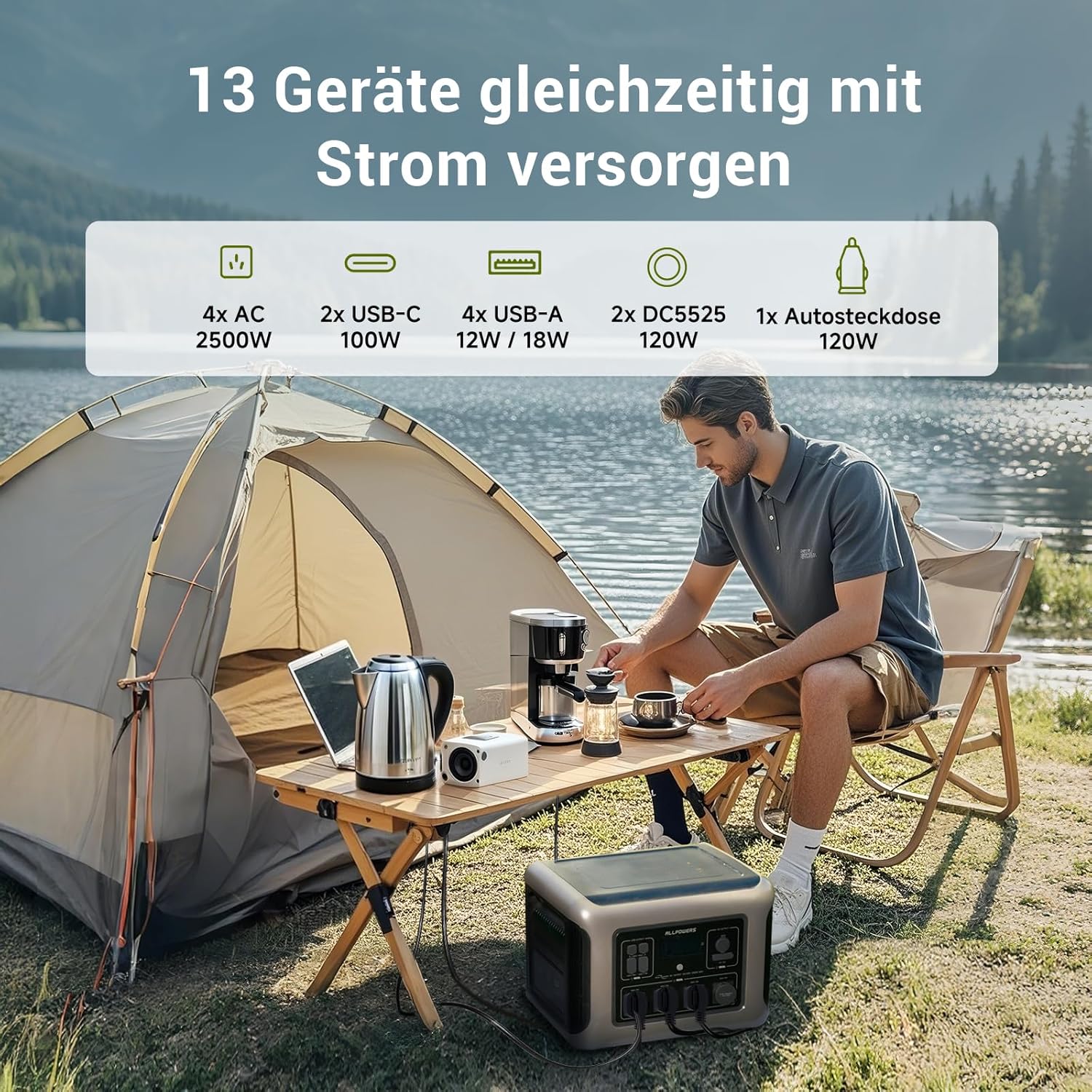
Figure 4.1: The R2500 Power Station connected to a solar panel for charging.
5. Operating Instructions
5.1 Powering On/Off
- To power on the R2500, press and hold the main power button for a few seconds until the LCD display illuminates.
- To power off, press and hold the main power button again until the display turns off.
5.2 Using AC Outlets
- Press the AC output button to activate the AC outlets. The AC indicator on the display will light up.
- Plug your AC appliances into the 230V outlets.
- Ensure the total power consumption of your devices does not exceed 2500W (or 4000W peak).
- Press the AC output button again to turn off the AC outlets when not in use.
5.3 Using DC and USB Outputs
- Press the DC output button to activate the DC5525 ports and car outlet.
- Press the USB output button to activate the USB-A and USB-C ports.
- Connect your devices to the appropriate ports.
- Turn off the DC and USB outputs when not in use to conserve power.

Figure 5.1: The R2500 Power Station in use, powering various appliances.
5.4 UPS Function (Uninterruptible Power Supply)
The R2500 features a UPS function, providing continuous power to connected devices during a power outage. When connected to an AC wall outlet, the R2500 can pass through power to connected devices while simultaneously charging its internal battery. In the event of a power failure, the R2500 automatically switches to battery power within 15 milliseconds, ensuring uninterrupted operation for critical devices.

Figure 5.2: The R2500 providing continuous power via its UPS function.
5.5 Smart App Remote Control
The R2500 can be controlled remotely via a smartphone app. Download the ALLPOWERS app from your device's app store. Follow the in-app instructions to connect your R2500 via Bluetooth or Wi-Fi. The app allows you to monitor battery status, control output ports, and adjust settings.

Figure 5.3: Controlling the R2500 Power Station using the ALLPOWERS smartphone app.
6. Charging Methods
The ALLPOWERS R2500 supports multiple charging options to ensure you always have power.
6.1 AC Wall Charging
Connect the R2500 to a standard wall outlet using the provided AC charging cable. The R2500 features ultra-fast charging, reaching 80% capacity in approximately 50 minutes and a full charge in about 1 hour with a maximum input of 2000W. Ensure the UltraFast mode is activated for optimal charging speed.
6.2 Solar Charging
Connect the SE200 solar panel (or other compatible solar panels up to 1000W, 150V max) to the R2500's solar input port. Place the solar panels in direct sunlight for maximum efficiency. With a 1000W solar input, the R2500 can be fully charged in approximately 2 hours.
6.3 Car Charging
The R2500 can be charged using a car charger (not included, typically sold separately). Connect the car charger to your vehicle's 12V/24V car outlet and to the R2500's car input port.

Figure 6.1: Overview of R2500 charging methods: AC wall, solar, and car.
7. Maintenance
7.1 Cleaning
Wipe the unit with a dry, soft cloth. Do not use abrasive cleaners or solvents. Keep ports free of dust and debris.
7.2 Storage
- Store the R2500 in a cool, dry place, away from direct sunlight and extreme temperatures.
- For long-term storage, charge the unit to 50-80% every 3-6 months to maintain battery health.
- The LiFePO4 battery is designed for over 4500 charge cycles, offering a lifespan of approximately 10 years with regular use and proper maintenance.
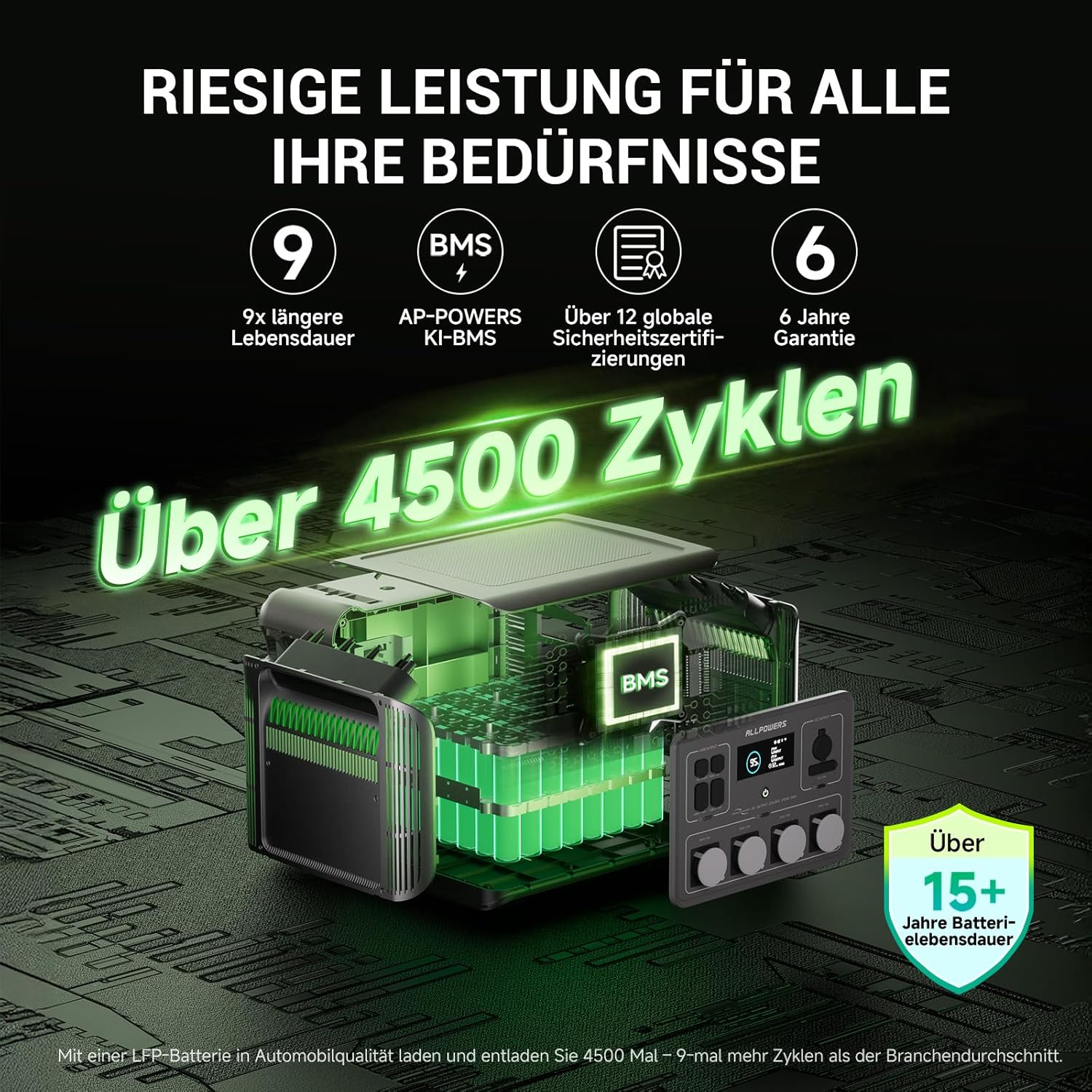
Figure 7.1: The R2500's LiFePO4 battery, engineered for extended durability.
8. Troubleshooting
If you encounter issues with your ALLPOWERS R2500, refer to the following common problems and solutions:
- Unit Not Turning On:
Ensure the battery is charged. If the battery is depleted, connect the unit to an AC outlet for charging. Press and hold the power button firmly for a few seconds. - No Output from Ports:
Verify that the specific output (AC, DC, USB) is activated by pressing its respective button. Check if the device you are trying to power is within the R2500's wattage limits. Ensure cables are securely connected. - Slow Charging:
For AC charging, ensure UltraFast mode is enabled. For solar charging, ensure solar panels are in direct sunlight and free from obstructions. Check cable connections. - Overload Protection Activated:
If the unit shuts down or displays an overload warning, disconnect some devices to reduce the load. Restart the unit. - Display Not Working:
Try restarting the unit. If the issue persists, contact customer support.
9. Specifications
| Brand | ALLPOWERS |
| Model | R2500 |
| Battery Capacity | 2016Wh |
| Battery Type | LiFePO4 (Lithium Iron Phosphate) |
| AC Output Power | 2500W (Continuous), 4000W (Peak) |
| AC Output Voltage | 230V AC |
| Solar Input (MPPT) | Max 1000W (150V) |
| AC Input Power | Max 2000W |
| USB-C Output | 2 x 100W |
| USB-A Output | 4 x (12W/18W) |
| DC5525 Output | 2 x 120W |
| Car Outlet Output | 1 x 120W |
| UPS Switching Time | <15ms |
| Dimensions (L x W x H) | 45.6 x 36 x 34.6 cm |
| Weight | 29 kg |
| Material | ABS |
10. Warranty and Support
The ALLPOWERS R2500 Portable Power Station and SE200 Solar Panel come with a 6-year warranty from the date of purchase. This warranty covers manufacturing defects and ensures reliable performance under normal use.
Customer Support:
For technical support, warranty claims, or any questions regarding your product, please contact ALLPOWERS customer service through their official website or the contact information provided on your warranty card. Please have your purchase receipt and product model number ready when contacting support.

Figure 10.1: ALLPOWERS 6-Year Premium Warranty information.


