
1. Introduction
This manual provides essential information for the safe and efficient operation, setup, and maintenance of your ANTHBOT M9 Robot Lawn Mower. Please read this manual thoroughly before using the product and retain it for future reference.
The ANTHBOT M9 is an advanced robotic lawn mower designed for residential yards up to 0.3 acres. It features a dual AI vision system combined with Full-Band RTK technology for precise navigation without the need for perimeter wires. The mower is equipped with obstacle avoidance capabilities, adjustable cutting height, and multi-zone management via a dedicated mobile application.
2. Package Contents
Verify that all items listed below are present in your package. If any components are missing or damaged, contact customer support.
- 1 ANTHBOT M9 Robotic Lawn Mower
- 1 Charging Base Station
- 1 Blade Set (5 blades in total)
- 1 RTK Reference Station
- Usage Instructions (Quick Start Guide and User Manual)
- Installation Tools (screwdriver, screws, hex key)

Figure 2.1: ANTHBOT M9 Package Contents. This image displays the main unit, charging station, RTK kit, blades, and installation tools.
3. Setup
3.1 RTK Reference Station Installation
The RTK reference station is crucial for the M9's precise positioning. Install it in an open area with a clear view of the sky, away from obstructions like tall buildings or dense trees. Ensure the indicator light on the RTK base station is always green for optimal signal reception.
Video 3.1: ANTHBOT - M5&M9 - Teaching Collection. This video demonstrates the setup process for the ANTHBOT M5 and M9 models, including RTK station placement and app configuration.

Figure 3.1: ANTHBOT RTK Wall Mount Kit. This image shows the components for securely mounting the RTK reference station.
3.2 App Installation and Initial Mapping
Download the ANTHBOT application from your device's app store. Follow the on-screen instructions to pair your M9 mower. The app will guide you through the initial mapping process, which typically takes about 10 minutes. This process creates a virtual map of your lawn, eliminating the need for physical perimeter wires.
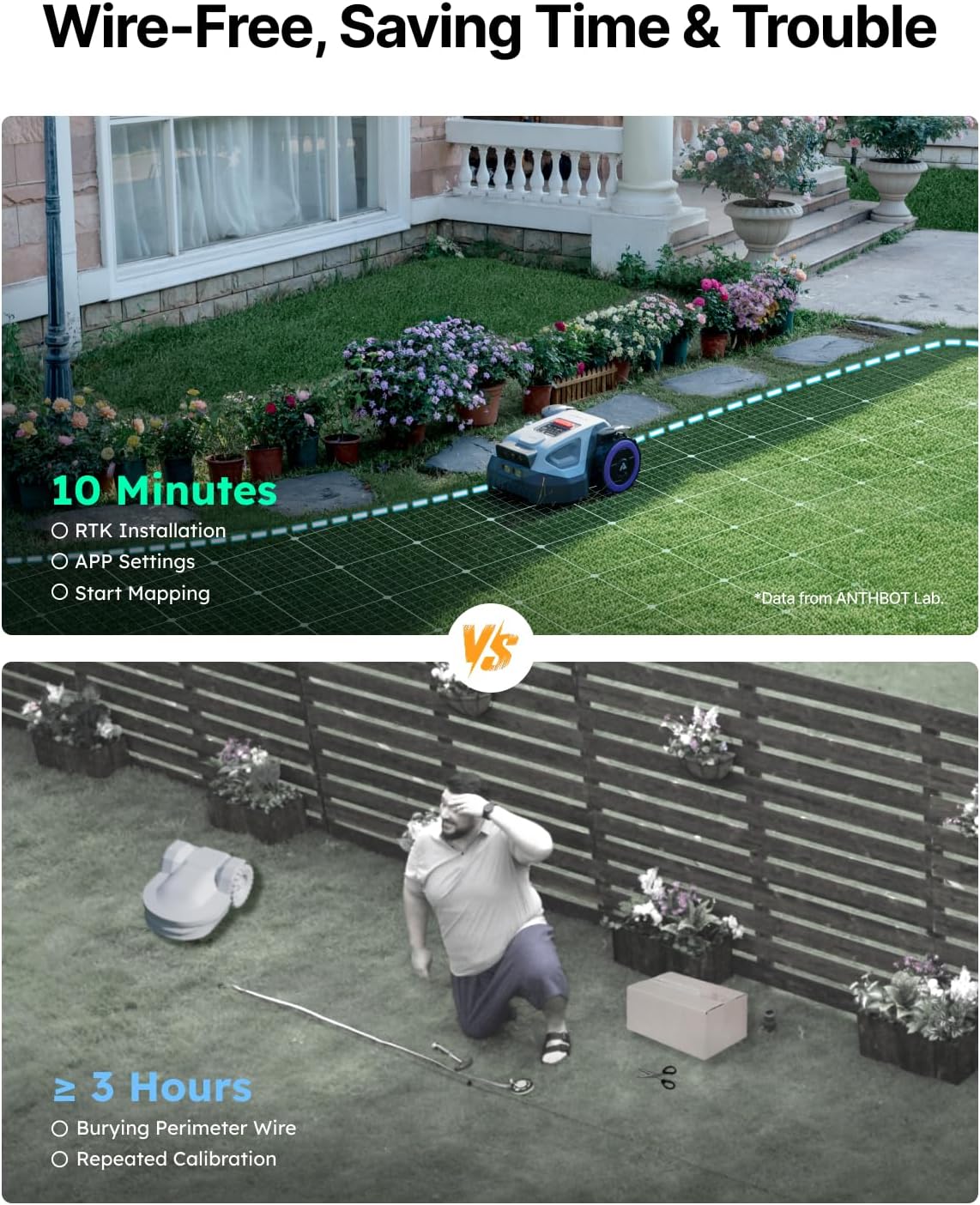
Figure 3.2: Wire-Free Mapping. The ANTHBOT M9 uses its app for quick, wire-free lawn mapping.
Video 3.2: ANTHBOT - M5&M9 - Teaching Collection (Preview). This short video clip demonstrates the initial app setup and confirmation steps for the ANTHBOT M9.
4. Operating Instructions
4.1 Mowing Modes and Scheduling
The ANTHBOT M9 allows for intelligent path planning and multi-zone management. Through the app, you can define up to 30 work zones, create seamless paths between them, and set customizable no-go zones. Schedule mowing times based on your preferences; the mower will automatically return to its charging station and resume work as needed.
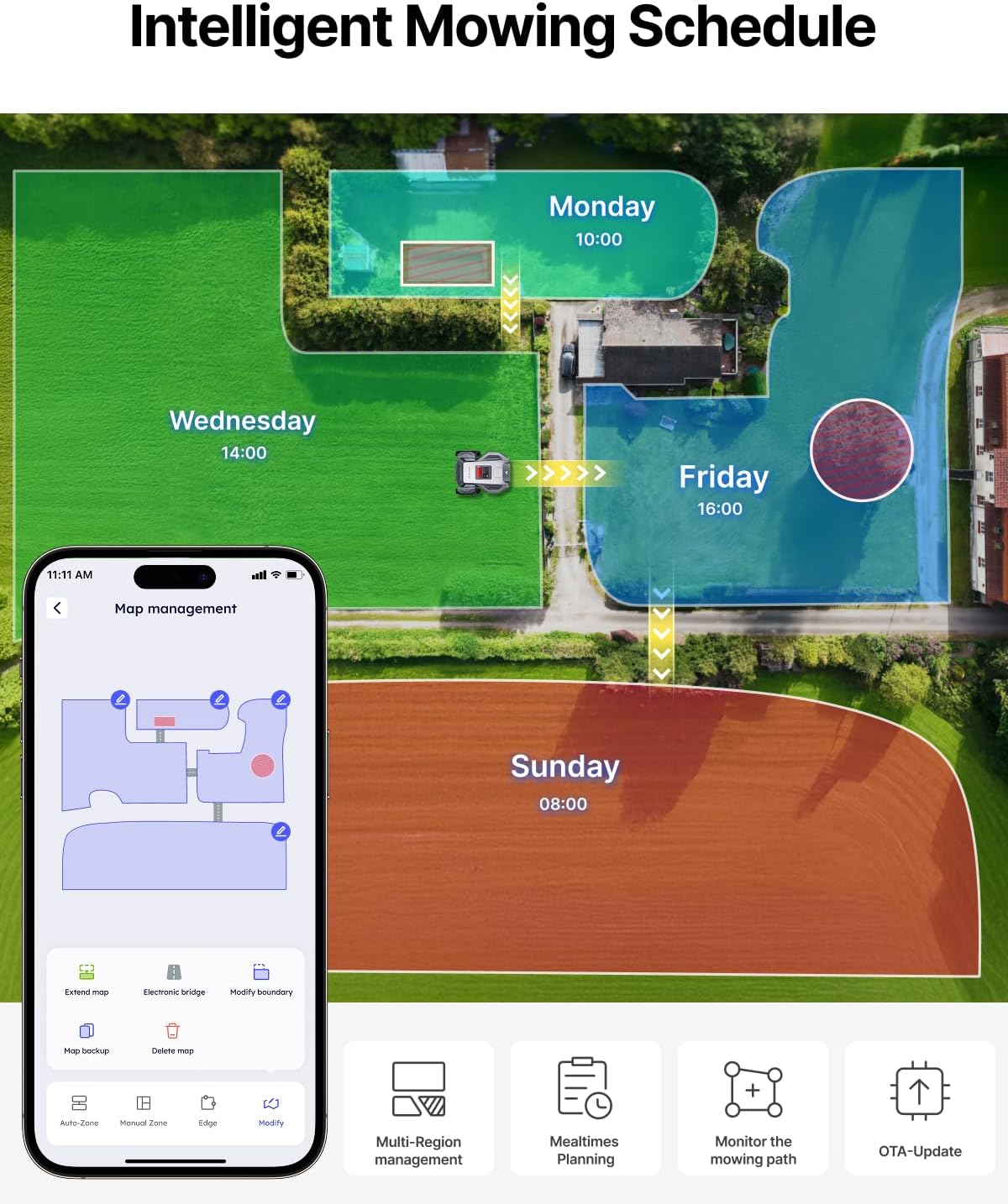
Figure 4.1: Intelligent Mowing Schedule. The app allows for multi-region management and path monitoring.
4.2 Obstacle Avoidance
The M9 utilizes dual 150° HDR cameras with built-in AI algorithms to identify over 1,000 common garden objects, including pets and garden furniture. This system provides superior obstacle avoidance and enhances safety during operation.
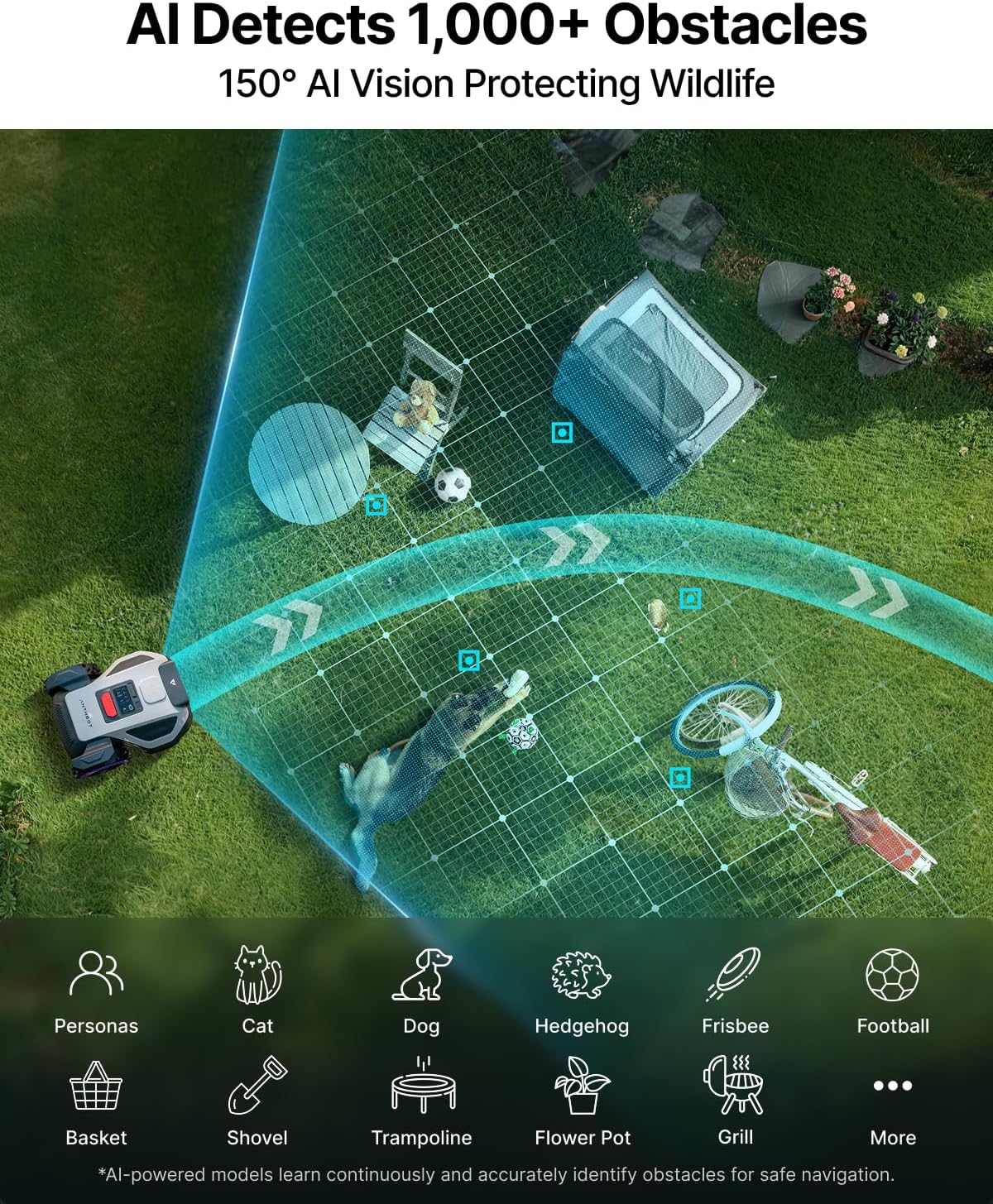
Figure 4.2: AI Detects 1,000+ Obstacles. The M9's AI vision system identifies and avoids various objects.
4.3 Cutting Height Adjustment
Adjust the cutting height of the M9 between 1.2 to 2.7 inches directly through the ANTHBOT app. This allows for customization based on grass type, seasonal requirements, and desired lawn appearance.

Figure 4.3: App-Adjusted Cutting Height. The app provides precise control over mowing height.
4.4 Slope Handling and Navigation
The M9 is designed to handle slopes up to a 45% gradient. Its dual vision and Full-Band RTK system ensure centimeter-level precision, adapting to diverse lawn layouts and maintaining performance even in challenging environments or when satellite signals are weak.

Figure 4.4: Slope Handling. The M9 can manage slopes up to 45% gradient.
Video 4.5: ANTHBOT Robot Lawn Mower. This video provides a general overview of the ANTHBOT M9 robot lawn mower in operation.
5. Maintenance
5.1 Cleaning and Waterproofing
The ANTHBOT M9 has an IPX6 waterproof rating, allowing it to withstand heavy rain and be cleaned with water. Regularly clean the cutting deck and wheels to ensure optimal performance.

Figure 5.1: IPX6 Waterproof. The mower can be cleaned with water and withstands heavy rain.
5.2 Blade Replacement
The M9 uses a 5 Free-Rotating Blades design. For best cutting results, inspect blades regularly and replace them when they show signs of wear or damage. Refer to the quick start guide for detailed blade replacement instructions.
5.3 Software Updates (OTA)
The mower supports Over-The-Air (OTA) wireless updates. Ensure your mower is connected to Wi-Fi to receive the latest firmware and features, which can improve performance and add new functionalities.

Figure 5.2: OTA Updates. Wireless updates keep your mower's software current.
6. Safety Features
- Emergency Stop Button: A prominent red stop button is located on the mower for immediate shutdown in case of an emergency.
- Anti-Theft Protection: Receive immediate app notifications and track your M9 via GPS if it leaves its designated safety zone. (Note: Anti-theft features may require a separate 4G service purchase.)
- Quiet Operation: Operates at ≤58 dB, minimizing disturbance to neighbors.
- Smart Rain Sensor: Automatically returns to the charging station when rain is detected, protecting the mower and your lawn.
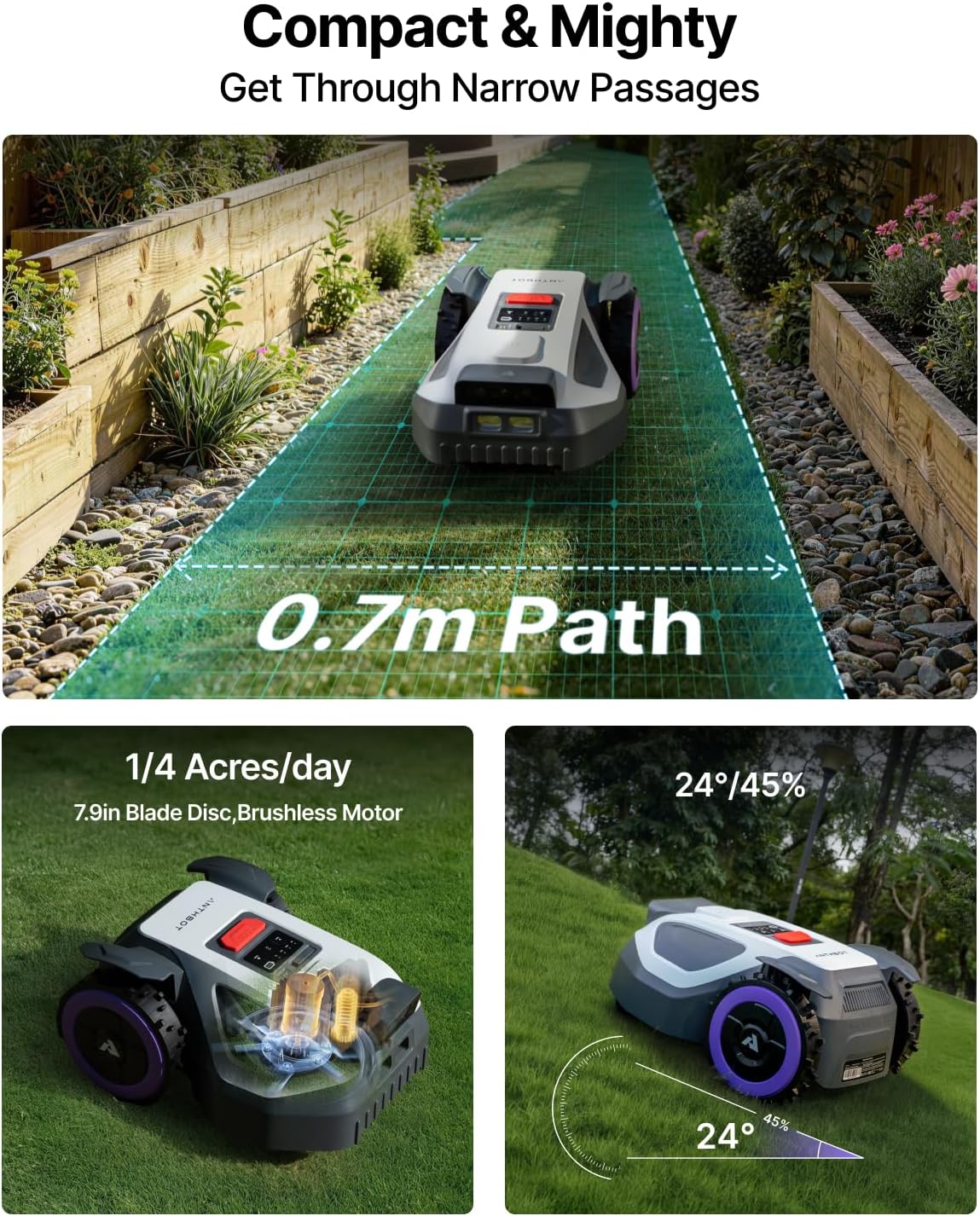
Figure 6.1: Safety and Operational Features. This image highlights key safety and convenience aspects of the M9.
7. Troubleshooting
This section addresses common issues you might encounter with your ANTHBOT M9 Robot Lawn Mower. For problems not listed here, please contact customer support.
| Problem | Possible Cause | Solution |
|---|---|---|
| Mower is lost or spinning in circles. | Poor RTK signal, GPS interference, or mapping error. | Ensure RTK station has a clear view of the sky. Check app for signal strength. Re-map the area if necessary. Perform a hard reset if behavior persists. |
| Mower gets stuck frequently or flips over. | Uneven terrain, hidden obstacles, or incorrect no-go zone setup. | Inspect the lawn for uneven spots or objects. Adjust no-go zones in the app to exclude problematic areas. Ensure the mower's wheels are clean and free of debris. |
| Fails to return to charging station or battery dies mid-mow. | Charging station obstruction, poor signal to base, or battery issue. | Ensure the charging station is clear of debris and correctly positioned. Verify the mower can detect the charging station signal. If the issue persists, contact support for battery diagnostics. |
| App shows inconsistent mowing progress or map issues. | App synchronization issues, network connectivity problems, or firmware bug. | Ensure your phone and mower have stable internet/Wi-Fi connection. Restart the app and the mower. Check for available OTA firmware updates. |
8. Specifications
| Feature | Detail |
|---|---|
| Brand | ANTHBOT |
| Model | M9 |
| Power Source | Battery Powered |
| Material | Aluminum |
| Item Weight | 21.6 Pounds |
| Product Dimensions (D x W x H) | 19.61"D x 15.43"W x 9.88"H |
| Cutting Width | 7.9 Inches |
| Adjustable Cutting Height | 1.2 - 2.7 Inches |
| Max Slope | 45% |
| Noise Level | ≤58 dB |
| Waterproof Rating | IPX6 |
| Smart Home Compatibility | Smart Home Compatible |
9. Warranty and Support
ANTHBOT provides a warranty for the M9 Robot Lawn Mower. Please refer to the warranty card included in your package for specific terms and conditions. A 3-year warranty is typically offered.
For technical assistance, troubleshooting, or warranty claims, please contact ANTHBOT customer support:
- Email: support@anthbot.com
- Phone (US): +1 (888) 821-5189
- Support is available 24 hours a day, 7 days a week.
Additionally, a 30-day order protection is provided. If the product listing is adjusted within 30 days of your purchase, contact the support team for assistance.


