
1. Introduction
This manual provides essential instructions for the safe operation, setup, and maintenance of your Generic XT505 4K Camera Drone. The XT505 is a professional-grade drone equipped with a 4K camera, GPS for precise navigation, and a remote control with FPV capabilities, offering an impressive flight range of up to 1200 meters. Please read this manual thoroughly before operating the drone to ensure optimal performance and safety.
2. Safety Guidelines
Adhering to these safety guidelines is crucial for preventing accidents and ensuring a safe flight experience.
- Pre-Flight Check: Always inspect the drone, remote control, and batteries for any damage before each flight. Ensure propellers are securely attached.
- Battery Safety: Use only the provided charging cable and batteries. Do not overcharge or puncture batteries. Discontinue use if batteries show signs of swelling or damage.
- Environmental Awareness: Fly in open areas, away from people, animals, buildings, and power lines. Avoid flying in strong winds, rain, or other adverse weather conditions.
- Line of Sight: Always maintain visual line of sight with your drone during flight.
- Respect Privacy: Be mindful of privacy laws and personal space when using the camera.
- Age Recommendation: This product is not a toy and is recommended for users aged 14 and above.
3. Package Contents
Verify that all items are present in your package:
- 1 x XT505 Drone Body
- 1 x Remote Control
- 2 x Rechargeable 3.7V 2000 mAh Batteries
- 1 x USB Charging Cable
- 4 x Spare Propellers
- 1 x User Manual
4. Product Overview
The XT505 drone is designed for both beginners and experienced pilots, featuring advanced technology for stable and high-quality aerial photography and videography.
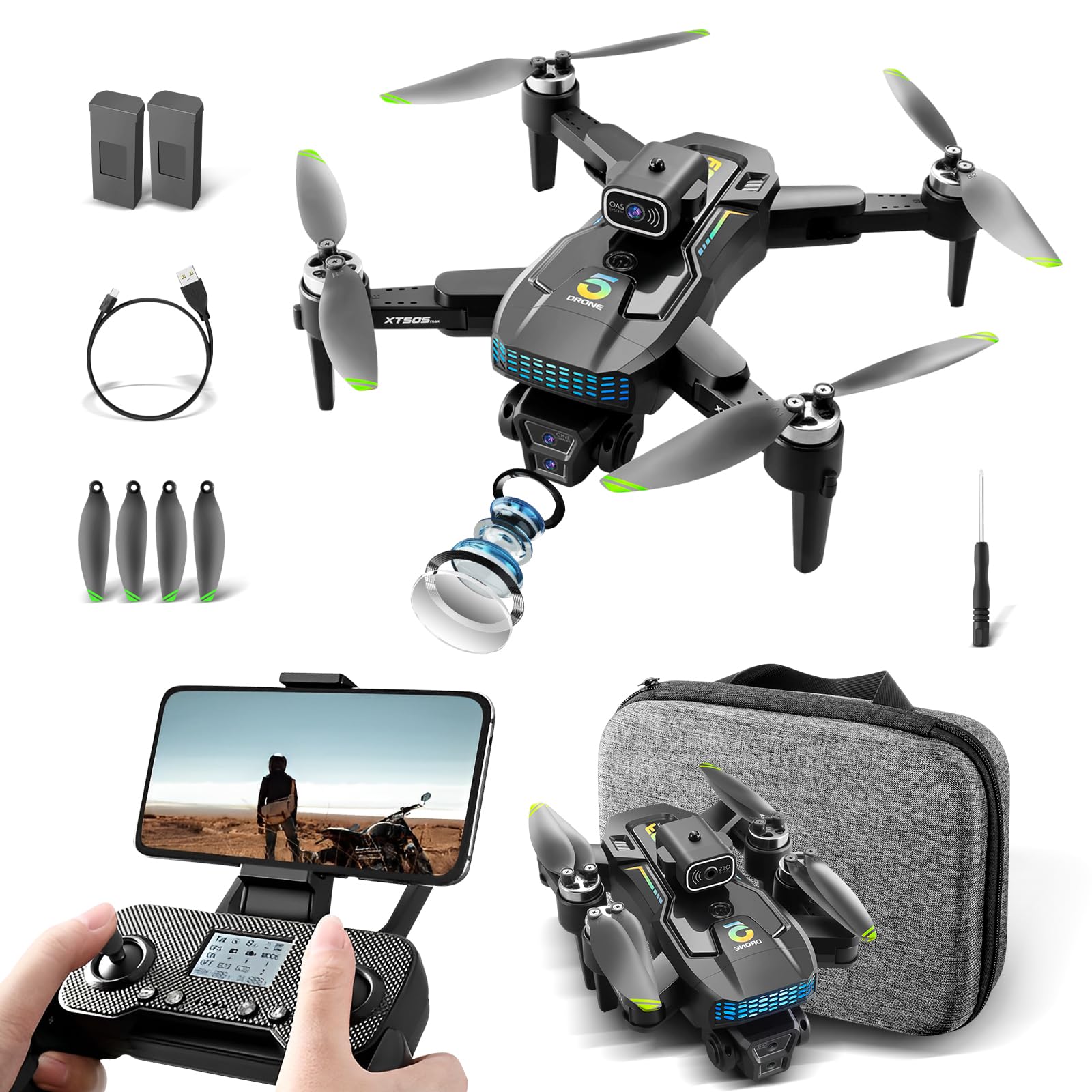
Image: The XT505 drone, showcasing its sleek design and camera module.
Key Features:
- 4K Camera: High-resolution camera for capturing stunning photos and videos.
- GPS Integration: Enables precise positioning, stable flight, and automatic return-to-home functionality.
- Optical Flow Positioning: Provides stable hovering, especially useful for indoor flights or in areas with weak GPS signals.
- Brushless Motors: Offers strong wind resistance, low noise, and energy-efficient operation for stable flight.
- Long Flight Time: Equipped with a 2000 mAh battery, providing up to 20 minutes of flight time.
- 1200m Range: Extended control and FPV transmission range.
- Real-time FPV: Connect your smartphone to the remote control for live video feed.

Image: Illustration of the drone's brushless motors, highlighting their power and wind resistance.
5. Setup
5.1. Battery Charging
The drone battery may be partially discharged upon arrival. Fully charge the battery before its first use.
- Connect the provided USB charging cable to the battery and a suitable USB power adapter (not included).
- The charging indicator light on the battery will show its status (e.g., red for charging, green for fully charged).
- Charging time is approximately 120 minutes for a full charge.

Image: Modular battery design with 2000mAh capacity and 20 minutes flight time.
5.2. Battery Installation
Insert the fully charged modular battery into the designated compartment on the drone body until it clicks into place.
5.3. Propeller Installation
Attach the propellers to the motor shafts. Ensure each propeller is correctly oriented and securely fastened. Refer to the markings on the propellers and drone arms for correct placement (e.g., 'A' to 'A', 'B' to 'B').
5.4. Remote Control Setup
Install batteries into the remote control (if not pre-installed). The remote control is compatible with smartphones for real-time image viewing. Mount your smartphone onto the remote control holder.
6. Operating Instructions
6.1. First Flight Preparation
- Power on the drone, then power on the remote control.
- Wait for the drone and remote control to pair. Indicator lights will confirm connection.
- Calibrate the drone's gyroscope and compass as per the instructions in the quick start guide (usually by specific stick movements).
- Ensure GPS signal is acquired for outdoor flights (if applicable).
6.2. Basic Flight Controls
Familiarize yourself with the remote control sticks and buttons. Typically, the left stick controls altitude and yaw (rotation), while the right stick controls forward/backward and left/right movement.
- Take-off: Press the one-key take-off button or push both sticks outwards and downwards to start motors, then push the left stick up.
- Landing: Press the one-key landing button or slowly pull the left stick down.
- Emergency Stop: In an emergency, press the emergency stop button (refer to remote control diagram).
6.3. Advanced Flight Modes & Features
- GPS Positioning: Provides stable hovering and precise flight paths outdoors.
- Optical Flow Positioning: Utilizes a downward-facing camera for stable hovering in indoor environments or when GPS is unavailable.
- Automatic Return Home (RTH): With GPS enabled, the drone can automatically return to its take-off point if the signal is lost or the battery is low.
- Waypoint Flight: Draw a desired flight path on the mobile app, and the drone will automatically follow it.
- Follow Me Mode: The drone will automatically follow the remote control or connected smartphone.
- Orbital Flight: The drone will circle a designated point of interest.
- Intelligent Obstacle Avoidance: The drone can detect and avoid obstacles in its flight path.

Image: The XT505 drone demonstrating its GPS return feature, showing it returning to a home point.
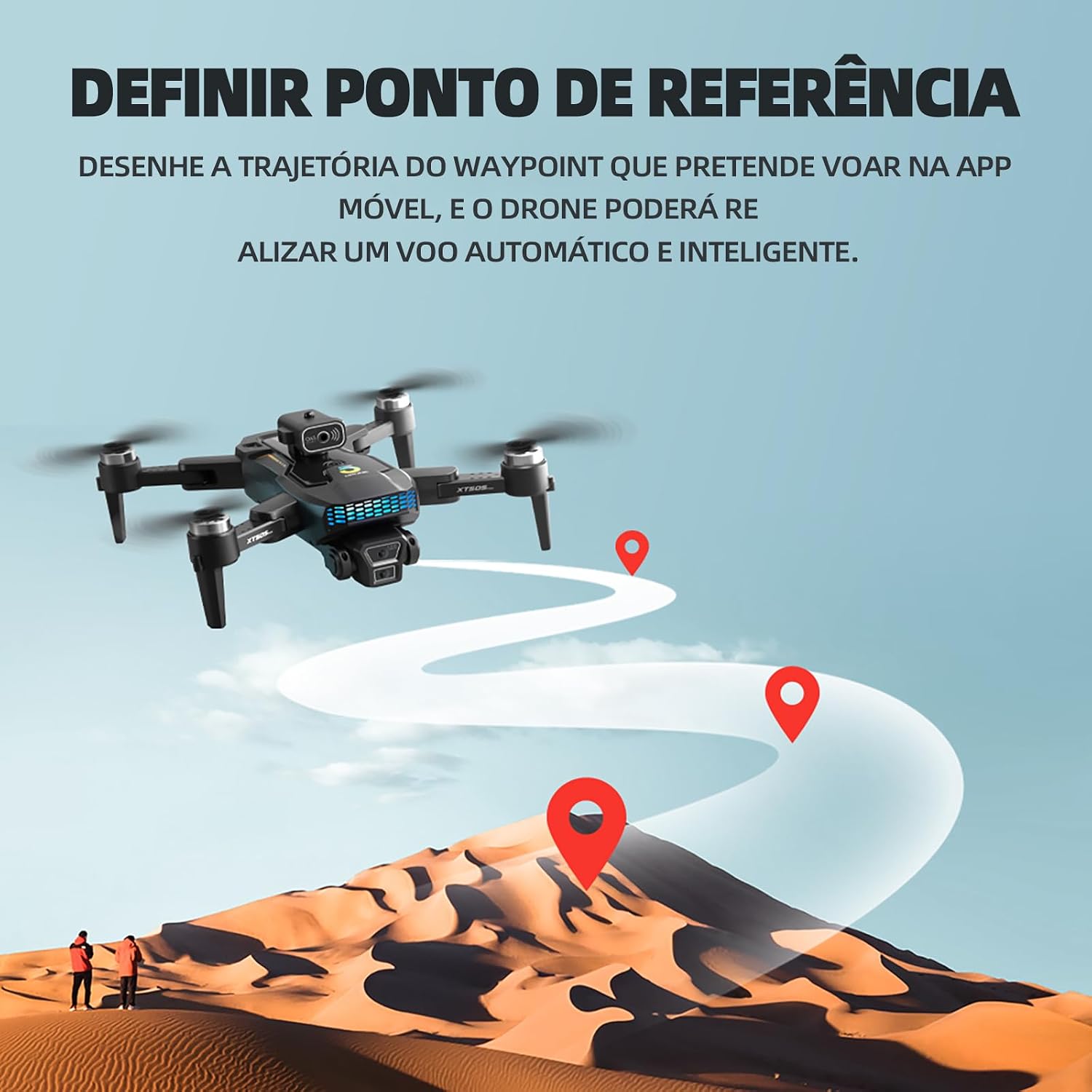
Image: The drone executing a pre-defined waypoint flight path over a landscape.
6.4. Camera Operation & FPV
The XT505 is equipped with a 4K camera for high-quality imaging and Electronic Image Stabilization (EIS) for smoother footage.
- Photo/Video Capture: Use the dedicated buttons on the remote control or the mobile app interface to take photos or start/stop video recording.
- Real-time Image Transmission: Connect your smartphone to the drone's Wi-Fi network to view live footage from the camera. The high-definition Wi-Fi band ensures smooth, lag-free transmission.
- Adjustable Camera Angle: The camera angle can be adjusted for various shooting perspectives.
- Creative Shots: Experiment with horizontal/vertical shots, head-up shots, and top-down shots (0-30 degrees frontal, 30-90 degrees top-down).

Image: Remote control with a smartphone attached, showing real-time HD image transmission via Wi-Fi.

Image: Examples of various camera perspectives achievable with the drone, including landscape and vertical shots.
7. Maintenance
Regular maintenance ensures the longevity and optimal performance of your drone.
- Battery Care: Store batteries in a cool, dry place. Do not leave them fully charged or fully discharged for extended periods. Charge them to about 50-60% for long-term storage.
- Cleaning: Use a soft, dry cloth to clean the drone body and camera lens. Avoid using harsh chemicals or solvents.
- Propeller Inspection: Regularly check propellers for cracks, bends, or damage. Replace damaged propellers immediately to ensure stable flight.
- Motor Inspection: Ensure motors are free from debris and can spin freely.
8. Troubleshooting
If you encounter issues with your XT505 drone, refer to the following common problems and solutions:
| Problem | Possible Cause | Solution |
|---|---|---|
| Drone does not power on. | Battery is not charged or not installed correctly. | Ensure battery is fully charged and properly inserted. |
| Drone does not respond to remote control. | Not paired, out of range, or remote control battery low. | Re-pair the drone and remote. Check remote control batteries. Ensure drone is within range. |
| Unstable flight or drifting. | Improper calibration, damaged propellers, or strong winds. | Recalibrate gyroscope/compass. Check and replace damaged propellers. Fly in calm conditions. |
| Poor camera image quality. | Insufficient lighting, dirty lens, or incorrect camera settings. | Ensure adequate lighting. Clean the camera lens. Check camera resolution settings in the app. |
| Battery takes too long to recharge. | This is normal for a 2000mAh battery. | A full charge takes approximately 120 minutes. Ensure you are using a compatible USB power source. |
| No real-time FPV feed. | Smartphone not connected to drone's Wi-Fi or app issue. | Ensure your smartphone is connected to the drone's Wi-Fi network. Restart the app and drone. |
9. Specifications
Detailed technical specifications for the Generic XT505 Drone:
| Feature | Detail |
|---|---|
| Brand | Generic |
| Model Name | XT505 |
| Video Capture Resolution | 4K |
| Effective Still Resolution | 4.01 MP |
| Connectivity Technology | Bluetooth (for remote control), Wi-Fi (for FPV) |
| Battery Cell Composition | Lithium-ion |
| Batteries Included | Yes (2 x 3.7V 2000 mAh) |
| Item Weight | 710 Grams |
| Item Dimensions (L x W x H) | 8.5 x 22 x 6.5 Centimeters |
| Flight Time | Up to 20 minutes |
| Flight Range | Approximately 1200 meters |
| Charging Time | Approximately 120 minutes |

Image: Visual representation of the drone's approximate flight distance (100 meters shown, but product states 1200m) and charging time (120 minutes).
10. Warranty & Support
For warranty information and customer support, please refer to the documentation provided with your purchase or contact the seller directly. Keep your proof of purchase for any warranty claims.
For technical assistance or further inquiries, please reach out to the manufacturer or authorized service center.


