
SIHOO B100
SIHOO B100 Ergonomic Office Chair User Manual
Model: B100
1. Introduction
Thank you for choosing the SIHOO B100 Ergonomic Office Chair. This chair is designed to provide optimal comfort and support for long hours of sitting, featuring dynamic lumbar support, adjustable recline, and breathable mesh. Please read this manual carefully before assembly and use to ensure proper function and longevity of your chair.
2. Important Safety Information
- Ensure all parts are present and undamaged before assembly. Do not use if any parts are missing or broken.
- Assemble the chair on a soft, clean surface to prevent scratches.
- Tighten all screws and bolts securely. Recheck tightness periodically.
- Do not stand on the chair or use it as a step stool.
- Do not exceed the maximum weight capacity of 136 kg (300 lbs).
- Keep children away from the chair during assembly. Small parts may be a choking hazard.
- Use the chair only for its intended purpose as an office chair.
3. Package Contents
Before starting assembly, verify that all components are included in your package:

Image: Overview of all chair components, including the base, casters, gas lift, seat, backrest, armrests, and headrest.
- Chair Base
- Casters (5 pieces)
- Gas Lift Cylinder
- Seat Mechanism
- Seat Cushion
- Backrest
- Armrests (2 pieces)
- Headrest
- Hardware Kit (screws, Allen wrench)
4. Assembly Instructions
Follow these general steps to assemble your SIHOO B100 ergonomic office chair. For detailed visual guidance, please refer to the assembly video available on the manufacturer's official website or YouTube channel.
Step 1: Prepare the Base
Insert the five casters into the holes at the end of each leg of the chair base. Push firmly until they click into place. Then, place the gas lift cylinder into the center hole of the assembled chair base, ensuring it sits securely.
Step 2: Assemble the Seat
Align the seat mechanism with the pre-drilled holes on the underside of the seat cushion. Secure it with the provided screws, ensuring the front of the mechanism faces the front of the seat. Attach the armrests to the seat assembly using the designated screws.
Step 3: Attach the Backrest and Headrest
Connect the backrest to the seat assembly using the designated screws, ensuring a firm connection. Slide the headrest into the slots at the top of the backrest.
Step 4: Final Connection
Carefully place the assembled seat, backrest, and armrests onto the gas lift cylinder. The tapered hole in the seat mechanism should fit snugly over the top of the gas lift. Once assembled, sit on the chair to firmly seat the components.
5. Operating Instructions and Adjustments
The SIHOO B100 chair offers several adjustment features to customize your seating experience:
5.1. Seat Height Adjustment
To adjust the seat height, locate the lever on the right side under the seat. Pull the lever up while sitting to lower the seat, or pull it up while standing to raise the seat. Release the lever at your desired height.
5.2. Recline Function and Tension
The chair features a recline function with multiple locking angles (110°, 123°, 135°). To recline, pull the recline lever (usually on the left side) and lean back. Release the lever to lock the backrest in position. The recline tension can be adjusted by turning the round knob located under the seat, allowing you to control the resistance when reclining.

Image: Visual representation of the chair's recline capabilities, illustrating optimal angles for various activities like working (110°), reading (125°), and relaxing (135°).
5.3. Dynamic Lumbar Support Adjustment
The SIHOO B100 Pro incorporates a dynamic lumbar support system that automatically adjusts intensity and angle based on your posture. This system adapts to your back's curve, providing continuous support and reducing pressure.

Image: A visual guide demonstrating the chair's advanced lumbar support, highlighting its ability to preserve the spine's natural curve, stabilize the pelvis, and provide conforming lumbar adjustment.
5.4. Armrest Adjustment (Flip-up)
The armrests are designed to flip up 90 degrees, allowing you to push the chair closer to your desk or save space when not in use. Simply lift the armrests upwards to engage the flip-up mechanism.

Image: Demonstrates the versatility of the flip-up armrests, showing them in a standard position for support, partially raised for comfort, and fully raised to allow the chair to fit under a desk.
5.5. Headrest Adjustment
The 2D headrest can be adjusted for height and angle to provide optimal neck support. Gently push or pull the headrest to adjust its height, and tilt it to find the most comfortable angle for your neck.

Image: A visual guide detailing the headrest's adjustable features, including its ability to rotate 45 degrees and elevate by 10 centimeters for personalized neck support.
6. Maintenance and Care
Proper care will extend the life and appearance of your SIHOO B100 chair:
- Cleaning: Wipe the chair with a damp cloth. For mesh areas, use a mild soap solution and a soft brush, then wipe with a clean, damp cloth. Avoid harsh chemicals or abrasive cleaners.
- Inspection: Periodically check all screws and bolts to ensure they are tight. Retighten as necessary.
- Casters: Keep casters clean from hair and debris to ensure smooth movement.
- Gas Lift: Do not attempt to disassemble the gas lift cylinder. It contains pressurized gas.

Image: A detailed view of the chair's breathable mesh fabric, illustrating its open weave for optimal air circulation and comfort.
7. Troubleshooting
If you encounter any issues with your chair, refer to the following common problems and solutions:
| Problem | Possible Cause | Solution |
|---|---|---|
| Chair does not adjust height | Gas lift malfunction or lever not engaged. | Ensure the height adjustment lever is fully engaged. If the issue persists, the gas lift may need replacement. Contact customer support. |
| Chair is wobbly or unstable | Loose screws or improper assembly. | Check and tighten all assembly screws. Ensure the gas lift is properly seated in the base. |
| Squeaking noises | Loose connections or friction between parts. | Tighten all screws. Apply a small amount of silicone lubricant to moving parts if necessary, avoiding the gas lift. |
| Casters not rolling smoothly | Debris caught in casters. | Remove any hair or debris from the caster wheels. |
8. Product Specifications
Here are the key specifications for the SIHOO B100 Ergonomic Office Chair:
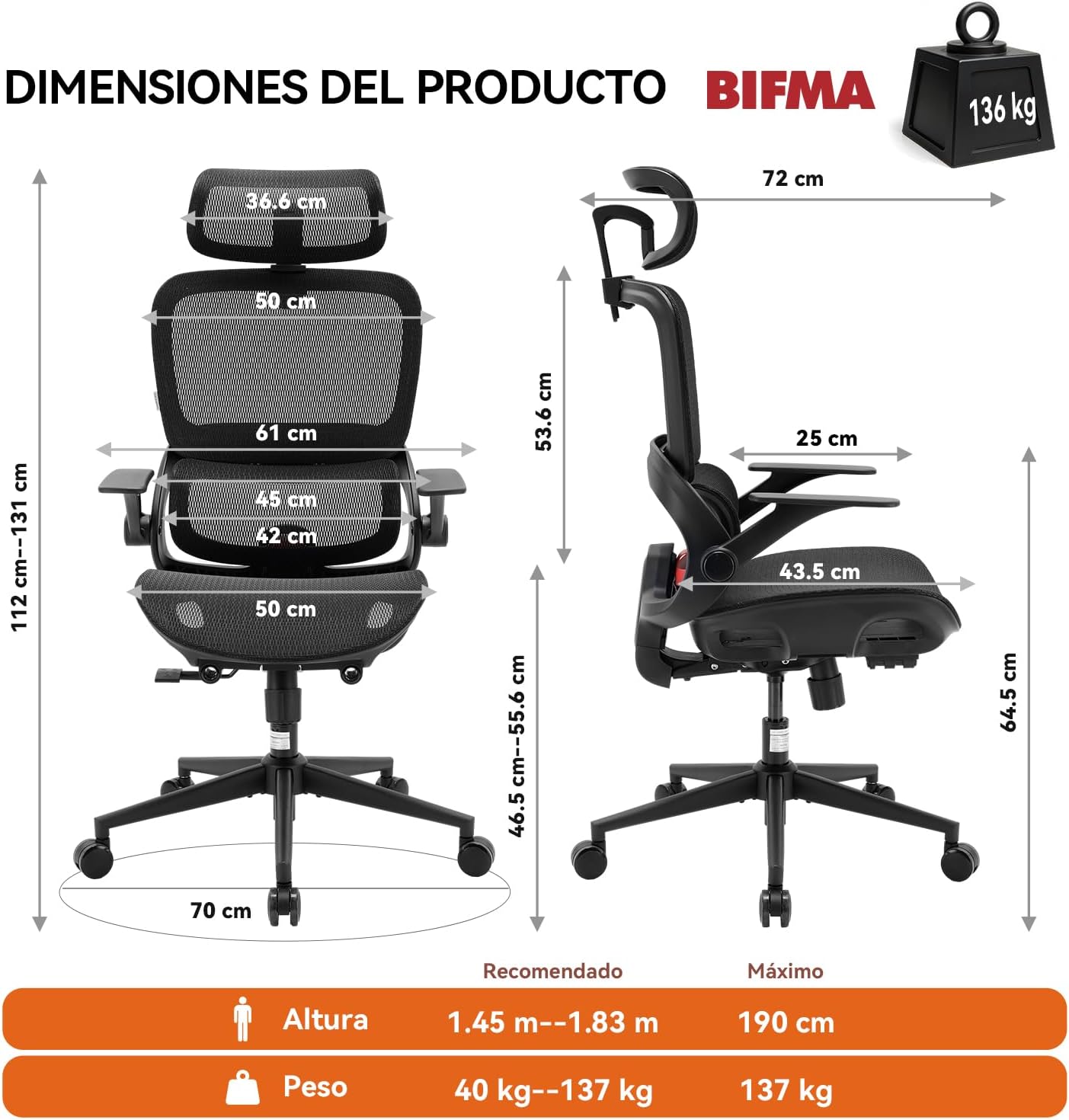
Image: A diagram illustrating the precise dimensions of the SIHOO B100 chair, showing measurements for overall height, width, depth, seat height, backrest height, and maximum weight capacity (136 kg).
| Feature | Detail |
|---|---|
| Brand | SIHOO |
| Model Name | B100 |
| Color | Black |
| Material | Polyethylene, Polypropylene (PP) frame, Polyester upholstery |
| Product Dimensions (D x W x H) | 72 x 70 x 112-131 cm (28.3 x 27.6 x 44.1-51.6 inches) |
| Item Weight | 14.55 kg (32.08 lbs) |
| Maximum Recommended Weight | 136 kg (300 lbs) |
| Special Features | Ergonomic, Adjustable Headrest, Adjustable Lumbar Zone, Flip-up Armrests |
| Reclining Positions | 3 (110°, 123°, 135°) |
| Assembly Required | Yes |
9. Warranty and Customer Support
9.1. Warranty Information
The SIHOO B100 Ergonomic Office Chair comes with a 3-year warranty. This warranty covers manufacturing defects and significant malfunctions under normal use. Please retain your proof of purchase for warranty claims. Additionally, SIHOO offers hassle-free returns within 30 days of purchase.
9.2. Customer Support
For any questions, concerns, or assistance with your SIHOO B100 chair, please contact our customer support team. We aim to respond to all inquiries within 24 hours.
- Email: service@sihoooffice.com
- Online: Visit the SIHOO store on Amazon or our official website for FAQs and further support.
- To contact seller via Amazon:
- Log in to your Amazon account.
- Go to "Your Orders".
- Find your SIHOO B100 order.
- Click "Contact Seller".
Related documentsB100


Ask a question about this manual
Ask about setup, troubleshooting, compatibility, parts, safety, or missing instructions. Manuals+ will review the question and use this page’s manual context to help answer it.