Introduction
Thank you for choosing the Monster N-Lite 211 Wireless Earbuds. This manual provides essential information for setting up, operating, and maintaining your new earbuds. Please read it thoroughly to ensure optimal performance and longevity of your device. For additional support, please visit the official Monster website.

Image: Monster N-Lite 211 True Wireless Stereo Earbuds. This image highlights key features such as ergonomic design, 13mm dynamic drivers, Bluetooth 6.0 connectivity, and fast charging capabilities.
What's in the Box
Upon unpacking your Monster N-Lite 211 Wireless Earbuds, please ensure all items are present:
- Monster N-Lite 211 Wireless Earbuds (Left and Right)
- Charging Case
- USB-C Charging Cable
- User Manual
- Eartips (various sizes)
Product Overview
The Monster N-Lite 211 earbuds are designed for a superior audio experience with advanced features.

Image: The Monster N-Lite 211 Wireless Earbuds resting inside their open charging case, showcasing their sleek design.
Ergonomic Design
The earbuds feature an ergonomic contour for natural comfort and a secure fit, engineered for extended wear.
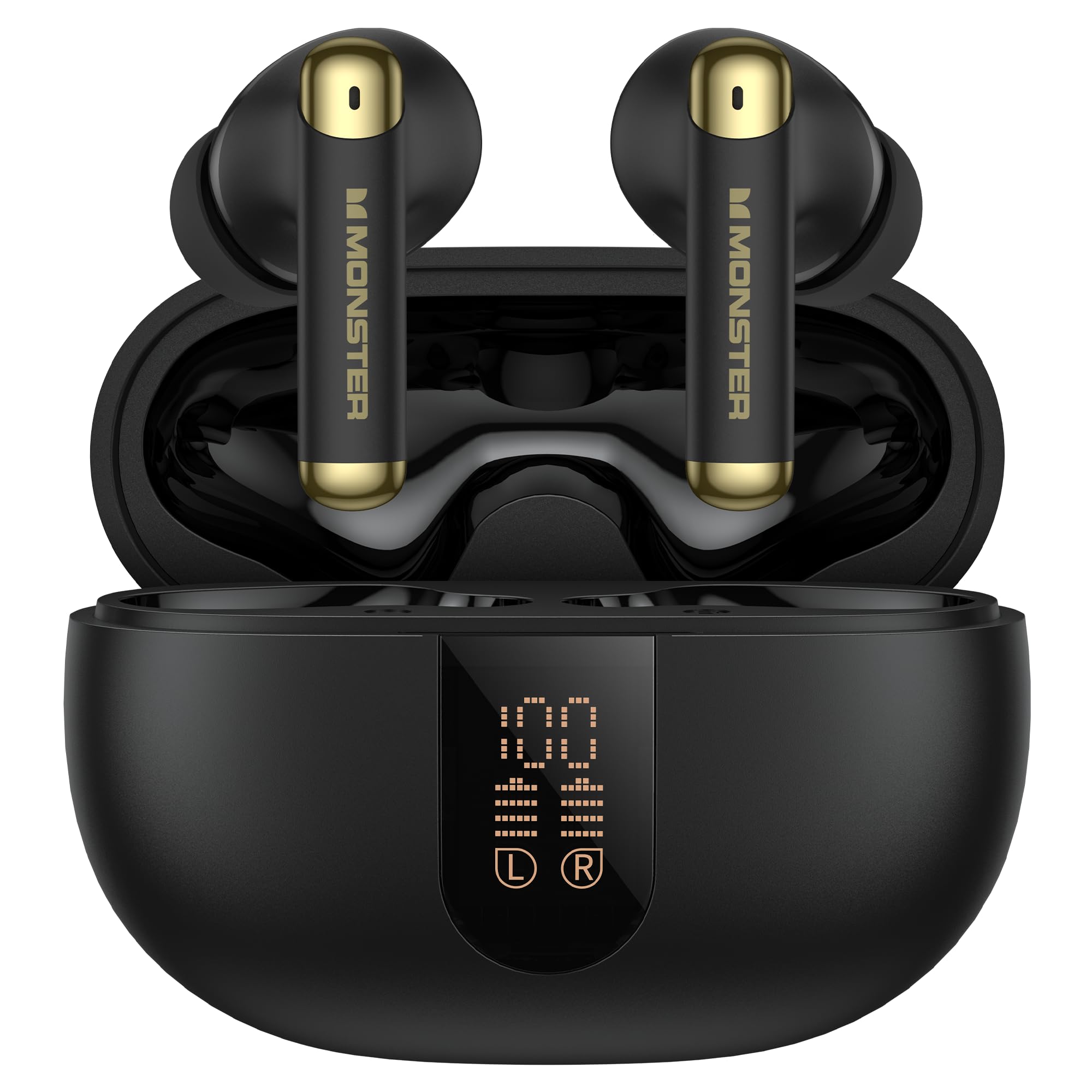
Image: A person wearing a Monster N-Lite 211 earbud, demonstrating its comfortable and secure in-ear fit.

Image: An engineering sketch detailing the ergonomic design of the N-Lite 211 earbuds, emphasizing comfort and stability through a 45-degree contour.
Pure Monster Sound with 13mm Dynamic Drivers
Experience clear, pure sound with decreased distortion, immersive audio, and premium diaphragms for enhanced clarity and detail, delivered by precision-engineered 13mm dynamic drivers.

Image: An exploded diagram illustrating the components of the 13mm dynamic driver within the Monster N-Lite 211 earbud, responsible for clear audio.

Image: A graphic emphasizing the 13mm dynamic driver, designed to deliver crisp and clear sound with exceptional audio performance.
Built-in ENC Noise Reduction Chip
The integrated Environmental Noise Cancellation (ENC) chip effectively reduces environmental noise, ensuring clear call quality by minimizing background distractions.

Image: A visual representation of the built-in ENC Noise Reduction Chip within the earbud, demonstrating its function in providing clear call quality by reducing environmental sound.

Image: A graphic explaining AI Call Noise Cancellation, showing how it significantly reduces street noise and other annoying background sounds for clearer communication.
Setup
Initial Charging
Before first use, fully charge the earbuds and charging case. Place the earbuds into the charging case. Connect the USB-C charging cable to the charging port on the case and a power source. The LED power display on the case will show the charging status.

Image: The Monster N-Lite 211 charging case with earbuds inserted, displaying the battery percentage on its LED screen.

Image: A graphic illustrating the digital power display of the charging case, which shows the individual battery levels for both the case and the left and right earbuds.
Power On/Off
- Power On: The earbuds will automatically power on when removed from the charging case.
- Power Off: Place the earbuds back into the charging case. They will automatically power off and begin charging.
Bluetooth Pairing
The Monster N-Lite 211 earbuds utilize advanced Bluetooth 6.0 for stable and high-quality connections.

Image: A detailed graphic of the Bluetooth 6.0 chip, emphasizing its role in providing fast, stable connections, lower power consumption, and quicker data transmission.

Image: A graphic showcasing the Bluetooth 6.0 technology, highlighting its benefits for advanced, stable connections and energy savings.
- First-time Pairing: Open the charging case and remove both earbuds. They will automatically enter pairing mode, indicated by a flashing LED light on one of the earbuds.
- On your device (smartphone, tablet, etc.), enable Bluetooth and search for new devices.
- Select "Monster N-Lite 211" from the list of available devices.
- Once connected, you will hear a confirmation tone, and the LED indicator on the earbud will turn off or show a steady light.
- Re-pairing: The earbuds will automatically reconnect to the last paired device when removed from the case, if Bluetooth is enabled on the device.
Operating Instructions
Touch Controls
The Monster N-Lite 211 earbuds feature intuitive touch controls for easy management of music and calls. The touch sensitive area is located on the outer surface of each earbud.
| Function | Action |
|---|---|
| Play/Pause Music | Single tap on either earbud |
| Next Track | Double tap on the right earbud |
| Previous Track | Double tap on the left earbud |
| Answer/End Call | Single tap on either earbud |
| Reject Call | Press and hold either earbud for 2 seconds |
| Activate Voice Assistant | Triple tap on either earbud |
| Volume Up | Press and hold the right earbud |
| Volume Down | Press and hold the left earbud |
Wearing the Earbuds
For optimal sound quality and comfort, ensure the earbuds are properly seated in your ears. Choose the eartip size that provides a snug fit to create a good seal, which enhances bass response and noise isolation.
Battery Life and Charging
The earbuds offer up to 32-36 hours of continuous play with the charging case, and approximately 6-8 hours on a single charge. The LED display on the charging case indicates the battery level of both the case and individual earbuds.

Image: A graphic illustrating the battery performance, indicating 8 hours of playback for the earbuds on a single charge and up to 36 hours total with the charging case.
Maintenance
Cleaning
- Regularly clean the earbuds and charging case with a soft, dry, lint-free cloth.
- Remove eartips and clean them with mild soap and water, then dry thoroughly before reattaching.
- Do not use abrasive cleaners or solvents.
Water Resistance (IPX5)
The Monster N-Lite 211 earbuds are rated IPX5 water-resistant, meaning they can withstand splashes and sweat. They are suitable for workouts and light rain. Do not submerge the earbuds in water or expose them to strong jets of water.

Image: A graphic demonstrating the IPX5 water resistance of the earbuds, indicating protection against rain, sweat, and splashes.
Storage
When not in use, store the earbuds in their charging case to protect them and keep them charged. Store in a cool, dry place away from extreme temperatures.
Troubleshooting
If you encounter any issues with your Monster N-Lite 211 earbuds, please refer to the following common solutions:
- No Sound from Earbuds:
- Ensure earbuds are charged.
- Check Bluetooth connection on your device.
- Adjust volume on both your device and the earbuds.
- Earbuds Not Pairing:
- Make sure Bluetooth is enabled on your device.
- Ensure earbuds are in pairing mode (flashing LED).
- Forget "Monster N-Lite 211" from your device's Bluetooth list and try pairing again.
- Try resetting the earbuds (refer to the reset procedure below).
- Charging Case Not Charging:
- Check the USB-C cable and power adapter.
- Ensure the charging port is clean and free of debris.
- One Earbud Not Working:
- Ensure both earbuds are charged.
- Place both earbuds back in the case, close it, then open and remove them again to re-establish connection.
- Perform a factory reset.
Factory Reset Procedure
If issues persist, a factory reset may resolve them:
- Place both earbuds into the charging case.
- On your device, remove or forget "Monster N-Lite 211" from your Bluetooth device list.
- With the earbuds in the case, press and hold the reset button (if available, or follow specific instructions in the full manual if different) for approximately 10-15 seconds until the LED indicators on the earbuds flash.
- Close the case, then open it and attempt to pair the earbuds with your device again.
Specifications
| Feature | Specification |
|---|---|
| Model Name | N-Lite 211 (W39) |
| Connectivity Technology | Bluetooth 6.0 |
| Ear Placement | In Ear |
| Form Factor | In Ear |
| Driver Size | 13mm Dynamic Driver |
| Battery Life (Earbuds) | Up to 6-8 hours (single charge) |
| Total Battery Life (with Case) | Up to 32-36 hours |
| Noise Cancellation | Built-in ENC Noise Reduction Chip for calls |
| Water Resistance Rating | IPX5 (splashproof, sweatproof) |
| Item Weight | 4.6 ounces (total package) |
| Package Dimensions | 4.09 x 4.02 x 1.54 inches |
Safety Information
Please observe the following safety guidelines to prevent damage to your device or personal injury:
- Avoid listening at high volume levels for extended periods to prevent hearing damage.
- Do not use the earbuds in situations where inability to hear ambient sounds could be dangerous (e.g., while driving, cycling, or walking in traffic).
- Keep the earbuds and charging case away from extreme temperatures, direct sunlight, and moisture.
- Keep out of reach of children and pets to prevent accidental ingestion of small parts.
- Use only the provided charging cable or a certified equivalent.
Warranty and Support
Your Monster N-Lite 211 Wireless Earbuds come with a limited manufacturer's warranty. Please refer to the warranty card included in your package for specific terms and conditions.
For technical support, troubleshooting assistance, or warranty claims, please visit the official Monster website or contact their customer service department. You can find more information at the Monster Store on Amazon.


