
Introduction
This manual provides comprehensive instructions for the Arkaia replacement remote control, specifically designed for the GOODMANS GDVD218 device. This remote is pre-programmed for immediate use and requires no additional setup. It operates via infrared (IR) technology and offers high compatibility with the original device functions.
Setup
1. Battery Installation
The remote control requires two AAA batteries (not included) for operation. Follow these steps to install them:
- Locate the battery compartment on the back of the remote control.
- Slide the battery compartment cover downwards or in the direction indicated by an arrow to open it.
- Insert two AAA batteries, ensuring the positive (+) and negative (-) terminals align correctly with the markings inside the compartment.
- Replace the battery compartment cover by sliding it back into place until it clicks securely.
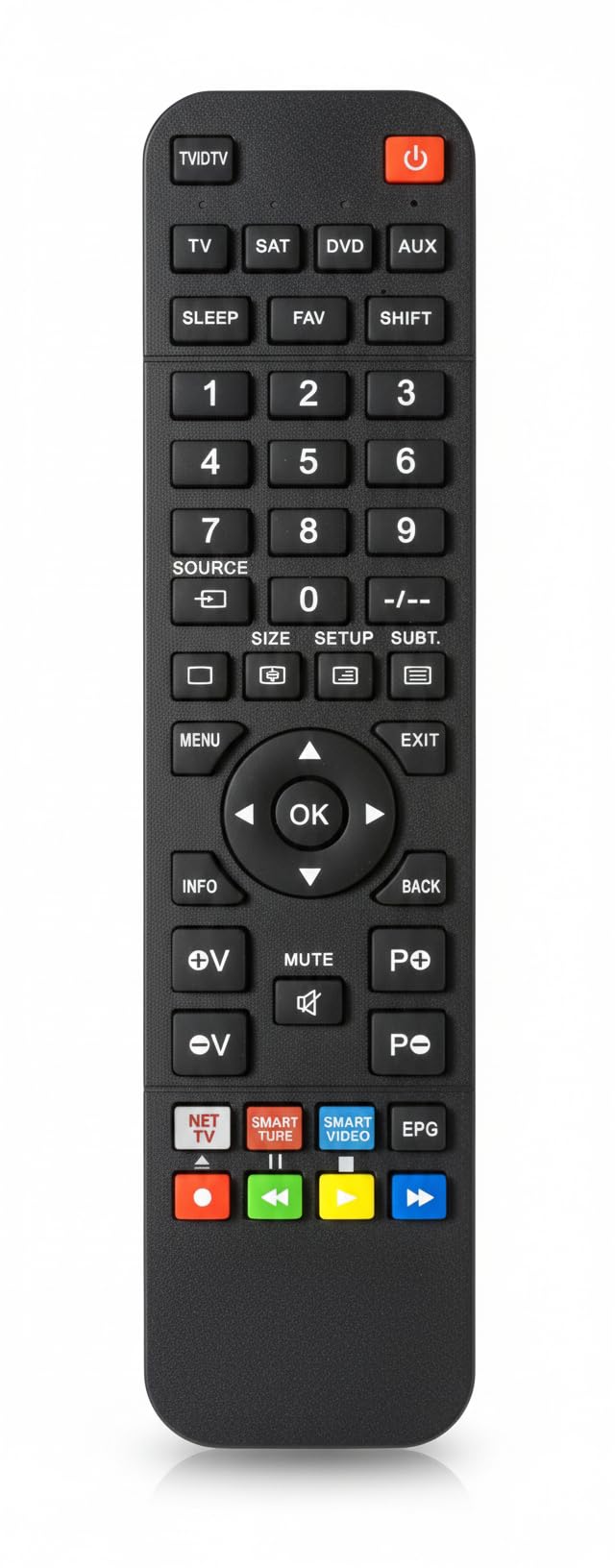
Figure 1: Arkaia Replacement Remote Control. The battery compartment is located on the back of the device.
2. Initial Use
Once batteries are installed, the remote control is ready for immediate use. No programming or pairing is required. Point the remote directly at your GOODMANS GDVD218 device and begin operation.
Operating Instructions
This remote control operates using infrared (IR) signals. Ensure there is a clear line of sight between the remote and your GOODMANS GDVD218 device for optimal performance. The design may differ from the original remote, but 99% of functions are fully adopted.

Figure 2: Arkaia Replacement Remote Control showing button layout and approximate dimensions (Length: 19cm, Width: 4.7cm).
Key Functions Overview
Below is a general guide to common button functions. Refer to the included key assignment schema for a detailed layout.
- Power Button (●): Turns the device on or off.
- TV/DTV, SAT, DVD, AUX: Selects the input source.
- Number Buttons (0-9): For direct channel selection or inputting numerical values.
- SOURCE: Cycles through available input sources.
- MENU: Accesses the device's main menu.
- Navigation Buttons (Up, Down, Left, Right): Navigates through menus and options.
- OK Button: Confirms selections.
- INFO: Displays information about the current program or content.
- MUTE: Mutes or unmutes the audio.
- Volume Up/Down (V+/V-): Adjusts the volume level.
- Channel Up/Down (P+/P-): Changes channels.
- EXIT: Exits the current menu or function.
- Colored Buttons (Red, Green, Yellow, Blue): Functionality varies depending on the device and current menu.
Maintenance
Cleaning the Remote
To clean the remote control, gently wipe its surface with a soft, dry cloth. For stubborn dirt, slightly dampen the cloth with water or a mild, non-abrasive cleaner. Avoid using harsh chemicals or excessive moisture, as these can damage the remote's electronics.
Battery Replacement
Replace the AAA batteries when the remote control's response becomes sluggish or stops working. Always replace both batteries at the same time with new ones. Do not mix old and new batteries, or different types of batteries.
Storage
When not in use for extended periods, it is recommended to remove the batteries to prevent leakage and potential damage to the remote control.
Troubleshooting
- Remote not responding:
- Ensure fresh AAA batteries are correctly installed.
- Check for any obstructions between the remote control and the GOODMANS GDVD218 device's IR sensor.
- Make sure you are within the effective operating range and pointing the remote directly at the device.
- Some functions (e.g., PVR, 3D, Voice Control) are not working:
- This remote control operates exclusively via infrared (IR) and does NOT support voice control or pointer functions.
- While 99% of original functions are adopted, some advanced or device-specific functions (like PVR or 3D modes) might require specific button combinations or may not be directly mapped if they rely on non-standard IR signals or different communication protocols. Refer to the key assignment schema for available functions.
- Remote design is different from the original:
- This is a high-quality replacement remote. Its physical design differs from the original, but its functionality is designed to be highly compatible.
Specifications
| Brand | Arkaia |
| Model Compatibility | GOODMANS GDVD218 |
| Power Source | 2 x AAA Batteries (not included) |
| Technology | Infrared (IR) |
| Dimensions (Approx.) | Length: 19 cm, Width: 4.7 cm |
Warranty and Support
Warranty Information
This Arkaia replacement remote control comes with a 2-year warranty from the date of purchase, covering manufacturing defects. Please retain your proof of purchase for warranty claims.
Customer Support
For further assistance or if you encounter issues not covered in this manual, please contact your retailer or the point of purchase. Provide your product model (GOODMANS GDVD218) and the remote control's brand (Arkaia) when seeking support.