
1. Introduction
This manual provides essential information for setting up, operating, and maintaining your vivo V70 Elite 5G smartphone. Please read this manual thoroughly before using your device to ensure proper functionality and safety.
2. What's in the Box
Verify that all items are present in your product packaging:
- vivo V70 Elite 5G Smartphone
- Phone Case
- Power Adapter
- SIM Tray Ejector
- Screen Protector
- USB Cable
3. Product Overview
The vivo V70 Elite 5G features a compact metal frame design and an immersive display. Familiarize yourself with the device's physical components.
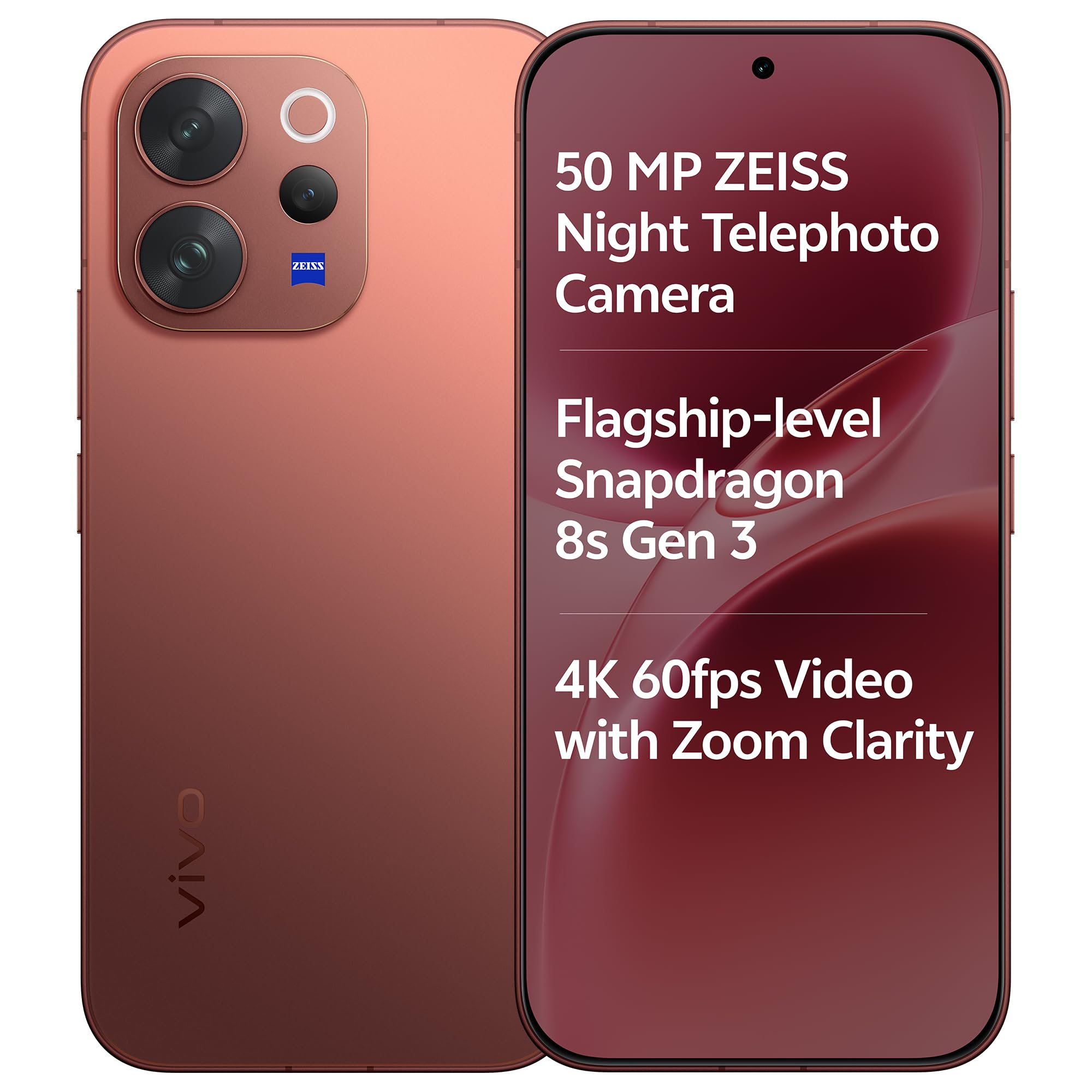
Image: Front and back view of the vivo V70 Elite 5G smartphone in Passion Red.

Image: Close-up of the vivo V70 Elite 5G showcasing its compact design and metal frame.
3.1. Physical Components
- Front Camera: Located at the top center of the display.
- Rear Camera Module: Features a triple-camera system with ZEISS optics.
- Power Button: Typically on the right side.
- Volume Buttons: Typically on the right side, above the power button.
- USB Type-C Port: Located at the bottom for charging and data transfer.
- SIM Card Tray: Located on the side for inserting SIM cards.
- Speakers: Located at the bottom.
4. Setup
4.1. Inserting SIM Cards
- Locate the SIM card tray on the side of your device.
- Insert the SIM tray ejector tool into the small hole next to the tray and press firmly until the tray pops out.
- Place your Nano-SIM cards into the designated slots on the tray. This device supports Dual SIM functionality.
- Carefully reinsert the tray into the phone until it clicks into place.
4.2. Initial Power On and Setup
- Press and hold the Power button until the vivo logo appears.
- Follow the on-screen instructions to select your language, connect to a Wi-Fi network, and set up your Google account.
- Configure security features such as fingerprint recognition and screen lock.
4.3. Charging the Device
Connect the provided USB Type-C cable to the phone's charging port and the power adapter. Plug the power adapter into a wall outlet. The device supports 90W FlashCharge technology for rapid recharging.
5. Operating Instructions
5.1. Camera Features
The vivo V70 Elite 5G is equipped with a professional ZEISS imaging system designed for high-quality photography.

Image: Diagram illustrating the ZEISS Professional Portrait Camera system on the vivo V70 Elite 5G.
- Triple Rear Camera System: Includes a 50MP ZEISS OIS Main Camera (Sony IMX766), a 50MP ZEISS Night Telephoto Camera (Sony IMX882) with 3X optical zoom and up to 100X digital zoom, and an 8MP Ultra Wide-Angle lens.
- Front Camera: Features a 50MP ZEISS group selfie camera with AF, f/2.0, and a 92° FOV.
- 4K 60fps Video: Capture high-resolution videos with enhanced zoom clarity.
- 10X Zoom-In Portrait: Utilize the telephoto lens for detailed portrait shots from a distance.

Image: A couple embracing on a beach, demonstrating 4K 60fps video recording with zoom clarity.

Image: A couple on a beach, illustrating the 10X Zoom-In Portrait capability.
5.2. Display
The device features a vibrant 1.5K Ultra-Narrow Bezel OLED display.

Image: The phone's display highlighting its 1.5K Ultra Clear OLED technology, 459 PPI, 1.07 billion colors, and 120 Hz refresh rate.
- Size: 16.74 cm (6.59 inches).
- Resolution: 1.5K (2750 × 1260 Pixels) for sharp visuals.
- Refresh Rate: 120Hz for smooth scrolling and gaming.
- Brightness: Local peak brightness of 5000 nits for excellent outdoor visibility.
- Bezels: Ultra-narrow side bezels at just 0.125 cm.

Image: A hand holding the vivo V70 Elite 5G, emphasizing its narrow bezel design.
5.3. Performance
The device is powered by a flagship processor for optimal performance.

Image: Visual representation of the Snapdragon 8s Gen 3 chip, highlighting its 4nm process, 92% GPU performance increase, 20% CPU performance increase, and 1.8 million AnTuTu Benchmark Score.
- Processor: Flagship Snapdragon 8s Gen 3 (4nm) for elite performance and AI multitasking.
- RAM: 12GB LPDDR5X for high-performance memory.
- Storage: 256GB UFS 4.1 for seamless data flow.
- Gaming: Optimized for smooth 90fps gaming with an X-Axis Linear Motor for enhanced haptic feedback.

Image: Graphic showing LPDDR5X memory and UFS 4.1 storage components.

Image: Hands holding the phone while gaming, illustrating the X-Axis Linear Motor feature.
5.4. Battery and Charging
The vivo V70 Elite 5G is equipped with a large capacity battery and fast charging capabilities.

Image: Diagram showing the 6500 mAh BlueVolt Battery and 90W Flash Charge, with usage estimates for navigation, gaming, and 4K video recording.
- Battery Capacity: Massive 6500mAh BlueVolt Battery for extended usage.
- Charging: 90W FlashCharge technology for rapid power replenishment.
5.5. Durability and Security
- Durability: IP68 & IP69 certified for extreme water and dust resistance, capable of withstanding high-pressure water jets and submersion up to 1.5 meters for 30 minutes.
- Security: 3D Ultrasonic Fingerprint 2.0 with anti-spoofing technology, functional even with wet or sweaty fingers.
5.6. Software Features
The device runs on OriginOS 6 and includes several AI-enhanced features.
- AI Floral Blessing: Enhances photos with AI-generated floral effects.
- AI Holi Portrait: India's exclusive AI feature for vibrant Holi-themed portraits.
- AI Magic Weather: Transforms moments by adjusting weather effects in photos.
- 3D Spatial Wallpaper: Dynamic lock screen that reacts to movement.
- Software Support: Commitment to 4 years of OS updates and 6 years of security patches.

Image: Before and after comparison demonstrating the AI Floral Blessing feature on a photo of a couple.

Image: Before and after comparison showing the AI Holi Portrait feature applied to a photo of a couple.

Image: Four variations of a photo of a couple, demonstrating different AI Magic Weather effects: Clear Sky, Morning Glow, Evening Glow, and Twilight.

Image: Graphic indicating 6 years of security updates for the vivo V70 Elite 5G.
6. Maintenance
- Cleaning: Use a soft, lint-free cloth to clean the screen and body. Avoid abrasive materials or harsh chemicals.
- Water Exposure: While the device is water-resistant (IP68/IP69), avoid intentional submersion or exposure to high-pressure water jets. Ensure all ports are dry before charging.
- Temperature: Operate the device within recommended temperature ranges to prevent damage.
- Software Updates: Regularly update your device's software to ensure optimal performance and security.
7. Troubleshooting
- Device Not Responding: Press and hold the Power button for approximately 10 seconds to force a restart.
- Battery Draining Quickly: Check background app usage, reduce screen brightness, and disable unnecessary features like GPS or Bluetooth when not in use.
- Network Issues: Ensure SIM cards are correctly inserted. Try restarting the device or resetting network settings.
- App Crashes: Clear the cache of the problematic app or reinstall it. Ensure your device software is up to date.
- Factory Reset: As a last resort, if software issues persist, you may perform a factory reset. Warning: This will erase all data on your device. Back up important data before proceeding.
8. Specifications
| Feature | Detail |
|---|---|
| Brand | vivo |
| Model | V70 Elite 5G |
| Operating System | OriginOS 6 |
| CPU Model | Snapdragon 8s Gen 3 |
| RAM Memory | 12 GB |
| Storage Capacity | 256 GB |
| Display Size | 16.74 cm (6.59 Inches) |
| Display Type | AMOLED |
| Max Display Resolution | 2750 × 1260 Pixels |
| Refresh Rate | 120 Hz |
| Rear Camera Resolution | 50 MP (Main) |
| Front Camera Resolution | 50 MP |
| Battery Capacity | 6500 Milliamp Hours |
| Charging Technology | 90W FlashCharge |
| SIM Card Slot Count | Dual SIM |
| Connector Type | USB Type C |
| Biometric Security | Fingerprint Recognition |
| Water Resistance Level | IP68 & IP69 (Waterproof) |
| Item Weight | 194 Grams |
| Item Dimensions | 15.8 x 7.4 x 0.8 Centimeters |
9. Warranty and Support
Your vivo V70 Elite 5G comes with a 1-year manufacturer warranty for the device and 6 months for in-box accessories from the date of purchase.
For technical support, service, or warranty claims, please contact vivo customer service or visit the official vivo website. Keep your proof of purchase for warranty validation.
Manufacturer: vivo, vivo Mobile India Pvt Ltd Plot No 08, Sector 24, Yamuna Expressway Area, Gautam Buddha Nagar, Uttar Pradesh, 201310


