
1. Introduction
This user manual provides essential information for the safe and efficient operation of your Panasonic 1.5 Ton 3 Star Hot & Cold Wi-Fi Inverter Smart Split AC. This appliance is designed to provide both cooling and heating, featuring inverter technology for energy efficiency, Wi-Fi connectivity for smart control, and a PM 0.1 filter for improved air quality. Please read this manual thoroughly before installation and use, and retain it for future reference.
2. Safety Information
Always adhere to the following safety precautions to prevent injury or damage to the unit:
- Installation must be performed by qualified service personnel in accordance with local and national wiring regulations.
- Ensure the power supply voltage matches the rating label on the unit.
- Do not insert fingers or objects into the air inlet/outlet.
- Do not operate the AC with wet hands.
- Keep the remote control out of reach of children.
- In case of abnormal operation, unusual sounds, or smoke, immediately turn off the power and contact customer service.
- Do not attempt to repair or modify the unit yourself.
3. What's in the Box
Upon unpacking, verify that all components are present:
- 1 Indoor Unit
- 1 Outdoor Unit
- 1 Remote Controller
- 1 Remote Controller Holder
- 2 AAA Batteries
- 1 User Manual with Warranty Card
- Copper Pipes with IDU to ODU connecting cable (Length: up to 10 ft.)

Image: Components included in the Panasonic AC package, showing the remote control, AAA batteries, copper pipes, and the user manual with warranty card.
4. Setup
4.1 Professional Installation
The Panasonic Split AC requires professional installation. Contact authorized service personnel for proper setup of the indoor and outdoor units, refrigerant piping, and electrical connections. Incorrect installation can lead to water leakage, electric shock, or fire.
4.2 Wi-Fi and Smart Features Setup (MirAIe App)
Your AC is equipped with Wi-Fi connectivity and Matter/MirAIe integration for smart control.
- Download the MirAIe App: Search for 'MirAIe' in your smartphone's app store (iOS/Android) and install it.
- Create an Account: Follow the in-app instructions to create a new user account or log in if you already have one.
- Add Your AC: Select the option to add a new device and follow the on-screen prompts to connect your AC to your home Wi-Fi network. This typically involves putting the AC into pairing mode and entering your Wi-Fi credentials.
- Enable Voice Control: Once connected to MirAIe, you can link your AC to voice assistants like Amazon Alexa or Google Assistant for hands-free control. Refer to the MirAIe app's settings for integration options.

Image: The MirAIe app on a smartphone, demonstrating smart control features for the AC.
5. Operating Instructions
5.1 Basic Operation with Remote Control
The remote control allows direct access to all primary functions.
- Power On/Off: Press the ON/OFF button.
- Mode Selection: Press the MODE button to cycle through Cooling, Heating, Fan, and Dry modes.
- Temperature Adjustment: Use the TEMP ▲/▼ buttons to set your desired temperature.
- Fan Speed: Press FAN SPEED to adjust the fan intensity.
- Swing Function: Use the SWING button to activate or deactivate the 4-way air swing for uniform air distribution.
- Timer: Set on/off timers using the TIMER button.
5.2 Hot & Cold Functionality
This AC provides year-round comfort with both cooling and heating capabilities. Select the appropriate mode using the remote or MirAIe app based on ambient conditions.

Image: Illustration of the AC providing both hot and cold air, suitable for all seasons.
5.3 8-in-1 Convertible Modes
The 8-in-1 convertible feature allows you to adjust the AC's cooling performance from 40% to full capacity, optimizing energy consumption based on room occupancy or specific cooling needs. Access these modes via the remote control or MirAIe app.

Image: Visual representation of the 8-in-1 convertible modes, adjusting cooling capacity for different room occupancies.
5.4 Smart Control via MirAIe App
The MirAIe app offers advanced control and monitoring features:
- Remote Operation: Control your AC from anywhere, anytime.
- AI Mode: The AC uses AI to adjust cooling performance based on ambient conditions, optimizing comfort and energy use.
- Custom Sleep Profiles: Create personalized sleep settings to avoid midnight chills and schedule hourly temperatures for uninterrupted sleep.
- Proximity Control: Receive notifications to turn your AC on/off as you enter or exit a custom range (e.g., 100m - 35km from home).
- Voice Control: Seamlessly integrate with Alexa and Google Assistant for voice commands.

Image: Custom sleep profiles ensure comfortable and uninterrupted sleep.

Image: Proximity control feature, allowing the AC to react to your location.

Image: Voice control integration with smart assistants for effortless operation.
6. Maintenance
Regular maintenance ensures optimal performance and longevity of your AC.
6.1 Filter Cleaning (PM 0.1 Filter)
The AC is equipped with a PM 0.1 filter to capture fine particulate matter. Clean the air filters regularly (e.g., every two weeks or as indicated by the unit) to maintain air quality and cooling efficiency. Refer to the detailed instructions in the full manual for filter removal and cleaning procedures.

Image: The PM 0.1 filter helps eliminate harmful pollutants for a dust-free environment.
6.2 Crystal Clean Function
Utilize the Crystal Clean function for automatic self-cleaning of the evaporator coils. This feature helps prevent mold and bacteria growth, ensuring pure air and maintaining cooling performance. Activate it via the remote control or MirAIe app.

Image: The Crystal Clean function allows for easy frosting and defrosting to clean the coil.
6.3 ShieldBlu+ Protection
The outdoor unit's heat exchanger features a special ShieldBlu+ protection coating to prevent leakages and corrosion, extending the lifespan of the unit.
7. Troubleshooting
If you encounter issues, refer to the following common troubleshooting steps. For complex problems or error codes, consult the full user manual or contact customer support.
- No Power: Check the circuit breaker and ensure the AC is properly plugged in.
- Not Cooling/Heating Effectively: Verify the mode setting, temperature setting, and ensure air filters are clean. Check for obstructions to airflow.
- Remote Not Working: Replace batteries. Ensure there are no obstructions between the remote and the indoor unit.
- Wi-Fi Connectivity Issues: Restart your router and the AC. Ensure the MirAIe app is updated.
- Unusual Noises: Minor noises during operation are normal. If loud or persistent, contact service.
The AC also features a Smart Self-Diagnosis function accessible via the MirAIe app, which can help identify and report issues for quicker service.

Image: The MirAIe app offers smart self-diagnosis and one-touch service for convenience.
8. Specifications
| Brand | Panasonic |
| Model Number | CS/CU-EZ18CKYXFM |
| Capacity | 1.5 Tons |
| Energy Rating | 3 Star (ISEER Value: 4.50) |
| Annual Energy Consumption | 877.71 kWh |
| Cooling Power | 17402 British Thermal Units (5100 W) |
| Operating Temperature Range | -10 ℃ to 55 ℃ |
| Special Features | 4 Way Swing, Air Purification Filter (PM 0.1), Auto Clean, Heating And Cooling Function, Wi-Fi Enabled (Matter/MirAIe, AI), Stabilizer Free Operation (100-290V) |
| Refrigerant | R-32 (Environment Friendly) |
| Compressor Type | Inverter (Variable Speed Rotary Scroll) |
| Noise Level (IDU) | 35 dB |
| Indoor Unit Dimensions (L x B x H) | 104.0 cm x 24.4 cm x 29.6 cm |
| Outdoor Unit Dimensions (L x B x H) | 78.0 cm x 28.8 cm x 54.2 cm |
| Indoor Unit Weight | 12.0 Kg |
| Outdoor Unit Weight | 25.5 Kg |
| Control Method | App, Remote, Voice |
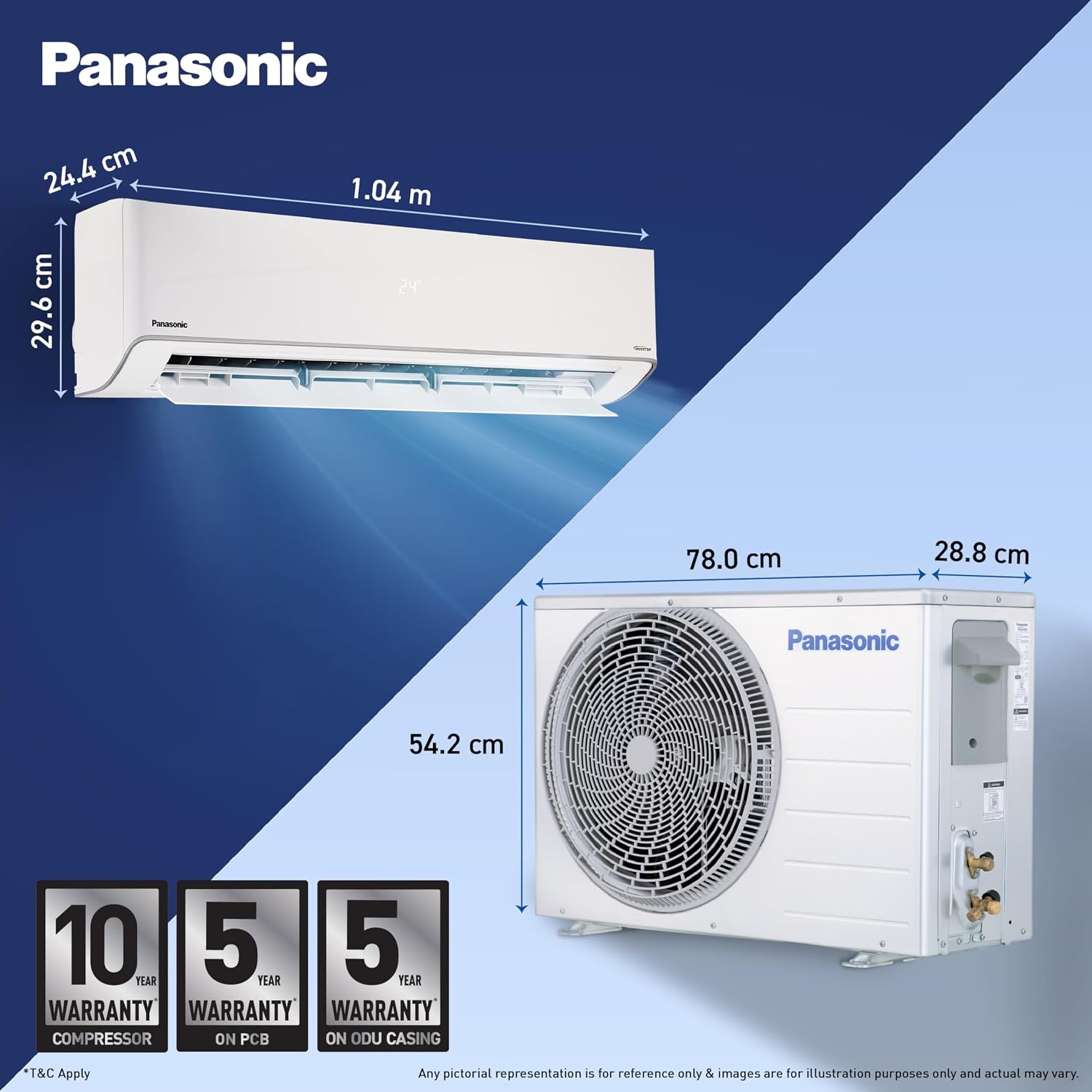
Image: Detailed dimensions of the indoor and outdoor units for installation planning.

Image: Power savings guide and electricity consumption details for the AC.
9. Warranty and Support
9.1 Manufacturer Warranty
Your Panasonic AC comes with the following manufacturer warranty:
- 10 years on Compressor
- 5 years on PCB (Printed Circuit Board)
- 5 years on ODU (Outdoor Unit) casing
To avail warranty services, please retain your Amazon invoice as proof of purchase.
9.2 Extended Comprehensive Warranty
An optional 6-year comprehensive warranty is available for an additional charge (INR 499 + GST). This extended warranty includes:
- 6 years warranty on evaporator & condenser coil
- 6 years warranty on motors (IDU fan motor, ODU fan motor & internal air swing motor)
- 6 years coverage of gas charging on compressor, evaporator coil & condenser coil
- Additional 1 year warranty on PCB (after 5th year)
Note: Consumables (filters), plastic parts, metal parts, and remote handset are not covered under this warranty. Terms and Conditions apply.

Image: Overview of the 6-year comprehensive warranty benefits.
9.3 Customer Support
For service requests, technical assistance, or warranty claims, please contact Panasonic customer support. You can also utilize the one-touch service feature available through the MirAIe app for convenient doorstep service.


