
1. Introduction
This manual provides detailed instructions for the assembly, operation, and maintenance of your SEDETA 47x24 Inch Electric Standing Desk. Please read all instructions carefully before use to ensure proper function and safety. This desk is designed for versatile use in various environments, including home offices, studios, and gaming setups.
Safety Information
- Ensure all components are securely fastened before use.
- Keep children and pets away from the desk during height adjustment.
- Do not overload the desk; refer to the specifications for maximum weight capacity.
- Avoid placing liquids directly on the control panel or power outlets.
- Unplug the desk from the power source before cleaning or maintenance.
2. Package Contents
Verify that all parts are present before beginning assembly. If any parts are missing or damaged, please contact customer service.
- Desktop (1)
- Leg Frames (2)
- Crossbar/Support Bar (1)
- Control Panel (1)
- Power Adapter and Cable (1)
- Casters (4, 2 with locks)
- Adjustable Feet (4, optional alternative to casters)
- Built-in Power Strip (1)
- Assembly Hardware (screws, washers, Allen wrench, screwdriver)
- Instruction Manual (1)
3. Setup and Assembly
Assembly typically requires two people for ease, but can be completed by one. Tools are included.
- Unpack Components: Carefully remove all parts from the packaging and lay them out on a clean, soft surface to prevent scratches.
- Attach Leg Frames: Secure the leg frames to the desktop using the provided screws. Ensure they are aligned correctly.
- Install Crossbar: Attach the crossbar between the leg frames. Ensure the lifting axle is fully inserted into both slots for proper lifting mechanism function.
- Choose Mobility Option: Decide between casters for mobility or adjustable feet for stationary use. Attach your chosen option to the bottom of the leg frames. If using casters, ensure the two lockable casters are placed on the same side for easier locking.
- Mount Control Panel: Secure the control panel to the underside of the desktop in the designated area.
- Connect Wiring: Connect the motor cables from the leg frames to the control box, and then connect the control panel cable to the control box. Plug the power adapter into the control box.
- Install Power Strip: If not pre-installed, secure the built-in power strip into its designated slot on the desktop.
- Initial Power-Up: Plug the desk into a wall outlet. The LED display on the control panel should light up.

4. Operating Instructions
Height Adjustment
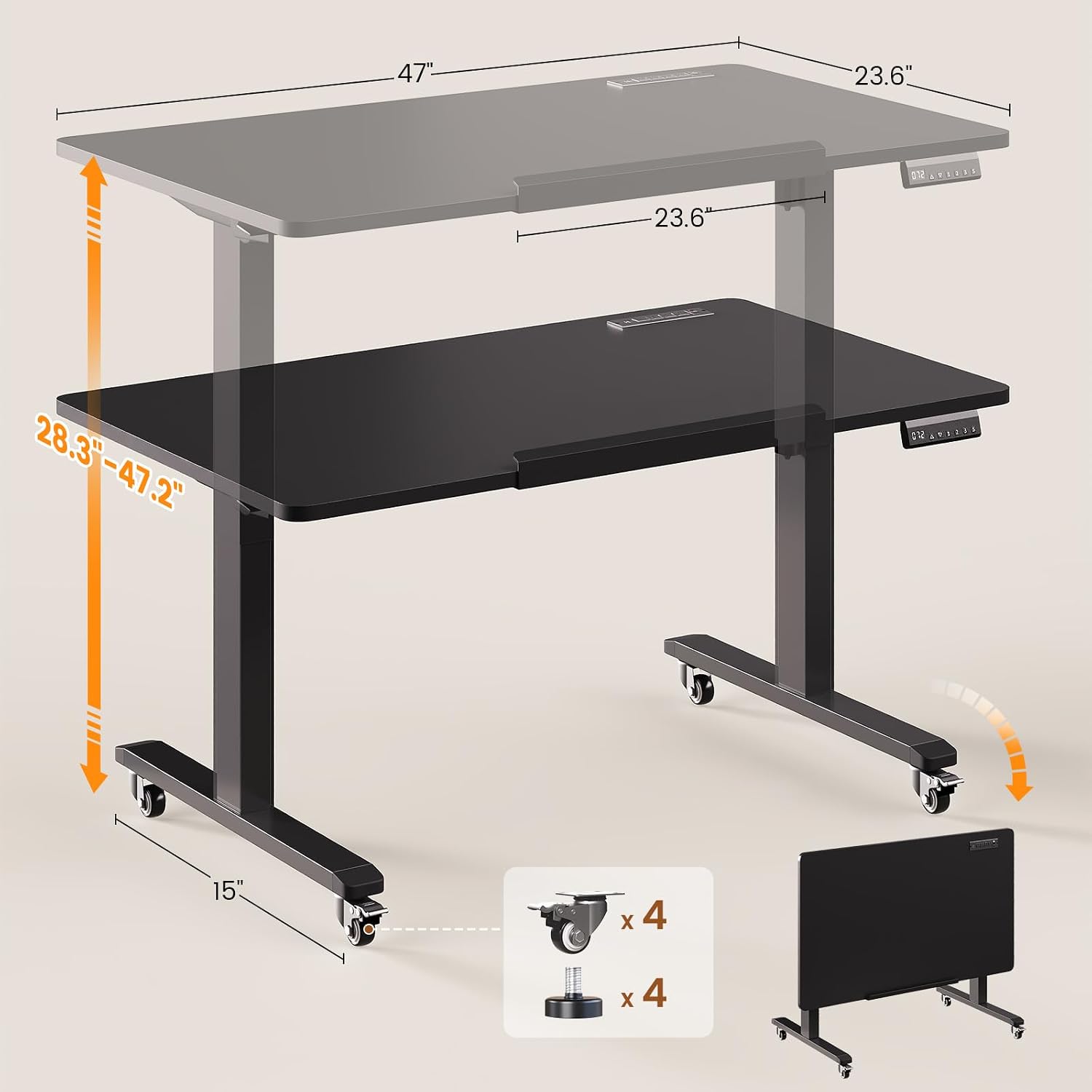
The desk features an electric lift system for smooth height adjustments between 28.3 inches and 47.2 inches.

- Adjusting Height: Use the Up and Down arrow buttons on the control panel to raise or lower the desk to your desired height. The current height will be displayed on the LED screen.
- Memory Presets: The control panel has three memory preset buttons (1, 2, 3). To save a height, adjust the desk to the desired position, then press the S button followed by the desired preset number (1, 2, or 3). To recall a saved height, simply press the corresponding preset number button.
- Reset Function (RST): If the desk encounters an error or does not respond, press and hold the RST button until the desk moves to its lowest position and resets.
Desktop Tilt Function
The desktop can be tilted from 0° to 180° for various activities like drawing or using it as a writing board.

- To tilt the desktop, locate the tilt mechanism on the side of the desk.
- Release the locking mechanism (usually a lever or knob) and adjust the desktop to your desired angle.
- Securely lock the mechanism once the desired tilt is achieved.
Mobility and Folding
The desk is equipped with casters for easy movement and can be folded for compact storage.
- Moving the Desk: Unlock the two lockable casters. Gently push the desk to its new location. Once in position, lock the casters to prevent unintended movement.
- Folding for Storage: Adjust the desk to its lowest height. Tilt the desktop to the 180° vertical position. This allows the desk to be stored flat against a wall or in a closet.
5. Features
- Electric Height Adjustment: Smooth and quiet motor (<40dB) allows for height changes from 28.3" to 47.2".
- 180° Tiltable Desktop: Converts from a flat desk to a drafting table or vertical writing board.
- Multifunctional Control Panel: Features an LED display, up/down buttons, and 3 memory presets for quick height recall.
- Built-in Power Strip: Includes 4 AC outlets (120V/12A), 2 USB ports (5V/2A), and 1 Type-C port (5V/2A) with a 6.6 ft power cord for convenient device charging.
- Mobile Design: Equipped with four smooth-rolling casters (two lockable) for easy relocation. Adjustable feet are also included as an alternative.
- Foldable for Storage: The desk can be folded flat for space-saving storage when not in use.
- Spacious Desktop: Measures 47"L x 23.6"W, providing ample space for work or creative projects.
- Sturdy Construction: Features a robust alloy steel frame with a 200-lb capacity.


6. Maintenance
- Cleaning: Wipe the desktop and frame with a soft, damp cloth. Avoid abrasive cleaners or harsh chemicals that could damage the finish.
- Cable Management: Regularly check and organize cables to prevent tangles and damage.
- Lubrication: The electric lift mechanism is generally maintenance-free. Do not attempt to lubricate internal components unless specifically instructed by customer support.
- Fastener Check: Periodically check all screws and fasteners to ensure they are tight. Retighten if necessary.
7. Troubleshooting
| Problem | Possible Cause | Solution |
|---|---|---|
| Desk does not move or respond to control panel. | Power cable disconnected; motor cable loose; control panel error. | Check power connections. Ensure all motor and control panel cables are securely plugged in. Press and hold the RST button for 5 seconds to reset the system. |
| Desk moves unevenly. | Lifting axle not fully inserted; uneven weight distribution. | Ensure the crossbar's lifting axle is fully inserted into both leg frame slots. Redistribute items on the desktop evenly. Perform a system reset. |
| Noise during operation. | Normal motor sound; loose fasteners. | A quiet motor sound is normal (<40dB). Check and tighten all assembly screws if excessive noise occurs. |
| Desktop tilt mechanism is stiff or loose. | Locking mechanism needs adjustment. | Ensure the tilt locking mechanism is fully engaged or disengaged. Do not force the tilt. |
| Power outlets not working. | Power strip switch off; desk not powered. | Check the power switch on the built-in power strip. Ensure the desk is plugged into a live wall outlet. |
8. Specifications
- Brand: SEDETA
- Model: B0GHQ32MJ2
- Product Dimensions: 47.2"D x 23.6"W x 28.3"H (minimum height)
- Height Adjustment Range: 28.3" to 47.2"
- Desktop Tilt Range: 0° to 180°
- Color: Black
- Material: Engineered Wood (Desktop), Alloy Steel (Frame)
- Lifting Mechanism: Electric
- Noise Level: <40dB
- Weight Capacity: 200 lbs (approximate, for flat desktop)
- Power Strip: 4 AC Outlets (120V/12A), 2 USB Ports (5V/2A), 1 Type-C Port (5V/2A)
- Power Cord Length: 6.6 ft
- Special Features: Foldable, 180° Tiltable desktop, Mobile (with casters), Built-in Power Outlet, Memory Presets
9. Warranty and Support
SEDETA provides a 3-year service warranty for this product. For any issues during purchase, assembly, or use, please contact SEDETA customer service. We are committed to providing satisfactory solutions.
Contact Information: Please refer to the contact details provided with your purchase or visit the official SEDETA website for support.