
1. Introduction
The ALIENPRO Apollo 8R Mini 4-unit moving head kit is engineered for professional productions demanding an extremely concentrated beam, high intensity, and a versatile effects palette for stages, concerts, clubs, and corporate events. Each unit features a 250W SPR MSD Platinum lamp with a 450W power consumption, integrating an LED ring for visual accents, 0° to 4° optics for precise light cuts, and a rapid movement system with 540° PAN and 270° TILT. It incorporates two rotating prisms (8+16 and 8+16+24 facets), frost and rainbow effects, a 0–100% mechanical dimmer, and a strobe macro control, in addition to 13 colors + white and 14 gobos + white wheels with rotation and shake. Full control is available via 16/20 channel DMX, RDM, automatic, sound-active, and master-slave modes, with overheating protection, AC/DC magnetic ballast, and IP20 rating. The set is delivered in a professional flight case for safe transport and quick setup on tours and demanding productions, ensuring reliability, visual impact, and full compatibility with standard DMX systems.
This manual provides essential information for the safe and efficient operation, setup, and maintenance of your ALIENPRO Apollo 8R Mini Moving Head LED Light Set.
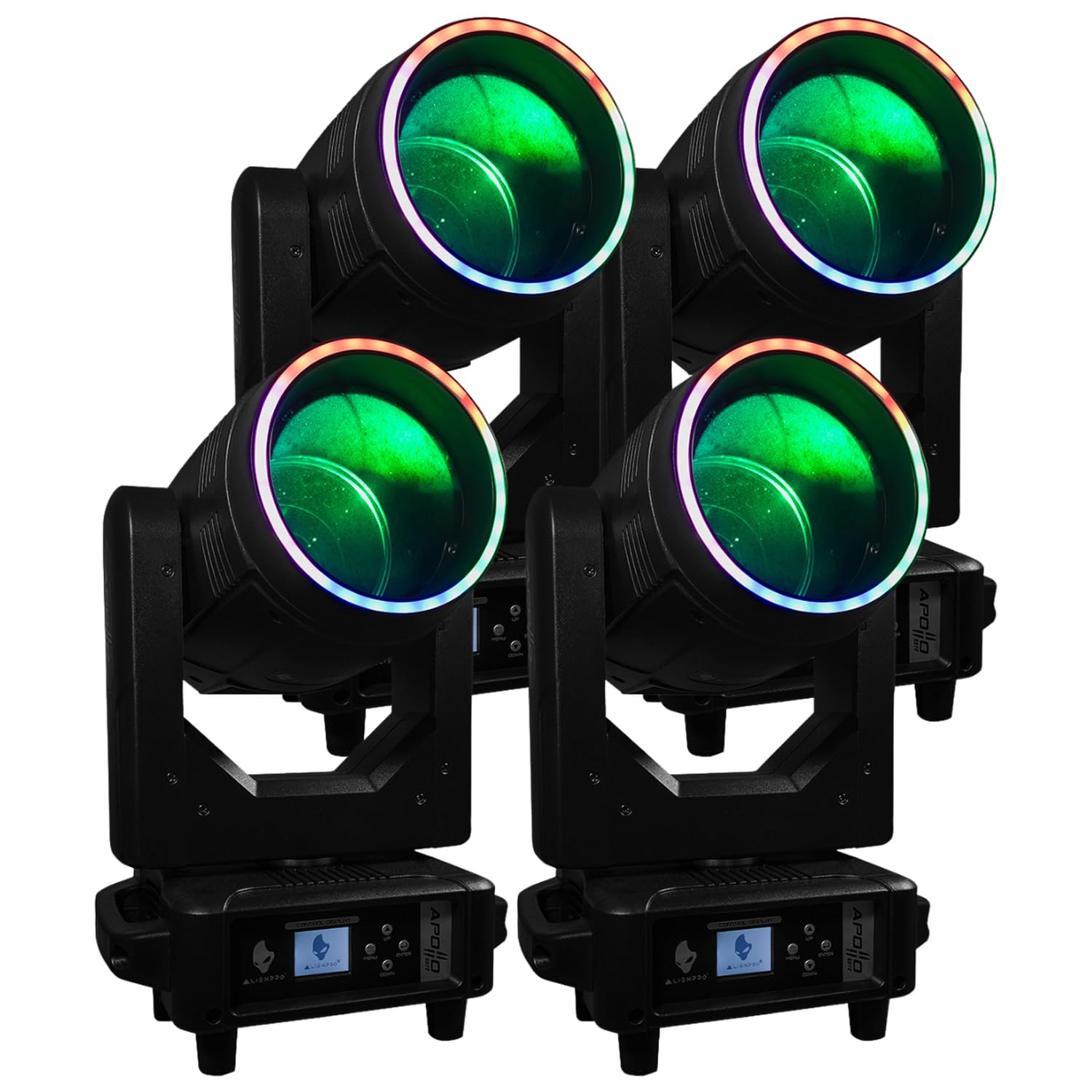
Image 1.1: ALIENPRO Apollo 8R Mini Moving Head LED Light showcasing its rainbow effect.
2. Safety Instructions
Please read these safety instructions carefully before installing or operating the ALIENPRO Apollo 8R Mini. Failure to follow these instructions may result in electric shock, fire, or personal injury.
- Electrical Safety: Always connect the unit to a grounded power outlet. Ensure the power supply voltage matches the unit's requirements. Disconnect power before any service or maintenance.
- Heat: The unit generates heat during operation. Ensure adequate ventilation and do not block cooling vents. Maintain a minimum distance of 0.5 meters (1.6 feet) from flammable materials.
- Eye Safety: Do not look directly into the light source when the unit is operating, as it can cause severe eye injury.
- Installation: Install the unit in a stable and secure location. Use appropriate mounting hardware and safety cables when suspending the unit. Ensure the installation surface can support the weight of the fixture.
- Moisture: This unit has an IP20 rating, meaning it is not protected against water. Do not expose the unit to rain, moisture, or high humidity.
- Service: Refer all servicing to qualified service personnel. Do not attempt to repair the unit yourself.
- Children: Keep the unit out of reach of children and unauthorized persons.
3. Package Contents
Upon unpacking, please verify that all items listed below are present and in good condition. If any items are missing or damaged, contact your dealer immediately.
- 4 x ALIENPRO Apollo 8R Mini Moving Head LED Lights
- 1 x Professional Flight Case
- Power Cables (for each unit)
- DMX Cables (optional, may be sold separately)
- User Manual (this document)

Image 3.1: Professional flight case for secure transport of the ALIENPRO Apollo 8R Mini units.
4. Setup
4.1 Unpacking and Inspection
- Carefully remove the moving head lights from the professional flight case.
- Inspect each unit for any signs of damage that may have occurred during shipping.
- Retain the packaging materials for future transport or storage.
4.2 Mounting the Fixture
The Apollo 8R Mini can be mounted in various positions (floor, truss, wall) using appropriate clamps and safety cables (not included). Ensure the mounting surface is capable of supporting the fixture's weight (68.1 kg for the set, individual unit weight not specified but significantly less). Always use a safety cable as a secondary attachment.
4.3 Power Connection
- Connect the provided power cable to the power input on the rear of each moving head unit.
- Plug the other end of the power cable into a grounded electrical outlet (AC 100-240V, 50/60Hz).
- Ensure the power source can handle the total power consumption of all connected units (450W per unit).
4.4 DMX Connection
For DMX control, connect a DMX cable from your DMX controller's output to the DMX input of the first Apollo 8R Mini unit. Then, daisy-chain DMX cables from the DMX output of the first unit to the DMX input of the next, and so on. Terminate the last unit in the chain with a DMX terminator (not included) for optimal signal integrity.

Image 4.1: Front view of the ALIENPRO Apollo 8R Mini, illustrating the control display and potential connection points.
5. Operating Instructions
5.1 Control Panel Overview
Each Apollo 8R Mini unit features a control display and buttons for menu navigation and settings adjustment.

Image 5.1: Close-up of the control display and navigation buttons (MENU, UP, DOWN, ENTER).
- MENU: Accesses the main menu or goes back to the previous menu level.
- UP/DOWN: Navigates through menu options or adjusts parameter values.
- ENTER: Confirms a selection or enters a submenu.
5.2 Operating Modes
The Apollo 8R Mini offers several operating modes:
- DMX Mode (16/20 Channels): For professional control via a DMX controller. Set the DMX address for each unit using the control panel. Refer to the DMX channel chart (typically found in a separate DMX manual or appendix) for specific functions.
- RDM (Remote Device Management): Allows for remote DMX addressing and fixture monitoring via a compatible RDM controller.
- Automatic Mode: The unit runs through pre-programmed internal light shows. Select different auto programs via the control panel.
- Sound-Active Mode: The unit reacts to sound input via its built-in microphone, synchronizing light effects with music. Adjust sensitivity via the control panel.
- Master-Slave Mode: Connect multiple units via DMX cables. Set one unit as 'Master' and the others as 'Slave'. The slave units will mirror the master's operation (e.g., automatic or sound-active programs).
5.3 Light Effects and Functions
The Apollo 8R Mini offers a wide range of effects:
- PAN (540°) & TILT (270°): Precise and rapid movement across the stage.
- Color Wheel: 13 colors + white, allowing for vibrant color changes.
- Gobo Wheel: 14 gobos + white, with rotation and shake functions for dynamic pattern projection.
- Prisms: Two rotating prisms (8+16 and 8+16+24 facets) to multiply the beam.
- Frost Effect: Softens the beam edge for wash-like effects.
- Rainbow Effect: Creates a flowing spectrum of colors.
- Dimmer: 0-100% mechanical dimmer for smooth intensity control.
- Strobe: Adjustable strobe macro control for pulsating light effects.

Image 5.2: Example of the powerful and colorful beam effects produced by the Apollo 8R Mini.
6. Maintenance
Regular maintenance ensures optimal performance and extends the lifespan of your ALIENPRO Apollo 8R Mini units. Always disconnect power before performing any maintenance.
6.1 Cleaning
- Exterior: Clean the exterior casing with a soft, lint-free cloth. Do not use abrasive cleaners or solvents.
- Optics: Gently clean the lenses and mirrors with a soft cloth and a specialized lens cleaning solution. Avoid scratching optical surfaces.
- Cooling Vents: Periodically use compressed air to clear dust and debris from the cooling vents to ensure proper airflow.
6.2 General Care
- Store the units in their professional flight case when not in use to protect them from dust, moisture, and physical damage.
- Avoid exposing the units to extreme temperatures or direct sunlight for prolonged periods.
- Regularly check all cables for wear and tear. Replace damaged cables immediately.
7. Troubleshooting
This section addresses common issues you might encounter. If you experience a problem not listed here, or if the suggested solutions do not resolve the issue, please contact ALIENPRO customer support.
| Problem | Possible Cause | Solution |
|---|---|---|
| Unit does not power on | No power supply; Faulty power cable; Blown fuse | Check power connection; Test power cable; Replace fuse (if accessible and safe to do so) |
| No DMX control | Incorrect DMX address; Faulty DMX cable; No DMX signal from controller; Missing DMX terminator | Verify DMX address setting; Check DMX cables; Ensure DMX controller is active; Add DMX terminator to the last unit |
| Light output is weak or inconsistent | Dirty optics; Overheating; Lamp nearing end of life (for non-LED components) | Clean lenses; Ensure proper ventilation; Contact service for lamp replacement if applicable |
| Moving head not responding to PAN/TILT | Motor error; DMX signal issue; Mechanical obstruction | Restart unit; Check DMX connection; Ensure no physical obstructions; Contact service |
8. Specifications
Below are the technical specifications for the ALIENPRO Apollo 8R Mini Moving Head LED Light Set:
- Model Number: 44-KIT8RMINI
- Brand: ALIENPRO
- Color: Black
- Material: Aluminum
- Lamp Type: SPR MSD Platinum 250W (per unit)
- Power Consumption: 450W (per unit)
- Optics: 0°-4° Beam
- Movement: PAN 540°, TILT 270°
- Prisms: Two rotating (8+16 facets and 8+16+24 facets)
- Effects: Frost, Rainbow, Dimmer (0-100%), Strobe
- Color Wheel: 13 colors + white
- Gobo Wheel: 14 gobos + white (with rotation and shake)
- Control Modes: DMX (16/20 channels), RDM, Automatic, Sound-Active, Master-Slave
- Protection Rating: IP20
- Item Dimensions (L x W x H): 61 cm x 63 cm x 67 cm (for the flight case with units)
- Item Weight: 68.1 Kilograms (total for the set in flight case)
- Batteries Included: No
- Global Trade Item Number (GTIN): 27500807003893
9. Warranty and Support
9.1 Manufacturer's Warranty
The ALIENPRO Apollo 8R Mini Moving Head LED Light Set is covered by a factory warranty. Please refer to your purchase documentation or contact your dealer for specific warranty terms and conditions, including duration and coverage details.
9.2 Customer Support
For technical assistance, service inquiries, or questions regarding your product, please contact your authorized ALIENPRO dealer or visit the official ALIENPRO website for support resources.
