
1. Introduction
Thank you for choosing the Pard USA Night Stalker 4K EX Digital Night Vision Scope. This advanced optical device is designed for superior performance in low-light and nighttime conditions, featuring a 4K CMOS sensor, 5.5X optical magnification, and a high-resolution OLED display. This manual provides detailed instructions for the proper setup, operation, and maintenance of your Night Stalker 4K EX scope to ensure optimal performance and longevity.
Key Features
- Ultra-Clear 4K Night Vision: Equipped with a 3840x2160 4K CMOS sensor and 0.001 lux sensitivity for exceptional clarity in near-total darkness.
- Powerful Magnification: Offers 5.5x optical zoom and 2x digital zoom, combined with a 70mm objective lens for maximum light gathering.
- High-Resolution OLED Display: Features a 2560x2560 OLED screen for sharp, detailed viewing and reticle display.
- Auto-Record Function: Recoil-activated recording captures footage automatically upon firing.
- Ergonomic Side-Focus: Provides rapid and precise focus adjustments.
- Modular Design: Compatible with optional Pard USA IL1 Laser Rangefinder and IR Illuminator (sold separately).
Package Contents
- Pard USA Night Stalker 4K EX Digital Night Vision Scope
- User Manual (this document)
- (Additional accessories may vary by package)
2. Product Overview and Components
Familiarize yourself with the various parts of your Night Stalker 4K EX scope.
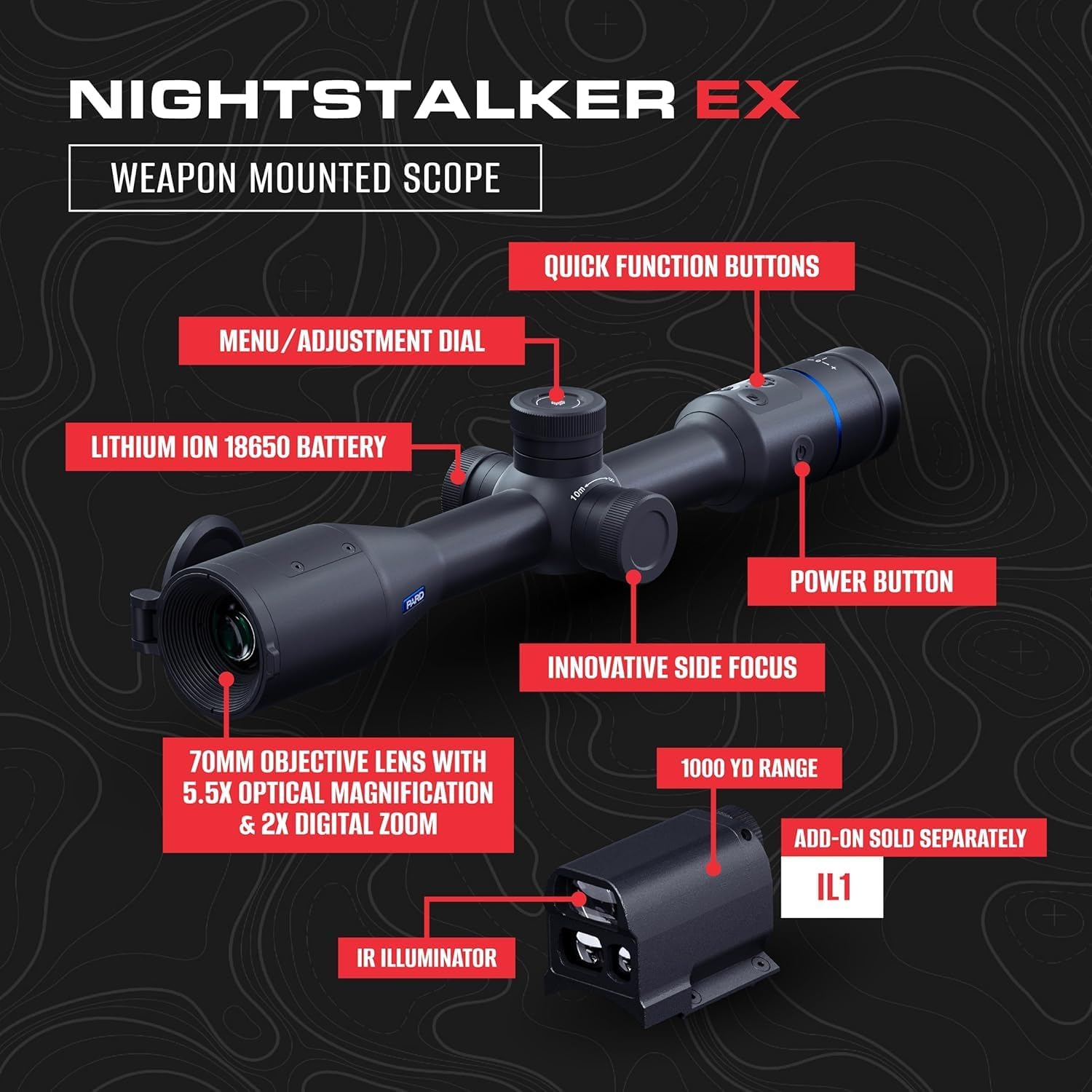
Image 2.1: Overview of the Pard Night Stalker 4K EX Digital Night Vision Scope with key components labeled. This image shows the 70mm objective lens, innovative side focus knob, menu/adjustment dial, quick function buttons, power button, and the battery compartment for a Lithium Ion 18650 battery. An optional IL1 IR Illuminator is also depicted.
- 70mm Objective Lens: Main lens for light gathering.
- Lithium Ion 18650 Battery Compartment: Houses the power source.
- Menu/Adjustment Dial: Used for navigating menus and adjusting settings.
- Quick Function Buttons: Programmable buttons for rapid access to frequently used features.
- Innovative Side Focus: Knob for precise focus adjustment.
- Power Button: Turns the device on and off.
- Eyepiece/OLED Display: Viewing area for the digital image.
- IR Illuminator (Optional IL1): External infrared light source for enhanced night vision (sold separately).
3. Setup
3.1 Battery Installation
- Locate the battery compartment on the scope.
- Unscrew the battery cap.
- Insert a fully charged 18650 Lithium Ion battery, ensuring correct polarity (+/-).
- Securely screw the battery cap back on.
3.2 Mounting the Scope
The Night Stalker 4K EX is designed for weapon mounting.
- Attach the scope to your preferred mounting system (e.g., Picatinny rail) using appropriate rings or mounts (not included).
- Ensure the scope is securely fastened and aligned correctly.
- Refer to your weapon's manual and mounting system instructions for specific torque specifications and alignment procedures.
3.3 Initial Power On and Focus Adjustment
- Press and hold the Power Button until the display illuminates.
- Look through the eyepiece. If the image is blurry, adjust the Innovative Side Focus knob until the image appears sharp and clear.
- Adjust the eyepiece diopter if necessary for your individual vision.
4. Operation
4.1 Power On/Off
- To Power On: Press and hold the Power Button for approximately 3 seconds.
- To Power Off: Press and hold the Power Button for approximately 3 seconds until the display shuts down.
4.2 Menu Navigation and Settings
Use the Menu/Adjustment Dial to access and navigate the scope's settings.
- Press the Menu/Adjustment Dial to enter the main menu.
- Rotate the dial to scroll through menu options.
- Press the dial again to select an option or confirm a setting.
- Rotate the dial to adjust values (e.g., brightness, contrast, magnification).
- Press the dial to confirm the adjustment.
- To exit a menu, navigate to the "Exit" option or press a designated quick function button if configured.
4.3 Magnification Adjustment
The scope features 5.5x optical magnification and 2x digital zoom.
- Optical magnification is fixed at 5.5x.
- Digital zoom can be adjusted via the Menu/Adjustment Dial or a quick function button, if assigned.
4.4 Night Vision and Imaging Modes
The 4K CMOS sensor provides clear imaging in various light conditions.

Image 4.1: Illustration of the 4K imaging capabilities of the Pard Night Stalker 4K EX, highlighting the 4K CMOS sensor with 3840x2160 resolution and 0.001 lux low-light sensitivity.
The scope offers various imaging and display options to suit different environments and preferences.
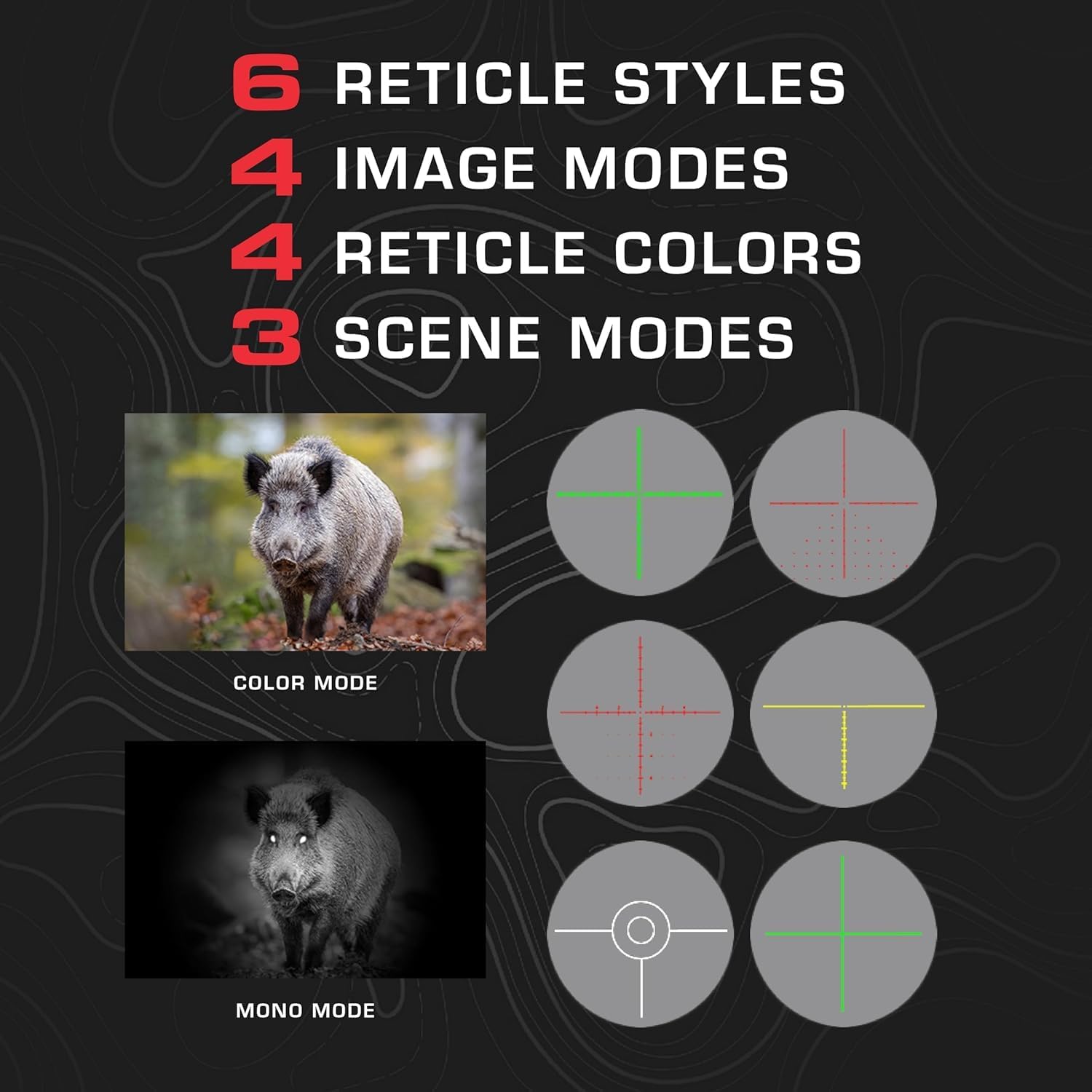
Image 4.2: Visual representation of the customizable display options, including 6 reticle styles, 4 image modes (e.g., Color Mode, Mono Mode), 4 reticle colors, and 3 scene modes available on the Pard Night Stalker 4K EX.
- Image Modes: Select between different image modes (e.g., Color, Mono) based on ambient light conditions and personal preference.
- Scene Modes: Optimize image processing for specific environments (e.g., Forest, Desert, Snow).
- Reticle Styles and Colors: Choose from 6 reticle styles and 4 reticle colors to customize your aiming point. These settings can be adjusted in the menu.
4.5 Recoil-Activated Recording
The scope features an automatic recording function that activates upon detecting recoil.
- Ensure a compatible microSD card (not included) is inserted into the designated slot.
- Activate the recoil-activated recording feature in the system settings menu.
- The scope will automatically begin recording a short video clip when a shot is fired.
- Recorded videos can be reviewed on the device or transferred to a computer.
4.6 Optional Accessories Integration
The Night Stalker 4K EX is designed to integrate with specific Pard USA accessories (sold separately).
- Pard USA IL1 Laser Rangefinder: Attach the IL1 to the designated port for accurate distance measurements. Refer to the IL1 manual for specific operation instructions.
- Pard USA IR Illuminator: Attach an external IR illuminator for enhanced visibility in complete darkness.
5. Maintenance
5.1 Cleaning the Lenses
- Use a soft, lint-free cloth or a lens brush to gently remove dust and loose debris.
- For stubborn smudges or fingerprints, use a specialized lens cleaning solution and a microfiber cloth.
- Avoid using abrasive materials or harsh chemicals, as these can damage the lens coatings.
5.2 General Cleaning
- Wipe the body of the scope with a soft, damp cloth.
- Do not immerse the device in water.
- Ensure all caps and covers are in place when not in use to protect from dust and moisture.
5.3 Battery Care
- Always use high-quality 18650 Lithium Ion batteries.
- Remove the battery if the scope will not be used for an extended period.
- Store batteries in a cool, dry place.
- Do not expose batteries to extreme temperatures or direct sunlight.
6. Troubleshooting
If you encounter issues with your Night Stalker 4K EX, refer to the following common problems and solutions.
| Problem | Possible Cause | Solution |
|---|---|---|
| Device does not power on. |
|
|
| Image is blurry or out of focus. |
|
|
| Poor image quality in low light. |
|
|
| Recoil-activated recording not working. |
|
|
If the problem persists after attempting these solutions, please contact Pard USA customer support.
7. Specifications
| Feature | Detail |
|---|---|
| Model | NS4E-40 |
| Brand | Pard |
| Sensor | 4K CMOS (3840x2160) |
| Low Light Sensitivity | 0.001 Lux |
| Objective Lens Diameter | 70 mm |
| Optical Magnification | 5.5x |
| Digital Zoom | 2x |
| Display Type | OLED |
| Display Resolution | 2560x2560 |
| Field of View | 5.8 Degrees (10.7m@100m) |
| Material | Aluminium Alloy |
| Compatible Devices | Rifle |
| Power Source | 18650 Lithium Ion Battery (not included) |
| Night Vision | Yes |
| Reticle Type | Duplex (multiple styles available) |
| Included Components | Scope |
8. Warranty & Support
8.1 Manufacturer's Warranty
The Pard USA Night Stalker 4K EX Digital Night Vision Scope comes with a 2-Year Manufacturer's Warranty. This warranty covers defects in materials and workmanship under normal use. Please retain your proof of purchase for warranty claims.
For full details regarding warranty terms and conditions, please refer to the official Pard USA website or contact their customer service.
8.2 Customer Support
For technical assistance, troubleshooting, or warranty inquiries, please contact Pard USA customer support.
- Manufacturer: PARD
- Website: www.pard.com (Note: This is a placeholder, please refer to official product documentation for correct website.)
- Contact Information: Refer to the Pard USA official website for the most current contact details, including phone numbers and email addresses.


