
Introduction
The Redroad R11 Robot Vacuum and Mop is an advanced cleaning device designed to automate floor maintenance. It features powerful 20,000 Pa suction, intelligent LiDAR navigation, and a self-emptying dustbin for a hands-free cleaning experience. This manual provides essential information for setup, operation, maintenance, and troubleshooting to ensure optimal performance of your device.

The Redroad R11 Robot Vacuum and Mop in a modern living room environment.
What's in the Box
Verify that all components are present upon unboxing:
- Robot Vacuum Main Unit
- 4L Self-Emptying Station
- 2-in-1 Dustbin & Water Tank
- Mop Cloths * 2
- High-Efficiency Filter * 2
- Anti-Tangle Side Brush * 2
- 240-Day Dust Collection Dust Bags * 2
- Cleaning Brush
- User Manual (this document)

Illustration of the Redroad R11 Robot Vacuum and its included accessories.
Setup
1. Charging Station Placement
Place the self-emptying station against a wall in an open area, ensuring there are no obstacles within 1.5 meters in front and 0.5 meters on either side. Connect the power adapter.

The Redroad R11 Robot Vacuum docked with its self-emptying station.
2. Initial Charge
Place the robot vacuum onto the charging station. Ensure the charging contacts align. The robot will automatically begin charging. Fully charge the device before its first use.
3. App Connection (5GHz & 2.4GHz WiFi Support)
- Download the Redroad app from your smartphone's app store.
- Open the app and follow the on-screen instructions to create an account and add your R11 robot vacuum.
- Ensure your phone is connected to a 2.4GHz or 5GHz Wi-Fi network during the pairing process.
The Redroad R11 Robot Vacuum can be controlled via its dedicated smartphone app and supports voice commands.
Operating Instructions
Cleaning Modes
The R11 offers versatile cleaning options:
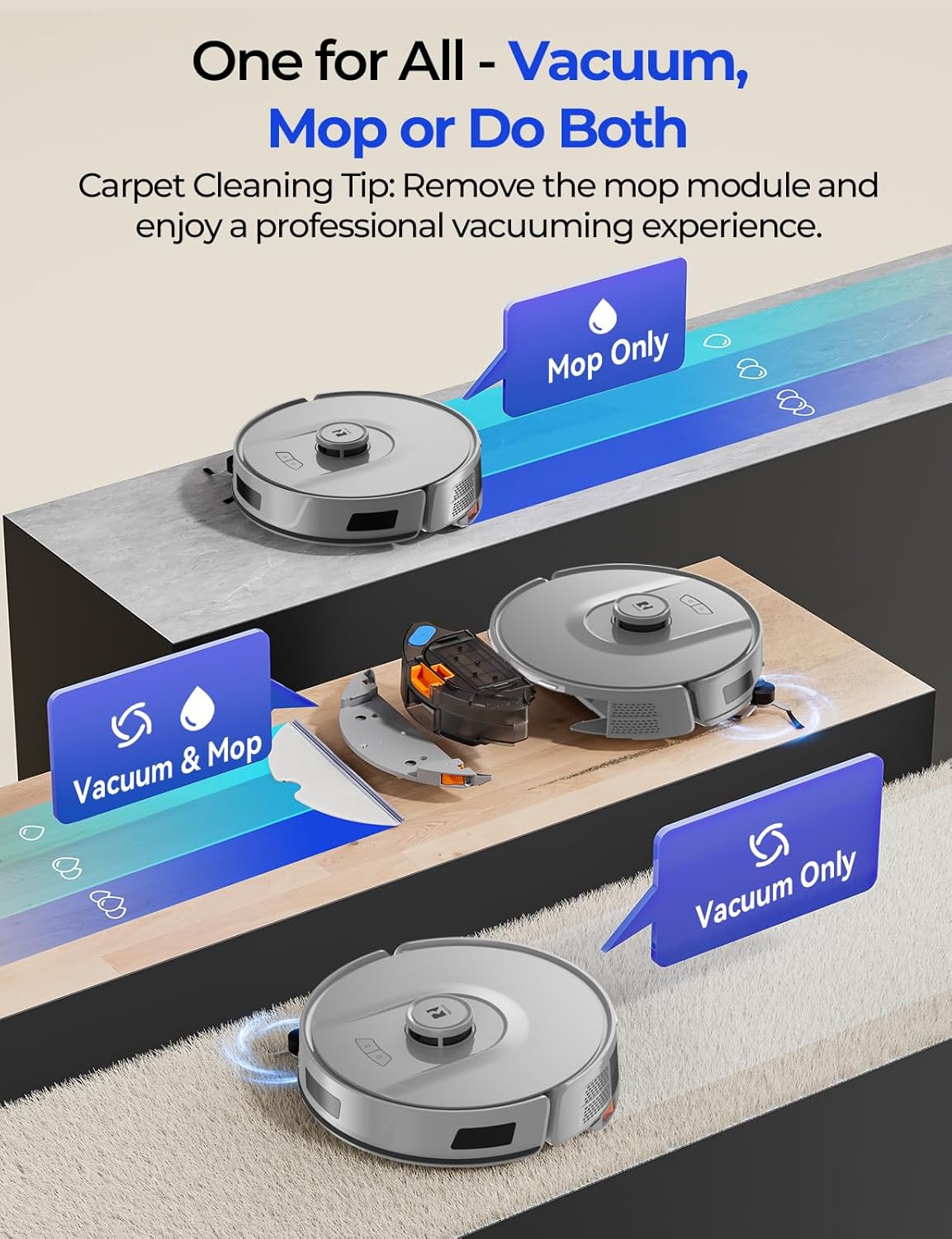
- Vacuum Only: Ideal for dry debris, pet hair, and general dust. The large-capacity dustbin efficiently collects debris.
- Mop Only: For hard floors, the air valve precisely controls water flow at three levels to remove stains without over-wetting.
- Vacuum & Mop: Combines both functions for comprehensive cleaning.

The Redroad R11 Robot Vacuum can operate in vacuum-only, mop-only, or combined vacuum and mop modes.
LiDAR Navigation and Mapping
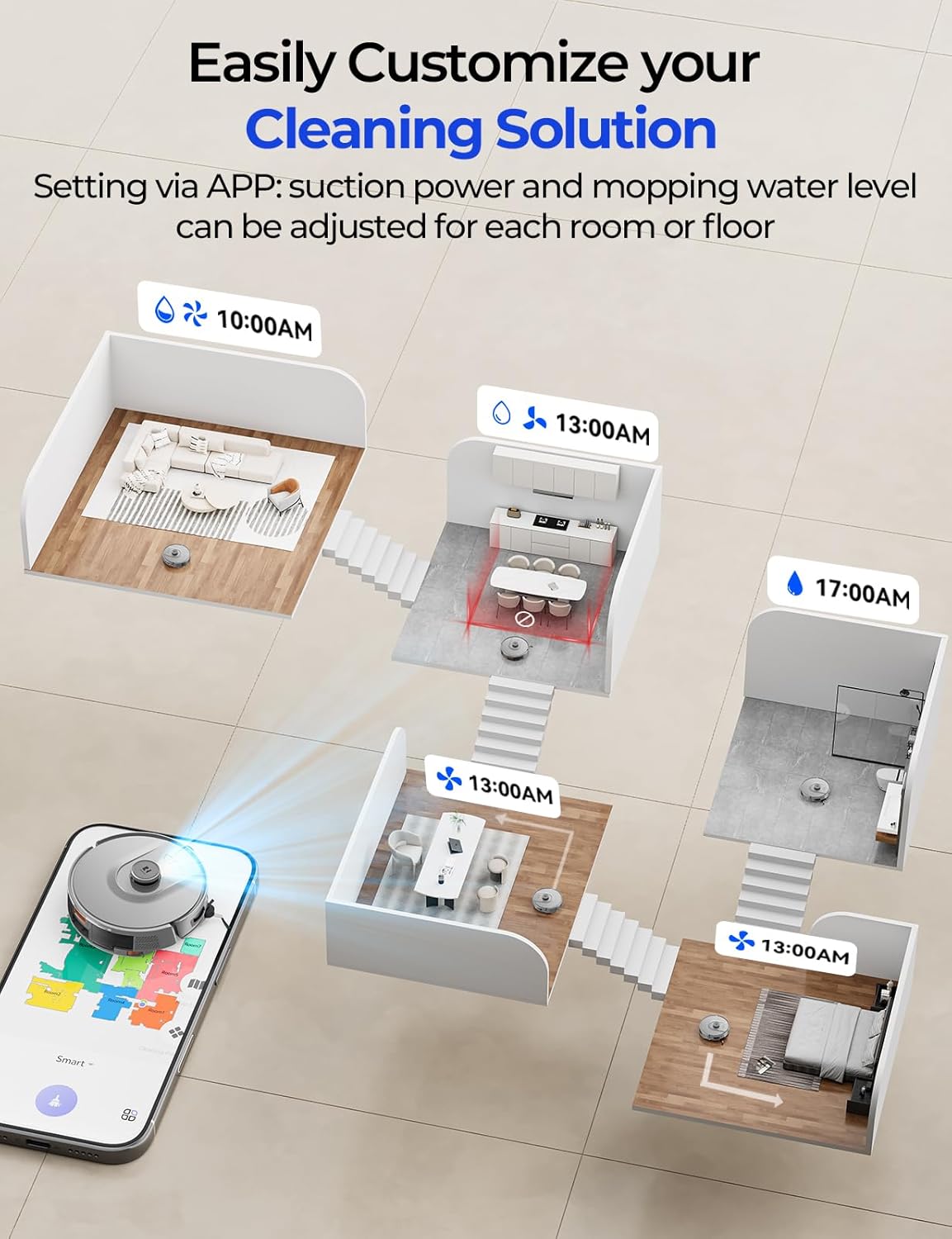
The R11 utilizes a 360° Smart LiDAR navigation system to create accurate room maps and plan efficient cleaning routes. It avoids repetition and omissions, ensuring thorough coverage. The robot can store up to 4 maps, suitable for multi-floor homes.

The Redroad R11 Robot Vacuum employs LiDAR technology for precise mapping and navigation.
Smart Obstacle Avoidance and Drop Sensing
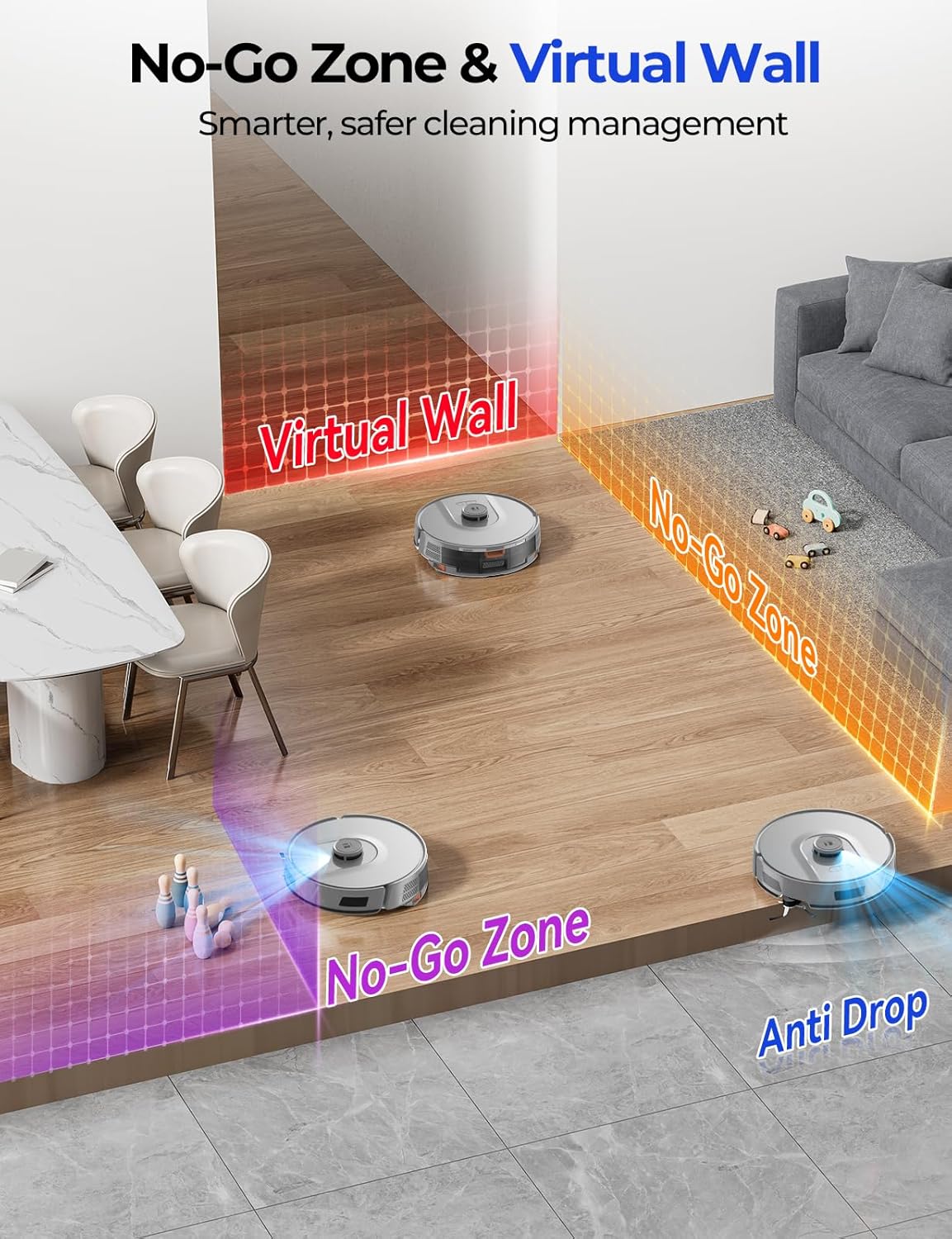
Equipped with high-precision sensors, the R11 detects and avoids obstacles, protecting furniture and preventing collisions. Smart drop sensing prevents the robot from falling down stairs or off ledges.
The Redroad R11 Robot Vacuum uses advanced sensors for obstacle avoidance.
App Control and Customization
Through the Redroad app, you can:
- Set cleaning schedules.
- Switch between cleaning modes.
- Adjust suction levels (4 levels available).
- Adjust water flow levels (3 levels available).
- Define no-go zones and virtual walls to restrict access to certain areas.
- Monitor cleaning progress and view maps.
The Redroad app allows for easy customization of cleaning settings and schedules.
Voice Control
The R11 supports voice control via Amazon Alexa and Google Home, allowing for convenient hands-free operation.
Carpet Auto-Boost
The robot automatically detects carpets and boosts suction power to ensure deep cleaning, effectively removing embedded dirt and pet hair.

The Redroad R11 Robot Vacuum automatically increases suction on carpets for deeper cleaning.
Maintenance
Automatic Dust Collection
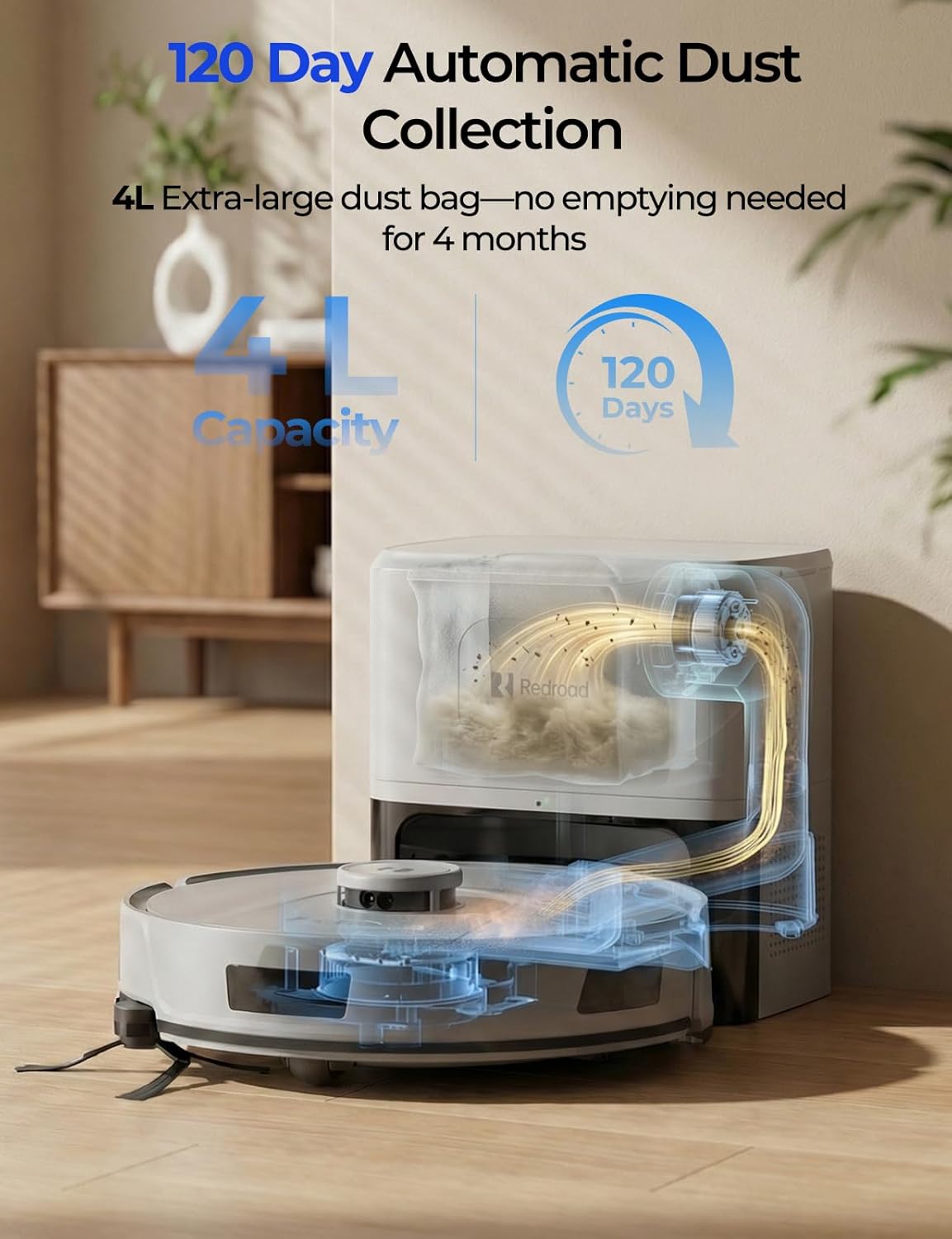
The 4L self-emptying station automatically transfers collected debris from the robot's dustbin into a disposable dust bag, providing up to 120 days of hands-free operation (240 days with two included bags). Replace the dust bag when full.

The Redroad R11 Robot Vacuum's self-emptying station with a 4L dust bag.
Cleaning Brushes and Filters
- Side Brushes: The mechanical arm-extended side brush is designed to reach edges and corners effectively and features an anti-tangle design to minimize hair entanglement. Regularly check and clean for optimal performance.
- Roller Brush: The roller brush also features an anti-tangle design. Remove any tangled hair or debris using the included cleaning tool.
- High-Efficiency Filter: Clean the filter regularly by tapping out dust. Replace the filter every 3-6 months, or as needed, to maintain suction power.
The underside of the Redroad R11 Robot Vacuum, highlighting the side brush and roller brush.
Water Tank and Mop Cloths
After mopping, empty any remaining water from the 2-in-1 dustbin and water tank. Clean the mop cloths thoroughly and allow them to air dry before reuse.
Troubleshooting
| Problem | Possible Cause | Solution |
|---|---|---|
| Robot does not turn on. | Low battery; Power switch off. | Charge the robot; Ensure power switch is on. |
| Robot cannot connect to Wi-Fi. | Incorrect Wi-Fi password; Router too far; Incorrect frequency band. | Verify password; Move robot closer to router; Ensure 2.4GHz or 5GHz network is used. |
| Poor cleaning performance. | Full dustbin; Clogged filter; Tangled brushes. | Empty dustbin; Clean/replace filter; Clean brushes. |
| Robot gets stuck frequently. | Obstacles in path; No-go zones not set. | Clear obstacles; Use the app to set no-go zones or virtual walls. |
| Mop function not working. | Empty water tank; Clogged water nozzle; Mop cloth not attached. | Refill water tank; Clean water nozzle; Attach mop cloth correctly. |
Specifications
| Feature | Detail |
|---|---|
| Brand | Redroad |
| Model Name | R11 Vacuum |
| Suction Power | 20,000 Pa |
| Battery Capacity | 3200 mAh (Lithium Ion) |
| Battery Life | Up to 180 minutes |
| Dust Bag Capacity | 4 Liters (up to 120 days hands-free) |
| Navigation Type | 360° Smart LiDAR |
| Control Method | App, Voice (Alexa/Google Home) |
| Wi-Fi Support | Dual-band (5GHz & 2.4GHz) |
| Filter Type | High-Efficiency |
| Surface Recommendation | Hard Floor, Hardwood, Tile/Marble, Short Pile, Carpet |
Warranty and Support
The Redroad R11 Robot Vacuum comes with a 2-year worry-free protection warranty. For any operational issues or malfunctions, please contact the official Redroad after-sales team. They guarantee an effective solution within 24 hours.
For additional support or to purchase compatible accessories like dust bags (ASIN: B0G7ZNZYGW), please visit the official Redroad website or contact customer service.
Official Product Video
Official product video demonstrating the features and operation of the Redroad R11 Robot Vacuum and Mop.


