
MXV TS30280BKBKMXVN
MXV 80-Inch Floating TV Stand with 40-Inch Electric Fireplace Instruction Manual
Model: TS30280BKBKMXVN
Introduction
Thank you for purchasing the MXV 80-Inch Floating TV Stand with 40-Inch Electric Fireplace. This manual provides essential information for the safe assembly, operation, and maintenance of your new entertainment center. Please read all instructions carefully before beginning assembly or use, and retain this manual for future reference.
Important Safety Information
- Always ensure the TV stand is securely mounted to a suitable wall. This product is designed for concrete walls and brick walls. It is not suitable for wooden walls or hollow walls.
- Assembly requires two adults. Do not attempt to assemble alone.
- Ensure all electrical connections for the fireplace and LED lights are properly installed and meet local electrical codes.
- Keep flammable materials at least 3 feet (0.9 meters) away from the front of the electric fireplace.
- Do not block the air vents of the electric fireplace.
- Unplug the fireplace from the power outlet before cleaning or performing any maintenance.
Package Contents
Your MXV Floating TV Stand with Electric Fireplace is shipped in two separate packages. Please verify that all components are present and undamaged before beginning assembly. If any parts are missing or damaged, contact customer support.
Components List:
- Floating TV Stand panels and hardware
- 40-inch Electric Fireplace insert
- Remote control for fireplace
- LED light strip and remote control
- Wall mounting hardware (screws, anchors)
- Instruction manual

Overview of the MXV Floating TV Stand with Electric Fireplace, illustrating its main components.
Setup and Installation
Assembly and installation are estimated to take approximately 40 minutes for two adults, with an additional 30 minutes for drilling and wall mounting. Ensure you have the necessary tools (e.g., drill, level, screwdriver) before starting.
1. Assemble the TV Stand
- Unpack all components and lay them out on a clean, soft surface to prevent scratches.
- Follow the step-by-step diagrams provided in the included assembly guide to construct the main cabinet structure. Pay close attention to the orientation of panels.
- Install the soft hinges and adjustable shelves into the cabinet sections as indicated.
- Ensure the cable holes are correctly positioned for wire management.

Detailed view of the TV stand's features, including cable management holes, soft-close hinges, and adjustable shelves for optimal storage.
2. Install the Electric Fireplace
- Carefully insert the 40-inch electric fireplace into the designated opening in the assembled TV stand.
- Secure the fireplace with the provided screws, ensuring it is flush and stable within the cabinet.
- Connect the fireplace power cord to a standard electrical outlet.
3. Wall Mounting the TV Stand
This TV stand is designed for wall mounting on concrete or brick walls only. Do not mount on wooden or hollow walls.
- Determine the desired height and position for the TV stand on your wall. Use a level to mark the mounting points accurately.
- Drill pilot holes at the marked locations using an appropriate drill bit for your wall type (concrete/brick).
- Insert wall anchors into the drilled holes if required.
- With the help of a second person, lift the TV stand and align the mounting brackets on the back of the stand with the drilled holes.
- Secure the TV stand to the wall using the provided screws. Ensure all screws are tightened firmly for a secure installation.
4. Install the LED Light Strip
- Attach the LED strip to the bottom of the TV cabinet using the provided clips. Ensure the strip is positioned correctly and leaves a small section to pass through the pre-designated holes.
- After adjusting the fireplace to the correct position, fix it with screws.
- Connect the LED strip to the fireplace extension cable. Thread the power plug through the upper socket.
- Use the remote control to turn on the LED lights.

Step-by-step guide for installing the LED light strip beneath the TV stand.
Operating Instructions
Electric Fireplace Operation
The 40-inch electric fireplace can be controlled via the included remote or the touch panel on the unit.
- Power On/Off: Press the power button on the remote or touch panel to turn the fireplace on or off.
- Temperature Control: Adjust the heat output between 62°F and 82°F (17°C and 28°C) using the temperature buttons. The fireplace provides up to 4,800 BTU, heating areas up to 400 sq. ft.
- Timer Setting: Set an automatic shut-off timer from 1 to 8 hours.
- Flame Color: Choose from 12 different flame colors to match your mood or decor.
- LED Color: Select from 12 LED colors for the ambient lighting.
- Brightness: Adjust the flame brightness with 5 levels (L1-L5).
- Flame Effect: Switch between Crystal Stone Effect and Faux Log Effect for varied visual appeal.

Key features of the 40-inch smart electric fireplace, including remote control, temperature settings, and timer.
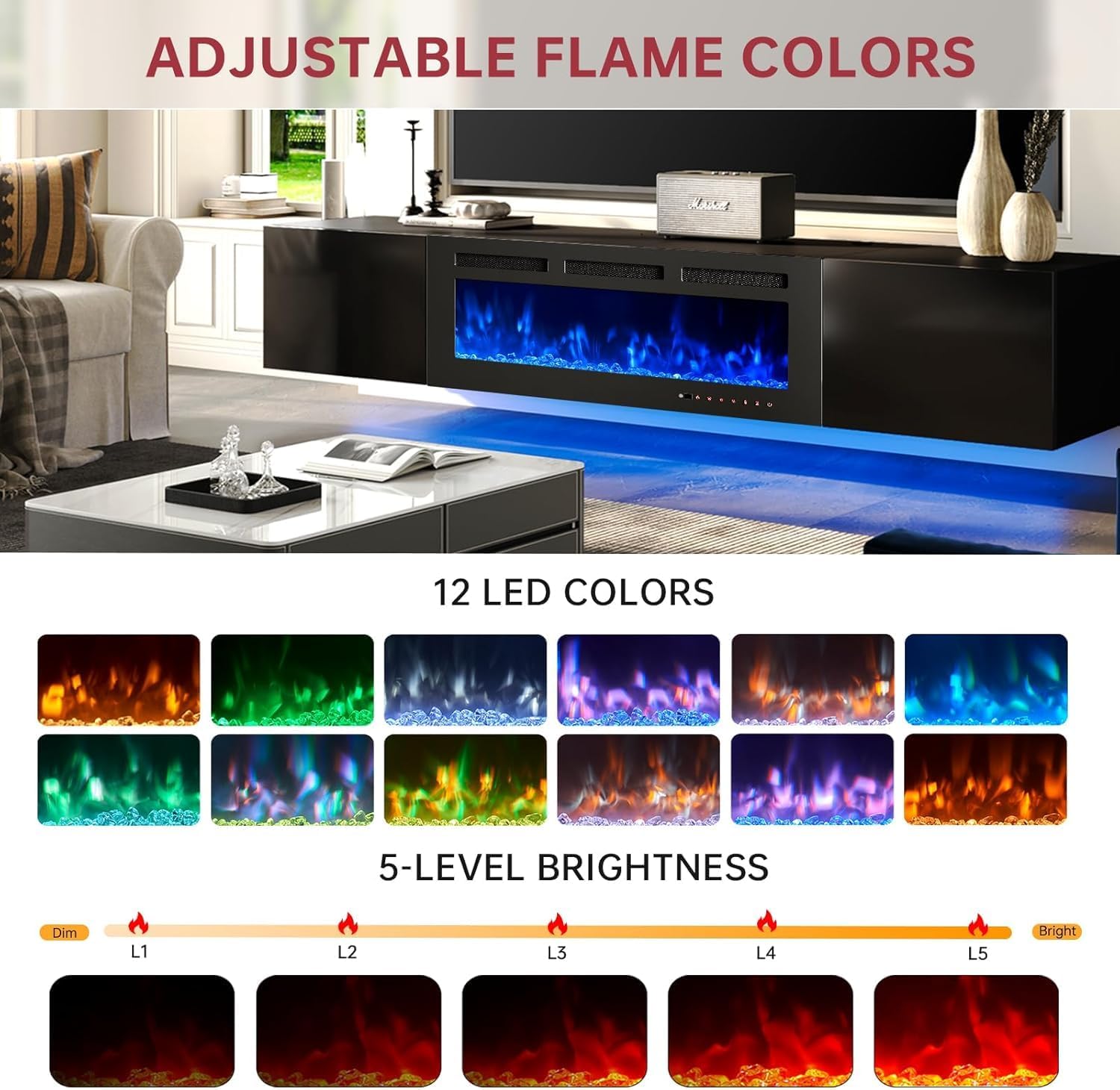
Visual representation of the 12 adjustable flame colors and 5 brightness levels.

Comparison of the Crystal Stone Effect and Faux Log Effect flame styles available with the fireplace.
LED Light Strip Operation
The integrated LED light strip provides ambient lighting and is controlled by its dedicated remote.
- Power On/Off: Use the remote to turn the LED strip on or off.
- Color Selection: Cycle through 12 different colors to create various lighting effects.

Illustration of the 12-color LED light change feature, showing various ambient lighting options.
Maintenance and Care
Proper care will ensure the longevity and appearance of your MXV Floating TV Stand.
- Cleaning the Cabinet: The high-gloss cabinet finish is easy to clean. Use a soft, damp cloth to wipe surfaces. Avoid abrasive cleaners or harsh chemicals that could damage the finish.
- Cleaning the Fireplace: Ensure the fireplace is unplugged and cool before cleaning. Wipe the glass and exterior surfaces with a soft, lint-free cloth. Do not spray cleaners directly onto the unit.
- Dusting: Regularly dust all surfaces with a dry, soft cloth.
- Inspection: Periodically check all screws and connections to ensure they remain tight and secure, especially for the wall mounting.
Troubleshooting
If you encounter issues with your MXV Floating TV Stand or Electric Fireplace, refer to the following common problems and solutions.
| Problem | Possible Cause | Solution |
|---|---|---|
| Electric fireplace does not turn on. | No power, thermal overload activated, remote battery low. | Check power cord connection and wall outlet. Reset circuit breaker if tripped. Allow fireplace to cool if thermal overload activated. Replace remote batteries. |
| No heat output from fireplace. | Heat function not activated, temperature setting too low. | Ensure heat function is turned on via remote or touch panel. Increase temperature setting. |
| LED light strip not working. | Loose connection, remote battery low, strip damaged. | Check connection to fireplace extension cable. Replace remote batteries. If still not working, contact support. |
| Assembly holes do not align. | Incorrect panel orientation, manufacturing defect. | Double-check the assembly diagrams for correct panel orientation. If parts are defective, contact customer support for replacements. |
| TV stand feels unstable after wall mounting. | Improper wall type, loose screws, insufficient anchors. | Ensure the wall is concrete or brick. Re-tighten all mounting screws. Verify appropriate wall anchors were used and installed correctly. If unsure, consult a professional. |
Specifications
Detailed technical specifications for the MXV 80-Inch Floating TV Stand with 40-Inch Electric Fireplace.
| Feature | Detail |
|---|---|
| Brand | MXV |
| Model Number | TS30280BKBKMXVN |
| Product Dimensions (TV Stand) | 80"L x 13.7"W x 17.8"H |
| Electric Fireplace Dimensions | 40"L x 4.5"D x 17"H (approximate insert size) |
| Material | Engineered Wood |
| Finish Type | High Gloss |
| Installation Type | Wall Mount (Concrete/Brick walls only) |
| Power Source | Corded Electric |
| Heat Output | 4800 BTU |
| Heating Coverage | Up to 400 sq. ft. |
| Temperature Range | 62°F to 82°F |
| Timer Settings | 1-8 Hours |
| Flame Colors | 12 Options |
| LED Light Colors | 12 Options |
| Flame Brightness | 5 Levels |
| Maximum Compatible TV Size | Up to 85 inches (TV stand supports up to 85", image shows up to 75") |
| Max. Load (Tabletop) | 132 lbs |
| Max. Load (Adjustable Shelves) | 33 lbs |
| Item Weight | 87 pounds |

Detailed product dimensions for the TV stand and electric fireplace, along with maximum load capacities.

Visual guide for compatible TV sizes, showing the stand can accommodate TVs up to 75 inches.
Warranty and Customer Support
For warranty information or if you require assistance with your MXV Floating TV Stand and Electric Fireplace, please contact MXV customer support. Details for contacting support are typically provided with your purchase documentation or on the manufacturer's official website.
Please have your model number (TS30280BKBKMXVN) and purchase date available when contacting support.
Ask a question about this manual
Ask about setup, troubleshooting, compatibility, parts, safety, or missing instructions. Manuals+ will review the question and use this page’s manual context to help answer it.