
TODIMART D6
TODIMART D6 Electric Scooter User Manual
Model: D6
1. Introduction
Thank you for choosing the TODIMART D6 Electric Scooter. This manual provides essential information for the safe operation, maintenance, and troubleshooting of your scooter. Please read it thoroughly before your first ride to ensure proper use and to maximize your riding experience.
2. Safety Information
Your safety is paramount. Always wear a helmet and appropriate protective gear when riding. Adhere to local traffic laws and regulations. Avoid riding in adverse weather conditions or on slippery surfaces.
- Always wear a certified helmet and protective gear (knee pads, elbow pads).
- Perform a pre-ride check: ensure brakes function correctly, tires are properly inflated, and all components are secure.
- Do not ride under the influence of alcohol or drugs.
- Maintain a safe speed and distance from other vehicles and pedestrians.
- Avoid sudden turns or maneuvers at high speeds.
- The maximum weight limit for this scooter is 150 kg. Do not exceed this limit.
- This scooter is rated IP55 for water resistance, meaning it is protected against dust and low-pressure water jets. Avoid submerging the scooter or riding in heavy rain.
3. What's in the Box
Upon unpacking, please verify that all the following items are included:
- TODIMART D6 Electric Scooter
- Charger
- Installation Tool Kit
- User Manual (this document)
4. Setup and Assembly
The TODIMART D6 Electric Scooter features a convenient folding design for easy transport. Initial setup primarily involves unfolding and securing the handlebar.
- Unfolding the Scooter:
Place the scooter on a flat surface. Release the folding latch mechanism, typically located near the base of the handlebar stem. Carefully lift the handlebar stem until it locks into an upright position. Ensure the locking mechanism is fully engaged and secure. - Handlebar Assembly:
If the handlebars are detached, attach them to the stem using the provided installation tools. Ensure all screws are tightened securely. - Initial Charge:
Before your first ride, fully charge the scooter's battery. Connect the charger to the charging port and then to a power outlet. The charging indicator on the charger will typically change color (e.g., red to green) when fully charged. Charging time is approximately 7 hours. - Tire Inflation:
Check the tire pressure of the 10-inch inflatable tires. Inflate to the recommended pressure indicated on the tire sidewall or in the specifications section.

Image: The TODIMART D6 Electric Scooter showing its folded and unfolded states, along with key dimensions for transport and storage.
5. Operating Instructions
5.1 Power On/Off and Riding Modes
- Power On: Press and hold the power button on the display for a few seconds. The LED display will illuminate.
- Power Off: Press and hold the power button again until the display turns off.
- Speed Modes: The scooter offers 3 speed modes. Press the mode button (or short press the power button, depending on model variation) to cycle through the modes. The current speed mode will be indicated on the display. The maximum speed is limited to 25 km/h in accordance with regulations.
- Acceleration: Use the throttle lever or button to accelerate.
- Cruise Control: Activate cruise control by maintaining a consistent speed for a few seconds. The scooter will hold this speed until you apply the brake or throttle.
5.2 Display and Smart Features
The intelligent LED display provides real-time information, and the scooter can connect to a smartphone app via Bluetooth for additional controls and data.
- Real-time Speed: Displays your current riding speed.
- Battery Level: Shows the remaining battery charge.
- Mileage: Tracks the distance traveled.
- Bluetooth App: Connect your smartphone to the scooter via Bluetooth to view riding data, adjust settings like brightness, and manage automatic shutdown timers.

Image: Close-up of the scooter's LED display showing speed, battery, and mileage, alongside a smartphone screen demonstrating the Bluetooth app connectivity.
5.3 Braking System
The D6 scooter is equipped with a dual braking system for enhanced safety.
- Electronic Brake: Activated by the brake lever, providing smooth and controlled deceleration.
- Mechanical Brake: A physical disc brake system, also activated by the brake lever, offering strong stopping power.

Image: Illustration highlighting the dual electronic and mechanical braking system of the TODIMART D6 Electric Scooter.
5.4 Lighting and Visibility
For safe riding, especially at night, the scooter includes comprehensive lighting.
- Powerful Front Headlight: Illuminates the path ahead.
- Rear Taillight: Enhances visibility from behind.
- Left/Right Turn Signals: Indicate your turning intentions to others.
5.5 All-Terrain Capability and Suspension
The D6 is designed for various terrains, offering a comfortable ride.
- 10-inch Inflatable All-Terrain Tires: Provide grip and shock absorption on asphalt, gravel, dirt paths, and uneven surfaces.
- Double Spring Suspension (Front and Rear): Absorbs shocks and vibrations for a smoother ride.

Image: The TODIMART D6 Electric Scooter demonstrating its capability on different terrains, highlighting its 10-inch all-terrain tires and IP55 water resistance.
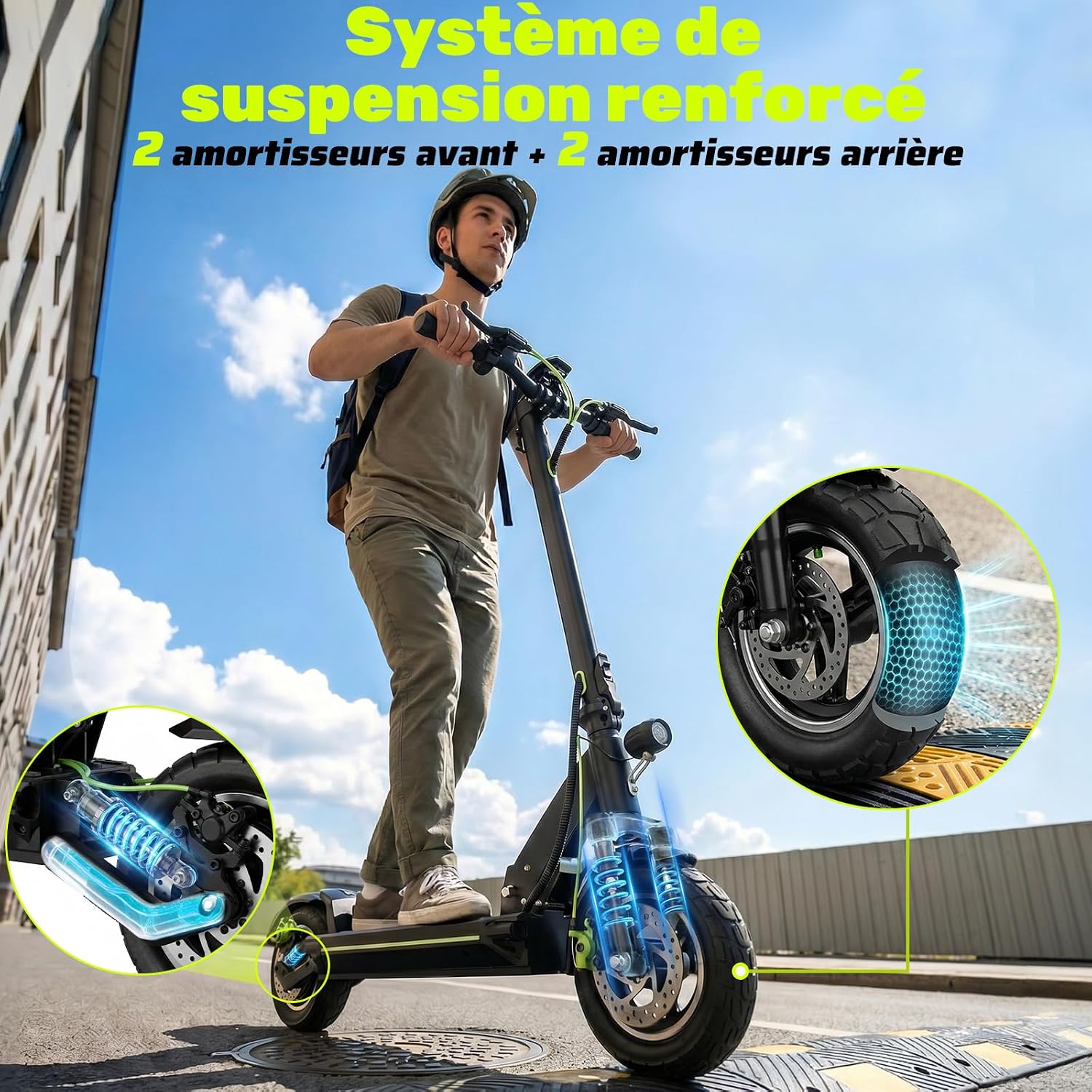
Image: Detailed view of the reinforced double suspension system (front and rear) on the TODIMART D6 Electric Scooter.
6. Maintenance
Regular maintenance ensures the longevity and safe operation of your TODIMART D6 Electric Scooter.
- Cleaning: Wipe the scooter with a damp cloth. Do not use high-pressure water jets or submerge the scooter.
- Battery Care:
- Charge the battery fully before first use.
- Do not allow the battery to fully discharge for extended periods.
- Store the scooter in a cool, dry place, and charge the battery periodically (e.g., once a month) if not in use.
- Use only the original charger provided.
- Tire Maintenance: Regularly check tire pressure and inflate to the recommended PSI. Inspect tires for wear and tear or punctures.
- Brake Check: Periodically test the electronic and mechanical brakes to ensure they are responsive and effective. Adjust if necessary, or consult a professional.
- Fasteners: Check all screws and bolts regularly to ensure they are tight and secure.
7. Troubleshooting
If you encounter issues with your TODIMART D6 Electric Scooter, refer to the following common troubleshooting steps:
- Scooter does not power on:
- Ensure the battery is charged.
- Check all cable connections for looseness.
- Scooter does not accelerate:
- Verify the scooter is powered on and not in a locked mode via the app.
- Check if the throttle is functioning correctly.
- Ensure the brake levers are not partially engaged.
- Unusual noises or vibrations:
- Inspect wheels, brakes, and suspension for any loose or damaged parts.
- Check for foreign objects lodged in the wheels or motor area.
- Tire issues (e.g., flat tire):
- Inspect the tire for punctures. Repair or replace as needed.
- Ensure the tire is mounted correctly and the directional arrow on the sidewall (if present) points in the direction of rotation.
- Display not working correctly:
- Restart the scooter.
- Check for loose connections to the display unit.
For persistent issues or complex repairs, please contact customer support.
8. Specifications
| Brand | TODIMART |
| Model Name | D6 |
| Motor Power | 500W (Peak 1000W) |
| Max Speed | 25 km/h (adjustable) |
| Battery | 48V 13Ah Lithium-ion |
| Max Range | 45-50 km |
| Charging Time | 7 hours |
| Tire Size | 10 inches (inflatable all-terrain) |
| Braking System | Dual (Electronic + Mechanical) |
| Suspension | Double (Front & Rear) |
| Max Load Capacity | 150 kg |
| Scooter Weight | 20.6 kg |
| Dimensions (L x W x H) | 116L x 63W x 127H cm |
| Water Resistance | IP55 |
| Frame Material | Aluminum |
9. Warranty and Support
9.1 Warranty Information
The TODIMART D6 Electric Scooter comes with a 1-year limited warranty from the date of purchase. This warranty covers manufacturing defects under normal use. It does not cover damage caused by misuse, accidents, unauthorized modifications, or normal wear and tear.
Each scooter has a unique serial number for warranty tracking. Please retain your proof of purchase.
9.2 Customer Support
For any questions, technical assistance, or warranty claims, please contact TODIMART customer support. Our specialized support team is available to assist you.
Please refer to the contact information provided with your purchase or visit the official TODIMART website for support details.
Related documentsD6


Ask a question about this manual
Ask about setup, troubleshooting, compatibility, parts, safety, or missing instructions. Manuals+ will review the question and use this page’s manual context to help answer it.