
1. Important Safety Instructions
Please read all instructions carefully before operating the dehumidifier. Failure to follow these instructions may result in electric shock, fire, or personal injury.
- Always plug the unit into a grounded 3-prong outlet. Do not remove the grounding prong.
- Do not use an adapter or extension cord.
- Do not operate the unit if the power cord or plug is damaged.
- Keep the unit away from water and other liquids.
- Ensure the unit is placed on a level, stable surface.
- Do not block air inlets or outlets. Maintain at least 8 inches (20 cm) clearance around the unit.
- Unplug the unit before cleaning or performing any maintenance.
- This appliance is not intended for use by persons (including children) with reduced physical, sensory or mental capabilities, or lack of experience and knowledge, unless they have been given supervision or instruction concerning use of the appliance by a person responsible for their safety.
2. Product Components
Familiarize yourself with the main parts of your Tehanld Dehumidifier.
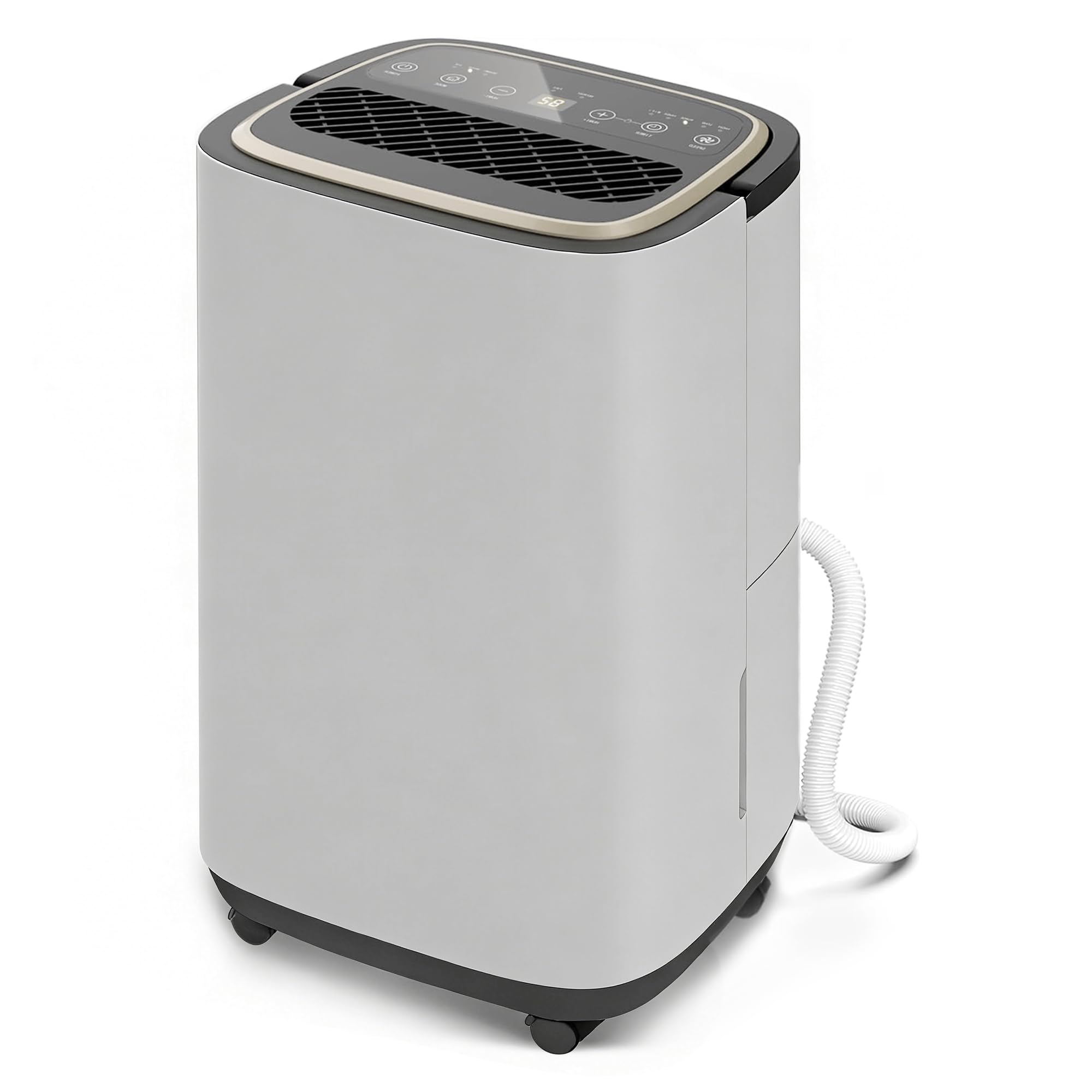
Figure 2.1: Front view of the Tehanld 30 Pint Dehumidifier, showing the control panel, air outlet, and water bucket.
- Control Panel: Located on the top, features buttons for power, mode selection, timer, and humidity settings.
- Air Outlet: Positioned at the top, releases dry air.
- Air Inlet: Located on the rear, draws in moist air.
- Water Bucket: Removable container at the front for collecting condensed water.
- Drain Hose Connection: Located on the rear, for continuous drainage.
- Power Cord: Attached at the rear.
- Filter: Reusable air filter, accessible from the rear.
3. Setup Guide
3.1 Unpacking
- Carefully remove the dehumidifier from its packaging.
- Remove all packing materials, including any tape or protective films.
- Inspect the unit for any shipping damage. If damaged, do not operate and contact customer support.
3.2 Placement
Proper placement is crucial for efficient operation.
- Place the dehumidifier on a firm, level surface capable of supporting its weight when the water bucket is full.
- Ensure there is at least 8 inches (20 cm) of space around all sides of the unit for proper airflow.
- Do not place the unit near heat-generating appliances or in direct sunlight.
- For best results, operate the dehumidifier in an enclosed area. Close all doors and windows.
3.3 Power Connection
Plug the power cord into a grounded 120V, 60Hz electrical outlet. Do not use an extension cord or adapter.
3.4 Drainage Options
Your dehumidifier offers two drainage methods:
- Manual Drainage (Water Bucket): The unit will collect water in the internal bucket. When full, the unit will automatically shut off and an indicator light will illuminate. Empty the bucket and reinsert it to resume operation.
- Continuous Drainage (Drain Hose): For continuous operation without emptying the bucket, attach the included drain hose to the drain port on the rear of the unit. Ensure the hose is sloped downwards to a suitable drain (e.g., floor drain, sink) to allow gravity drainage.
Figure 3.1: Rear view of the Tehanld 30 Pint Dehumidifier, highlighting the drain hose connection point.
4. Operating Instructions
4.1 Control Panel Overview
The control panel allows you to manage all functions of your dehumidifier.
| Button/Indicator | Function |
|---|---|
| Power Button | Turns the unit ON or OFF. |
| Mode Button | Cycles through available dehumidification modes: Auto, Continuous, Sleep. |
| Humidity Setting (Up/Down) | Adjusts the desired humidity level (e.g., 30% - 80% RH). |
| Timer Button | Sets the auto-on or auto-off timer (1-24 hours). |
| Full Water Indicator | Illuminates when the water bucket is full and needs to be emptied. |
4.2 Operating Modes
- Auto Mode: The unit automatically adjusts fan speed and dehumidification based on the ambient humidity and your set humidity level.
- Continuous Mode: The unit runs continuously regardless of the humidity level. Ideal for very damp conditions or drying clothes.
- Sleep Mode: Operates at a lower fan speed for quieter operation, suitable for bedrooms.
4.3 Setting Desired Humidity
Press the Humidity Up or Down buttons to set your desired relative humidity (RH) level. The unit will operate until the ambient humidity reaches this level, then cycle on and off to maintain it. A typical comfortable humidity range is 45-55% RH.
4.4 Timer Function
Press the Timer button to set an auto-on or auto-off time. Each press increases the time by 1 hour, up to 24 hours. The timer will automatically cancel if the unit is turned off or if the bucket is full.
5. Maintenance
Regular maintenance ensures optimal performance and extends the lifespan of your dehumidifier.
5.1 Cleaning the Air Filter
The air filter should be cleaned every two weeks or more frequently depending on usage and air quality.
- Turn off and unplug the dehumidifier.
- Remove the filter from the rear of the unit.
- Wash the filter with warm, soapy water. Rinse thoroughly.
- Allow the filter to air dry completely before reinserting it. Do not use a dishwasher or hot water.
Figure 5.1: Rear view of the Tehanld 30 Pint Dehumidifier, indicating the location of the removable air filter.
5.2 Emptying and Cleaning the Water Bucket
Empty the water bucket when the "Full Water" indicator illuminates. Clean the bucket periodically to prevent mold and mildew growth.
- Grasp the sides of the bucket and pull it out from the unit.
- Pour out the collected water.
- Clean the bucket with mild detergent and warm water. Rinse thoroughly.
- Ensure the bucket is completely dry before reinserting it into the unit.
5.3 Storing the Dehumidifier
If the unit will not be used for an extended period:
- Unplug the unit and empty the water bucket.
- Clean the air filter and the water bucket.
- Allow the unit to dry for at least 24 hours in a well-ventilated area.
- Wrap the power cord and secure it.
- Store the unit upright in a cool, dry place.
6. Troubleshooting Guide
Before contacting customer support, please refer to the following common issues and solutions.
| Problem | Possible Cause | Solution |
|---|---|---|
| Unit does not turn on. | No power; Power cord not plugged in; Circuit breaker tripped. | Ensure unit is plugged in; Check household circuit breaker; Try a different outlet. |
| Unit runs but does not dehumidify. | Air filter clogged; Room temperature too low; Humidity setting too high. | Clean the air filter; Ensure room temperature is above 41°F (5°C); Lower the desired humidity setting. |
| "Full Water" indicator is on, but bucket is not full. | Water bucket not properly seated; Float switch malfunction. | Remove and reinsert the water bucket firmly; Contact support if issue persists. |
| Unit is noisy. | Unit not on a level surface; Air filter clogged; Internal components loose. | Place on a level surface; Clean air filter; Contact support if noise is excessive. |
7. Product Specifications
| Feature | Specification |
|---|---|
| Model | 30 Pint Dehumidifier |
| Dehumidification Capacity | 30 Pints/Day (at 80°F, 60% RH) |
| Coverage Area | Up to 3000 Sq.Ft |
| Power Supply | 120V / 60Hz |
| Rated Current | 3.5A |
| Water Tank Capacity | 0.8 Gallons / 3 Liters |
| Operating Temperature Range | 41°F - 95°F (5°C - 35°C) |
| Refrigerant | R290 |
| Dimensions (W x D x H) | 13.4 x 9.6 x 19.7 inches |
| Weight | 28 lbs |
Note: Specifications are subject to change without notice for product improvement.
8. Warranty and Customer Support
8.1 Limited Warranty
This Tehanld Dehumidifier is covered by a 1-year limited warranty from the date of purchase. This warranty covers defects in materials and workmanship under normal use. It does not cover damage resulting from accident, misuse, abuse, alteration, or improper installation.
To register your product or for full warranty terms and conditions, please visit our official website or contact customer support.
8.2 Customer Support
If you have any questions, require assistance, or need to claim warranty service, please contact our customer support team:
- Email: support@tehanld.com
- Phone: 1-800-XXX-XXXX (Available Monday-Friday, 9 AM - 5 PM EST)
- Website: www.tehanld.com/support
Please have your model number (30 Pint Dehumidifier) and purchase date ready when contacting support.