
1. Introduction
Thank you for choosing the SOFTSEA Full Size Corner Bed. This manual provides essential information for the safe assembly, operation, and maintenance of your new bed. Please read all instructions carefully before beginning assembly and retain this manual for future reference.
Important Safety Information
- This bed is not intended for children.
- Always use appropriate bedding materials and ensure the mattress fits securely to prevent entrapment.
- Ensure all parts are present and undamaged before assembly. Do not use if any parts are missing or broken.
- Assemble the bed on a soft, clean surface to prevent scratches.
- Periodically check and tighten all connections to ensure stability.
- Do not exceed the maximum weight capacity of 600 lbs.
2. Product Overview
The SOFTSEA Full Size Corner Bed is designed for optimal space utilization and functionality, combining a comfortable sleeping area with integrated features for studying, working, and storage. This L-shaped daybed includes a full-size sleeping surface, a pull-out twin trundle bed, an integrated desk, an LED-lit bookcase, and a built-in charging station with USB ports and power outlets. The upholstered headboard provides added comfort and ambiance.
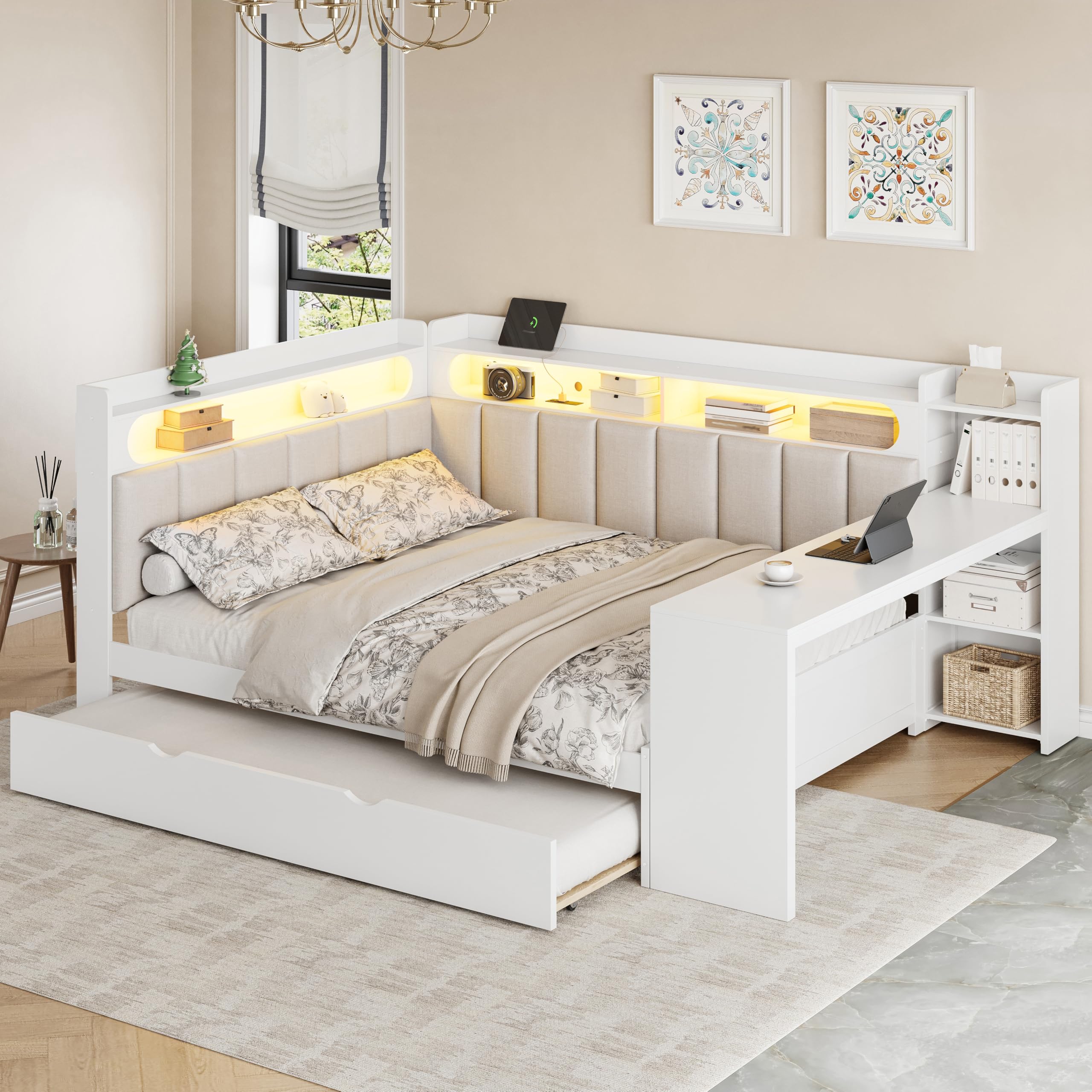
Image 2.1: Overview of the SOFTSEA Full Size Corner Bed with Desk and Trundle.
3. Setup & Assembly
Full assembly is required for this product. It is recommended that two people participate in the assembly process. All necessary tools are included in the packaging. The product will arrive in 3 separate packages.
Assembly Steps:
- Unpack All Components: Carefully open all 3 packages and lay out all parts on a clean, soft surface (e.g., a carpet or blanket) to prevent damage. Verify that all parts listed in the included parts list are present.
- Identify Hardware: Separate and identify all screws, bolts, and other hardware components. Refer to the hardware list in the separate assembly guide.
- Follow Detailed Instructions: Refer to the step-by-step assembly guide provided in the packaging. Each step will illustrate how to connect specific components.
- Secure Connections: Ensure all bolts and screws are tightened securely, but do not overtighten to avoid stripping.
- Final Inspection: Once assembled, gently shake the bed to ensure stability. Re-tighten any loose connections if necessary.
Product Dimensions:

Image 3.1: Detailed dimensions of the SOFTSEA Full Size Corner Bed in inches.
- Overall Dimensions: 94.5''L x 64.2''W x 43.3''H
- Bed Inner Space: Full
- Trundle Bed Inner Space: Twin
- Recommended Mattress Thickness: 6-8 inches
4. Operating Instructions
4.1 Trundle Bed Operation
The trundle bed is designed to be easily pulled out for an additional sleeping space and pushed back in to save room. It is located beneath the main bed frame.
- To Extend: Gently pull the handle or front panel of the trundle bed outwards from under the main bed. The trundle is equipped with wheels for smooth movement.
- To Retract: Push the trundle bed back into its position under the main bed until it is fully recessed.
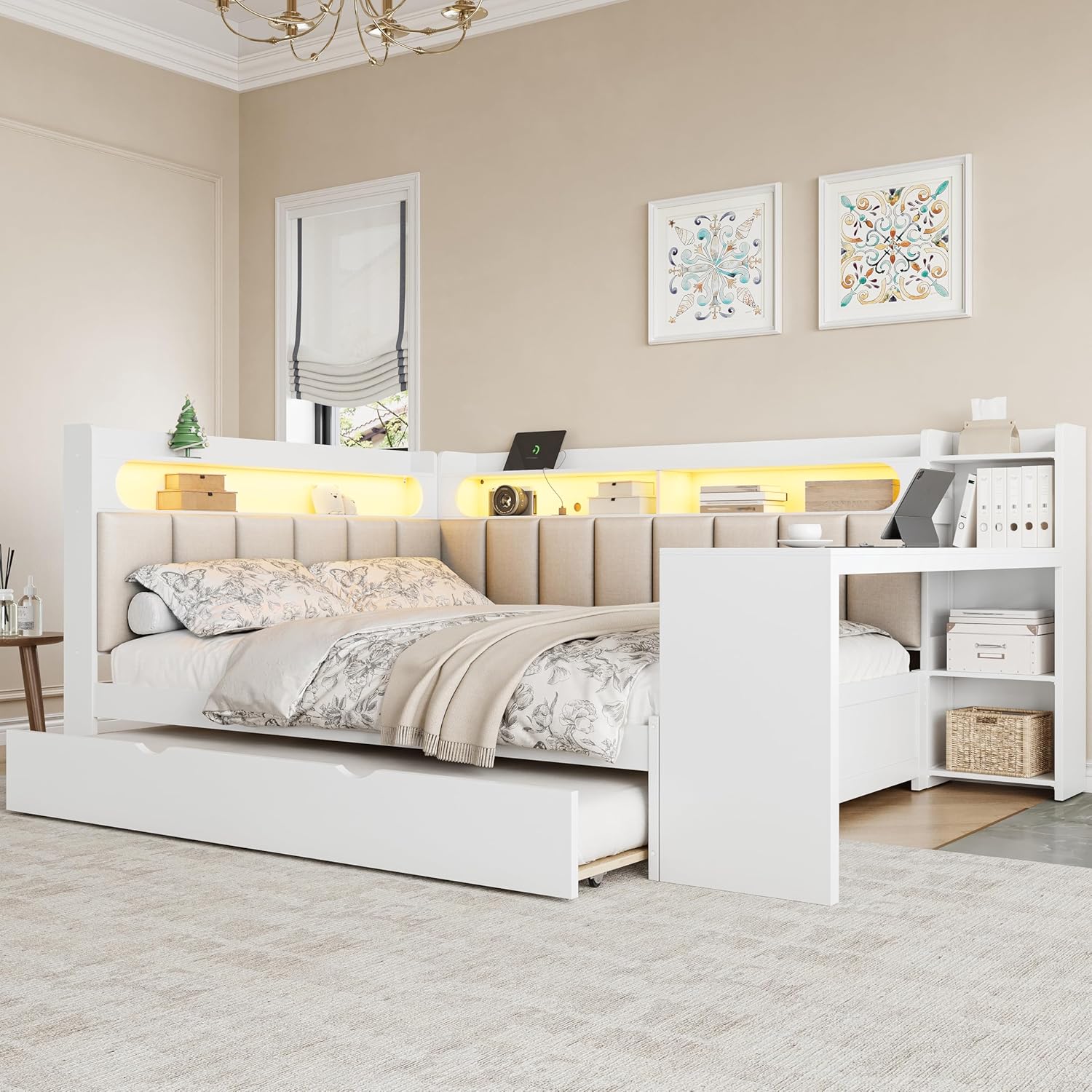
Image 4.1: The trundle bed fully extended, providing an additional sleeping area.
4.2 LED Bookcase and Lighting
The integrated bookcase features LED lighting to provide ambient illumination and practical storage. The LED lights are typically controlled by a switch located on or near the bookcase unit.
- To Turn On/Off: Locate the power switch for the LED lights, usually a small button or toggle switch. Press or toggle to activate or deactivate the lights.
- Adjusting Brightness (if applicable): Some models may feature adjustable brightness. Refer to the specific controls on your unit for this function.

Image 4.2: The corner bed with LED lights illuminated, showcasing the bookcase and desk area.
4.3 USB Ports & Power Outlets
A built-in charging station is provided for convenient access to power for your electronic devices.
- Connecting Devices: Plug your USB charging cables into the USB ports or your device's power adapter into the standard power outlets.
- Power Source: Ensure the bed's power cord (if applicable) is securely plugged into a functional wall outlet.
4.4 Integrated Desk and Storage
The L-shaped design incorporates a functional desk and open shelves for organization.
- Desk Usage: Utilize the desk surface for laptops, books, or other personal items.
- Storage Shelves: Arrange books, decor, or other essentials in the open shelves of the bookcase and desk unit.
5. Maintenance
Proper care and maintenance will extend the life and appearance of your SOFTSEA Corner Bed.
- Cleaning: For the wooden and MDF surfaces, wipe with a soft, damp cloth. Avoid harsh chemicals or abrasive cleaners. For the upholstered headboard, spot clean with a mild fabric cleaner as needed. Test on an inconspicuous area first.
- Hardware Check: Periodically (e.g., every 3-6 months) check all bolts, screws, and connections to ensure they are tight. Re-tighten if any feel loose.
- Mattress Care: Follow the manufacturer's guidelines for your mattress. Rotate and flip your mattress regularly to ensure even wear.
- Avoid Overloading: Do not place excessive weight on the shelves, desk, or bed frame beyond the specified weight capacity.
6. Troubleshooting
If you encounter any issues with your SOFTSEA Corner Bed, please refer to these general troubleshooting tips:
- Squeaking Noises: Check all bed frame connections and tighten any loose bolts or screws. Ensure the mattress is properly seated on the slats.
- Trundle Not Moving Smoothly: Inspect the trundle wheels for any obstructions (e.g., debris, carpet fibers). Ensure the floor surface is clear.
- LED Lights Not Working: Verify that the bed's power cord (if applicable) is plugged into a live outlet. Check the LED light switch to ensure it is in the 'on' position.
- USB Ports/Outlets Not Charging: Confirm the bed's power cord is connected. Test the wall outlet with another device. Ensure your device's charging cable is functional.
- Stability Concerns: Re-check all assembly steps and ensure all hardware is correctly installed and tightened.
If problems persist after attempting these solutions, please contact customer support.
7. Specifications
| Feature | Detail |
|---|---|
| Brand | SOFTSEA |
| Model | Full Size Corner Bed with Desk and Trundle |
| ASIN | B0GH741V3M |
| Color | White |
| Style | Modern, L-Shape |
| Frame Material | MDF, Plywood (Wood) |
| Upholstery Fabric Type | Linen |
| Overall Dimensions (L x W x H) | 94.5" x 64.2" x 43.3" |
| Item Weight | 221 Pounds |
| Weight Capacity Maximum | 600 Pounds |
| Recommended Mattress Thickness | 6-8 inches |
| Assembly Required | Yes (Full Assembly Needed) |
| Suggested Number of People for Assembly | 2 |
| Included Components | Desk, Slat, Trundle |
| Special Features | Charging Station, Corner Bed, Trundle, Upholstered Headboard, LED Bookcase |
8. Warranty Information
This SOFTSEA product comes with a Limited Warranty. The specifics of this warranty, including coverage duration and terms, are typically provided with your purchase documentation or can be obtained by contacting the manufacturer directly. Please retain your proof of purchase for any warranty claims.
9. Customer Support
For any questions, concerns, or assistance with assembly, parts, or warranty claims, please contact:
- Manufacturer: SOFTSEA
- Seller: ORIEN HOME CORP.
Please have your product model number (B0GH741V3M) and proof of purchase ready when contacting support to expedite assistance.