
Introduction
This manual provides essential instructions for setting up, operating, maintaining, and troubleshooting your OPPO Reno15 F 5G AI Smartphone. Please read this manual thoroughly to ensure proper use and to maximize the device's performance and longevity.
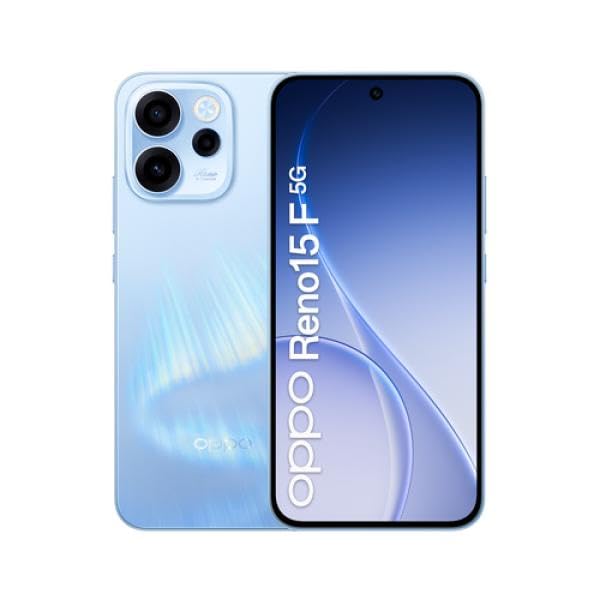
Image: The OPPO Reno15 F 5G AI Smartphone, showcasing its design. This image illustrates the general appearance of the device.
1. Setup
1.1 Unboxing and Initial Inspection
Carefully remove all items from the packaging. Verify that the following components are present:
- OPPO Reno15 F 5G AI Smartphone
- USB Cable
- SIM Ejector Tool
- Quick Start Guide (may vary by region)
- Safety Information (may vary by region)
Inspect the device for any visible damage. If any components are missing or damaged, contact your retailer.
1.2 SIM Card Installation
The OPPO Reno15 F supports Dual SIM functionality. Follow these steps to install your SIM card(s):
- Locate the SIM card tray on the side of the device.
- Insert the SIM ejector tool into the small hole next to the tray and press firmly until the tray pops out.
- Place your Nano-SIM card(s) into the designated slots on the tray. Ensure the gold contacts face downwards.
- Carefully reinsert the SIM card tray into the phone until it clicks into place.
1.3 Initial Power On and Setup
To power on your device for the first time:
- Press and hold the Power button (usually on the right side) until the OPPO logo appears.
- Follow the on-screen instructions to complete the initial setup, including language selection, Wi-Fi connection, Google account login, and security settings.
1.4 Charging the Battery
Before first use, it is recommended to fully charge the device. The OPPO Reno15 F is equipped with a 6500mAh battery.
- Connect the USB cable to the phone's charging port and the other end to a compatible power adapter.
- Plug the power adapter into a wall outlet.
- The charging indicator will appear on the screen.
2. Operating Your Smartphone
2.1 Display and Navigation
The device features a 6.57-inch 120Hz AMOLED FHD+ display. Navigate the interface using touch gestures:
- Tap: Select an item or open an application.
- Swipe: Scroll through screens or lists.
- Pinch: Zoom in or out on images and web pages.
- Long Press: Access contextual menus or move icons.
2.2 Camera Functions
The OPPO Reno15 F is equipped with a triple rear camera system (50MP main, 8MP, 2MP) and a 50MP front camera.
- Open the Camera application from the home screen or app drawer.
- Select your desired mode (e.g., Photo, Video, Portrait, Night).
- Tap the shutter button to capture a photo or start/stop recording a video.
- Use the front/rear camera switch icon to change cameras.
2.3 Connectivity
Your smartphone supports 5G and LTE cellular networks, Wi-Fi, Bluetooth, and GPS.
- Wi-Fi: Go to Settings > Wi-Fi to connect to available networks.
- Bluetooth: Go to Settings > Bluetooth to pair with other Bluetooth devices.
- Mobile Data: Ensure your SIM card is active and mobile data is enabled in Settings > Mobile Network.
2.4 Making Calls and Sending Messages
To make a call, open the Phone app, enter the number, and tap the call icon. To send a message, open the Messages app, start a new conversation, enter the recipient and your message, then tap send.
3. Maintenance
3.1 Cleaning Your Device
To clean your OPPO Reno15 F:
- Use a soft, lint-free cloth to wipe the screen and body.
- Avoid using harsh chemicals, abrasive cleaners, or compressed air.
- For stubborn smudges, slightly dampen the cloth with water.
3.2 Software Updates
Regular software updates provide new features, security enhancements, and bug fixes. To check for updates:
- Go to Settings > About device > Software update.
- Follow the on-screen prompts to download and install any available updates. Ensure your device is sufficiently charged and connected to Wi-Fi before updating.
3.3 Battery Care
To prolong battery life:
- Avoid extreme temperatures.
- Do not let the battery completely drain frequently.
- Use the original charger and cable.
3.4 Water Resistance
The OPPO Reno15 F is resistant to water. However, water resistance is not a permanent condition and may decrease over time with normal wear. Avoid submerging the device in water or exposing it to high-pressure water jets. If the device gets wet, dry it thoroughly before charging or using ports.
4. Troubleshooting
4.1 Device Not Powering On
- Ensure the battery is charged. Connect the charger and wait a few minutes before attempting to power on.
- Perform a forced restart: Press and hold the Power button and Volume Up button simultaneously for about 10-15 seconds until the device restarts.
4.2 Network Connectivity Issues
- Check if your SIM card is properly inserted.
- Verify that mobile data is enabled in Settings.
- Try restarting the device.
- Reset network settings: Go to Settings > System settings > Backup and reset > Reset phone > Reset network settings.
4.3 Camera Not Working
- Close and reopen the Camera app.
- Clear the Camera app's cache and data: Go to Settings > Apps > App management > Camera > Storage usage > Clear data and Clear cache.
- Restart the phone.
4.4 Audio Problems
- Check volume levels.
- Ensure no headphones are connected.
- Clean the speaker and microphone grilles.
- Restart the device.
4.5 Performing a Factory Reset
A factory reset will erase all data on your phone and restore it to its original factory settings. Back up your data before proceeding.
- Go to Settings > System settings > Backup and reset > Reset phone > Erase all data.
- Confirm your decision and enter your password/PIN if prompted.
5. Specifications
Key technical specifications for the OPPO Reno15 F 5G AI Smartphone:
| Feature | Detail |
|---|---|
| Brand | OPPO |
| Model Name | Reno15 F |
| RAM | 8 GB |
| Storage Capacity | 256 GB |
| Display Size | 6.57 Inches |
| Display Type | AMOLED |
| Refresh Rate | 120 Hz |
| Cellular Technology | 5G |
| Connectivity Technology | 5G, LTE |
| Rear Camera Resolution | 50MP (Main), 8MP, 2MP |
| Front Camera Resolution | 50 MP |
| Battery Capacity | 6500mAh |
| SIM Card Slots | Dual SIM |
| Water Resistance | Resistant to water |
| Dimensions | 25 x 1850 x 100 mm |
| Talk Time | 150 Hours |
Note: Some specifications, such as dimensions, may contain discrepancies in the source data. The most common and realistic values have been prioritized where applicable.
6. Warranty and Support
6.1 Product Warranty
The OPPO Reno15 F 5G AI Smartphone comes with a three-year official warranty against manufacturing defects. This warranty covers defects in materials and workmanship under normal use. For warranty claims, please retain your proof of purchase and contact OPPO customer service or your retailer.
Note: The warranty period and terms may vary by region. Please refer to the specific warranty information provided with your product or on the official OPPO website for details.
6.2 Customer Support
For further assistance, technical support, or service inquiries, please visit the official OPPO support website or contact their customer service hotline in your region. You can often find support contact details on the OPPO official website or in the documentation included with your device.
Online Resources:
- Official OPPO Website: www.oppo.com
- OPPO Support Page: (Check official website for regional support links)


