
1. Introduction
Welcome to the BLU Bold K12 user manual. This guide provides essential information for setting up, operating, maintaining, and troubleshooting your new smartphone. The BLU Bold K12 is designed for reliable daily performance, featuring a large 6.8-inch HD+ 120Hz display, a powerful 5,000mAh battery, and a 50MP main camera.

Image: Front and back view of the BLU Bold K12 smartphone, showcasing its design and camera module.
2. Box Contents
Please verify that all items are present in your BLU Bold K12 package:
- BLU Bold K12 Smartphone
- Rugged Case
- Glass Screen Protector
- Charger
- Type-C Cable
- Quick Guide
- Headphones
- SIM Key
- Sticker
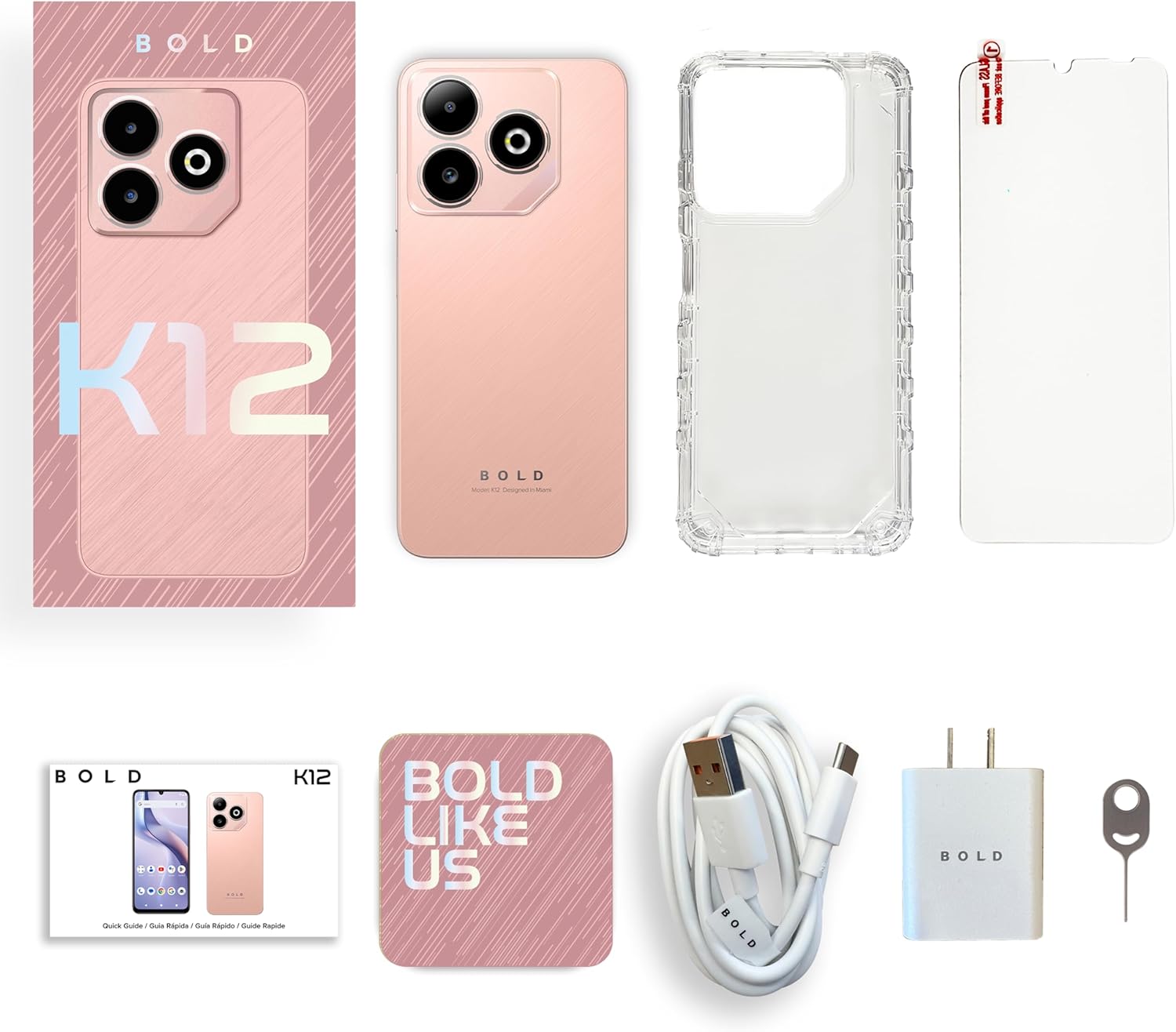
Image: All items included in the BLU Bold K12 retail packaging.
3. Initial Setup
3.1. Inserting the SIM Card
- Locate the SIM card tray on the side of your BLU Bold K12.
- Insert the provided SIM key into the small hole next to the tray and gently push until the tray ejects.
- Place your Nano-SIM card(s) and/or microSD card into the tray with the gold contacts facing down. Ensure they are correctly seated.
- Carefully reinsert the tray into the phone.
Note: The BLU Bold K12 is GSM unlocked and compatible with T-Mobile, Metro, Mint Mobile, AT&T, Cricket, and other GSM networks. It is not compatible with Verizon Network.
3.2. Charging the Device
- Connect the Type-C cable to the charging port at the bottom of your phone.
- Connect the other end of the cable to the provided charger.
- Plug the charger into a power outlet.
- Allow the phone to charge fully before first use. The battery indicator on the screen will show charging status.
3.3. Powering On/Off
- To Power On: Press and hold the Power button (located on the side) until the BLU logo appears.
- To Power Off: Press and hold the Power button until the power options appear on the screen, then select "Power off".
- To Restart: Press and hold the Power button until the power options appear, then select "Restart".
3.4. Initial Configuration
Upon first power-on, follow the on-screen prompts to complete the initial setup. This includes selecting your language, connecting to Wi-Fi, setting up your Google account, and configuring security features like the fingerprint sensor.
4. Operating Your BLU Bold K12
4.1. Display and Navigation
The BLU Bold K12 features a 6.8-inch HD+ 120Hz Infinity Display, providing clear visuals and smooth scrolling. Navigate the interface using touch gestures: tap to select, swipe to scroll, pinch to zoom.
4.2. Camera Functions
Your device is equipped with a dual 50MP main camera with flash and an 8MP selfie camera. To access the camera, tap the Camera icon on your home screen or app drawer.
- Taking Photos: Tap the shutter button to capture an image.
- Recording Videos: Switch to video mode and tap the record button to start/stop recording. The main camera supports 1080p video capture at 30 frames per second.
- Switching Cameras: Tap the camera switch icon to toggle between the front and rear cameras.

Image: Detailed view of the BLU Bold K12's powerful dual camera system.
4.3. Battery Management
The BLU Bold K12 is powered by a 5,000mAh battery. To optimize battery life:
- Adjust screen brightness.
- Close unused applications running in the background.
- Enable battery saver mode when needed.
- Avoid extreme temperatures.

Image: Graphic illustrating the 5000mAh Super Battery capacity.
4.4. Security Features
The device includes a side-mounted fingerprint sensor for secure and quick unlocking. To set up your fingerprint:
- Go to Settings > Security & privacy > Device unlock.
- Select Fingerprint and follow the on-screen instructions to register your fingerprint.

Image: Visual representation of the side-mounted fingerprint sensor for secure access.
4.5. Storage and Performance
The BLU Bold K12 comes with 128GB of internal storage and 12GB RAM, powered by an Octa-Core processor. Storage can be expanded using a microSD card (sold separately). The device runs on Android 15, offering a smooth and responsive user experience for multitasking, entertainment, and browsing.

Image: Graphic displaying the Android 15 operating system logo.
5. Maintenance
5.1. Cleaning Your Device
Use a soft, lint-free cloth to clean the screen and body of your phone. Avoid using harsh chemicals or abrasive materials, as these can damage the device.
5.2. Software Updates
Regularly check for and install software updates to ensure your device has the latest features, security patches, and performance improvements. Go to Settings > System > System update.
5.3. Battery Care
To prolong battery lifespan, avoid fully discharging the battery frequently. Charge your phone using only the provided charger and cable. Do not expose the device to extreme heat or cold.
6. Troubleshooting
If you encounter issues with your BLU Bold K12, try the following solutions:
- Device Unresponsive: Press and hold the Power button for about 10-15 seconds to force a restart.
- Battery Draining Quickly: Check background app usage, reduce screen brightness, and ensure Wi-Fi/Bluetooth are off when not in use.
- Network Connectivity Issues: Ensure your SIM card is properly inserted. Try toggling Airplane Mode on and off. If issues persist, contact your carrier.
- Apps Crashing: Clear the cache for the problematic app (Settings > Apps > [App Name] > Storage > Clear cache). If the issue continues, try reinstalling the app.
- Slow Performance: Close unused apps, clear cache, and ensure you have sufficient free storage space.
- Factory Reset: As a last resort, if software issues persist, you can perform a factory reset. Warning: This will erase all data on your phone. Back up important data before proceeding. Go to Settings > System > Reset options > Erase all data (factory reset).
7. Specifications
| Feature | Specification |
|---|---|
| Brand | BLU |
| Model Name | K12 |
| Operating System | Android 15 |
| Screen Size | 6.8 Inches |
| Display Type | LCD |
| Refresh Rate | 120Hz |
| Memory Storage Capacity | 128 GB |
| RAM | 12 GB |
| Rear Camera Resolution | 50 MP |
| Front Camera Resolution | 8 MP |
| Battery Capacity | 5000 Milliamp Hours |
| Wireless Carrier | Unlocked (GSM) |
| Cellular Technology | 4G |
| Biometric Security | Fingerprint Recognition (Side-mounted) |
| Connector Type | USB Type C |
| Manufacturer | BLU |
8. Warranty Information
The BLU Bold K12 comes with a 1-year limited US Warranty. This warranty covers manufacturing defects under normal use. It does not cover damage caused by accidents, misuse, unauthorized modifications, or external causes.
For detailed warranty terms and conditions, please refer to the warranty card included in your product packaging or visit the official BLU website.
9. Customer Support
If you require further assistance or have questions not covered in this manual, please contact BLU customer support:
- Official Website: www.bluproducts.com
- Refer to the contact information provided in your Quick Guide or on the BLU website for phone and email support options.


