
1. Introduction
Thank you for choosing the Nkccnur C360 Solar-Powered Security Surveillance Camera. This manual provides essential information for the proper installation, operation, and maintenance of your security camera system. Please read this manual thoroughly before use and retain it for future reference.
2. Product Features
- 2K Resolution & Full-Color HD Night Vision: Captures clear, high-definition images (1296p) with full-color night vision capabilities, ensuring visibility in low-light conditions.
- 360° Panoramic Pan-Tilt: Offers multi-directional coverage with a wide viewing angle, allowing for comprehensive monitoring.
- Intelligent PIR Motion Detection & AI Detection: Equipped with Passive Infrared (PIR) sensors for accurate motion detection and AI capabilities to identify anomalies, sending real-time notifications and triggering audio-visual alarms.
- Two-Way Audio Communication: Features dual-array built-in microphones with noise reduction for real-time, full-duplex voice intercom, enabling remote communication.
- IP66 Dustproof and Waterproof: Designed for outdoor use with an IP66 rating, providing protection against dust and water in various weather conditions.
- Dual-Band Wi-Fi Connectivity: Supports both 2.4GHz and 5GHz Wi-Fi for stable connections, intelligent switching, and interference resistance. Includes one-touch network setup for easy configuration.
- Solar Panel Charging & Large-Capacity Battery: Utilizes a solar panel for continuous power, reducing the need for frequent battery charging and ensuring uninterrupted operation.
3. Package Contents
The Nkccnur C360 camera package includes the following items:
- Nkccnur C360 Camera Body (2 units)
- Solar Panel (2 units)
- Mounting Bracket and Screws
- USB Charging Cable
- User Manual
4. Setup Guide
4.1 Charging the Camera
Before initial use, ensure the camera's internal battery is fully charged. Connect the camera to a power source using the provided USB cable. For continuous power, position the solar panel to receive maximum direct sunlight.
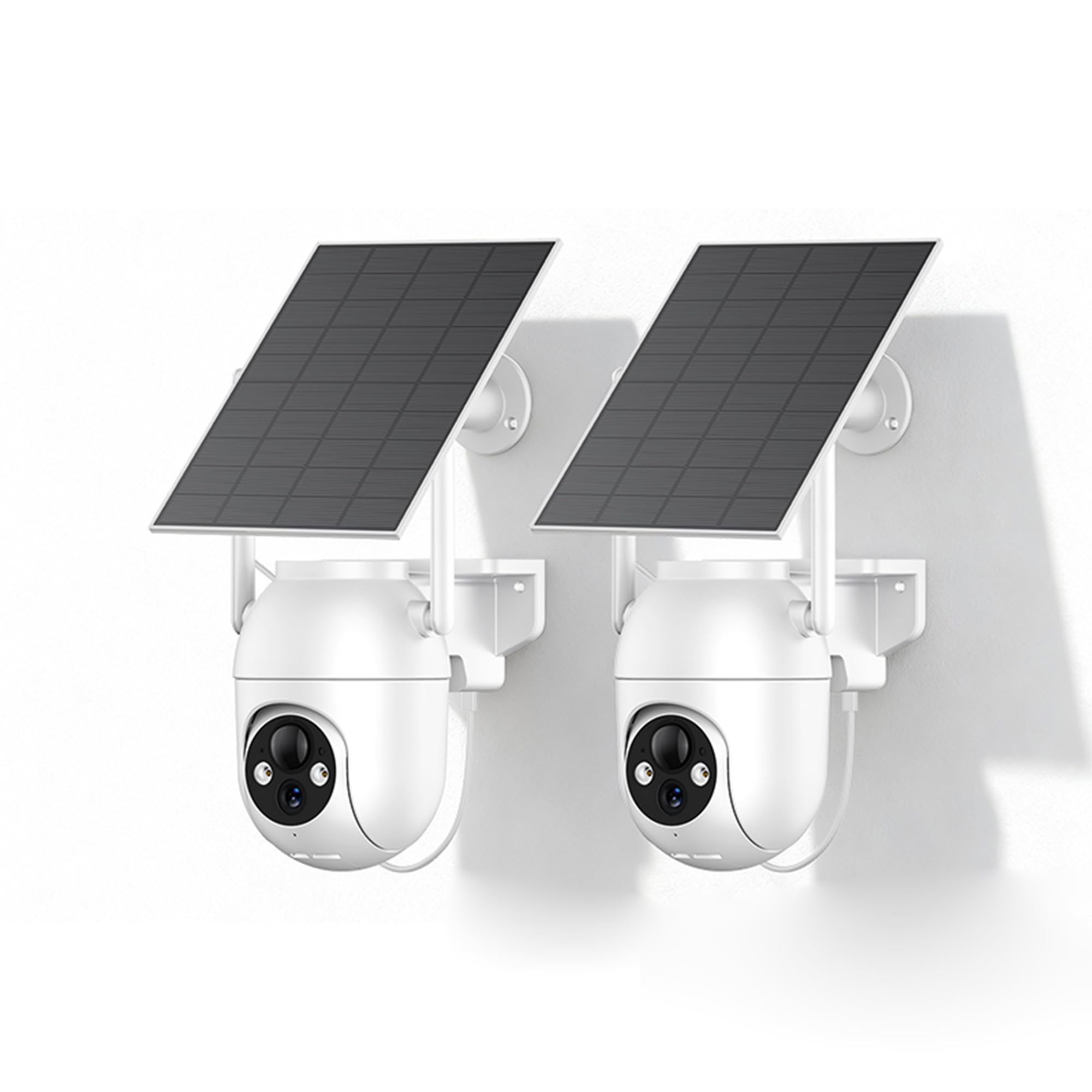
Figure 1: Solar-Powered Continuous Operation. The camera is designed for 24/7 operation with its solar panel and large-capacity battery, eliminating the need for messy cables.
4.2 Mounting the Camera
Select an outdoor location that provides the desired surveillance coverage and allows the solar panel to receive ample sunlight. Use the included mounting bracket and screws to securely attach the camera and solar panel to a wall or other stable surface. Ensure the camera is positioned within Wi-Fi range.
4.3 Network Connection
- Download the official Nkccnur app on your smartphone (compatible with iOS and Android).
- Create an account and log in.
- Follow the in-app instructions for one-touch network setup. The camera supports dual-band Wi-Fi (2.4GHz/5GHz) for stable connectivity.
- Once connected, you can view the live feed and configure settings via the app.
5. Operating Instructions
5.1 Live View and Pan-Tilt Control
Access the live video feed through the Nkccnur app. Use the on-screen controls to remotely pan and tilt the camera, achieving a 360° panoramic view of your monitored area.
5.2 Night Vision
The camera automatically switches to night vision mode in low-light conditions. It provides full-color HD night vision for clear visibility even in complete darkness.

Figure 2: HD Night Vision. The camera provides clear visibility in dark conditions, securing your property around the clock.
5.3 Motion Detection and Alerts
The camera features intelligent PIR motion detection and AI capabilities. When abnormal objects are detected in the monitored area, the camera will:
- Send real-time notifications to your smartphone.
- Trigger an integrated audio-visual alarm (if enabled in settings).
Adjust sensitivity settings within the app to minimize false alarms.

Figure 3: AI-Powered Smart Motion Detection. The camera detects abnormal objects and triggers alerts.
5.4 Two-Way Audio Intercom
Utilize the two-way audio feature to communicate with individuals near the camera. Tap the microphone icon in the app to speak, and listen through the camera's built-in speaker.

Figure 4: Real-Time Voice Intercom. Communicate with people anytime, anywhere through the camera.
6. Maintenance
6.1 Cleaning
Periodically clean the camera lens and solar panel with a soft, damp cloth to ensure optimal performance. Avoid using harsh chemicals or abrasive materials that could damage the surfaces.
6.2 Weather Protection
The Nkccnur C360 camera has an IP66 rating, making it dustproof and waterproof. While designed to withstand various weather conditions, ensure the protective cap for the charging port is securely closed to prevent water ingress.

Figure 5: IP66 Dustproof and Waterproof. The camera is built to withstand various weather conditions.
6.3 Software Updates
Regularly check the Nkccnur app for firmware updates to ensure your camera has the latest features and security enhancements.
7. Troubleshooting
- Camera not connecting to Wi-Fi: Ensure the camera is within range of your router. Verify your Wi-Fi password and network type (2.4GHz/5GHz). Try restarting both the camera and your router.
- Poor video quality: Check your internet connection speed. Ensure the camera lens is clean and free from obstructions.
- Motion detection not working: Verify that motion detection is enabled in the app settings. Adjust sensitivity levels. Ensure there are no physical obstructions blocking the sensor.
- Battery not charging: Ensure the solar panel is clean and receiving direct sunlight. Check the charging cable connection.
- Two-way audio issues: Check microphone and speaker permissions in your phone's settings for the Nkccnur app. Ensure network connectivity is stable.
8. Specifications

Figure 6: Product Dimensions.
| Feature | Detail |
|---|---|
| Model Name | Outdoor Security Solar Camera (C360) |
| Connectivity Technology | Wireless (Dual-band Wi-Fi 2.4GHz/5GHz) |
| Video Capture Resolution | 1296p (2K HD) |
| Special Features | 2-Way Audio, AI Detection, Full-Color Night Vision, Pan-Tilt |
| Indoor/Outdoor Usage | Outdoor |
| Power Source | Solar Powered (with 5200 mAh Battery) |
| IP Rating | IP66 (Dustproof and Waterproof) |
| Compatible Devices | Smartphone |
| Enclosure Material | Plastic |
| Item Dimensions | 6.89 x 11.81 x 10.24 inches |
| Item Weight | 3.3 Pounds |
9. Warranty and Support
For warranty information, technical support, or any inquiries regarding your Nkccnur C360 camera, please refer to the contact information provided with your purchase or visit the official Nkccnur website. Our customer support team is available to assist you with any questions or issues you may encounter.
