
1. Product Overview
The GRECELL EB1000 is a portable power station designed to provide reliable power for various applications, including camping, RV travel, home backup, and emergency situations. It features a 999Wh capacity with a 1000W continuous AC output (2000W peak surge) and multiple charging ports.
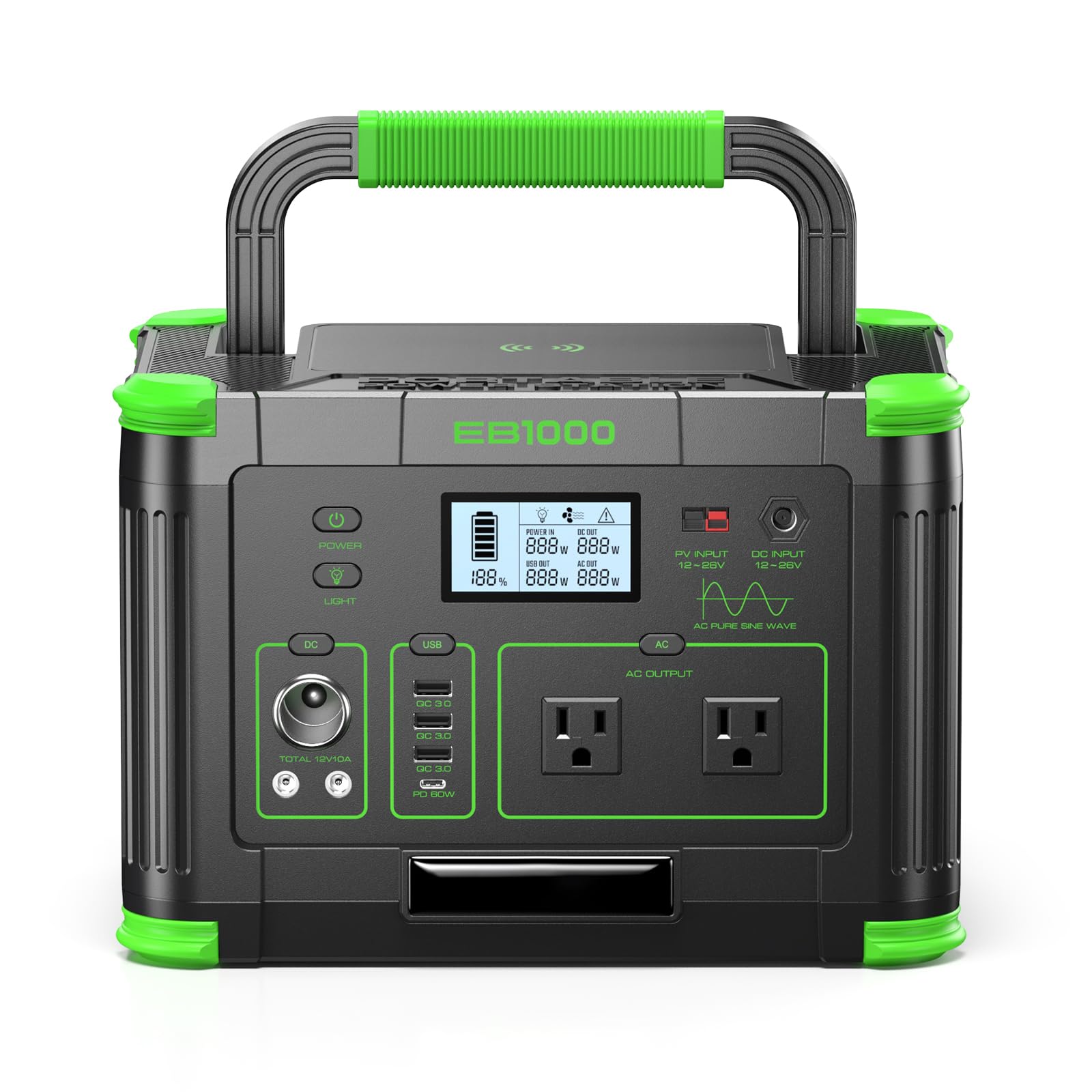
Image: The GRECELL EB1000 Portable Power Station, a compact and robust device for off-grid power.
Key Features:
- High Capacity & Power Output: 999Wh capacity with 1000W continuous AC output (2000W peak) for powering essential devices.
- Pure Sine Wave Technology: Ensures stable power output, safe for sensitive electronics like CPAP machines and laptops.
- Multiple Charging Ports: Includes 2x 110V AC outlets, 1x 60W USB-C PD, 3x 18W USB-A QC, 10W wireless charging pad, 12V car port, and 2x DC outputs.
- Triple Recharge Options: Recharge via AC wall outlet, 12V car port, or MPPT solar panels for versatile power replenishment.
- LiFePO4 Battery: Automotive-grade battery offers over 2000 charge cycles for extended lifespan and enhanced safety.
- Advanced BMS: Integrated Battery Management System protects against over-charge, short-circuit, and overload.
- Portable Design: Weighs approximately 17 lbs with an ergonomic handle for easy transport.
- Integrated LED Light: Features an LED light with SOS mode for emergency illumination.
2. Important Safety Information
Please read and understand all safety instructions before operating the GRECELL EB1000 Portable Power Station. Failure to follow these instructions may result in electric shock, fire, or serious injury.
- Do not disassemble, repair, or modify the unit. Incorrect reassembly may cause fire or electric shock.
- Do not expose the unit to fire or direct sunlight for prolonged periods.
- Do not charge, use, or store the unit in a bathroom or in an area exposed to water or high humidity.
- Use only the recommended accessories and chargers.
- Ensure proper ventilation during use and charging to prevent overheating.
- Keep the unit away from children and pets.
- Avoid dropping, impacting, or subjecting the unit to strong vibrations.
- If the unit emits an unusual odor, generates heat, or shows any other abnormality, discontinue use immediately and contact customer support.
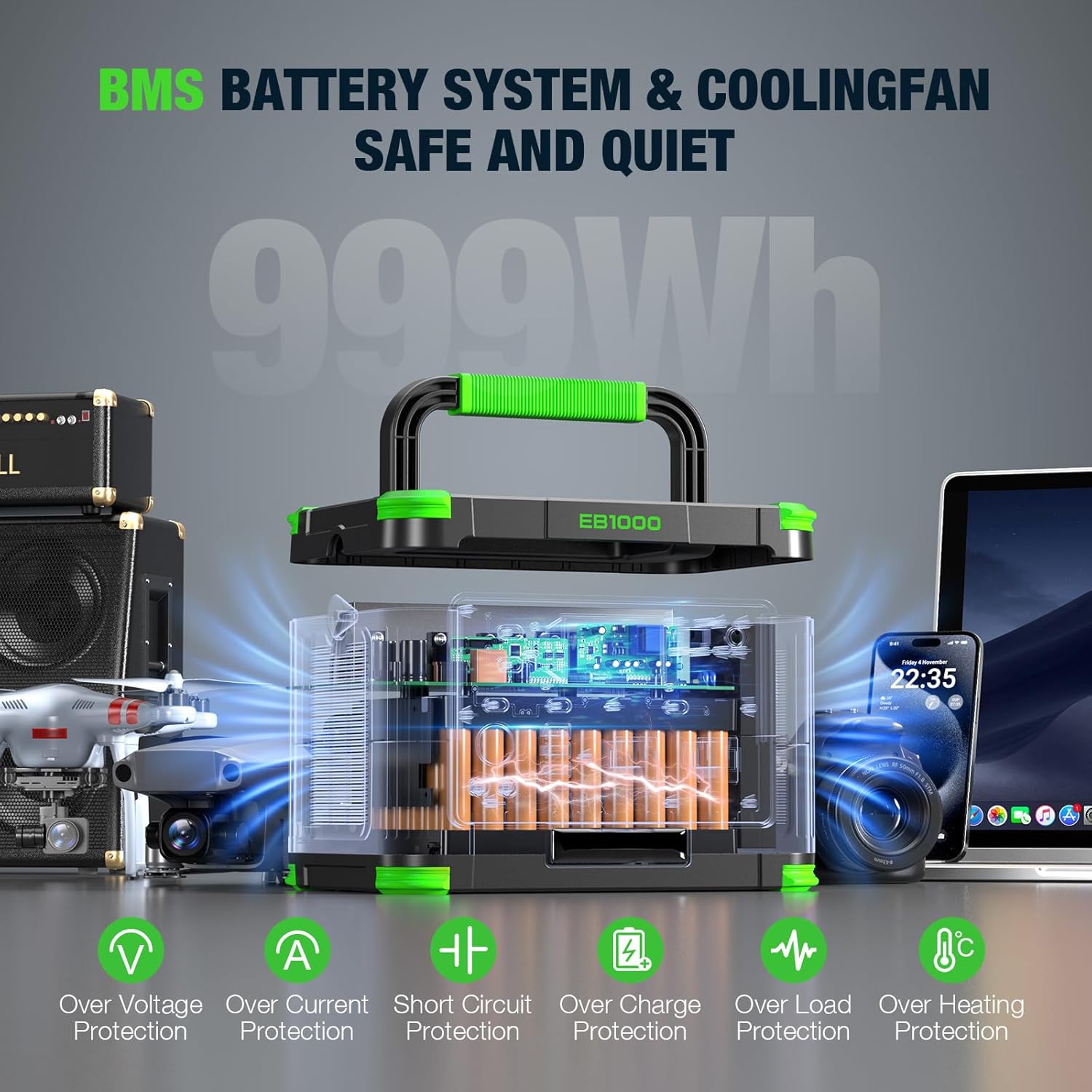
Image: Internal view highlighting the BMS Battery System and Cooling Fan, which provide protection against over voltage, over current, short circuit, over charge, over load, and over heating.
3. Setup and Initial Charging
Unpacking
Carefully remove the GRECELL EB1000 from its packaging. Verify that all components listed in the product manual are present and undamaged. Keep the packaging for future storage or transport.
Initial Charge
Before first use, it is recommended to fully charge the power station. This ensures optimal battery performance and calibration. Connect the provided AC adapter to a wall outlet and then to the power station's AC input port. The display will indicate charging status.
Charging Methods
The GRECELL EB1000 offers multiple ways to recharge:
- AC Wall Outlet: Using the included AC adapter, a full charge takes approximately 7-8 hours.
- Solar Panels: Connect compatible solar panels (not included) via the MPPT input. Charging time varies based on solar conditions and panel wattage (e.g., a 200W solar charger takes about 6-8 hours). An MC4 solar cable is included for compatibility.
- 12V Car Port: Recharge using your vehicle's 12V car outlet. This method typically takes 9-10 hours for a full charge.

Image: Illustration of the three charging methods: solar panel, AC wall adapter, and 12V car charger.
4. Operating Your Power Station
Control Panel and Display
The front panel of the EB1000 features an LCD display and various output ports with individual control buttons. The LCD display shows real-time wattage, battery percentage, and estimated runtime.
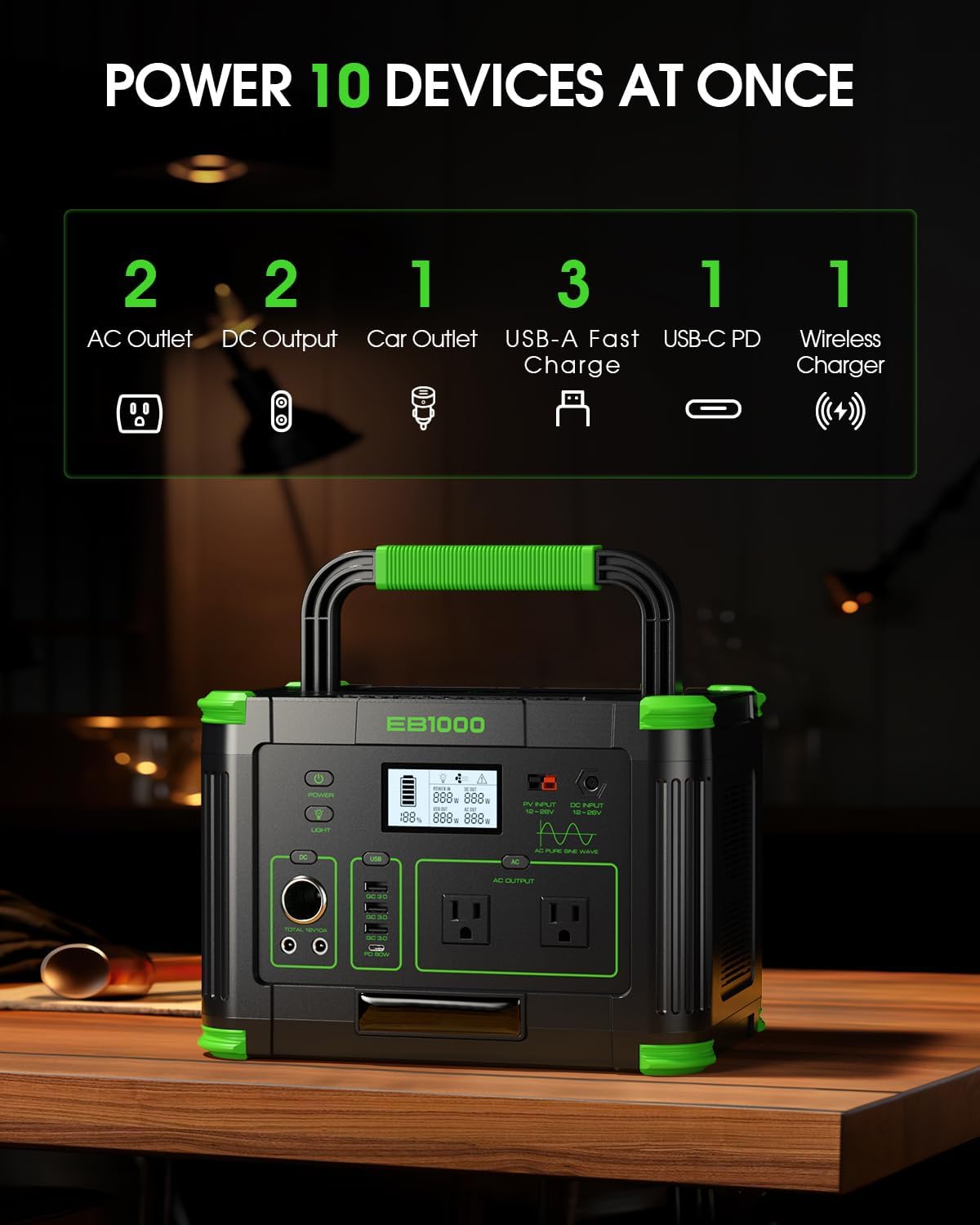
Image: The front panel of the GRECELL EB1000, showing the LCD display, AC outlets, DC outputs, car outlet, USB-A ports, USB-C PD port, and wireless charging pad.
Connecting Devices
To power a device, connect it to the appropriate output port on the power station. Press the corresponding power button (e.g., AC, DC, USB) to activate the output. The LCD display will show the power consumption.
- AC Outlets: For devices requiring 110V AC power, up to 1000W continuous.
- USB-C PD (60W): For fast charging compatible devices like laptops (e.g., MacBook).
- USB-A QC 3.0: For quick charging smartphones and other USB devices.
- DC Outputs & Car Port: For 12V DC devices.
- Wireless Charging Pad: Place compatible devices on the pad for 10W wireless charging.

Image: A user charging a MacBook Pro with the GRECELL EB1000 via the 60W USB-C PD port, demonstrating fast charging capability in an outdoor setting.
Pass-Through Charging
The EB1000 supports pass-through charging, allowing you to power devices while the power station itself is being recharged. This feature is useful for continuous power supply.
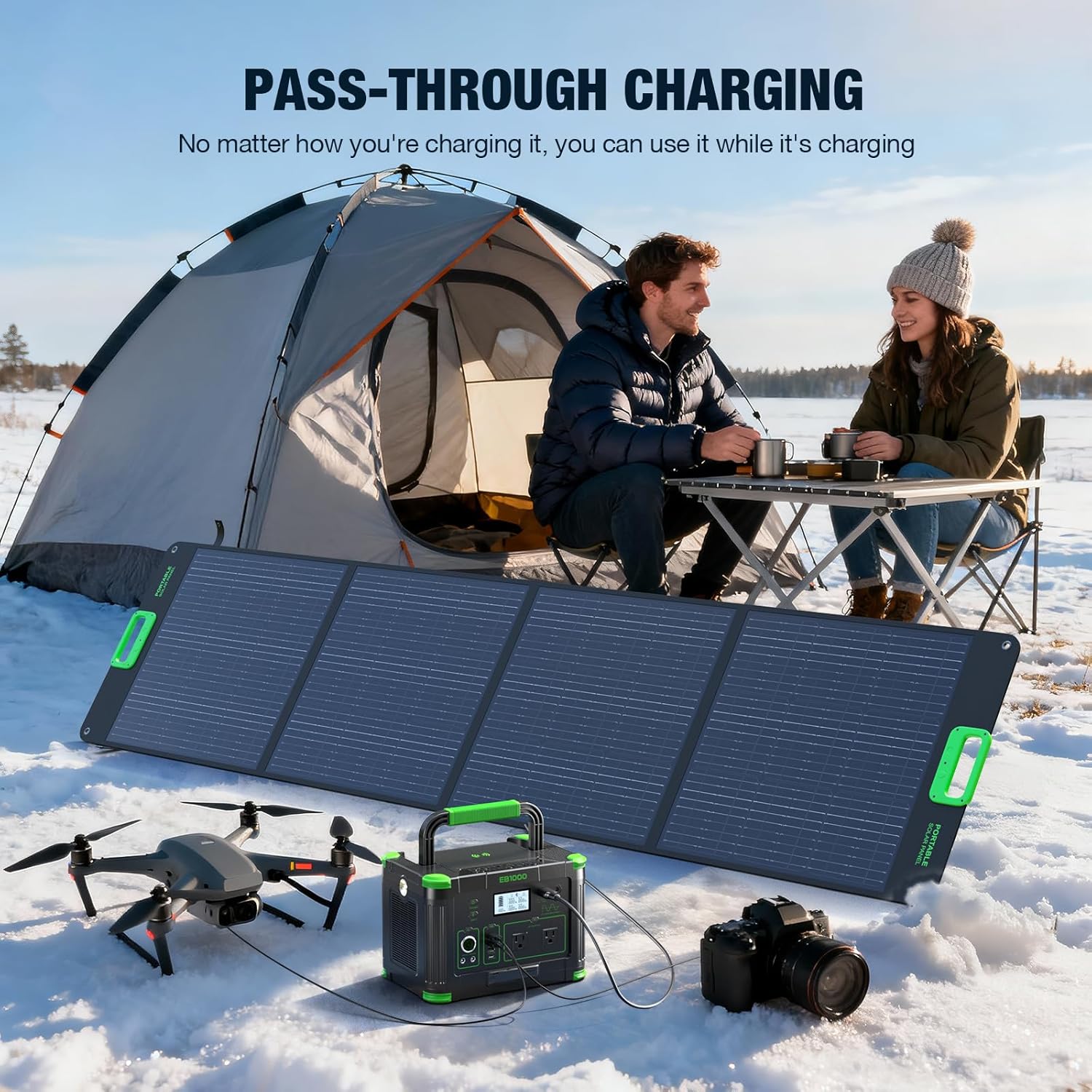
Image: The GRECELL EB1000 being recharged by a solar panel while simultaneously powering a drone and a camera, illustrating its pass-through charging capability.
Powering Various Devices
The EB1000 can power a wide range of devices. The following table provides estimated runtimes for common appliances:

Image: A visual guide showing estimated runtimes for various devices like rice cookers, CPAP machines, laptops, TVs, floor lamps, fans, electric towels, washing machines, coffee makers, cameras, drones, phones, and mini-fridges when powered by the EB1000.

Image: A family enjoying a picnic, with the GRECELL EB1000 powering a small coffee maker and toaster, demonstrating its utility for outdoor activities.
5. Maintenance and Storage
Battery Care
The GRECELL EB1000 uses a LiFePO4 battery, known for its long lifespan (over 2000 charge cycles). To maximize battery life:
- Avoid fully discharging the battery frequently.
- Recharge the unit at least once every 3-6 months if not in regular use.
- Store the unit with a charge level between 50% and 80%.
Cleaning
Wipe the exterior of the power station with a dry, soft cloth. Do not use abrasive cleaners or solvents. Ensure all ports are free from dust and debris.
Storage
Store the power station in a cool, dry place, away from direct sunlight, heat sources, and moisture. The recommended storage temperature is between 14°F and 113°F (-10°C and 45°C).
6. Troubleshooting
If you encounter issues with your GRECELL EB1000, refer to the following common problems and solutions:
| Problem | Possible Cause | Solution |
|---|---|---|
| Unit does not turn on | Battery is completely discharged; Power button not pressed correctly. | Charge the unit; Press and hold the main power button for 3 seconds. |
| No AC output | AC output not activated; Device power consumption exceeds 1000W; Overload protection triggered. | Press the AC power button; Reduce the load; Disconnect the device, restart the AC output. |
| No USB output | USB output not activated; Device is not compatible. | Press the USB power button; Ensure device is compatible with USB-A QC or USB-C PD. |
| Slow charging via solar | Insufficient sunlight; Solar panel not correctly positioned; Panel wattage too low. | Ensure direct sunlight; Adjust panel angle; Use higher wattage solar panels. |
If the problem persists after trying these solutions, please contact customer support.
7. Technical Specifications
| Feature | Value |
|---|---|
| Brand | GRECELL |
| Model Name | EB1000 |
| Capacity | 999Wh |
| AC Output (Continuous) | 1000W |
| AC Output (Peak) | 2000W |
| AC Voltage | 110 Volts |
| Battery Type | LiFePO4 |
| USB-C PD Output | 60W |
| USB-A QC Output | 3x 18W |
| Wireless Charging | 10W |
| DC Output | 2x DC outputs, 1x 12V Car Port |
| Recharge Time (AC) | 7-8 hours |
| Recharge Time (Car) | 9-10 hours |
| Item Weight | 18.2 Pounds |
| Product Dimensions (L x W x H) | 13.82" x 9.56" x 9.85" |
| Fuel Type | Solar |
| Power Source | Solar Powered |
| Recommended Uses | Camping, Residential |
8. Warranty and Customer Support
Warranty Information
The GRECELL EB1000 Portable Power Station comes with a 24-month warranty from the date of purchase. This warranty covers manufacturing defects and workmanship under normal use. Please retain your proof of purchase for warranty claims.
Customer Support
For technical assistance, warranty claims, or any questions regarding your GRECELL EB1000, please contact GRECELL customer support. You can find contact information on the official GRECELL website or through the retailer where you purchased the product.
Visit the official GRECELL Store for more information: GRECELL Store


