
1. Introduction
Thank you for choosing the Baseus FC41 145W 25000mAh Power Bank. This high-capacity portable charger is designed to provide ultra-fast charging for a wide range of devices, including laptops, smartphones, and tablets. Featuring a powerful 145W output and two integrated USB-C cables, it offers convenience and reliability for users on the go. This manual provides essential information for safe and efficient use of your power bank.
2. Safety Information
- Do not expose the power bank to extreme temperatures (above 60°C/140°F or below 0°C/32°F), direct sunlight, or fire.
- Avoid dropping, disassembling, or attempting to repair the device yourself.
- Keep away from water, moisture, and corrosive materials.
- Use only certified charging cables and adapters.
- Keep out of reach of children.
- Dispose of the power bank according to local regulations. Do not dispose of it with household waste.
- If the power bank swells, emits an odor, or becomes excessively hot, discontinue use immediately.
3. Product Overview
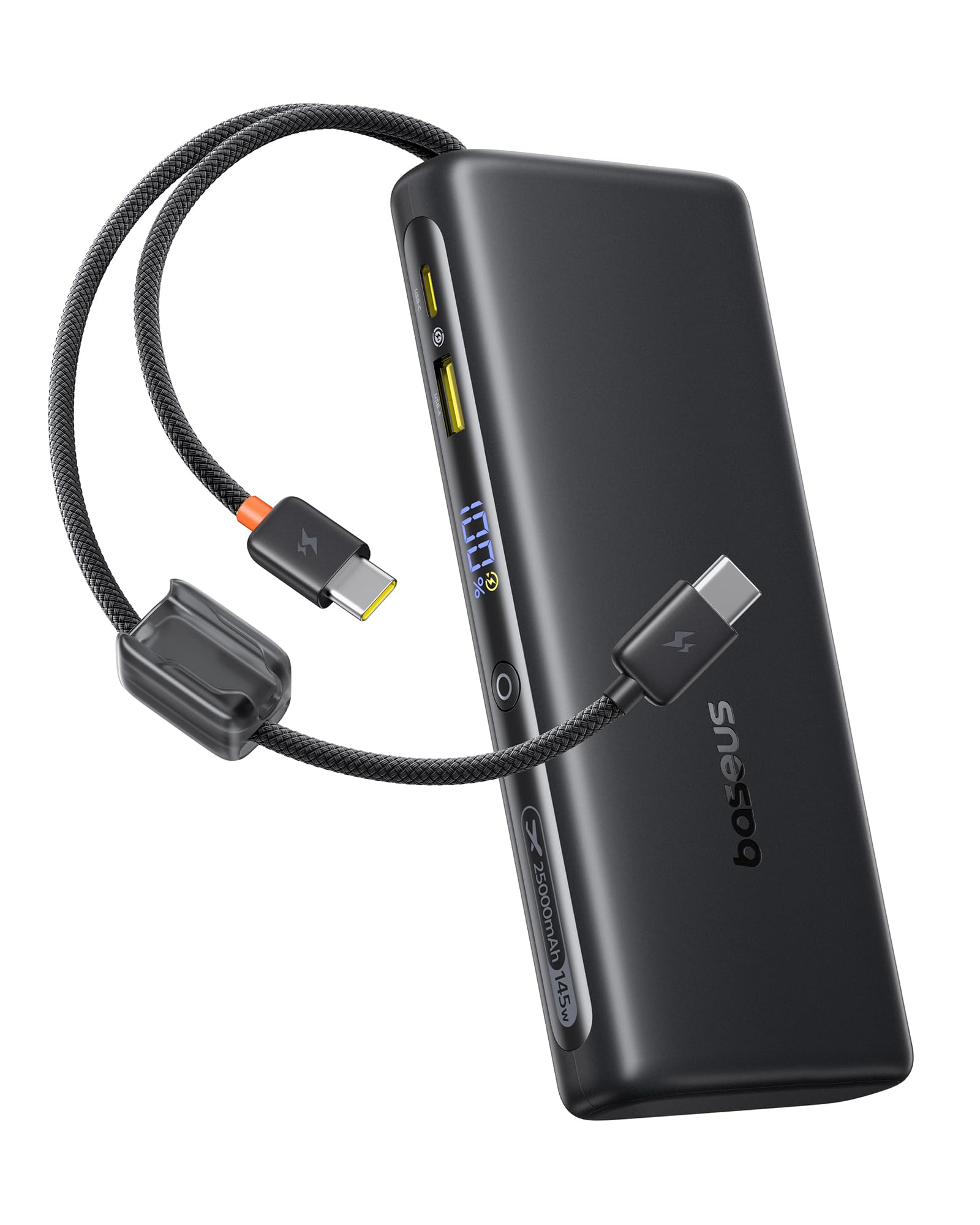
The Baseus FC41 Power Bank features a sleek design with multiple ports and integrated cables for maximum versatility.
Package Contents
- Baseus FC41 145W 25000mAh Power Bank
- User Manual
Components
The power bank includes the following key components:
- Digital Display: Shows real-time battery percentage and charging status.
- Integrated USB-C1 Cable: Supports up to 140W output/65W input.
- Integrated USB-C2 Cable: Supports up to 100W output/65W input.
- USB-C Port: Supports up to 100W output/65W input.
- USB-A Port: Supports up to 22.5W output.
- Power Button: Activates the display, initiates charging, and toggles low-power mode.

4. Setup
4.1 Initial Charging of the Power Bank
Before first use, fully charge your Baseus FC41 Power Bank. This ensures optimal battery performance and longevity.
- Connect a USB-C power adapter (not included) to either of the integrated USB-C cables or the external USB-C port on the power bank.
- Plug the power adapter into a wall outlet.
- The digital display will show the charging progress. A full charge from 0% to 100% typically takes approximately 4 hours with a 65W input.
- Once fully charged, the display will show 100%. Disconnect the power bank from the charger.

5. Operating Instructions
5.1 Charging Your Devices
The Baseus FC41 Power Bank can charge various devices using its multiple output options.
Using Integrated USB-C Cables
- The integrated USB-C1 cable provides up to 140W output, ideal for laptops like MacBook Pro/Air.
- The integrated USB-C2 cable provides up to 100W output, suitable for laptops, tablets, and smartphones.
- Simply pull out the desired integrated USB-C cable and connect it to your device's USB-C charging port. The power bank will automatically begin charging.
Using External Ports
- USB-C Port: Connect your device using a compatible USB-C to USB-C cable. This port supports up to 100W output.
- USB-A Port: Connect your device using a compatible USB-A to USB-C/Lightning cable. This port supports up to 22.5W output.
Simultaneous Charging
The power bank can charge up to four devices simultaneously. The BPS 2.0 technology intelligently distributes power for maximum efficiency.
- When charging a single device via USB-C1, it can reach up to 140W.
- When charging a laptop (e.g., 100W) and a smartphone (e.g., 45W) simultaneously, the total output can reach 145W.


5.2 Checking Battery Level
Press the power button once to activate the digital display, which will show the remaining battery percentage.
5.3 Low-Power Mode
For charging low-current devices such as Bluetooth earbuds or smartwatches, double-press the power button to activate low-power mode. This prevents the power bank from automatically shutting off due to low power draw.
5.4 Integrated Cables as Lanyard
The integrated USB-C cables are designed to also function as a durable lanyard, allowing for convenient carrying or attachment to a backpack.

6. Maintenance
6.1 Cleaning
Wipe the power bank with a soft, dry cloth. Do not use liquid cleaners or abrasive materials.
6.2 Storage
Store the power bank in a cool, dry place away from direct sunlight and extreme temperatures. For long-term storage, it is recommended to keep the battery charged to around 50-70%.
6.3 Battery Care
To prolong battery life, avoid fully discharging the power bank frequently. Recharge it when the battery level is low.
7. Troubleshooting
- Power bank not charging: Ensure the charging cable and adapter are properly connected and functional. Try a different cable or adapter.
- Device not charging from power bank: Ensure the power bank has sufficient charge. Check if the cable connecting the device to the power bank is securely connected and compatible. Press the power button to activate charging.
- Slow charging: Ensure your device and cable support fast charging protocols. If charging multiple devices, the total output power is shared, which may reduce individual charging speeds.
- Digital display not working: Press the power button to activate the display. If it remains unresponsive, contact customer support.
- Power bank gets warm during use: It is normal for the power bank to generate some heat during high-power charging. If it becomes excessively hot, discontinue use and contact customer support.
8. Specifications
| Feature | Detail |
|---|---|
| Model Number | E0028H |
| Battery Capacity | 25000mAh |
| Output Wattage | 145W (Max) |
| Input Wattage | 65W (Max) |
| Battery Type | Lithium Ion |
| Number of Battery Cells | 5 |
| Product Dimensions | 16.5 x 7.4 x 2.5 cm |
| Product Weight | 506 g |
| Color | Black |
| Special Feature | CCC Certification |
| Compatible Devices | Google Pixel 10 Pro XL/10 Pro/9 Pro/8 Series, MacBook Pro/Air; HP/Dell/Asus/Lenovo Laptops, Samsung Galaxy S25/S24/S23/S22 Series, iPhone 17/16/15 Pro/Pro Max Series |
| Power Source | Corded Electric |
| UPC | 810196184848 |
| GTIN | 810196184848 |
9. Warranty & Support
9.1 Warranty Information
This Baseus product comes with a 24-month warranty. We also offer lifetime customer service and a 45-day money-back guarantee. Please retain your proof of purchase for warranty claims.
9.2 Customer Support
For any questions, technical support, or warranty claims, please contact Baseus customer service through the retailer where you purchased the product or visit the official Baseus website for contact details.


