
1. Product Overview
The TechniSat DIGITRADIO 320 is a versatile compact stereo Hi-Fi system designed to deliver high-quality audio from various sources. It features DAB+ and FM radio reception, an integrated CD player, Bluetooth connectivity for wireless streaming, and a USB port for MP3 playback and device charging. The system is equipped with a TFT color display and intuitive controls for ease of use.
Key Features
- Digital and FM Radio: Enjoy a wide selection of digital radio programs via DAB+ and traditional FM stations.
- CD Player: Supports audio CDs, MP3 CDs, CD-R, and CD-RW formats.
- Bluetooth 5.0: Stream music wirelessly from your smartphone or other Bluetooth-enabled devices.
- USB Port: Play MP3 files from external storage or charge mobile devices (5V, 1A).
- Stereo Sound: Two integrated 5-watt RMS speakers provide a total of 10 watts of clear stereo sound.
- TFT Color Display: A 2.4-inch adjustable brightness display shows station information, time, and slideshows.
- Convenient Functions: Includes alarm clock, sleep timer, and snooze functions.
- Remote Control: Full-function remote control for convenient operation.
What's in the Box
- TechniSat DIGITRADIO 320 Unit
- Remote Control
- 2 x AAA Batteries (for remote control)
- User Manual
2. Setup Guide
2.1 Unpacking and Placement
Carefully remove all components from the packaging. Place the DIGITRADIO 320 on a stable, flat surface. Ensure adequate ventilation around the unit. Avoid placing it near heat sources or in direct sunlight.
2.2 Connecting Power
Connect the power cable to the AC inlet on the rear of the unit, then plug it into a standard wall outlet. The unit will enter standby mode.
2.3 Antenna Connection
Extend the telescopic antenna located at the rear of the unit for optimal DAB+ and FM radio reception. Adjust its position for the best signal quality.

Figure 2.1: Rear Panel Connections. This image displays the rear panel of the DIGITRADIO 320, highlighting the telescopic DAB/FM antenna, USB 5V 1A port, 3.5mm AUX IN, and 3.5mm headphone output. The remote control is also shown for reference.
2.4 Remote Control Setup
Insert the two supplied AAA batteries into the remote control, observing the correct polarity (+/-). The remote control is now ready for use.
3. Operating Instructions
3.1 Power On/Off
Press the POWER button on the front panel or the remote control to switch the unit on or off (standby mode).
3.2 Radio Operation (DAB+/FM)
- Press the MODE button to select DAB+ or FM radio mode.
- In DAB+ mode, the radio will automatically scan for available stations upon first use. Use the TUNING knob or SCAN button to navigate and select stations.
- In FM mode, use the TUNING knob to manually tune to a frequency or press the SCAN button for automatic station search.
- To save a favorite station, press and hold one of the preset buttons (1-20) until the display confirms the save.

Figure 3.1: DAB+ Radio Display. This image shows the DIGITRADIO 320's color display indicating DAB+ mode, station name ("Deutschlandfunk"), and program information.

Figure 3.2: TFT Color Display. A detailed view of the 2.4-inch TFT color display, which provides clear information on stations, time, and other functions.
3.3 CD Player Operation
- Press the MODE button to select CD mode.
- Insert a CD into the disc slot on the front of the unit with the label side facing up. The CD will load automatically.
- Use the PLAY/PAUSE, SKIP, and STOP buttons to control playback.
- To eject the CD, press the EJECT button.

Figure 3.3: CD Player. This image illustrates the integrated CD player with a disc partially ejected, demonstrating its functionality for playing audio and MP3 CDs.
3.4 Bluetooth Connectivity
- Press the MODE button to select Bluetooth mode. The display will show "Pairing" or "Waiting for connection".
- On your smartphone or Bluetooth device, enable Bluetooth and search for "DIGITRADIO 320".
- Select the device to pair. Once connected, you can stream audio wirelessly to the DIGITRADIO 320.
3.5 USB Playback and Charging
- Insert a USB storage device containing MP3 files into the USB port on the rear of the unit.
- Press the MODE button to select USB mode. The unit will automatically detect and begin playing MP3 files.
- Use the playback controls (PLAY/PAUSE, SKIP) to manage your music.
- The USB port can also be used to charge compatible mobile devices (5V, 1A) even when the unit is in standby.
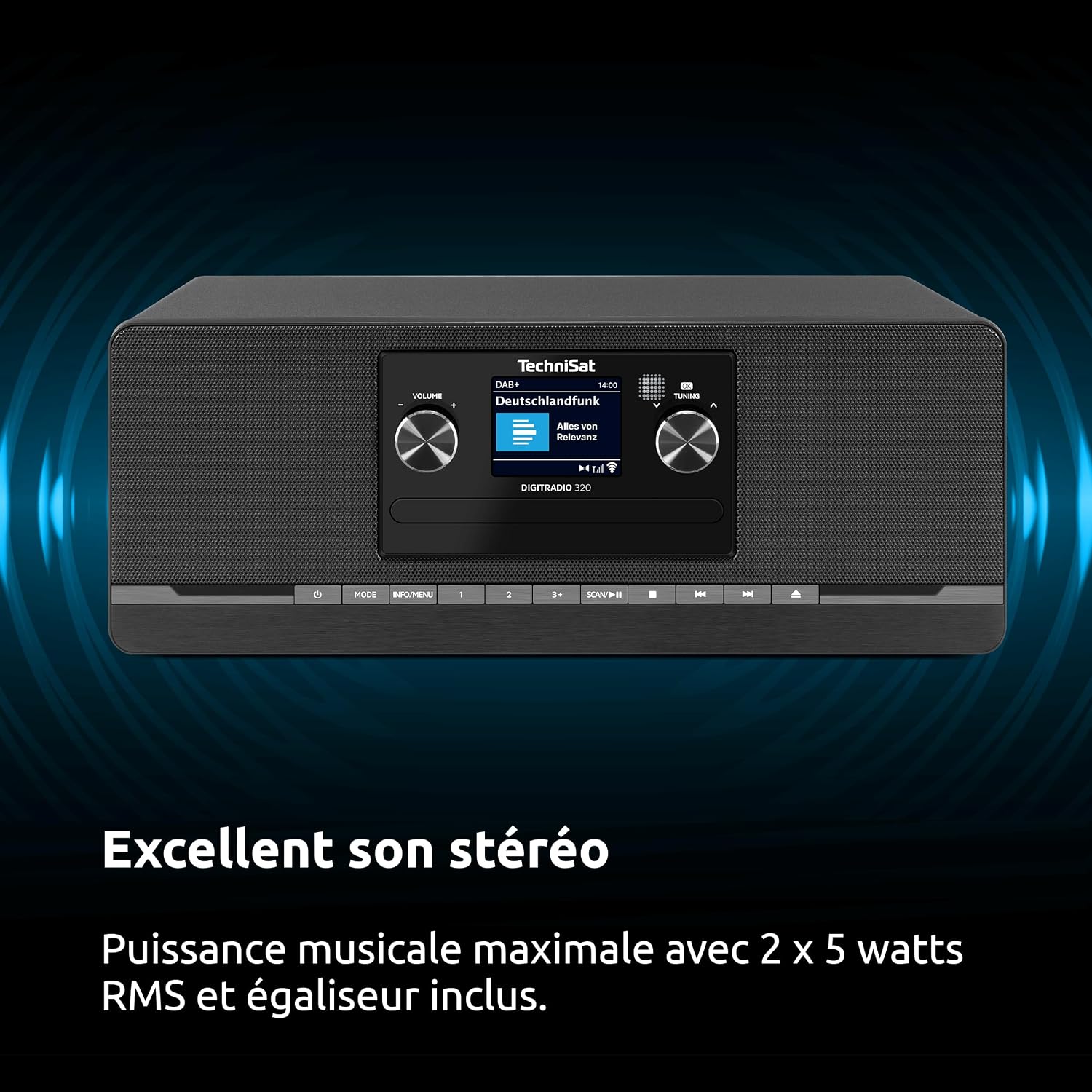
Figure 3.4: USB Functionality. This image highlights the USB port's dual functionality for playing MP3 files from external storage and charging mobile devices.
3.6 AUX IN Connection
Connect an external audio device (e.g., an MP3 player) to the 3.5mm AUX IN port on the rear of the unit using an appropriate audio cable. Press the MODE button to select AUX IN mode to play audio from the connected device.
3.7 Headphone Output
For private listening, connect headphones with a 3.5mm jack to the headphone output port on the rear of the unit. The main speakers will be muted automatically.
3.8 Alarm, Sleep Timer, and Snooze Functions
- Alarm: Set up to two independent alarms with customizable sources (DAB+, FM, CD, or buzzer) and volume levels. Refer to the on-screen menu for detailed alarm setup.
- Sleep Timer: Program the unit to automatically switch to standby after a set period (e.g., 15, 30, 60 minutes).
- Snooze: When an alarm sounds, press the SNOOZE button to temporarily silence it for a few minutes.

Figure 3.5: Excellent Stereo Sound. The DIGITRADIO 320 delivers powerful and clear stereo sound through its two integrated 5-watt RMS speakers, providing a rich audio experience.
4. Maintenance
4.1 Cleaning the Unit
Before cleaning, ensure the unit is switched off and unplugged from the power outlet. Use a soft, dry cloth to wipe the exterior surfaces. Do not use abrasive cleaners, waxes, or solvents as they may damage the finish. For the display, use a soft, lint-free cloth specifically designed for electronic screens.
4.2 CD Player Care
Handle CDs by their edges to avoid fingerprints and scratches. If a CD is dirty, wipe it gently from the center outwards with a soft, lint-free cloth. Do not use cleaning sprays or abrasive materials on CDs. Regularly inspect the CD slot for dust or debris and clean if necessary with a soft brush or compressed air.
4.3 General Care
Keep the unit away from excessive dust, moisture, and extreme temperatures. Do not block ventilation openings. If the unit will not be used for an extended period, unplug it from the power outlet.
5. Troubleshooting
| Problem | Possible Cause | Solution |
|---|---|---|
| No power | Power cable not connected; Power outlet not active. | Ensure the power cable is securely connected. Check if the power outlet is working by plugging in another device. |
| Poor radio reception (DAB+/FM) | Antenna not extended or poorly positioned; Weak signal in the area. | Fully extend and adjust the telescopic antenna. Try repositioning the unit. Perform a new station scan. |
| CD not playing or skipping | CD is dirty, scratched, or inserted incorrectly; Unsupported CD format. | Clean the CD with a soft cloth. Ensure the CD is inserted with the label side up. Check if the CD format (audio CD, MP3 CD) is supported. |
| Bluetooth pairing failed | Bluetooth not enabled on device; Device too far; DIGITRADIO 320 not in pairing mode. | Ensure Bluetooth is enabled on your device. Move the device closer to the DIGITRADIO 320. Select Bluetooth mode on the unit to enter pairing mode. |
| No sound | Volume too low; Mute function active; Headphones connected. | Increase the volume. Check if the unit is muted. Disconnect headphones if you want sound from the speakers. |
6. Technical Specifications
| Feature | Specification |
|---|---|
| Brand | TechniSat |
| Model Number | 0000/2958 |
| Connectivity Technology | Auxiliary, Bluetooth, USB |
| Color | Black |
| Speaker Type | Stereo (2 speakers) |
| Audio Output Mode | Stereo 2.0 |
| Output Power | 10 Watts (2 x 5W RMS) |
| Dimensions (L x W x H) | 35 x 20 x 13.5 cm (13.8 x 7.9 x 5.3 inches) |
| Item Weight | 2.8 Kilograms (6.17 lbs) |
| Power Source | Electric Cable |
| Compatible Devices | Headphones, Smartphone |
| Supported Standards | DAB+, FM, Bluetooth, USB |
| Bluetooth Version | 5.0 |
| Supported Audio Formats | CD-DA, MP3 |
| Display | 2.4-inch TFT Color Display |
| Country of Origin | China |

Figure 6.1: Product Dimensions. This image provides a visual representation of the DIGITRADIO 320's dimensions: 35.1 cm (width), 21.2 cm (depth), and 13.3 cm (height).
7. Warranty and Support
7.1 Warranty Information
This TechniSat DIGITRADIO 320 comes with a 2-year warranty from the date of purchase. This warranty covers manufacturing defects and material faults under normal use. Please retain your proof of purchase for warranty claims. The warranty does not cover damage caused by misuse, accidents, unauthorized modifications, or normal wear and tear.
7.2 Customer Support
For technical assistance, troubleshooting, or warranty service, please contact TechniSat customer support. You can find contact information on the official TechniSat website or through your local retailer. Please have your product model number (DIGITRADIO 320) and proof of purchase ready when contacting support.
Official TechniSat Website: www.technisat.com