
Introduction
This manual provides detailed instructions for the NearStream AWM28T Wireless Lavalier Microphone system. It covers product components, setup procedures, operating modes, maintenance guidelines, troubleshooting tips, and technical specifications. Please read this manual thoroughly to ensure proper use and optimal performance of your device.
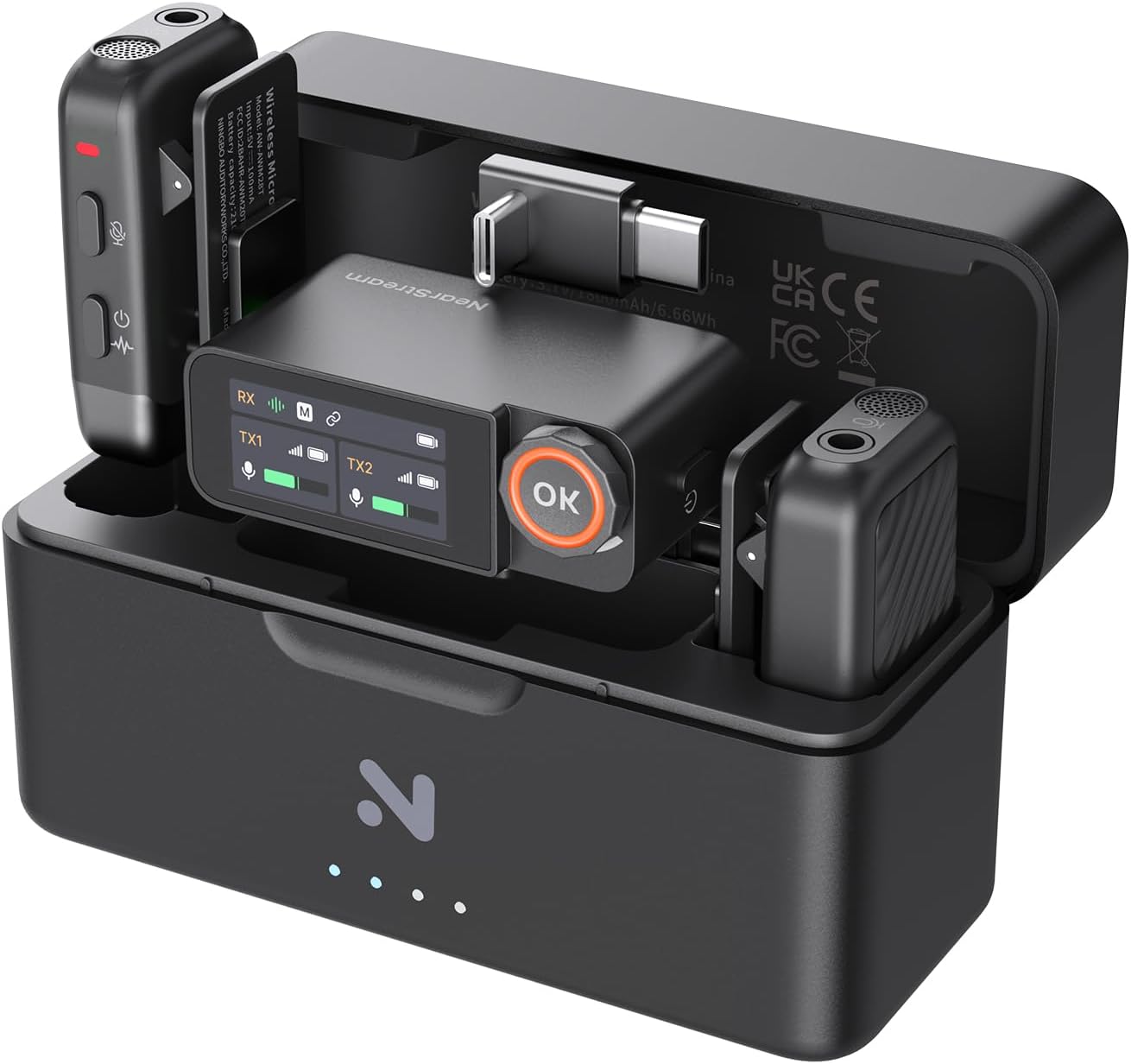
Image: The NearStream AWM28T Wireless Lavalier Microphone system, showcasing the two transmitters, one receiver, and the portable charging case.
What's in the Box
Verify that all components are present in your package:
- 2 x Transmitter
- 1 x Receiver
- 1 x Charging Case
- 1 x USB-A to USB-C Cable
- 1 x Camera Audio Cable (3.5mm TRS)
- 1 x Audio Cable (3.5mm TRS to TRRS)
- 1 x USB-C to Lightning Adapter
- 1 x USB-C to USB-C Adapter
- 2 x Attachment Magnetic
- 2 x Fur Windshield (Black)
- 2 x Fur Windshield (Gray)
- 1 x Small Bag

Image: All included accessories and main units of the AWM28T system, neatly arranged.
Product Overview
Transmitter (TX)
- Built-in microphone
- Power/Mute button
- Status indicator light
- Charging contacts
- Clip for attachment
Receiver (RX)
- LCD Touchscreen Display
- OK/Volume control knob
- 3.5mm Headphone Output for real-time monitoring
- 3.5mm TRS Output for camera/audio devices
- USB-C Output for smartphones/computers
- Charging contacts
Charging Case
- Houses and charges two transmitters and one receiver.
- LED indicators for charging status.
- USB-C charging port.

Image: The charging case with LED indicators, designed to hold and charge the transmitters and receiver.
Setup
1. Initial Charging
Before first use, fully charge the transmitters, receiver, and charging case. Place the transmitters and receiver into the charging case. Connect the USB-A to USB-C cable to the charging case and a power source. The LED indicators on the charging case will show the charging status.
2. Power On/Off
- Transmitter: Press and hold the Power button for 2 seconds to turn on or off.
- Receiver: Press and hold the OK button for 2 seconds to turn on or off.
3. Pairing
The transmitters and receiver are pre-paired at the factory. If re-pairing is needed:
- Ensure both transmitter(s) and receiver are powered on.
- On the receiver's LCD screen, navigate to the pairing menu.
- Follow the on-screen instructions to initiate pairing. The devices should connect automatically.
4. Connecting to Recording Device
The AWM28T offers wide compatibility:
- For Cameras/Laptops/PCs (3.5mm input): Use the provided 3.5mm TRS cable (for cameras) or 3.5mm TRS to TRRS cable (for laptops/smartphones with headphone jack) to connect the receiver's 3.5mm output to your device's audio input.
- For iPhone (Lightning port): Attach the USB-C to Lightning adapter to the receiver's USB-C output, then plug into your iPhone.
- For Android/PC (USB-C port): Attach the USB-C to USB-C adapter to the receiver's USB-C output, then plug into your Android device or PC.

Image: The receiver demonstrating its versatile connectivity options with cameras, laptops, and smartphones.
Video: Official NearStream AWM28T Wireless Lavalier Microphone setup and feature overview. This video demonstrates connecting the receiver to various devices and highlights key functionalities.
Operating Instructions
1. Audio Modes
The AWM28T supports three recording modes, selectable via the receiver's LCD touchscreen:
- Mono Mode: Combines audio from both transmitters into a single mono track. Ideal for interviews with two speakers or when a single, clear audio channel is preferred.
- Stereo Mode: Records audio from each transmitter to separate left and right channels, providing a wider soundstage. Useful for capturing distinct audio sources or for post-production flexibility.
- Safety Track Mode: Records a primary audio track and a secondary backup track at -6dB lower volume. This prevents audio clipping or distortion if the main track's volume unexpectedly peaks.
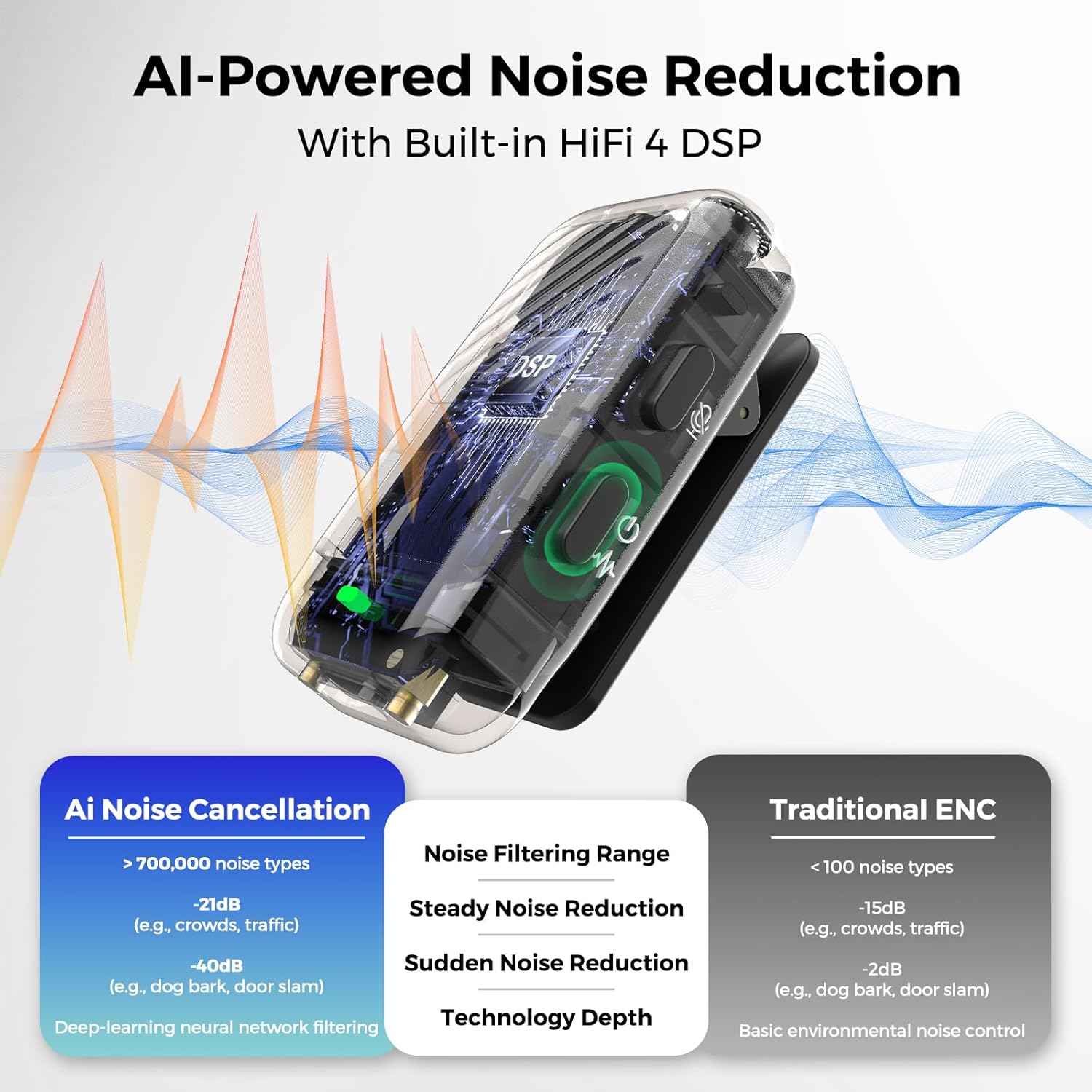
Image: The receiver's display illustrating the selection of Mono, Stereo, and Safety Track modes.
Video: A short preview demonstrating the selection of Safety Track, Mono, and Stereo modes on the receiver's LCD touchscreen.
2. AI Noise Cancelling
The built-in AI noise cancelling feature intelligently reduces background noise while preserving vocal clarity. Activate or deactivate this feature via the transmitter's controls or receiver's menu.

Image: Visual representation of the AI Noise Cancelling technology, highlighting its effectiveness in reducing various noise types.
3. Volume Control
Adjust the audio output volume using the OK/Volume control knob on the receiver. The LCD screen displays 20 levels of volume adjustment.
4. Mute Function
Press the Power/Mute button on the transmitter once to mute or unmute the microphone. The status indicator light will change to indicate mute status.
5. Real-Time Monitoring
Connect headphones to the 3.5mm headphone output on the receiver to monitor audio in real-time. This allows for immediate audio level adjustments during recording.
6. Multi-Source Recording
The transmitter supports an external audio input, allowing connection of an additional microphone or headset for flexible multi-track recording setups.
7. Wearing Options
The transmitters can be clipped to clothing or attached using the magnetic mounts for discreet placement.

Image: Examples of flexible wearing options for the transmitter, including clipping and magnetic attachment.
Maintenance
- Cleaning: Use a soft, dry cloth to clean the devices. Avoid liquid cleaners or solvents.
- Storage: Store the microphone system in its charging case in a cool, dry place when not in use.
- Battery Care: For optimal battery life, avoid fully discharging the batteries frequently. Charge regularly, even if not in constant use.
- Windshields: Clean fur windshields gently with a soft brush if needed. Replace if damaged to maintain sound quality.
Troubleshooting
| Problem | Possible Cause | Solution |
|---|---|---|
| No audio output |
|
|
| Poor audio quality / Noise |
|
|
| Short wireless range / Dropouts |
|
|
| Receiver LCD screen dim/unresponsive |
|
|
Specifications
| Feature | Detail |
|---|---|
| Model Name | AWM28T Wireless Lavalier Microphone |
| Connectivity Technology | Wireless (2.4GHz), USB-C, Lightning, 3.5mm TRS/TRRS |
| Audio Quality | 48kHz/24-bit, 120dB SPL, 90dB SNR |
| Special Features | AI Noise Cancelling, Mono/Stereo/Safety Track, 20-level Volume Control, Real-Time Monitoring |
| Battery Life (Transmitter/Receiver) | Up to 9 hours per unit |
| Total Battery Life (with Charging Case) | Up to 54 hours |
| Wireless Range | Up to 328ft (100m) in open areas |
| Compatible Devices | iPhone, Android phones, Tablets, Laptops, DSLR Cameras, PCs |
| Microphone Form Factor | Lavalier (Clip-on) |
| Number of Channels | 2 |

Image: Detailed specifications of the microphone's audio performance, including sample rate, bit depth, SNR, and SPL.
Warranty and Support
The NearStream AWM28T Wireless Lavalier Microphone comes with a 1 Year Manufacturer Warranty.
For technical support, warranty claims, or further assistance, please contact NearStream customer service through their official channels. Refer to the product packaging or the official NearStream website for contact information.