
Introduction
Thank you for choosing the DUMOS 47 Inch Computer Desk. This manual provides detailed instructions for assembly, operation, maintenance, and troubleshooting to ensure optimal use and longevity of your product. Please read this manual thoroughly before assembly and use, and retain it for future reference.
This desk is designed for versatility, functioning as a computer desk, gaming desk, office desk, or writing desk. It features integrated LED lighting, a power hub, a monitor riser, and four storage drawers.
Safety Information
- Ensure all parts are present and undamaged before assembly. Do not proceed with assembly if any parts are missing or damaged.
- Assemble the desk on a soft, clean surface to prevent scratches.
- Do not overtighten screws during assembly to avoid damaging the material.
- Keep small parts away from children during assembly.
- Do not exceed the maximum weight capacity of the desk (approximately 200 lbs).
- Ensure the power outlets are used with compatible devices and within specified voltage/current limits.
Setup and Assembly
The DUMOS computer desk requires assembly. All necessary tools, numbered parts, and detailed instructions are included in the packaging. Assembly typically takes less than an hour.
Assembly Steps:
- Unpack all components and verify against the parts list provided in the separate assembly guide.
- Follow the step-by-step instructions in the assembly guide to construct the desk frame and tabletop.
- Attach the monitor riser to the main desk surface.
- Install the power hub into the designated slot on the monitor riser.
- Assemble the four fabric drawers and insert them into the drawer unit. The drawer unit can be mounted on either the left or right side of the desk, offering a reversible layout.
- Securely attach the RGB LED light strip to the underside of the monitor riser.
- Adjust the leveling feet at the bottom of the desk to ensure stability on uneven surfaces.

Image: Overview of product dimensions and the reversible design feature for the drawer unit.

Image: The DUMOS desk assembled, showcasing the monitor riser and integrated drawers.
Operating Instructions
RGB LED Lighting System:
The desk features a built-in RGB LED light strip. Connect the USB power cable from the LED strip to a compatible USB port (e.g., on the desk's power hub or a computer).
- Controller Operation: Use the included remote controller to select from 12 preset lighting modes, adjust brightness, and power the lights on or off.
- App Control: Download the free companion application to unlock advanced features. The app allows access to over 60,000 colors, music synchronization, and programmable timers for the LED lights.
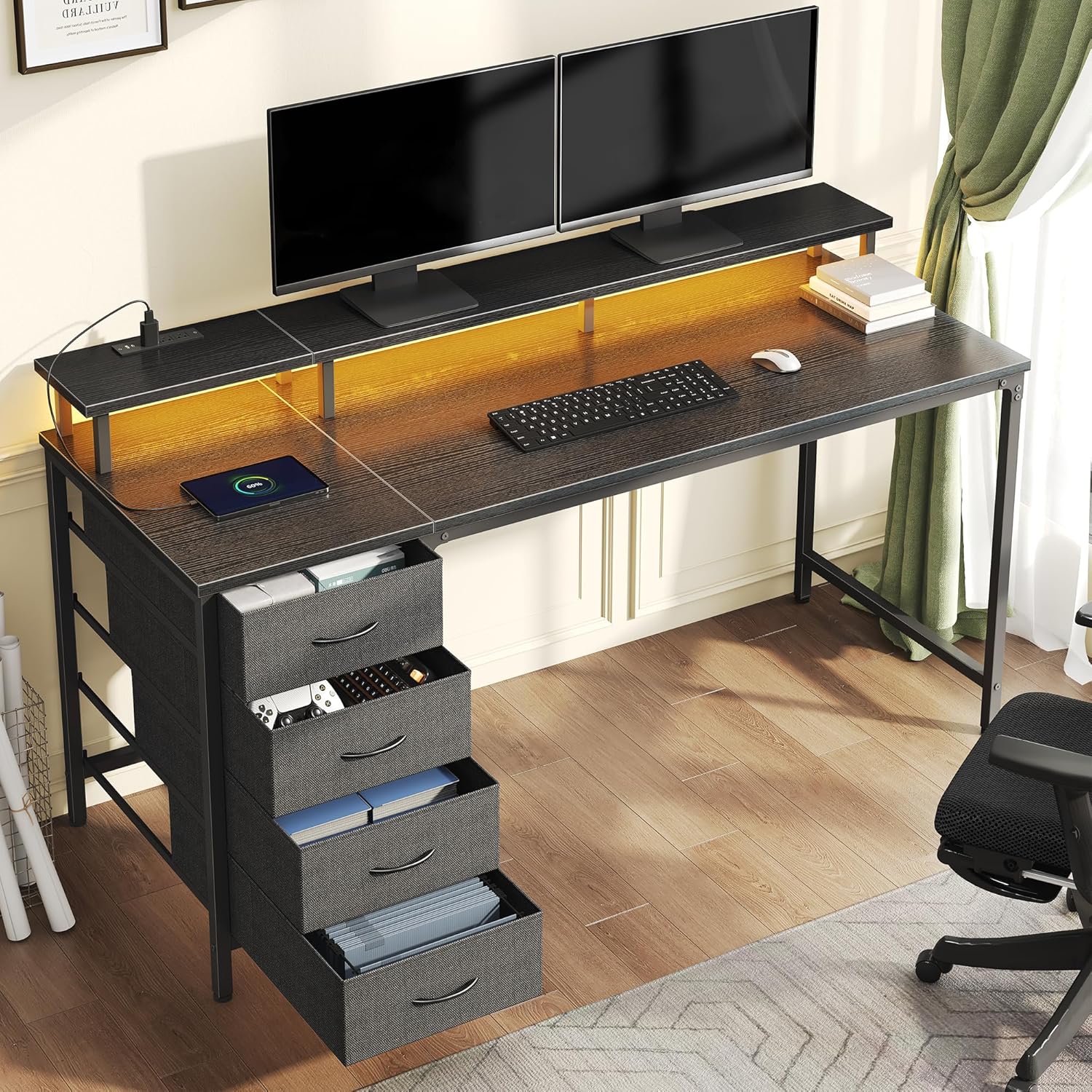
Image: Details of the RGB LED light strip, highlighting remote and app control capabilities, color options, and modes.
Built-in Power Hub:
The monitor riser includes a convenient power station to charge your electronic devices.
- AC Outlets: 3 standard AC outlets (125V/12A) for powering monitors, laptops, or other AC-powered devices.
- USB Ports: 1 USB-A port (5V-2A) and 1 Type-C port (5V-2A) for charging smartphones, tablets, and other USB-powered accessories.
Ensure devices connected to the power hub do not exceed the maximum rated power output to prevent overload.

Image: Detailed view of the integrated power hub on the monitor riser, showing AC, USB-A, and Type-C ports.
Monitor Riser:
The elevated monitor riser is designed to improve ergonomic posture by raising your screen to a comfortable viewing height, which can help reduce neck and back strain. It also provides additional storage space underneath for keyboards, mice, or other small items.

Image: Visual representation of the ergonomic monitor platform, demonstrating how it helps maintain proper posture.
Storage Drawers:
The desk includes four spacious, removable fabric drawers for organizing books, stationery, controllers, and other accessories. The drawer unit's reversible design allows it to be positioned on either the left or right side of the desk during assembly to suit your preference and space requirements.

Image: The four fabric storage drawers, illustrating their capacity for organizing various items.
Maintenance
- Cleaning: Wipe the desk surfaces with a soft, damp cloth. Avoid using harsh chemicals or abrasive cleaners, as these may damage the finish. The desk surface is designed to be easy to clean and wear-resistant.
- Inspection: Periodically check all screws and fasteners to ensure they remain tight. Retighten if necessary.
- Drawer Care: The fabric drawers can be spot cleaned with a mild detergent and water. Allow them to air dry completely before reinserting.
- Power Hub: Keep the power outlets free from dust and debris. Do not expose the power hub to liquids.

Image: Key features for durability and stability, including the easy-clean surface, adjustable feet, and reinforced bracket.
Troubleshooting
- Desk Wobbles: Ensure all assembly screws are tightened. Adjust the leveling feet at the bottom of the desk to stabilize it on uneven floors.
- LED Lights Not Working: Check if the USB power cable is securely connected to a power source. Verify that the power source is active. If using the app, ensure Bluetooth is enabled and the app is correctly paired.
- Power Outlets Not Functioning: Confirm the main power cable for the desk's power hub is plugged into a live wall outlet. Check if the total power draw of connected devices exceeds the hub's capacity.
- Drawers Stick: Ensure the fabric drawers are correctly assembled and inserted into their slots. Check for any obstructions within the drawer unit.
Specifications
| Feature | Detail |
|---|---|
| Brand | DUMOS |
| Model Number | KFH-GDZ4CJD-47BK-ZYX-01 |
| UPC | 715569021358 |
| Product Dimensions (L x W x H) | 113D x 85W x 50H centimetres (approx. 44.5 x 33.5 x 19.7 inches) |
| Desk Surface Length | 47 Inches |
| Item Weight | 15.3 kg (approx. 33.7 lbs) |
| Material | Engineered Wood (Top), Metal (Base) |
| Color | Black |
| Number of Drawers | 4 (Fabric) |
| Power Outlets | 3 AC Outlets (125V/12A) |
| USB Ports | 1 USB-A (5V-2A), 1 Type-C (5V-2A) |
| LED Lighting | RGB, App & Remote Control, 12 Preset Modes, 60,000+ Colors, Music Sync, Timer |
| Special Features | Monitor Riser, Reversible Drawer Layout, Adjustable Feet, Reinforced Bracket |
Warranty Information
DUMOS products are manufactured to high-quality standards. This product comes with a standard manufacturer's warranty against defects in materials and workmanship. Please refer to the warranty card included in your product packaging for specific terms, conditions, and duration of coverage. Keep your proof of purchase for warranty claims.
Customer Support
If you have any questions, require assistance with assembly, or encounter any issues with your DUMOS computer desk, please contact our customer support team. Refer to the contact information provided on the warranty card or the DUMOS official website for the most up-to-date support channels.
When contacting support, please have your model number (KFH-GDZ4CJD-47BK-ZYX-01) and proof of purchase readily available.


