
1. Introduction
The DAJUNGUO X400HS is a versatile 2.1 channel Bluetooth 5.0 amplifier board designed for various audio applications, including DIY speaker projects, home theater systems, and audio upgrades. This unit features dual TPA3223 amplifier chips, delivering a robust 200W + 200W + 400W output for left, right, and subwoofer channels, respectively. It operates efficiently with a wide DC input voltage range of 12-42V.
The X400HS offers multiple audio input options, including Bluetooth 5.0 for stable wireless streaming, a 3.5mm AUX input for wired connections, and a USB port for direct playback of audio files from a USB flash drive. Comprehensive control is provided through six independent knobs, allowing precise adjustment of subwoofer frequency and volume, left/right channel treble, bass, and volume, as well as a master volume control.
2. Product Features
- High Power Output: Dual TPA3223 amplifier chips provide 200W + 200W for left/right channels and 400W for the subwoofer channel.
- Wide Voltage Input: Compatible with 12-42V DC power input, requiring 10A or above for optimal performance.
- 6-Knob Control: Independent controls for Subwoofer Frequency, Subwoofer Volume, Left/Right Treble, Left/Right Bass, Left/Right Volume, and Master Volume.
- Multiple Audio Inputs: Supports Bluetooth 5.0, 3.5mm AUX, and USB playback (MP3, WAV, FLAC, APE up to 32GB FAT32).
- Physical Mode Switch: Dedicated switch for easy selection between Bluetooth, AUX, and USB input modes.
- Comprehensive Protection: Built-in safeguards against short-circuit, over-current, over-temperature, and reverse polarity.
- Smart Control: Multifunction knob for one-touch play/pause, track skipping, and factory reset. Features power-on memory.
- DIY Friendly: Compact design with pre-soldered IPEX antenna and standard 5.5x2.5mm DC jack for easy integration into custom setups.
3. Product Overview and Connections
Familiarize yourself with the layout and connection points of the X400HS amplifier board.

Figure 1: Front and Rear Panel Overview with Labeled Controls and Ports. This diagram illustrates the location of the Bluetooth antenna base, 3.5mm AUX input, USB audio input, DC 12-42V power input, speaker output terminals (Left, Right, Subwoofer), Multifunction Knob, Master Volume, L&R Volume, L&R Treble, L&R Bass, Subwoofer Volume, Subwoofer Frequency, Mode Switch, and Power Switch. It also highlights the large cooling fan and heatsink.

Figure 2: Available Audio Input Methods. This image details the 3.5mm AUX Input, Bluetooth Input, and USB Audio Input, indicating that USB flash drives must be FAT32 formatted and up to 32GB.

Figure 3: High-End Components for Hi-Fi Sound. This image shows close-ups of the Bluetooth chip (supporting AAC/SBC decoding), the external Bluetooth antenna base for extended range, and the upgraded DC jack designed to prevent spark generation.
4. Setup Instructions
- Power Supply Connection: Connect a DC power supply (12-42V, 10A or above) to the DC 5.5x2.5mm jack. Ensure the power supply matches the voltage and current requirements for your speaker setup to prevent damage and ensure optimal performance.
- Speaker Connection: Connect your passive speakers to the designated terminals. Connect left and right speakers to the L&R Channel outputs, and your subwoofer to the Subwoofer output. Pay close attention to polarity (+/-). Refer to the specifications section for recommended speaker impedance.
- Bluetooth Antenna: Attach the provided Bluetooth antenna to the IPEX antenna base for optimal wireless signal reception.
- Initial Power On: Flip the power switch to the "ON" position. The indicator light will illuminate.
5. Operating Instructions
5.1 Input Mode Selection
Use the physical Mode Switch located on the front panel to toggle between input sources:
- AUX: For wired connections via the 3.5mm AUX input.
- BT (Bluetooth): For wireless audio streaming.
- USB: For playing audio files from a USB flash drive.

Figure 4: Input Mode Toggle. This image shows the amplifier in a setup with speakers, highlighting the input mode toggle switch (ON/OFF, AUX, BT, USB) and its corresponding indicator lights for clear status.
5.2 Bluetooth Pairing
- Switch the input mode to BT. The Bluetooth indicator light will blink, indicating it is in pairing mode.
- On your audio device (smartphone, tablet, etc.), enable Bluetooth and search for available devices.
- Select "X400HS" from the list of devices to pair. Once connected, the Bluetooth indicator light will remain solid.
5.3 USB Playback
- Insert a USB flash drive (formatted to FAT32, maximum 32GB) containing supported audio files (MP3, WAV, FLAC, APE) into the USB Audio Input port.
- Switch the input mode to USB. The amplifier will automatically begin playing audio from the USB drive.
5.4 Knob Controls
Adjust the following knobs to fine-tune your audio experience:
- Master Vol: Controls the overall output volume of the amplifier.
- L&R Vol: Adjusts the volume of the left and right stereo channels.
- L&R Treble: Controls the high-frequency response of the left and right channels.
- L&R Bass: Controls the low-frequency response of the left and right channels.
- Subwoofer Vol: Adjusts the volume of the subwoofer channel.
- Subwoofer Freq: Sets the crossover frequency for the subwoofer, determining which low frequencies are sent to the subwoofer.
5.5 Multifunction Knob Operations
The Multifunction Knob provides quick control over playback and settings:
- Single Press: Play/Pause audio.
- Double Press: Skip to the next track.
- Triple Press: Go to the previous track.
- Five Presses: Restore factory settings.
- Long Press: Power on/Standby.
6. Maintenance
To ensure the longevity and optimal performance of your X400HS amplifier board, follow these maintenance guidelines:
- Cleaning: Use a soft, dry cloth to clean the surface of the amplifier. Avoid using liquid cleaners or solvents, as they may damage the components.
- Ventilation: Ensure the amplifier is placed in a well-ventilated area. Do not block the cooling fan or heatsink. Proper airflow is crucial to prevent overheating.
- Storage: When not in use for extended periods, store the amplifier in a cool, dry place away from direct sunlight and extreme temperatures.
- Connections: Periodically check all cable connections to ensure they are secure and free from corrosion.
7. Troubleshooting
If you encounter issues with your X400HS amplifier board, refer to the following troubleshooting steps:
| Problem | Possible Cause | Solution |
|---|---|---|
| No sound output |
|
|
| Distorted sound |
|
|
| Bluetooth connection issues |
|
|
| USB playback not working |
|
|
8. Specifications
Detailed technical specifications for the DAJUNGUO X400HS amplifier board.
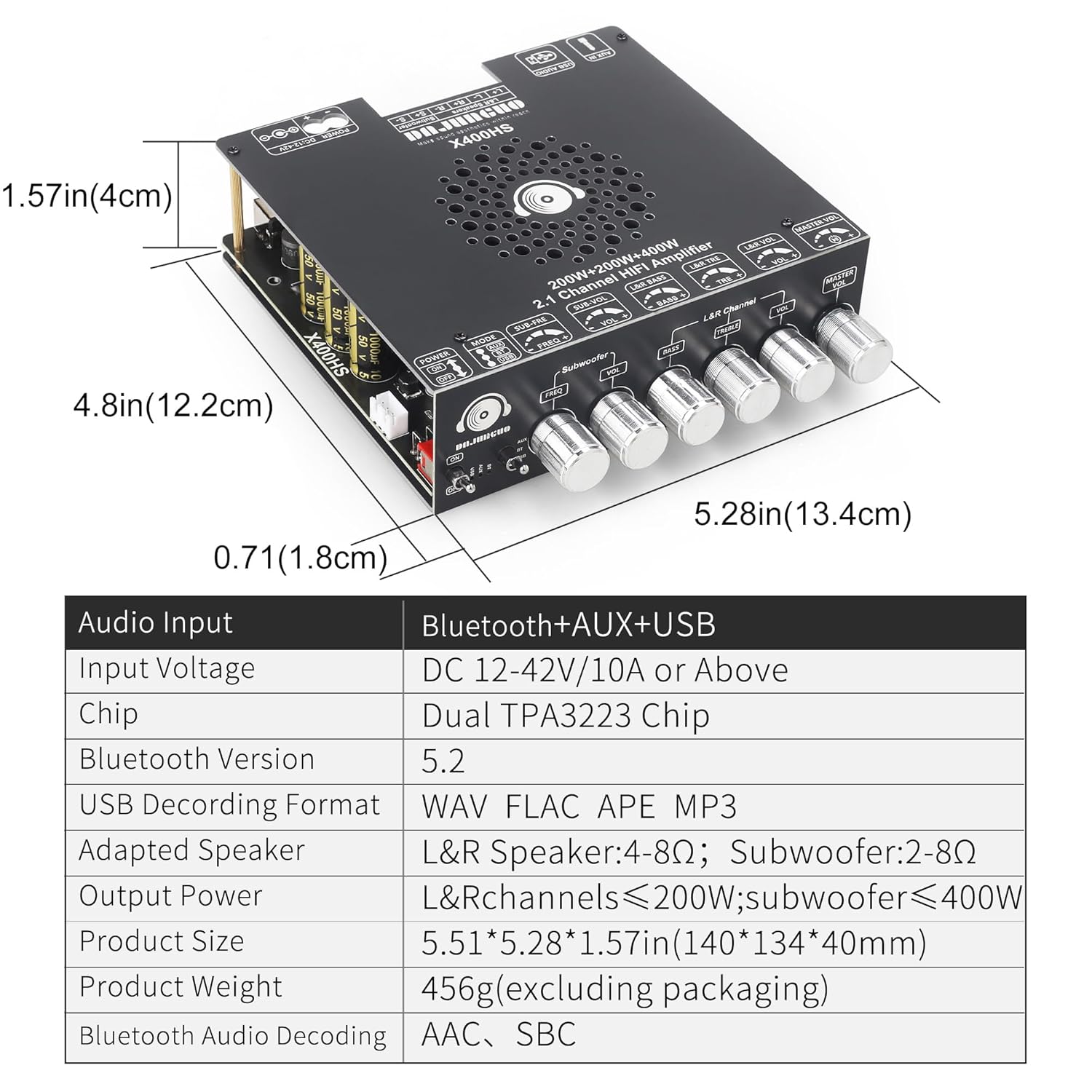
Figure 5: Product Dimensions and Key Specifications. This image provides a visual representation of the amplifier's dimensions (5.51 x 5.28 x 1.57 inches) and a table summarizing audio input, input voltage, chip type, Bluetooth version, USB decoding formats, adapted speaker impedance, output power, product size, product weight, and Bluetooth audio decoding.
| Feature | Specification |
|---|---|
| Audio Input | Bluetooth + AUX + USB |
| Input Voltage | DC 12-42V / 10A or Above |
| Amplifier Chip | Dual TPA3223 Chip |
| Bluetooth Version | 5.2 |
| USB Decoding Format | WAV, FLAC, APE, MP3 |
| Adapted Speaker Impedance | L&R Speaker: 4-8Ω; Subwoofer: 2-8Ω |
| Output Power | L&R Channels ≤200W; Subwoofer ≤400W |
| Product Dimensions (L x W x H) | 5.51 x 5.28 x 1.57 inches (140 x 134 x 40mm) |
| Product Weight | 456g (excluding packaging) / 1.23 pounds |
| Bluetooth Audio Decoding | AAC, SBC |
| Manufacturer | DAJUNGUO |
| UPC | 607606794724 |
8.1 Power Output Table (Test Conditions: 1kHz)
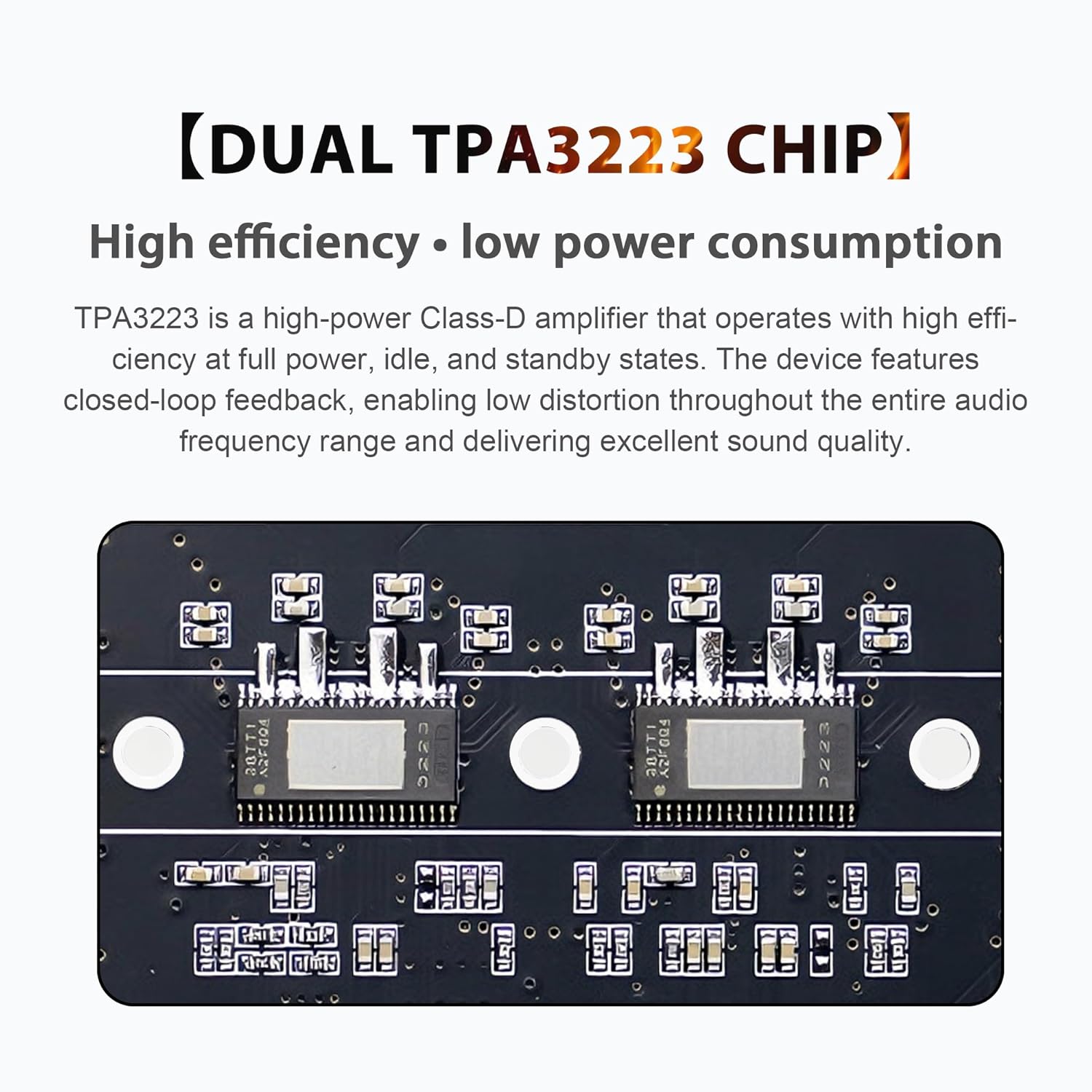
Figure 6: Power Output Table. This table details the power output (in Watts) for the X400HS amplifier board across different DC input voltages (12V, 24V, 36V, 40V) and speaker impedances (8Ω, 4Ω, 2Ω) for both R&L channels and the Subwoofer channel. It also includes a note regarding minimum speaker impedance requirements at 40V input.
| DC Voltage | Channel | DC12-42V/10A or Above | ||
|---|---|---|---|---|
| 8Ω | 4Ω | 2Ω | ||
| 12V | R & L | 10W+10W | 20W+20W | \ |
| Subwoofer | 10W | 20W | 30W | |
| 24V | R & L | 30W+30W | 70W+70W | \ |
| Subwoofer | 30W | 70W | 150W | |
| 36V | R & L | 80W+80W | 160W+160W | \ |
| Subwoofer | 80W | 160W | 350W | |
| 40V | R & L | 100W+100W | 200W+200W | \ |
| Subwoofer | 100W | 200W | 400W | |
Note: If the input voltage is 40V, the speaker impedance for the left and right channels must be greater than or equal to 4Ω, and the speaker impedance for the subwoofer must be greater than 2Ω.
9. Warranty Information
This DAJUNGUO X400HS amplifier board comes with a standard manufacturer's warranty. Please refer to the product packaging or contact your retailer for specific warranty terms and conditions. The warranty typically covers defects in materials and workmanship under normal use.
10. Support
For technical assistance, troubleshooting, or any questions regarding your DAJUNGUO X400HS amplifier board, please contact DAJUNGUO customer support through the retailer's platform or the official brand website. When contacting support, please have your product model (X400HS) and purchase information readily available.