
Introduction
The Mifaso PD30W Desk Clamp Power Strip is designed to provide convenient power access and charging capabilities directly at your workspace. This 8-in-1 unit features 4 AC outlets, 2 USB-A ports, and 1 USB-C port with 30W Power Delivery, all integrated into a compact, clamp-on design. It includes surge protection to safeguard your electronic devices.
Setup Instructions
1. Clamp Installation
The power strip features a clamp-on design for easy, tool-free installation. Ensure your desk or tabletop edge has a thickness between 0.5 inches (1.27 cm) and 1.96 inches (5 cm) for proper fit. The clamp includes foam pads to protect your desk surface from scratches.
- Position the power strip on the edge of your desk where you intend to install it.
- Align the clamp with the underside of the desk edge.
- Tighten the screw on the clamp until the power strip is securely fastened and does not wobble. Do not overtighten.

Image: Clamp installation diagram with desk thickness specifications.
2. Power Connection
Once securely clamped, plug the power strip's 5-foot extension cord into a standard 125V AC wall outlet. The power strip is now ready for use.
Operating Instructions
1. Using AC Outlets
The power strip features 4 widely-spaced AC outlets, designed to accommodate bulky power adapters without blocking adjacent outlets. Simply plug your devices into the available AC sockets.

Image: Wide-spaced AC outlets comparison.
2. Using USB Charging Ports
The power strip includes 2 USB-A ports and 1 USB-C port for charging mobile devices. The USB-C port supports 30W Power Delivery (PD) for fast charging compatible devices.
- USB-C Port (C1): Provides up to 30W PD when used alone, capable of fast-charging smartphones, tablets, and some laptops.
- USB-A Ports (A1, A2) & USB-C Port (C2): These ports provide standard charging speeds.
- Multi-Port Use: When multiple USB ports are in use, the total output is shared. The C1 port will deliver up to 18W, and the remaining ports (C2, A1, A2) will share 12W.

Image: USB-C PD charging details and power distribution.
3. Power Switch and Surge Protection
The integrated power switch controls all connected outlets and USB ports. It also functions as a circuit breaker for surge protection. In case of an overload or power surge, the switch will automatically trip to protect your devices. To reset, unplug some devices and press the switch back to the 'ON' position.
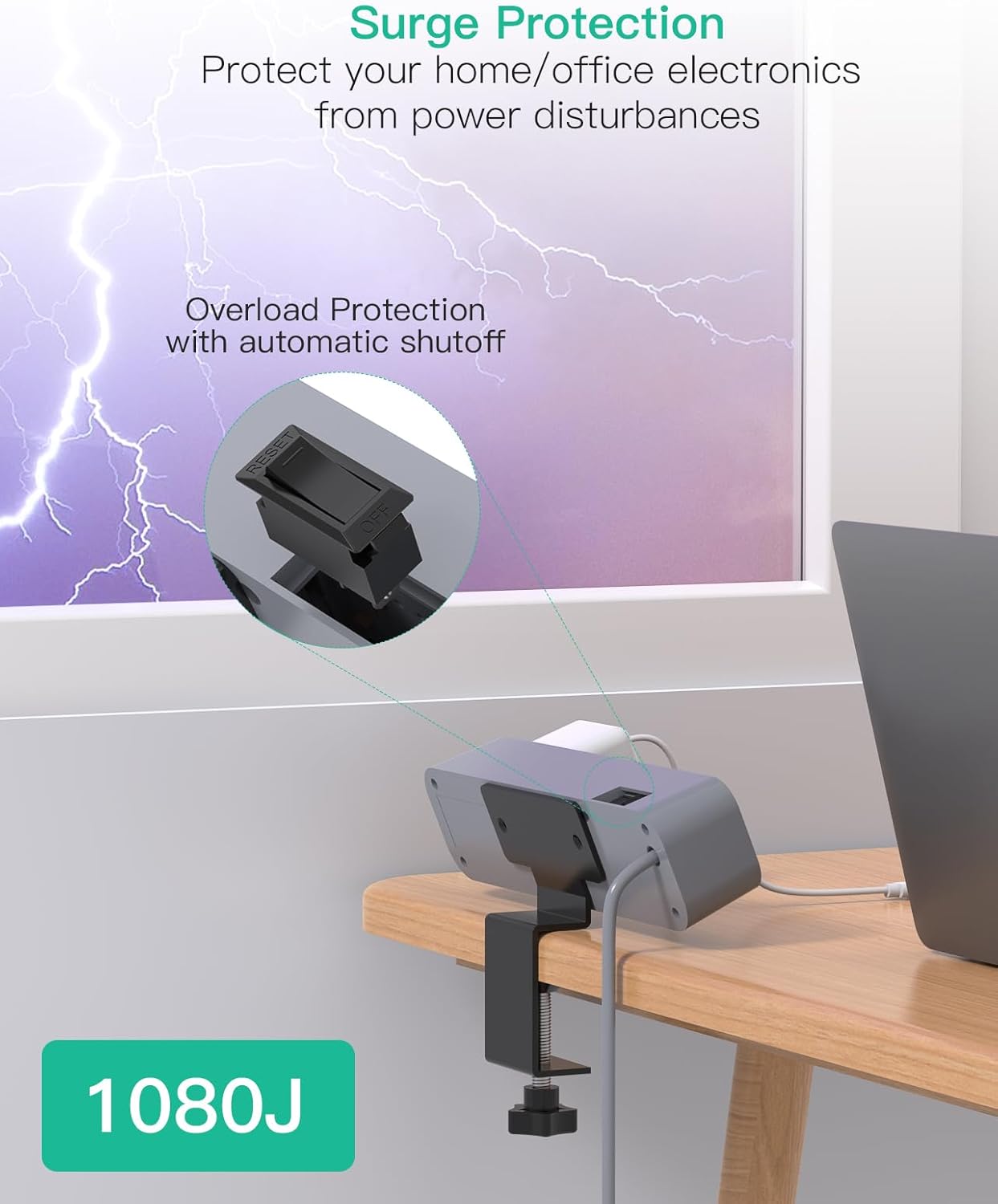
Image: Surge protection and reset switch.
Maintenance
To ensure optimal performance and longevity of your power strip, follow these maintenance guidelines:
- Cleaning: Disconnect the power strip from the wall outlet before cleaning. Use a dry, soft cloth to wipe the exterior. Do not use liquid cleaners or abrasive materials.
- Inspection: Periodically inspect the power cord and the unit for any signs of damage, such as frayed wires or cracks. If damage is found, discontinue use immediately and contact customer support.
- Environment: Keep the power strip in a dry environment, away from moisture, excessive heat, and direct sunlight.
Troubleshooting
If you encounter issues with your Mifaso PD30W Desk Clamp Power Strip, refer to the following common solutions:
| Problem | Possible Cause | Solution |
|---|---|---|
| No power to outlets/USB ports | Power switch is off Overload protection tripped Wall outlet issue | Ensure power switch is ON. Reduce connected devices, then press reset switch. Test wall outlet with another device. |
| Slow charging via USB-C PD | Multiple USB ports in use Device not PD compatible Faulty cable | Use USB-C1 port alone for maximum 30W output. Ensure your device supports USB Power Delivery. Try a different USB-C cable. |
| Power strip not clamping securely | Desk thickness outside range Clamp not tightened enough | Verify desk thickness is between 0.5 and 1.96 inches. Tighten the clamp screw firmly. |
Specifications
| Brand | Mifaso |
| Model | PD30W |
| AC Outlets | 4 |
| USB-A Ports | 2 |
| USB-C Ports | 1 (30W Power Delivery) |
| Total USB Ports | 3 |
| Surge Protection Rating | 1080 Joules |
| Voltage | 125V |
| Plug Type | Type A |
| Cord Length | 5 feet (1.5 meters) |
| Clamp Thickness Range | 0.5 - 1.96 inches (1.27 - 5 cm) |
| Color | Gray |
Warranty Information
The Mifaso PD30W Desk Clamp Power Strip comes with a 1-Year Limited Warranty from the date of purchase. This warranty covers manufacturing defects and malfunctions under normal use. It does not cover damage caused by misuse, accidents, unauthorized modifications, or external causes such as power surges not protected by the device's surge protection. Please retain your proof of purchase for warranty claims.
Customer Support
For technical assistance, warranty claims, or any questions regarding your Mifaso PD30W Desk Clamp Power Strip, please contact Mifaso customer service. You can typically find contact information on the official Mifaso website or through the retailer where you purchased the product.
You may also visit the Mifaso Store on Amazon for additional product information and support resources.