
1. Product Overview
This manual provides instructions for the MUSM Bread Machine Non-Stick Liner and Noodle Bucket, designed as a replacement or accessory for compatible bread makers. It features durable construction and a non-stick coating for optimal baking results.
Key Features:
- Strong Durability: Made of thickened carbon steel, scratch and wear-resistant, retains shape after long-term use.
- Non-Stick and Easy Release: Food-grade non-stick coating ensures bread comes out clean with no residue, and cleaning is effortless.
- Smooth Mixing: Interior grooves are designed to fit the mixing blade, making dough mixing more uniform and preventing jamming.
- Multipurpose Use: Can be used as a mixing or fermentation bowl, offering more value with multiple functions.
2. Compatibility
This bread machine liner and noodle bucket is compatible with various mainstream bread machine models, including specific Midea models:
- Midea AHS20AB-PG
- Midea AHS20AB-PP
- Midea AHS20AC-PASY N
Please verify the dimensions of your existing bread machine pan to ensure proper fitment. The top diameter of this bucket is approximately 14.3 cm.
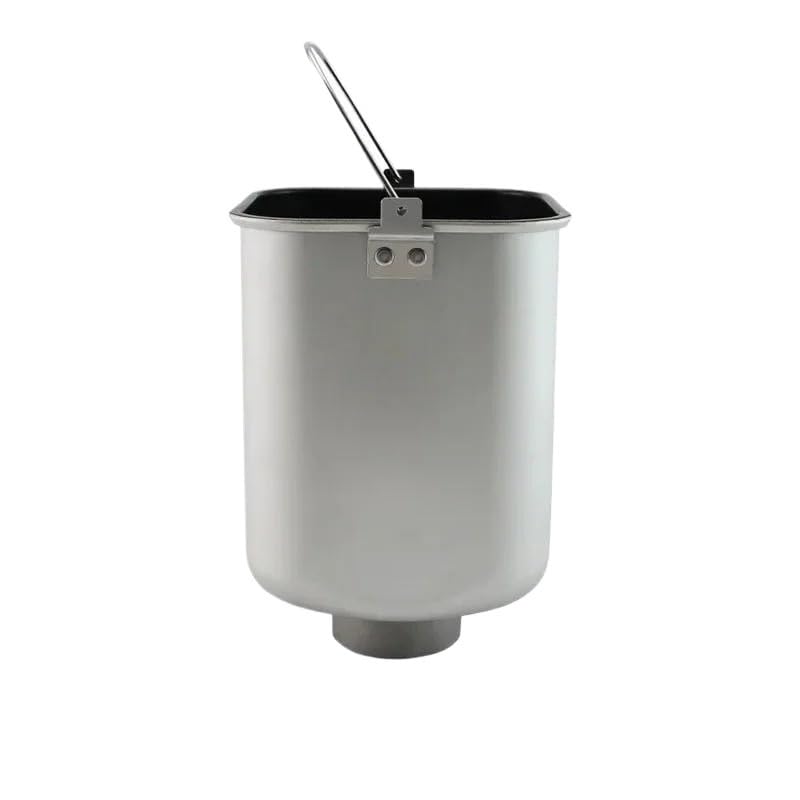
Image 1: Top view of the bread machine bucket with indicated diameter of 14.3 cm. This measurement is crucial for ensuring compatibility with your bread maker.
3. Setup and Installation
- Unpack: Carefully remove the bread machine liner and noodle bucket from its packaging.
- Initial Cleaning: Before first use, wash the bucket thoroughly with warm, soapy water. Rinse completely and dry with a soft cloth. Do not use abrasive cleaners or scouring pads, as these can damage the non-stick coating.
- Install Mixing Blade: Ensure the mixing blade (not included, typically from your bread machine) is securely attached to the shaft at the bottom of the bucket. The interior grooves are designed to fit the mixing blade for uniform dough mixing.
- Placement in Bread Machine: Insert the cleaned bucket into your bread machine's baking chamber. Ensure it is seated firmly and correctly according to your bread machine's manufacturer instructions.
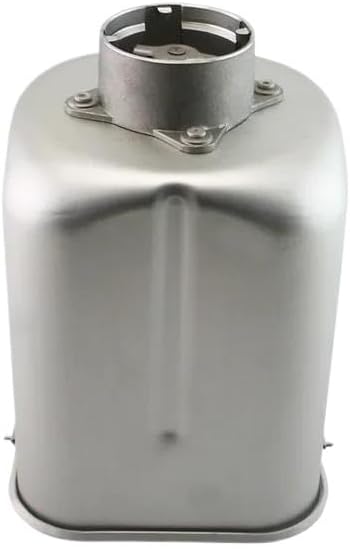
Image 2: Bottom view of the bread machine bucket, highlighting the mixing shaft where the mixing blade attaches.
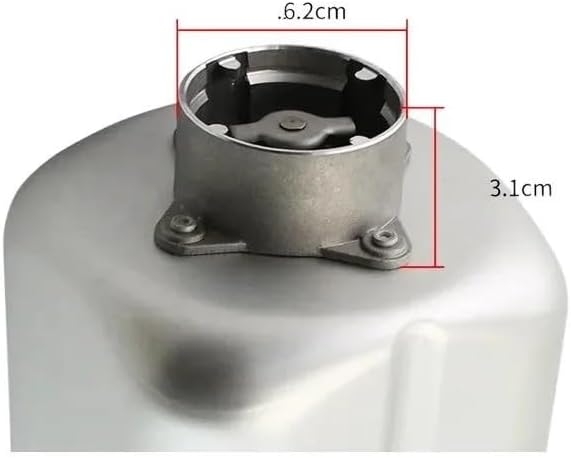
Image 3: Detailed view of the mixing shaft mechanism at the bottom of the bucket, showing its structure and approximate dimensions (6.2cm diameter, 3.1cm height) for blade compatibility.
4. Operating Instructions
This bucket functions as the primary container for mixing and baking within your compatible bread machine. Follow your bread machine's specific recipe and program instructions for best results.
- Add Ingredients: Place all ingredients into the bucket according to your recipe, typically liquids first, then dry ingredients, with yeast added last.
- Select Program: Close the bread machine lid and select the desired baking program on your bread machine.
- Baking Cycle: The bread machine will automatically mix, knead, rise, and bake the bread within the bucket. The non-stick coating facilitates easy dough release during mixing and prevents sticking during baking.
- Removal: Once the baking cycle is complete, carefully remove the hot bucket from the bread machine using oven mitts. Allow the bread to cool slightly in the bucket before attempting to remove it.
- Easy Release: Invert the bucket and gently shake to release the bread. The non-stick surface should allow the bread to slide out easily.
Note: This bucket can also be used for dough mixing or fermentation processes as part of your bread machine's functions or for manual preparation.
5. Maintenance and Cleaning
Proper care will extend the life of your non-stick liner and noodle bucket.
- After Each Use: Allow the bucket to cool completely. Fill with warm water and a small amount of dish soap. Let it soak for 10-15 minutes to loosen any stuck-on residue.
- Cleaning: Use a soft sponge or cloth to gently clean the interior and exterior. Do not use metal scouring pads, abrasive brushes, or harsh chemical cleaners, as these will damage the non-stick coating.
- Drying: Rinse thoroughly with clean water and dry immediately with a soft towel to prevent water spots and maintain the non-stick surface.
- Storage: Store the bucket in a dry place, away from direct heat or extreme cold.
- Mixing Blade: Ensure the mixing blade is also cleaned and dried after each use.
6. Troubleshooting
If you encounter issues with your bread machine liner, consider the following:
- Bread Sticking: Ensure the non-stick coating is not damaged. Always allow bread to cool slightly before attempting to remove it. A small amount of cooking oil or spray can be used on the mixing blade if dough consistently sticks.
- Dough Not Mixing Properly: Verify that the mixing blade is correctly installed on the shaft. Check your bread machine's manual for proper blade placement.
- Bucket Not Seating Correctly: Ensure there are no obstructions in the bread machine's baking chamber. The bucket should fit snugly and securely.
- Unusual Noises: If the bucket or mixing blade causes unusual noises, ensure all parts are correctly assembled and the bucket is properly seated. Refer to your bread machine's manual for further troubleshooting.
7. Specifications
| Attribute | Detail |
|---|---|
| Model Number | CS1025 |
| Brand | MUSM |
| Material | Thickened Carbon Steel with Food-Grade Non-Stick Coating |
| Approximate Top Diameter | 14.3 cm (5.6 inches) |
| Item Weight | 1.76 ounces (approximately 50 grams) |
| Package Dimensions | 0.39 x 0.39 x 0.39 inches (1 x 1 x 1 cm) - Note: These dimensions may refer to packaging and not the product itself. Please refer to the approximate top diameter for product fit. |
| ASIN | B0GGJFYS88 |
8. Warranty and Support
Specific warranty information for this product is not provided in the available documentation. For any questions, concerns, or support regarding this MUSM product, please contact the retailer or manufacturer directly.
Please retain your purchase receipt for any potential warranty claims or support inquiries.