
1. Introduction and Safety Guidelines
Thank you for choosing the WERHY H03 Foldable Electric Scooter. This manual provides essential information for the safe operation, maintenance, and troubleshooting of your scooter. Please read it thoroughly before your first ride and keep it for future reference. Always prioritize your safety and the safety of others.
General Safety Rules
- Always wear a helmet and appropriate safety gear (knee pads, elbow pads) when riding.
- Do not ride in wet conditions, heavy rain, or through puddles.
- Avoid riding on uneven surfaces, potholes, or obstacles.
- Adhere to local traffic laws and regulations.
- Do not allow children under the recommended age (Adult) to operate the scooter.
- Maintain a safe distance from pedestrians and other vehicles.
- Do not perform stunts or sudden maneuvers.
- Regularly inspect your scooter for any damage or loose parts before each ride.
- Ensure the battery is adequately charged before use.
2. Product Overview
The WERHY H03 electric scooter is designed for urban commuting and recreational riding, featuring a powerful motor, long-range battery, and smart controls. Familiarize yourself with its main components:

Figure 2.1: The WERHY H03 Foldable Electric Scooter, showcasing its sleek design and key features like 19 MPH top speed, 15 miles range, 15% uphill climbing, 350W brushless motor, and APP smart control.
Key Components
- Handlebars: For steering and control, equipped with grips, brake levers, and the digital display.
- Digital Display: Shows speed, battery level, and riding mode.
- Throttle: Controls acceleration.
- Brake Levers: Activates the front electronic brake and rear mechanical brake.
- LED Headlight: For visibility during low-light conditions.
- Folding Mechanism: Allows for easy folding and portability.
- Deck: The standing platform, housing the battery.
- 8.5-inch Solid Tires: Maintenance-free tires providing good grip.
- 350W Brushless Motor: Provides powerful and efficient propulsion.
- Taillight: For rear visibility and braking indication.
- Kickstand: For parking the scooter.
3. Setup
Your WERHY H03 scooter comes mostly pre-assembled. Follow these steps for initial setup:
Unboxing and Unfolding
- Carefully remove the scooter and all accessories (charger, manual) from the packaging.
- Place the scooter on a flat surface.
- Locate the folding mechanism near the base of the handlebar stem. Release the latch to unfold the stem until it locks securely into place.
- Ensure all connections are secure and the handlebars are firmly attached.
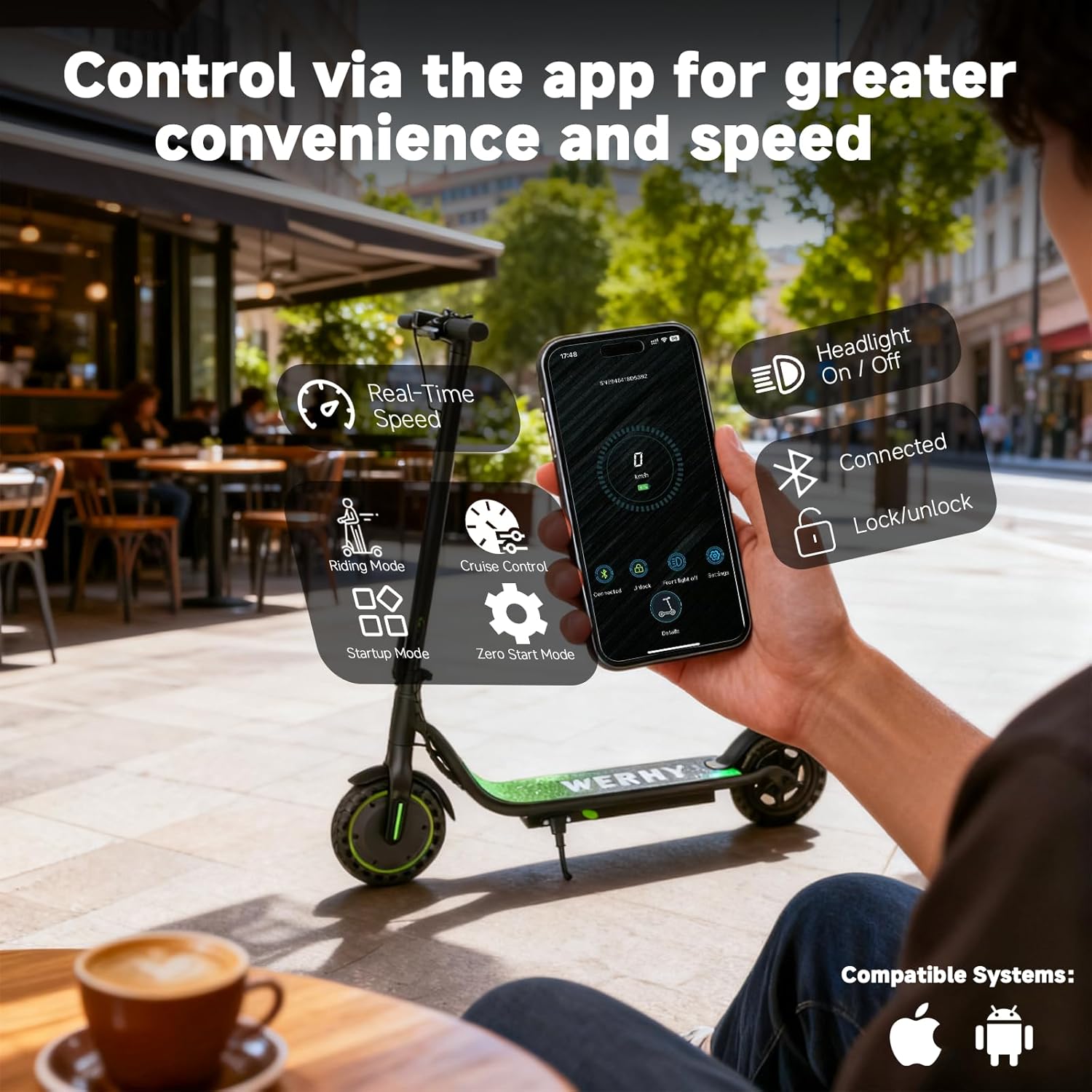
Figure 3.1: The WERHY H03 electric scooter in its folded state, demonstrating its compact design for easy carrying and storage.
Initial Charging
Before your first ride, fully charge the scooter's battery.
- Locate the charging port, usually on the side of the deck.
- Connect the charger to the charging port, then plug the charger into a power outlet.
- The charging indicator on the charger will typically show red during charging and turn green when fully charged.
- Charging time is approximately 4-5 hours for a full charge. Do not overcharge.

Figure 3.2: Internal view of the scooter's 36V 5.2Ah battery, highlighting its long-lasting capacity and overload protection for extended battery life.
4. Operating Instructions
Learn how to safely operate your WERHY H03 electric scooter.
Power On/Off and Riding Modes
- Power On: Press and hold the power button on the digital display for a few seconds until the screen illuminates.
- Change Riding Mode: Briefly press the power button to cycle through different speed modes (e.g., ECO, D, S). Each mode offers varying speed limits and power output.
- Power Off: Press and hold the power button until the display turns off.

Figure 4.1: The Smart LED Display on the handlebars, showing current speed, battery power, and the selected riding mode (ECO, D, S). It also indicates Bluetooth connection and cruise control activation.
Riding the Scooter
- Place one foot firmly on the deck and push off with the other foot to gain initial momentum.
- Once moving, gently press the throttle to accelerate.
- To brake, release the throttle and gently squeeze the brake levers. The scooter features a front electronic brake and a rear mechanical brake for reliable stopping power.
- Cruise Control: If enabled, maintain a consistent speed for a few seconds, and cruise control will activate, indicated by a light on the display. To disengage, press the brake or throttle.

Figure 4.2: Detailed view of the Dual Braking System (electronic brake and drum brake) and Dual Lighting System (LED headlight and taillight) for enhanced safety during travel.
Smart APP Control
Enhance your riding experience by connecting your scooter to the dedicated mobile application.
- Download the WERHY app from your smartphone's app store.
- Ensure your scooter is powered on and Bluetooth is enabled on your phone.
- Open the app and follow the on-screen instructions to pair with your scooter.
- Through the app, you can monitor real-time speed, adjust riding modes, activate/deactivate cruise control, lock/unlock the scooter, and control the headlight.
Figure 4.3: The WERHY mobile application interface, showing options for real-time speed monitoring, riding mode selection, cruise control, startup mode, headlight control, connection status, and digital lock/unlock.
5. Maintenance
Proper maintenance ensures the longevity and safe operation of your scooter.
Cleaning and Storage
- Clean the scooter regularly with a damp cloth. Do not use high-pressure water or harsh chemicals.
- Store the scooter in a cool, dry place away from direct sunlight and extreme temperatures.
- When storing for extended periods, ensure the battery is charged to about 50-70% and recharge it every 30-60 days to prevent deep discharge.
Battery Care
- Use only the original WERHY charger provided with your scooter.
- Avoid fully draining the battery before recharging.
- Do not expose the battery to temperatures below -10°C (14°F) or above 40°C (104°F).
Tire and Brake Inspection
- Regularly check the solid tires for wear and tear. While maintenance-free, excessive wear can affect performance.
- Ensure brake levers are responsive and the braking system functions correctly. Adjust if necessary or consult a service professional.
6. Troubleshooting
This section addresses common issues you might encounter with your WERHY H03 scooter.
| Problem | Possible Cause | Solution |
|---|---|---|
| Scooter does not power on | Low battery; loose connections; power button issue. | Charge the battery fully. Check all cable connections. Contact support if the issue persists. |
| Reduced speed or range | Low battery; heavy load; riding uphill; strong headwind; cold weather. | Ensure battery is fully charged. Reduce load. Avoid extreme conditions. |
| Brakes not responsive | Brake cable loose or damaged; brake pads worn. | Inspect brake cables and pads. Adjust or replace as needed. Seek professional service. |
| App connection issues | Bluetooth off; scooter not powered on; app outdated. | Ensure Bluetooth is on and scooter is powered. Update the app. Restart both devices. |
| Unusual noises during operation | Loose components; motor issue; wheel bearing issue. | Inspect for loose screws or parts. If noise persists, contact customer support. |
7. Specifications
Detailed technical specifications for the WERHY H03 Electric Scooter.
| Feature | Specification |
|---|---|
| Brand | WERHY |
| Model Name | H03 |
| Motor Power | 350W |
| Max Speed | 19 MPH |
| Max Distance Range | 15 Miles |
| Battery Capacity | 187.2Ah (36V 5.2Ah) |
| Charging Time | 4-5 hours |
| Weight Limit | 265 Pounds |
| Wheel Size | 8.5 Inches |
| Wheel Type | Solid |
| Brake Style | Front Electronic Brake, Rear Mechanical Brake |
| Frame Material | Aluminum |
| Special Feature | Digital Display, APP Control, Cruise Control |
| Recommended Age Range | Adult |
| Included Components | Electric Scooter, Charger, Manual |
8. Warranty and Support
WERHY is committed to providing high-quality products and customer satisfaction.
Warranty Information
The WERHY H03 Electric Scooter comes with a limited warranty:
- One-year warranty for the E-scooter and various parts.
- Six-month warranty for the battery and motor.
Please retain your proof of purchase for warranty claims. The warranty covers manufacturing defects and does not cover damage caused by misuse, accidents, or unauthorized modifications.
Customer Support
If you have any questions, require assistance, or need to make a warranty claim, please contact WERHY customer service. Refer to the contact information provided on the WERHY official website or your purchase documentation.