
Introduction
This manual provides instructions for the assembly, operation, and maintenance of your roomfitters Multifunctional Kitchen Pantry Buffet with Foldable Workstation Desk. Please read this guide thoroughly before assembly and use to ensure proper function and safety. Keep this manual for future reference.
The roomfitters pantry buffet is designed to offer versatile storage and a convenient workspace in compact living areas. It features adjustable shelving, a drop-down workstation desk, and an integrated power outlet with USB ports.
Safety Information
WARNING: Failure to follow these safety instructions may result in injury or damage to the product.
- Always assemble the unit on a soft, clean surface to prevent scratches.
- Ensure all connections are securely tightened before use. Periodically check and re-tighten as necessary.
- Do not overload shelves. Distribute weight evenly.
- This unit includes an anti-tipping build. Always use the provided anti-tip hardware to secure the unit to a wall, especially if children are present.
- Keep small parts away from children during assembly.
- Do not stand or climb on the unit.
- When using the integrated power outlet, ensure that connected devices do not exceed the maximum rated power. Avoid spilling liquids near the power outlet.
Package Contents
Before beginning assembly, verify that all parts and hardware are present. Refer to the included parts list in your assembly guide. If any components are missing or damaged, contact customer support immediately.
Included Components:
- Furniture panels and shelves
- Assembly hardware (screws, dowels, cam locks, etc.)
- Hinges and gas struts for foldable desk
- Wheels for bottom doors
- Integrated power outlet with USB ports
- Anti-tip hardware
- Assembly tools (e.g., Allen wrench)
- Detailed Assembly Instructions
Setup and Assembly
Assembly of this unit is required. Detailed, step-by-step instructions and all necessary tools are included in the product packaging. Please follow the provided assembly guide carefully.
Assembly Tips:
- Read through all steps before you begin.
- Identify and sort all parts and hardware.
- Work with a partner if possible, especially for lifting larger sections.
- Do not overtighten screws to avoid damaging the engineered wood.
- Ensure the unit is placed on a level surface after assembly.
Dimensions Overview:
Refer to the diagram below for overall and internal dimensions of the pantry buffet.
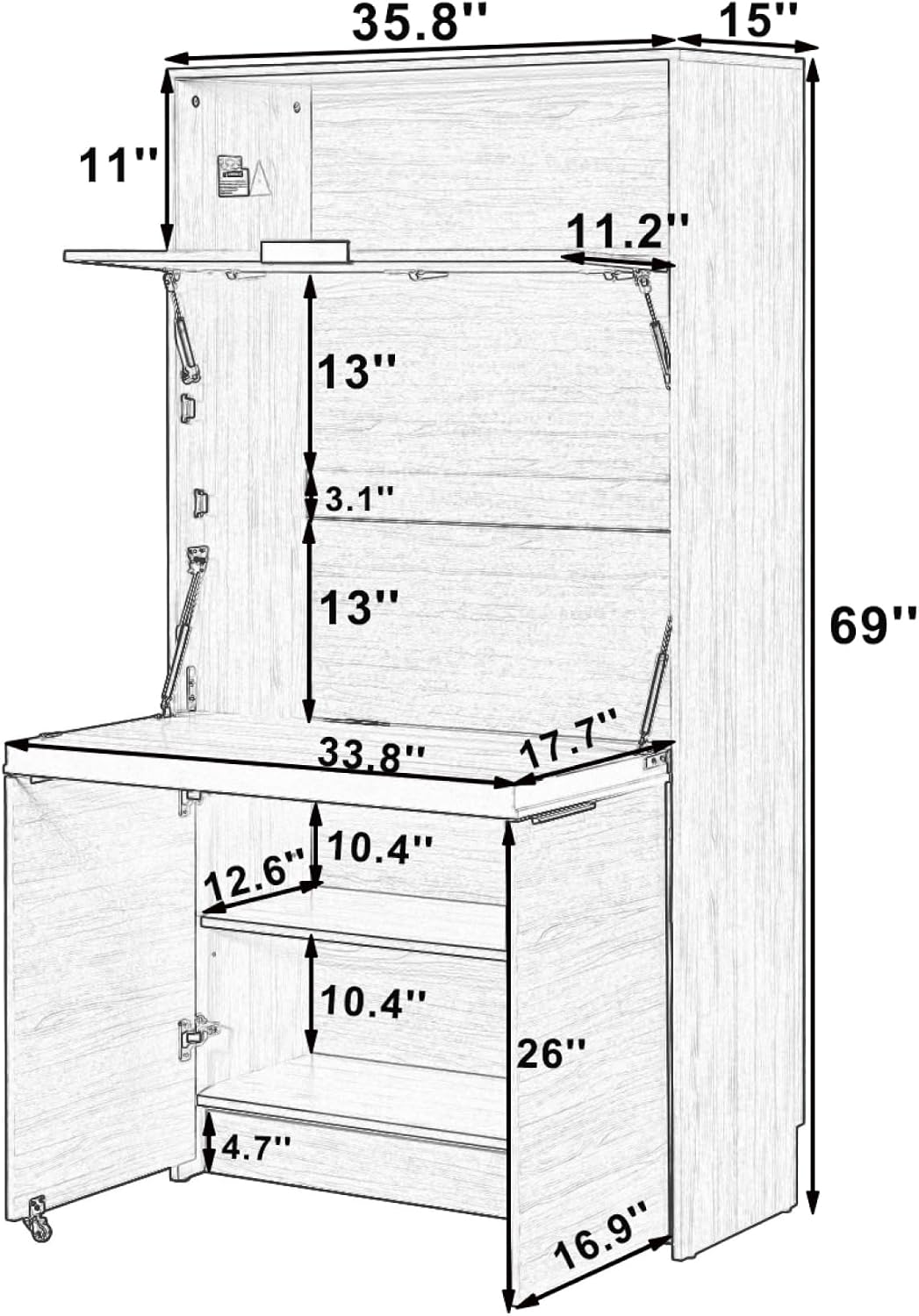
Figure 1: Product Dimensions Diagram
Overall Product Dimensions: L 35.8" x W 15.0" x H 69.0"
Item Weight: 121.04 Pounds
Operating Instructions
Using the Foldable Workstation Desk:
The central panel of the pantry buffet functions as a drop-down workstation desk. To open, gently pull the handle located on the top edge of the panel. The gas struts will assist in lowering the desk smoothly. The bottom doors include wheels that provide support when the desk is open, ensuring stability.

Figure 2: Workstation Desk in Open Position
To close the desk, lift the panel until it clicks securely into its upright position. Ensure the desk is fully closed before moving the unit.
Utilizing the Integrated Power Outlet:
The upper compartment features a built-in power outlet with standard plugs and USB ports. This allows for convenient charging of devices or powering laptops directly from the unit.

Figure 3: Power Outlet Location (Side View)
- Plug the unit's main power cord into a standard wall outlet.
- Insert device power cords or USB cables into the available ports.
- Do not exceed the maximum electrical load specified on the power strip.
Adjustable Shelving:
The internal shelves within the pantry and lower compartments are adjustable. To change shelf height, remove the shelf and reposition the shelf pins to the desired slots. Ensure all four pins are securely inserted before placing items on the shelf.
Figure 4: Interior Storage with Adjustable Shelves
Maintenance and Care
Proper care will extend the life and appearance of your roomfitters pantry buffet.
- Cleaning: Wipe surfaces with a soft, damp cloth. Avoid harsh chemicals or abrasive cleaners, which can damage the finish.
- Spills: Clean spills immediately to prevent staining or damage to the engineered wood.
- Protection: Use coasters or placemats on the workstation surface to protect against heat and moisture.
- Inspection: Periodically check all hardware connections and tighten if loose. Inspect the power cord for any damage.
- Scratch Resistant: The unit features a scratch-resistant finish, but care should still be taken to avoid sharp objects.
Troubleshooting
If you encounter issues with your pantry buffet, refer to the following common solutions:
| Problem | Possible Cause | Solution |
|---|---|---|
| Unit is wobbly or unstable | Loose hardware; uneven floor; anti-tip not installed | Check and tighten all screws. Move to a level surface or use shims. Install anti-tip hardware as directed. |
| Foldable desk does not open/close smoothly | Hinges or gas struts misaligned/damaged; obstruction | Inspect hinges and struts for proper alignment. Ensure no objects are blocking the mechanism. Contact support if damaged. |
| Power outlet not working | Unit not plugged in; wall outlet issue; overloaded circuit | Ensure the unit's power cord is securely plugged into a functional wall outlet. Test the wall outlet with another device. Reduce the number of connected devices. |
Specifications
- Brand: roomfitters
- Model Number: RF-N717SP000101AAN
- Product Dimensions (L x W x H): 35.8" x 15.0" x 69.0"
- Item Weight: 121.04 Pounds
- Material: Engineered Wood
- Finish Type: Painted, Scratch Resistant
- Color: Natural
- Number of Drawers: 2 (integrated into design)
- Special Features: Foldable Workstation Desk, Integrated Power Outlet (Plugs & USB), Adjustable Shelves, Mobile Bottom Doors, Anti-Tipping Build
- Mounting Type: Floor Mount (with wall anchor for anti-tip)
- Required Assembly: Yes
Warranty and Support
For warranty information, missing parts, or technical assistance, please contact roomfitters customer support. Refer to your purchase documentation or the roomfitters website for contact details.
Please have your model number (RF-N717SP000101AAN) and purchase date available when contacting support.