
AZZUNO AC/DC TIG Welder ACDC-200F User Manual
Model: ACDC-200F
1. Important Safety Information
Welding operations can be hazardous. Always follow safety precautions to prevent injury or damage. Read and understand all safety warnings before operating this equipment.
- Electric Shock: Can kill. Do not touch live electrical parts. Wear dry welding gloves and protective clothing. Ensure proper grounding.
- Fumes and Gases: Can be hazardous to your health. Keep your head out of the fumes. Use adequate ventilation or exhaust at the arc.
- Arc Rays: Can burn eyes and skin. Wear a welding helmet with a proper shade filter. Wear safety glasses with side shields. Protect others with a welding screen.
- Fire and Explosion: Hot metal and sparks can cause fires. Keep combustibles away from the welding area. Have a fire extinguisher readily available.
- Noise: Excessive noise can damage hearing. Wear ear protection.
- Moving Parts: Can cause injury. Keep clear of moving parts.
Always consult local safety regulations and standards for welding.
2. Product Overview
The AZZUNO ACDC-200F is a versatile AC/DC TIG welder designed for a wide range of welding tasks. It offers multiple welding processes including AC TIG, AC Pulsed TIG, DC TIG, DC Pulsed TIG, Spot TIG, and Stick (MMA) welding. This machine is suitable for welding materials such as aluminum, stainless steel, carbon steel, and iron.

Image 2.1: The AZZUNO ACDC-200F welder demonstrating its 6-in-1 multi-process capabilities, including various TIG modes and Stick welding.
The welder features an advanced MCU Digital control system for precise parameter adjustments and an automatic save function to restore previous settings.
3. Package Contents
Verify that all items listed below are included in your package. If any items are missing or damaged, contact AZZUNO customer support.
- AZZUNO AC/DC TIG Welder (ACDC-200F)
- TIG Torch (WP-26)
- Electrode Holder
- Ground Clamp
- Brush/Hammer
- 110V/220V Adapter Cord
- Argon Gas Regulator and Hose
- Nozzle (3 pieces)
- Collet (3 pieces)
- Tungsten Electrode (3 pieces)
- 5-pin Foot Pedal

Image 3.1: The AZZUNO ACDC-200F welder displayed with its complete set of accessories, including the TIG torch, ground clamp, electrode holder, foot pedal, and gas regulator.
4. Setup Instructions
4.1 Power Connection
The AZZUNO ACDC-200F operates on both 110V and 220V power supplies. Use the provided adapter cord to connect the welder to the appropriate power outlet. Ensure the power source matches the welder's requirements to prevent damage.
4.2 Gas Connection (TIG Welding)
- Connect the Argon Gas Regulator to your argon gas cylinder.
- Attach the gas hose from the regulator to the gas inlet port on the rear of the welder.
- Ensure all connections are tight to prevent gas leaks.
4.3 Torch and Ground Clamp Connection
- Connect the TIG Torch (WP-26) to the appropriate TIG torch connector on the front panel of the welder.
- Connect the Ground Clamp cable to the ground terminal on the front panel. Securely attach the ground clamp to the workpiece or welding table to ensure a good electrical connection.
- For Stick (MMA) welding, connect the Electrode Holder to the positive (+) terminal and the Ground Clamp to the negative (-) terminal.
4.4 Foot Pedal Connection
The 5-pin foot pedal provides remote amperage control. Connect the 5-pin plug of the foot pedal to the corresponding 5-pin receptacle on the front panel of the welder.

Image 4.1: The AZZUNO ACDC-200F welder with the 5-pin foot pedal connected to its designated port.
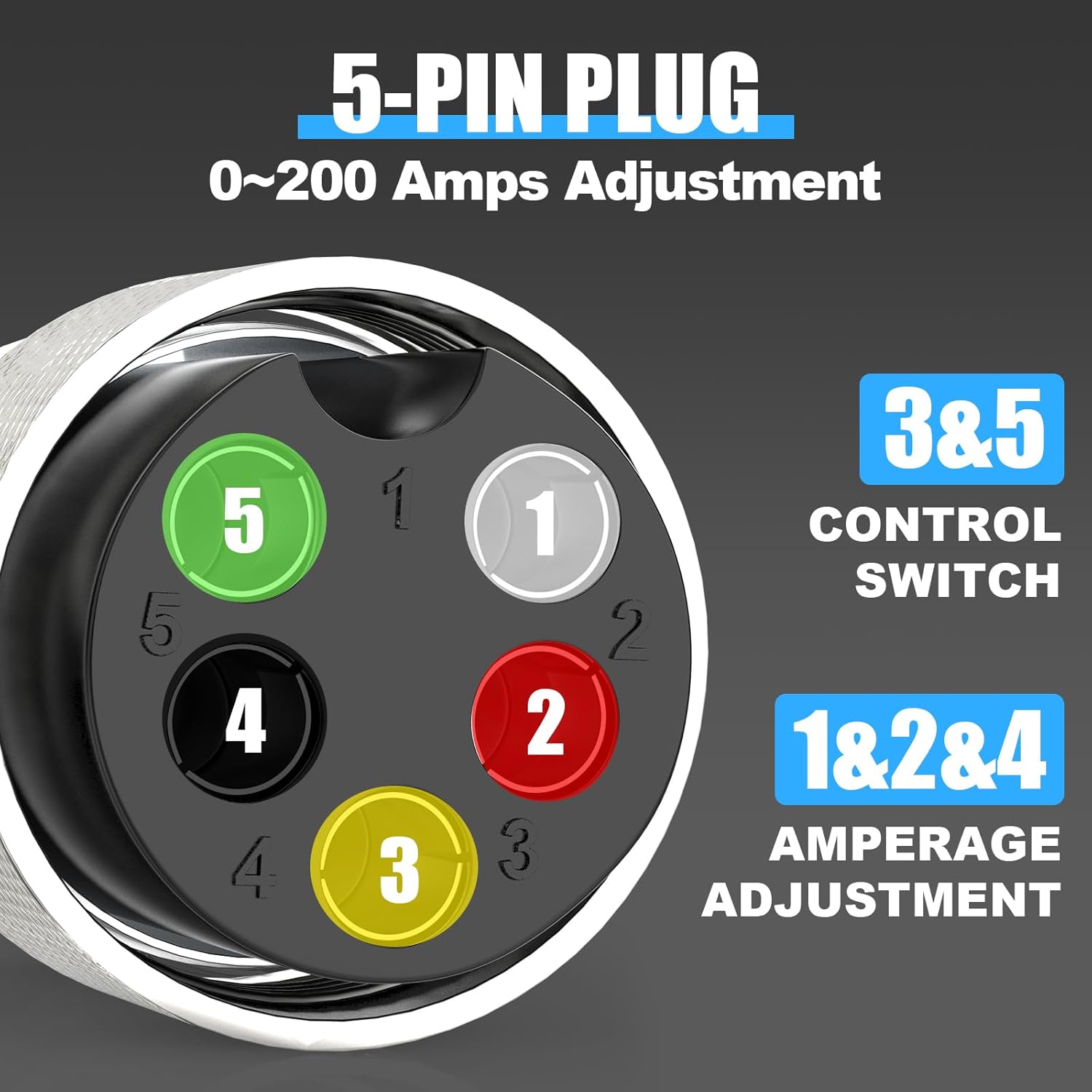
Image 4.2: A detailed view of the 5-pin plug, indicating pins 1, 2, and 4 for amperage adjustment, and pins 3 and 5 for control switch functions.
5. Operating Instructions
5.1 Control Panel Overview
The intuitive control panel allows for precise adjustment of welding parameters. Familiarize yourself with the layout:
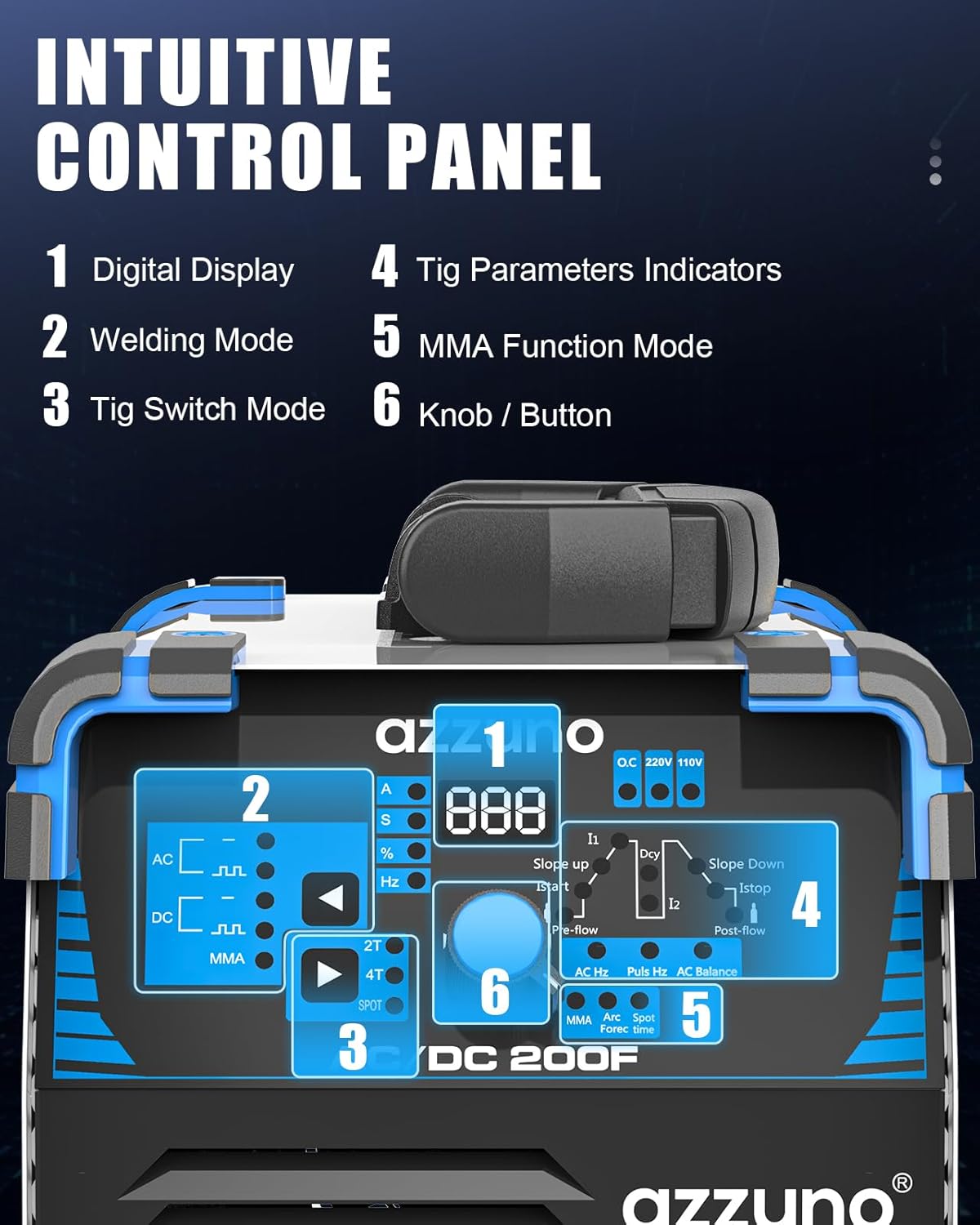
Image 5.1: The control panel of the AZZUNO ACDC-200F, highlighting key areas: 1. Digital Display, 2. Welding Mode, 3. TIG Switch Mode, 4. TIG Parameters Indicators, 5. MMA Function Mode, 6. Knob/Button for adjustments.
- Digital Display: Shows current parameter values.
- Welding Mode: Selects AC, DC, or MMA (Stick) welding.
- TIG Switch Mode: Selects 2T (2-touch), 4T (4-touch), or SPOT TIG.
- TIG Parameters Indicators: Displays active TIG parameters for adjustment.
- MMA Function Mode: Activates Stick welding functions.
- Knob/Button: Used to navigate menus and adjust parameter values.
5.2 Welding Modes and Parameter Settings
The ACDC-200F offers the following welding modes:
- AC TIG: For aluminum and magnesium alloys.
- AC Pulsed TIG: Provides better control over heat input for thin aluminum.
- DC TIG: For stainless steel, carbon steel, copper, and other non-ferrous metals (except aluminum).
- DC Pulsed TIG: Ideal for thin materials and out-of-position welding on DC-weldable metals.
- Spot TIG: For tack welding or joining thin sheets.
- Stick (MMA) Welding: For general purpose welding with coated electrodes.

Image 5.2: Visual representation of the different welding waveforms available, including TIG AC, TIG AC Pulse, TIG DC, TIG DC Pulse, TIG Spot, and MMA.
Adjustable Parameters:
Use the control knob to select and adjust the following parameters for precise welding control:
- Pre-flow: Gas flow before arc ignition.
- Initial current (I1): Starting amperage.
- Slope-up: Time to ramp up from initial to peak current.
- Peak current: Maximum welding amperage.
- Base current: Minimum amperage during pulse cycle.
- Slope-down: Time to ramp down from peak to crater current.
- Crater current (Istop): Final amperage before arc termination.
- Post-flow: Gas flow after arc termination to protect the weld puddle.
- Pulse duty: Percentage of time spent at peak current during pulse.
- AC frequency: Controls arc cone width and cleaning action in AC TIG.
- AC balance: Controls the ratio of electrode negative to electrode positive in AC TIG, affecting cleaning and penetration.
- Pulse frequency: Number of pulses per second in pulsed TIG.
The welder features an automatic save function, retaining your last used parameters even after power cycling.
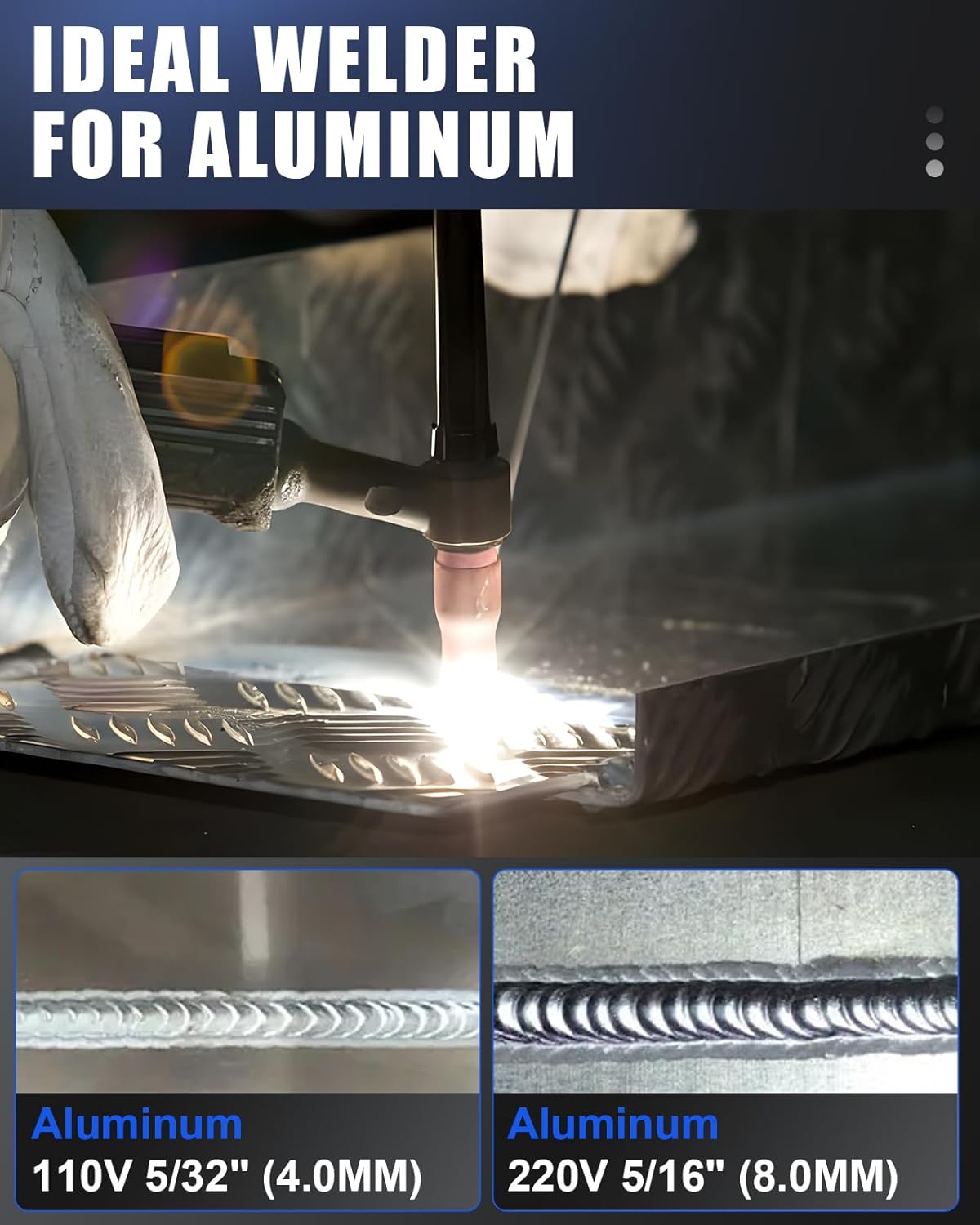
Image 5.3: Examples of TIG welds on aluminum, demonstrating results achievable with 110V (5/32" or 4.0mm) and 220V (5/16" or 8.0mm) settings.
6. Maintenance
Regular maintenance ensures the longevity and optimal performance of your welder.
- Cleaning: Periodically clean the welder's exterior with a dry, soft cloth. Use compressed air to blow out dust and debris from inside the machine, especially from cooling vents. Ensure the power is disconnected before cleaning.
- Cable Inspection: Regularly inspect all cables (power, torch, ground, foot pedal) for cuts, fraying, or damaged insulation. Replace damaged cables immediately.
- Connections: Check all electrical and gas connections for tightness. Loose connections can lead to poor performance or safety hazards.
- TIG Torch: Inspect the torch consumables (collet, collet body, ceramic nozzle, tungsten electrode) for wear. Replace as needed to maintain arc stability and weld quality.
- Storage: Store the welder in a clean, dry environment, away from excessive dust, moisture, and extreme temperatures.
7. Troubleshooting
This section provides solutions to common issues you might encounter.
| Problem | Possible Cause | Solution |
|---|---|---|
| Welder does not power on | No power supply; Faulty power cord; Internal fuse blown | Check power outlet and circuit breaker. Inspect power cord. Contact service if fuse is suspected. |
| No arc ignition (TIG) | No gas flow; Tungsten electrode not properly installed; Ground clamp not connected; Incorrect settings | Check gas cylinder and regulator. Ensure tungsten is correctly inserted. Secure ground clamp. Verify welding parameters. |
| Poor weld quality / Porosity | Insufficient shielding gas; Contaminated workpiece; Incorrect travel speed or amperage | Increase gas flow. Clean workpiece thoroughly. Adjust welding technique and parameters. |
| Foot pedal not responding | Foot pedal not connected; Faulty pedal cable | Ensure 5-pin foot pedal is securely connected. Inspect cable for damage. |
If you encounter issues not listed here or if solutions do not resolve the problem, contact AZZUNO customer support.
8. Specifications
| Feature | Specification |
|---|---|
| Model | ACDC-200F |
| Welding Processes | AC TIG, AC Pulsed TIG, DC TIG, DC Pulsed TIG, Spot TIG, Stick (MMA) |
| Input Voltage | 110V/220V (Dual Voltage) |
| Amperage Range | 0-200 Amps (approximate, depending on mode and input) |
| Dimensions (L×W×H) | 14.5" × 6.7" × 9" (36.8 cm × 17 cm × 22.9 cm) |
| Net Weight | 17 LBS (7.7 kg) |
| Foot Pedal | 5-pin, 10-ft cable, 5K potentiometer |

Image 8.1: Dimensions of the 5-pin foot pedal: 8.5" length, 5.4" width, 4.1" height, with a 10ft cord.
9. Warranty and Support
For warranty information, technical support, or service inquiries, please refer to the warranty card included with your product or visit the official AZZUNO website. Ensure you have your product model number (ACDC-200F) and purchase date available when contacting support.


