
1. Introduction
Thank you for choosing the GYROCOPTERS Zeno2.0 Electric Scooter. This manual provides essential information for the safe operation, assembly, maintenance, and troubleshooting of your scooter. Please read this manual thoroughly before your first ride to ensure optimal performance and safety.
The Zeno2.0 is designed for adults and teens, featuring a powerful motor, long-range battery, and a comfortable adjustable seat, making it suitable for commuting, travel, and various daily activities.
2. Safety Information
Your safety is paramount. Always wear a helmet and appropriate protective gear when riding. Adhere to all local traffic laws and regulations.
2.1 UL2272 Certification
The GYROCOPTERS Zeno2.0 Electric Scooter is UL2272 certified, ensuring it meets high safety standards for electrical and battery components. This certification provides peace of mind regarding the scooter's safety and reliability.

Image: The GYROCOPTERS Zeno2.0 is UL2272 approved, indicating compliance with safety standards for electrical and battery systems. It also features a Smart GPS World Tracker.
2.2 General Safety Guidelines
- Always perform a pre-ride check: ensure brakes are functional, tires are properly inflated, and all parts are secure.
- Do not ride under the influence of alcohol or drugs.
- Avoid riding in heavy rain, on slippery surfaces, or in extreme weather conditions.
- Maintain a safe distance from other vehicles and pedestrians.
- Do not exceed the maximum load capacity of 120 kg (265 lbs).
- Children should only ride under adult supervision and with appropriate safety gear.
3. Package Contents
Carefully unpack your GYROCOPTERS Zeno2.0 Electric Scooter and check for all included items:
- 1 x Gyrocopters Zeno2.0 Electric Scooter
- 1 x Adjustable Shock-Absorbing Seat
- 1 x Large Basket
- 1 x Charger
- 1 x Installation Tools
- 1 x User Manual (this document)
- 1 x GPS Tracker
If any items are missing or damaged, please contact customer support immediately.
4. Product Features
The Zeno2.0 Electric Scooter is equipped with advanced features for a superior riding experience:
4.1 Performance & Power
- Motor: Peak 500W brushless motor for efficient and responsive power.
- Max Speed: Up to 32 km/h (20 mph).
- Max Range: Up to 40 km (25 miles) on a single charge with its 10Ah high-capacity lithium battery.
- Uphill Climb: Capable of climbing inclines up to 15 degrees.
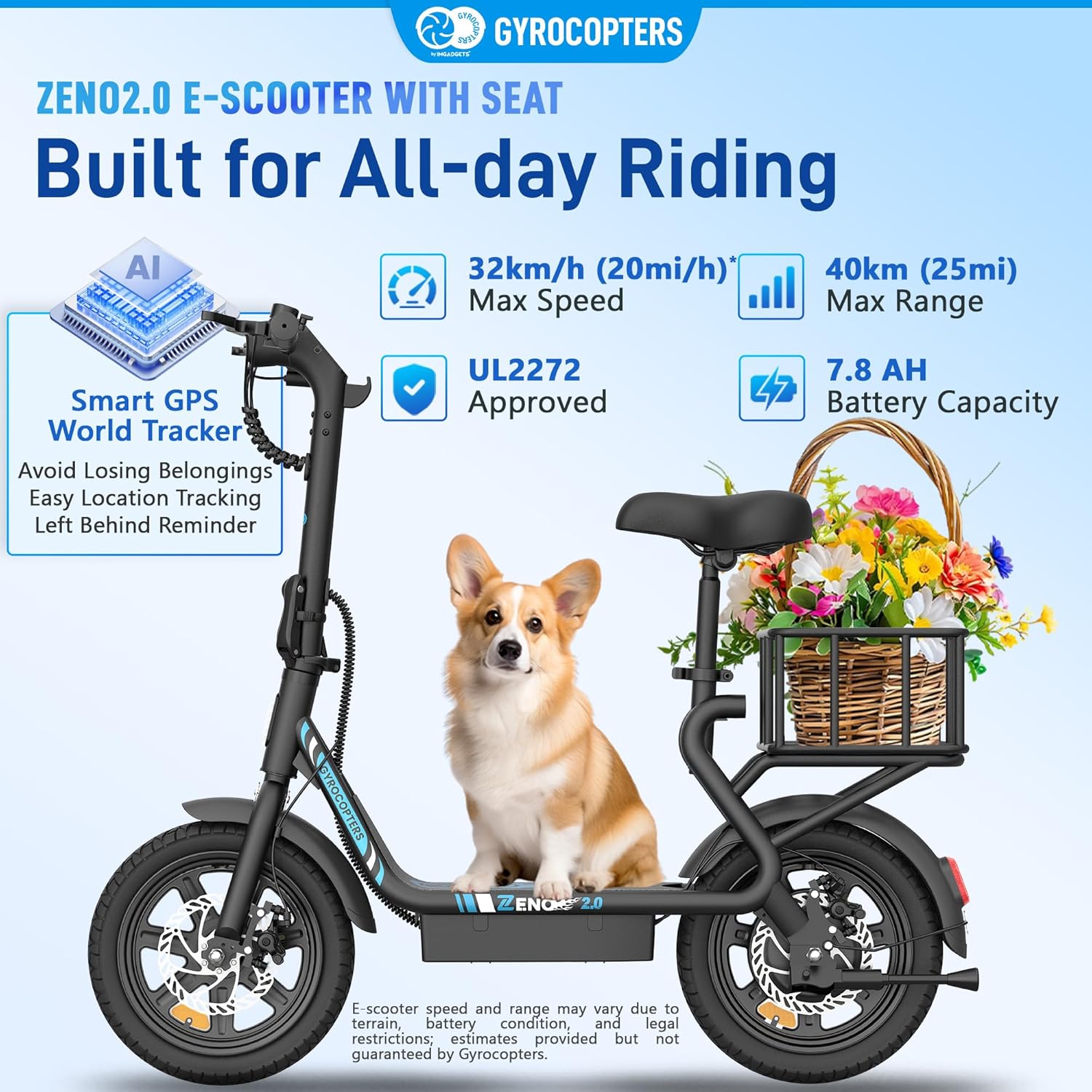
Image: The Zeno2.0 scooter highlighting its 32km/h max speed, 40km max range, 7.8Ah battery capacity, UL2272 approval, and Smart GPS World Tracker.
4.2 Comfort & Durability
- Tires: 14-inch x 2.1-inch durable tires for all-terrain riding, offering stability on city streets, gravel paths, and even snowy trails.
- Shock Absorption: Integrated shock-absorbing design for smoother rides.
- Rear Fender: Provides protection against mud and water splashes.
- Adjustable Seat: Shock-absorbing and height-adjustable seat (28"-34" / 71cm-86cm) for personalized comfort.
- Wider Deck: Anti-slip and stylish deck design for stable footing.

Image: Detail of the 14-inch tires and rear fender, illustrating the scooter's all-terrain capability and protection from mud.
4.3 Safety & Convenience
- Braking System: Dual braking system with front and rear disc brakes combined with regenerative technology for reliable stopping power.
- LED Lights: Front and rear LED lights for increased visibility during day and night.
- Digital Display: Clear LED display showing speed, battery level, and speed mode.
- Foldable Design: Effortless folding frame for easy storage and transport.
- Sturdy Kickstand: For convenient parking.
- Removable Basket: Large basket for carrying essentials, easily removable to accommodate a passenger seat.
- Smart GPS World Tracker: Integrated GPS tracker compatible with Apple Find My, offering anti-theft features, easy location tracking, and a 'Left Behind Reminder'.

Image: Visual representation of the shock-absorbing adjustable seat, bright headlight, front and rear dual disc brakes, and wider deck.

Image: The Zeno2.0 scooter folded and stored in a car trunk, illustrating its compact design for easy transport.
5. Setup
Follow these steps to prepare your Zeno2.0 Electric Scooter for its first ride:
5.1 Unpacking and Initial Inspection
- Carefully remove the scooter and all components from the packaging.
- Inspect the scooter for any visible damage that may have occurred during shipping.
- Ensure all items listed in the 'Package Contents' section are present.
5.2 Unfolding the Scooter
- Place the scooter on a flat surface.
- Locate the folding mechanism near the base of the handlebar stem.
- Release the locking mechanism and carefully lift the handlebar stem until it locks into an upright position. Ensure the locking mechanism is fully engaged and secure.
5.3 Handlebar Assembly (if required)
Some models may require minor handlebar assembly. If your handlebars are not pre-attached:
- Align the handlebars with the stem.
- Secure them using the provided screws and installation tools. Ensure all screws are tightened firmly.
5.4 Installing the Basket and Seat
- Attach the large basket to the rear rack using the provided hardware. Ensure it is securely fastened.
- To install the adjustable seat, slide the seat post into the designated opening on the scooter frame. Adjust the height to your preference and tighten the quick-release clamp or bolt.
- The basket can be removed to allow for a second passenger seat (sold separately) if desired.

Image: The removable basket feature, showing how it can be used for commuting or removed for a second rider.
5.5 Initial Charging
Before your first ride, fully charge the scooter's battery:
- Locate the charging port on the scooter.
- Connect the charger to the scooter, then plug the charger into a power outlet.
- The indicator light on the charger will typically turn red during charging and green when fully charged.
- Do not overcharge the battery. Disconnect the charger once charging is complete.
6. Operating Instructions
Familiarize yourself with the controls and operation of your Zeno2.0 scooter.
6.1 Controls Overview
Image: Detailed view of the handlebar controls, including brake levers, accelerator, LED display, power button, and setting button.
- Power Button: Hold for 3 seconds to power on/off the scooter.
- Setting Button: Press once to switch between speed modes. Hold for 3 seconds to turn the headlight on/off.
- Brake Levers: Located on both handlebars for front and rear disc brakes.
- Accelerator: Twist grip on the right handlebar to accelerate.
- Bell: Located on the left handlebar.
- LED Screen: Displays current speed, battery level, and active speed mode.
6.2 Powering On/Off
To turn the scooter on, press and hold the Power Button on the LED screen for approximately 3 seconds. The display will illuminate. To turn it off, press and hold the Power Button again for 3 seconds.
6.3 Riding and Speed Modes
- Place one foot on the deck and push off with the other foot to gain initial momentum.
- Gently twist the accelerator to engage the motor.
- Press the Setting Button to cycle through the available speed modes:
- Mode 1: 15 km/h
- Mode 2: 20 km/h
- Mode 3: 25 km/h
- Mode 4: 32 km/h
- Select the appropriate speed mode based on your riding environment and experience level.

Image: The LED display showing current speed and battery level, along with the four selectable speed modes.
6.4 Braking
To slow down or stop, gently squeeze both brake levers simultaneously. The dual disc brakes provide effective stopping power. For emergency stops, apply both brakes firmly.
6.5 Headlight Operation
To turn the headlight on or off, press and hold the Setting Button for 3 seconds. Always use the headlight when riding in low-light conditions.
6.6 GPS Tracker Usage
The integrated Smart GPS World Tracker is compatible with Apple Find My. Follow the instructions provided with the GPS tracker to pair it with your device. This allows for real-time location tracking, anti-theft alerts, and a 'Left Behind Reminder' feature.
7. Maintenance
Regular maintenance ensures the longevity and safe operation of your Zeno2.0 scooter.
7.1 Battery Care
- Charge the battery fully before first use and after every ride.
- Avoid completely draining the battery.
- If storing the scooter for an extended period, charge the battery to about 50-70% and recharge every 30-60 days.
- Do not expose the battery to extreme temperatures.
- The Battery Management System (BMS) protects against overload, undervoltage, short circuit, overcurrent, overtemperature, and overvoltage.

Image: Illustration of the 7.8Ah battery and the protective functions of the Battery Management System (BMS).
7.2 Tire Maintenance
- Regularly check tire pressure and inflate to the recommended PSI (refer to tire sidewall for details).
- Inspect tires for wear, punctures, or damage before each ride.
7.3 Cleaning and Storage
- Clean the scooter with a damp cloth. Do not use high-pressure water jets or harsh chemicals.
- Store the scooter in a cool, dry place, away from direct sunlight and moisture.
- When folding for storage, ensure all locking mechanisms are secure.
7.4 Brake Inspection
Periodically check the brake levers and cables for proper tension and responsiveness. If brakes feel loose or ineffective, have them adjusted by a qualified technician.
8. Troubleshooting
This section addresses common issues you might encounter with your Zeno2.0 scooter.
| Problem | Possible Cause | Solution |
|---|---|---|
| Scooter does not turn on | Low battery; Power button not pressed correctly; Loose connection | Charge the battery; Press and hold the power button for 3 seconds; Check all visible connections. |
| Reduced range or speed | Low battery; Overload; Tire pressure low; Riding uphill/against wind | Fully charge battery; Do not exceed max load; Inflate tires to correct pressure; Adjust riding style. |
| Brakes feel weak | Brake cables loose; Brake pads worn | Adjust brake cable tension; Inspect and replace brake pads if worn. Consult a technician if unsure. |
| Unusual noises | Loose components; Debris in wheels/motor | Inspect all parts for tightness; Check wheels and motor for obstructions. |
If you experience issues not listed here or if the suggested solutions do not resolve the problem, please contact customer support.
9. Specifications
| Feature | Detail |
|---|---|
| Model Name | Zeno2.0 |
| Motor Power | Peak 500W |
| Maximum Speed | 32 km/h (20 mph) |
| Maximum Range | Up to 40 km (25 miles) |
| Battery Capacity | 10 Ah |
| Wheel Size | 14 inches |
| Brake Style | Disc Brake + EABS |
| Item Weight | 21 kg (46 lbs) |
| Maximum Load Capacity | 120 kg (265 lbs) |
| Adjustable Seat Height | 28" - 34" (71cm - 86cm) |
| Recommended Rider Height | 4 - 5.9 ft |
| Material | Alloy Steel |
| Special Features | Anti-theft GPS Tracker, Removable Large Basket, Adjustable Seat, Cruise Control, Digital Display, Foldable, Rechargeable, Wide Platform |
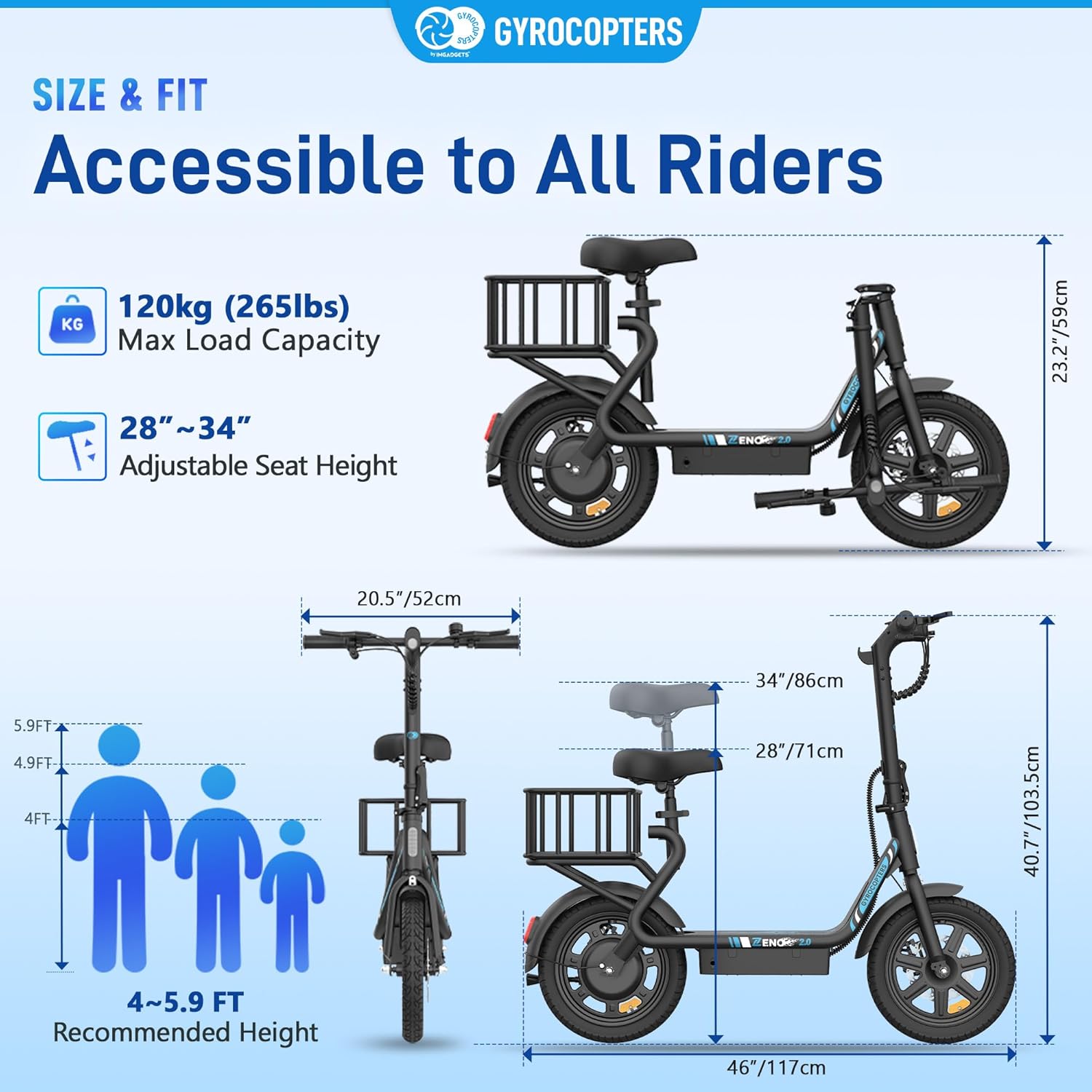
Image: Detailed size and fit diagram of the Zeno2.0 scooter, including maximum load, adjustable seat height, and recommended rider height range.
10. Warranty
The GYROCOPTERS Zeno2.0 Electric Scooter comes with a 90-day warranty from the date of purchase. This warranty covers manufacturing defects under normal use. It does not cover damage caused by misuse, accidents, unauthorized modifications, or normal wear and tear. Please retain your proof of purchase for warranty claims.
11. Support
For technical assistance, warranty claims, or any other inquiries, please contact IMGadgets customer support:
- Phone: +1 647-797-3804
- Email: customercare@imgadgets.com
- Chat: www.imgadgets.com
Please have your model number (Zeno2.0) and proof of purchase ready when contacting support.


