
1. Introduction
Thank you for choosing the GYROCOPTERS Sceptre Electric Scooter. This manual provides essential information for the safe operation, maintenance, and care of your scooter. Please read it thoroughly before your first ride to ensure optimal performance and safety.

Image 1.1: The Sceptre Electric Scooter in an urban environment.
The Sceptre Electric Scooter is designed for urban commuting and off-road adventures, offering a maximum speed of 38 km/h (unlocked mode) and a range of up to 40 km. It features an 800W peak brushless motor, 10AH 48V UL-approved battery, 10-inch off-road tires, and dual suspension for a smooth ride. Integrated LED lights and app control enhance both safety and user experience.

Image 1.2: Overview of Sceptre's main features.
2. Safety Information
Your safety is paramount. Always adhere to the following guidelines:
- Always wear a helmet and appropriate protective gear (knee pads, elbow pads) when riding.
- Familiarize yourself with local laws and regulations regarding electric scooter usage.
- Perform a pre-ride check: ensure brakes are functional, tires are properly inflated, and all parts are secure.
- Avoid riding in heavy traffic, on slippery surfaces, or in adverse weather conditions.
- Maintain a safe distance from other vehicles and pedestrians.
- The scooter is equipped with a UL-approved 10AH lithium battery and an advanced Battery Management System (BMS) to protect against overloading, short circuits, overcurrent, overvoltage, undervoltage, overheating, and fire.

Image 2.1: Battery Management System (BMS) safety features.
3. Package Contents
Verify that all items are present in the package:
- 1 x GYROCOPTERS Sceptre Electric Scooter
- 1 x UL-Certified Charging Adapter
- 1 x Assembly Tool Kit
- 1 x User Manual (English & French)
4. Setup
4.1 Unfolding the Scooter
The Sceptre scooter features a one-step fold mechanism for portability. To unfold, release the locking mechanism near the base of the handlebar stem and carefully raise the stem until it clicks securely into place. Ensure the locking mechanism is fully engaged before riding.

Image 4.1: Folded scooter being carried, highlighting portability.

Image 4.2: Scooter stored in a car trunk.
4.2 Initial Charging
Before first use, fully charge the scooter's battery using the provided UL-Certified Charging Adapter. Connect the charger to the charging port on the scooter and then to a power outlet. The indicator light on the charger will change when charging is complete.
4.3 Tire Inflation
Ensure the 10-inch pneumatic off-road tires are inflated to the recommended pressure for optimal ride quality and range. Refer to the tire sidewall for specific pressure recommendations.
5. Operating Instructions
5.1 Power On/Off
Press the power button on the integrated console once to turn the scooter on. Press and hold the power button to turn it off.

Image 5.1: LED Screen and controls on the handlebar.
5.2 Speed Modes
The Sceptre offers five speed modes. Double-press the power button to cycle through them:
- Walking Mode: 6 km/h (3.7 mph)
- Eco Mode: 10 km/h (6.2 mph)
- Drive Mode: 20 km/h (12.4 mph)
- Sport Mode: 32 km/h (20 mph)
- Unlocked Speed Mode: 38 km/h (23.6 mph)

Image 5.2: Five speed modes for various riding conditions.
5.3 Acceleration and Braking
Use the throttle on the right handlebar to accelerate. Apply the brake levers on both handlebars for dual disc braking combined with EABS (Electronic Anti-lock Braking System) for effective stopping power.
5.4 Lighting
Press the power button once to turn the headlight on or off. The scooter also features an active taillight and RGB LED deck lights for enhanced visibility and safety, especially during night rides.

Image 5.3: Bright headlight for safe night riding.

Image 5.4: Safety taillight and rear disc brake.

Image 5.5: RGB LED deck lights for visibility and style.
6. App Integration
Transform your iOS or Android device into a control center for your Sceptre scooter using the dedicated app. The app allows you to:
- Activate the anti-theft lock.
- Control cruise control settings.
- View ride history.
- Switch speed modes.
- Manage headlights.
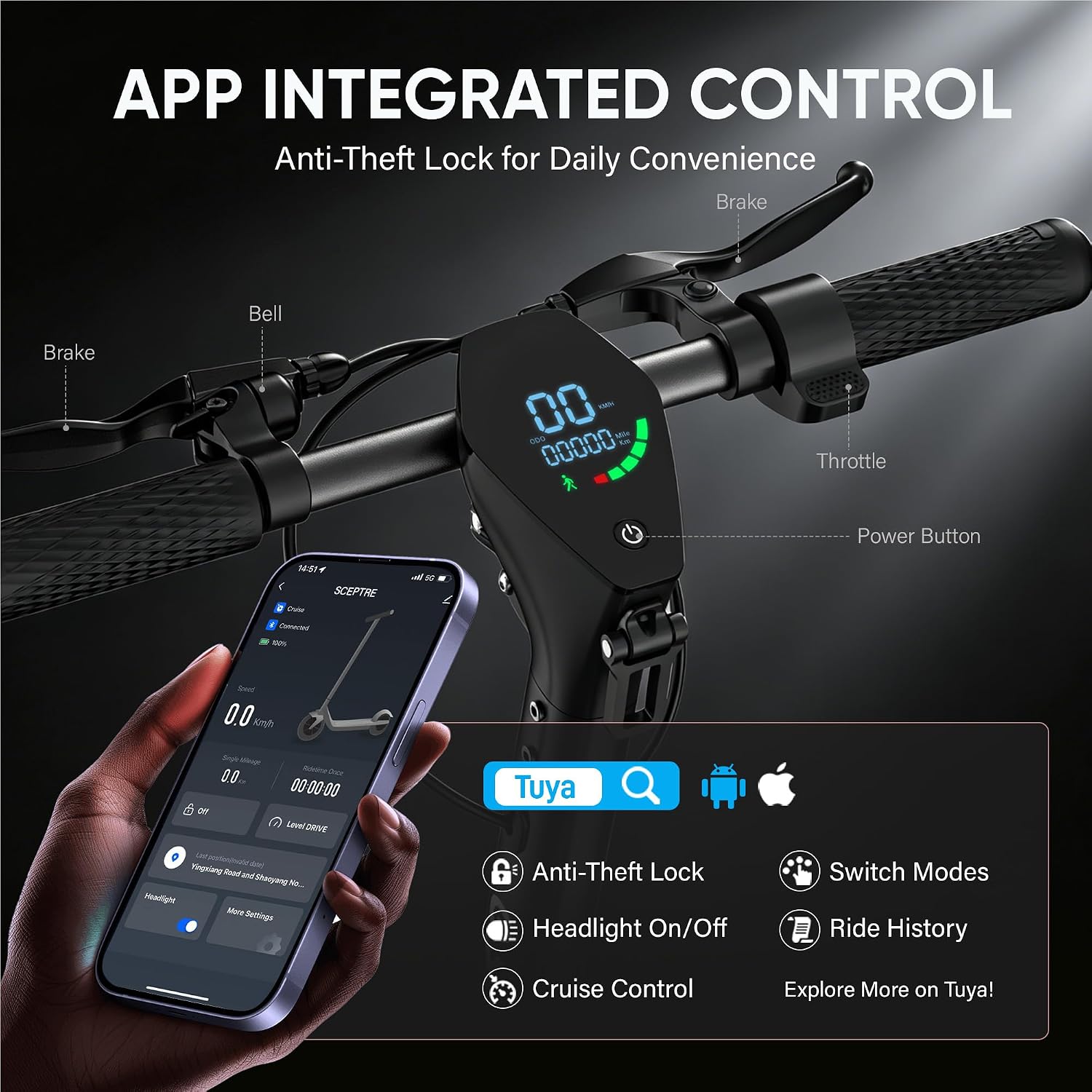
Image 6.1: App integrated control for the Sceptre scooter.

Image 6.2: Anti-theft app control for daily convenience.
7. Maintenance
Regular maintenance ensures the longevity and safe operation of your Sceptre scooter.
7.1 Battery Care
- Charge the battery regularly, even if not in use, to maintain its health.
- Avoid completely draining the battery before recharging.
- Store the scooter in a cool, dry place, away from direct sunlight and extreme temperatures.
7.2 Tire Pressure
Check tire pressure weekly and inflate to the recommended PSI (found on the tire sidewall) to prevent punctures and ensure efficient riding.
7.3 Brake Inspection
Periodically inspect brake levers, cables, and disc pads for wear and proper function. Adjust or replace components as needed.
7.4 Cleaning
The scooter has an IP65 water-resistance rating, allowing it to withstand splashes. Clean with a damp cloth; avoid high-pressure washing or submerging the scooter in water.

Image 7.1: Off-road tires and IP65 water resistance.

Image 7.2: All-terrain riding capabilities.
7.5 General Inspection
Regularly check all screws and fasteners for tightness. Inspect the frame and suspension for any signs of damage or wear.

Image 7.3: Dual elastomer suspensions for a smoother ride.
8. Troubleshooting
If you encounter issues with your Sceptre scooter, refer to the following common problems and solutions:
| Problem | Possible Cause | Solution |
|---|---|---|
| Scooter does not power on | Low battery; loose connection; power button malfunction | Charge battery fully; check all connections; contact support if issue persists |
| Reduced range or speed | Low tire pressure; heavy load; riding uphill; cold weather; battery degradation | Inflate tires to correct pressure; reduce load; ride on flatter terrain; ensure battery is fully charged |
| Brakes feel weak | Worn brake pads; loose brake cable; air in hydraulic system (if applicable) | Inspect and replace brake pads; adjust brake cable tension; seek professional service |
| App connectivity issues | Bluetooth off; app not updated; scooter not discoverable | Ensure Bluetooth is on; update app; restart scooter and phone; re-pair device |
For issues not listed here, please contact customer support.
9. Specifications
Key technical specifications for the GYROCOPTERS Sceptre Electric Scooter:
- Model Name: SCEPTRE
- Motor: 800W Peak Brushless Motor
- Battery: 48V, 10AH Lithium Battery (UL-Approved)
- Max Speed: Up to 38 km/h (Unlocked Speed Mode)
- Max Range: Up to 40 km
- Tires: 10-inch Off-Road Pneumatic Tires
- Suspension: Dual Front/Rear Suspension
- Brakes: Dual Disc Braking + EABS
- Water Resistance: IP65
- Max Load: 120.2 kg (265 lbs)
- Item Weight: 21.5 kg (47.4 lbs)
- Product Dimensions (Unfolded): 118L x 52W x 124H cm (46.5L x 20.5W x 48.8H inches)
- Frame Material: Alloy Steel
- Special Features: APP Control, Foldable, Portable, Cruise Control, RGB LED Lights, Anti-Theft Lock, 5-Speed Modes, 20% Hill Grade capability.

Image 9.1: 800W Peak Brushless Motor details.

Image 9.2: Max 800W Brushless Motor for performance.
10. Warranty
The GYROCOPTERS Sceptre Electric Scooter comes with a 90-day limited warranty from the date of purchase. This warranty covers manufacturing defects under normal use. Please retain your proof of purchase for warranty claims. The warranty does not cover damage caused by misuse, accidents, unauthorized modifications, or normal wear and tear.
11. Support
For any questions, concerns, or technical assistance, please contact our professional and friendly support team:
- Manufacturer: Gyrocopters (IMGadgets)
- Phone: +1 (647) 797-3804
- Email: customercare@imgadgets.com
- Operating Hours: Monday to Friday, 10:00 AM to 6:00 PM (EST)
