
1. Introduction
This manual provides instructions for the safe and effective operation of the TopTes Guard-863Pro 4 Gas Monitor. This device is designed to detect and monitor concentrations of Hydrogen Sulfide (H₂S), Carbon Monoxide (CO), Combustible Gases (LEL), and Oxygen (O₂) in various environments. Read this manual thoroughly before use to ensure proper handling and to maximize the device's performance and your safety.
2. Safety Information
Adhere to the following safety guidelines to prevent injury or damage to the device:
- Always operate the device in accordance with local safety regulations and industry best practices.
- Ensure the device is calibrated regularly to maintain accuracy and reliability. Refer to the calibration section for details.
- Do not expose the device to extreme temperatures, direct sunlight for prolonged periods, or corrosive chemicals.
- In case of an alarm, evacuate the area immediately and follow established safety protocols for the detected gas. Do not re-enter until the area is confirmed safe.
- The device is designed to be dustproof, waterproof, and explosion-proof, but it is not indestructible. Avoid dropping or subjecting it to severe impacts.
3. Package Contents
Upon unpacking, verify that all the following items are present in your package:
- Guard-863Pro Gas Detector
- Protective Packaging Box
- User Manual
- USB Charging Cable
- Standard Gas Hood

Image: Contents of the Guard-863Pro package, showing the gas detector, a protective carrying case, a USB charging cable, the user manual, and a standard gas hood.
4. Device Overview
The Guard-863Pro is a robust multi-gas detector featuring a clear TFT color screen and intuitive controls for reliable gas monitoring.

Image: Front view of the Guard-863Pro gas monitor, highlighting its display and button layout.
4.1 Key Features
- Detects four critical gases: Hydrogen Sulfide (H₂S), Carbon Monoxide (CO), Combustible Gases (LEL), and Oxygen (O₂).
- Fast 0.5-second response time for immediate hazard detection.
- Equipped with an upgraded O₂ sensor offering an extended service life of up to 5 years.
- Vivid TFT color screen displays real-time gas data, including concentration matrices and trend curves.
- Integrated triple alarm system: audible, visual (light), and vibration alerts for comprehensive notification.
- USB data export function for efficient tracking and analysis of alarm records, fault logs, calibration records, and operation history.
- Rapid charging: 2.5 hours for a full charge, providing over 18 hours of continuous operation.
- Durable design: dustproof, waterproof, and explosion-proof for reliable performance in demanding environments.
- Features a portable back clip for convenient carrying during work.

Image: Internal view of the Guard-863Pro, emphasizing the upgraded O₂ sensor designed for a 5-year lifespan, ensuring long-term reliability.
5. Setup
5.1 Initial Charge
Before using the device for the first time, ensure it is fully charged. Connect the provided USB charging cable to the device's USB port and a compatible power source (e.g., a USB wall adapter or computer USB port). A full charge typically takes approximately 2.5 hours.
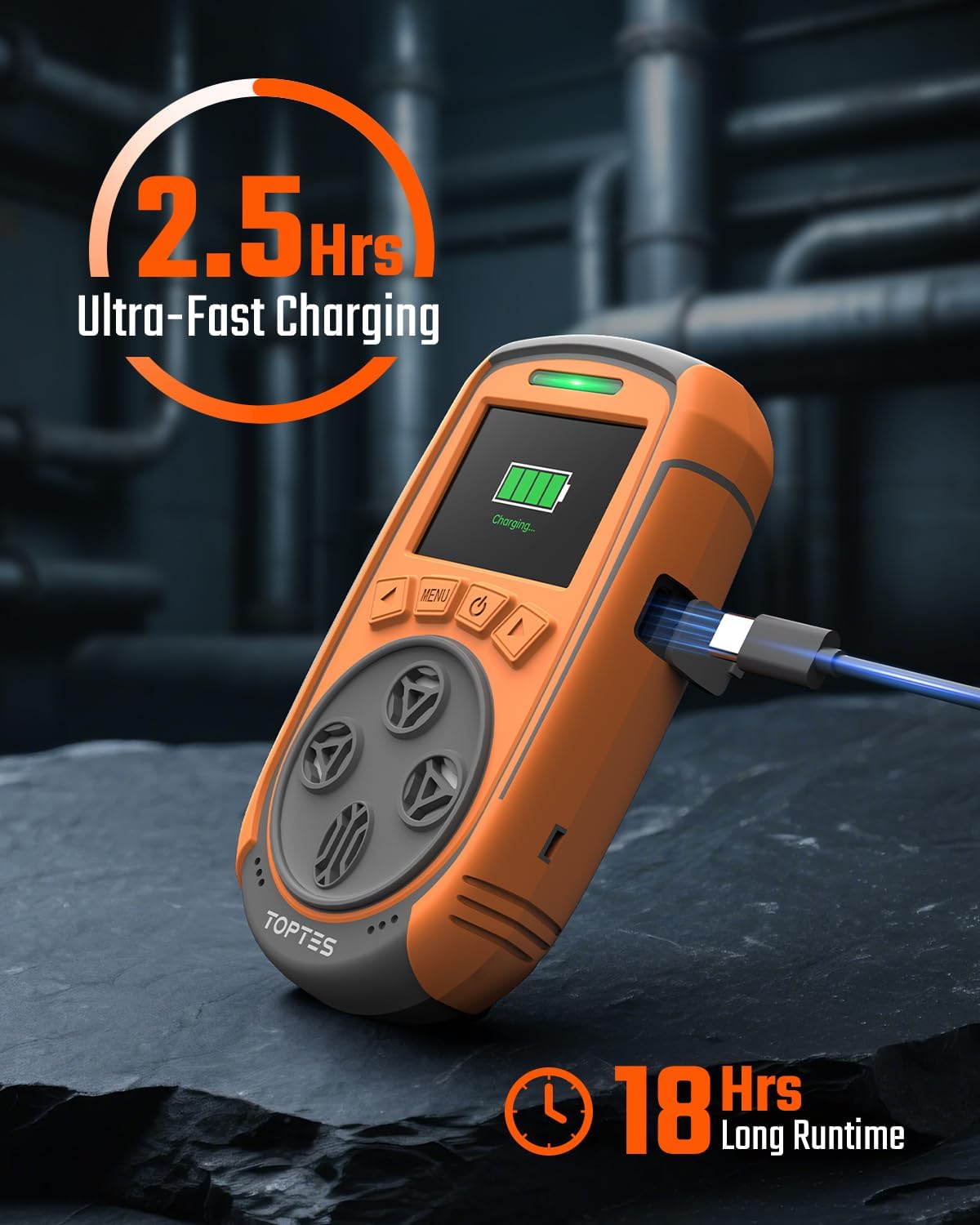
Image: The Guard-863Pro device connected to its charging cable, illustrating the charging process and battery indicator on the screen.
5.2 Power On/Off
- To Power On: Press and hold the power button (usually marked with a power symbol) until the screen illuminates and the device begins its self-check sequence.
- To Power Off: Press and hold the power button until a shutdown prompt appears on the screen. Confirm your selection to power off the device.
5.3 Zero Calibration
For accurate readings, it is essential to perform a zero calibration in a fresh air environment that is known to be free of the target gases. Refer to the device's on-screen menu for specific instructions on how to initiate and complete the zero calibration process.
6. Operating Instructions
6.1 Real-time Monitoring
Once powered on and calibrated, the device will automatically begin monitoring the air and displaying real-time gas concentrations on its TFT color screen. The display provides current readings for H₂S, CO, LEL, and O₂.

Image: The Guard-863Pro's TFT color screen displaying real-time concentration values for H₂S, CO, LEL, and O₂.
6.2 Display Modes
The Guard-863Pro supports two primary display modes to suit different monitoring needs:
- Real-time 4-Gas Readout Display: This mode shows the current concentration levels for all four monitored gases simultaneously in a clear numerical format.
- Gas Concentration Curve: This mode provides a graphical representation of gas levels over a period, which is useful for observing trends and fluctuations in gas concentrations.
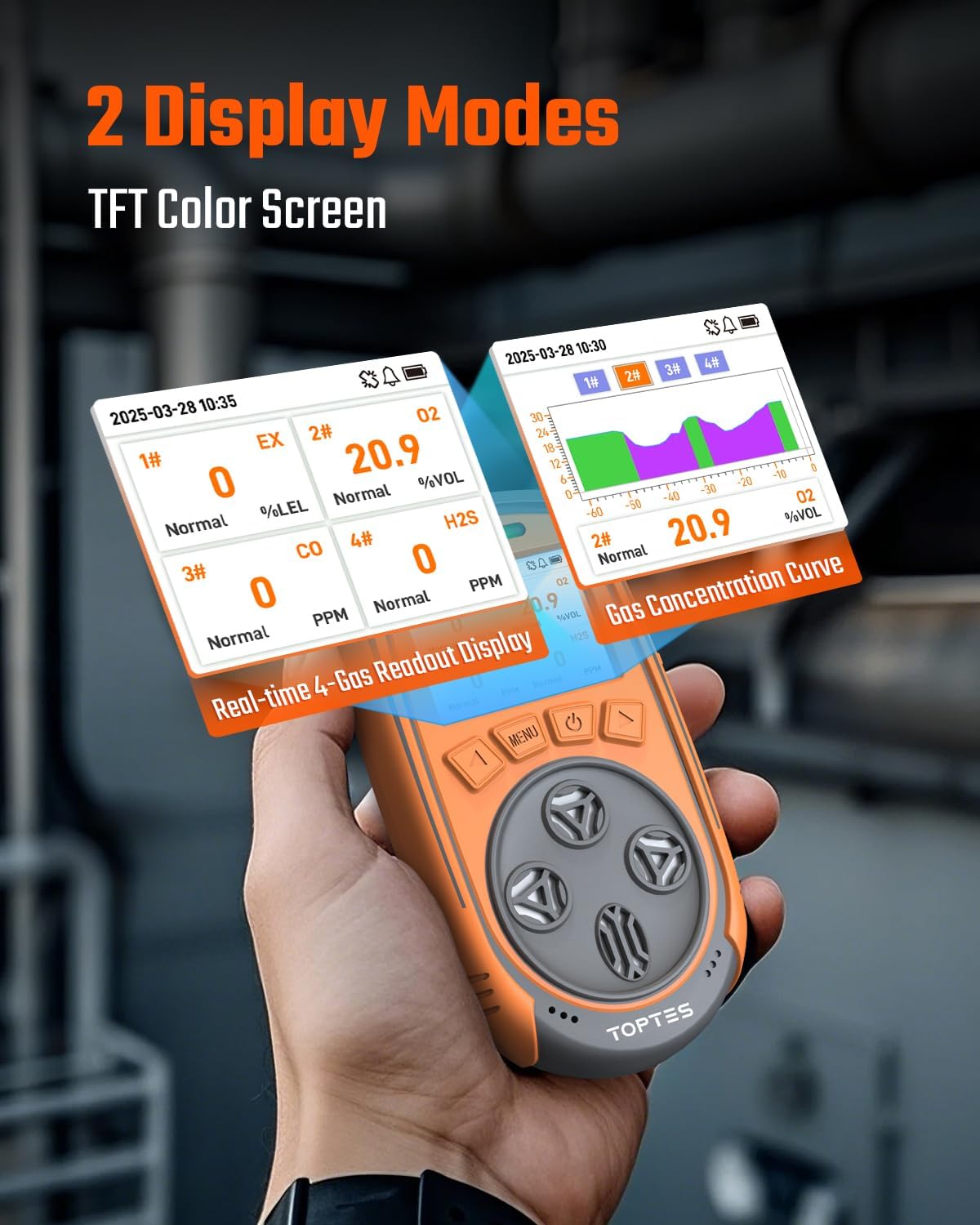
Image: Illustration of the two display modes available on the Guard-863Pro: a numerical readout of all four gases and a graphical trend curve for historical data.
6.3 Alarm System
The Guard-863Pro is equipped with a continuous triple alarm system to alert users to hazardous conditions:
- Audible Alarm: A loud sound signal to alert users in the vicinity.
- Visual Alarm: Flashing lights on the device provide a clear visual warning, especially useful in noisy environments.
- Vibration Alarm: The device vibrates, offering a tactile alert that can be felt even if audible or visual alarms are missed.
Alarms activate when gas levels exceed or fall below preset safe thresholds and will continue until the gas concentrations return to safe limits. Users can typically adjust alarm thresholds within safety parameters via the device's menu.
7. Data Management
7.1 Data Export
The device allows for convenient USB data export. To export data, connect the Guard-863Pro to a computer using the provided USB charging cable. The device can export various types of data for review and analysis, including:
- Alarm records
- Fault logs
- Calibration records
- Operation history
This function facilitates efficient tracking, reporting, and analysis of gas monitoring data, which is crucial for safety compliance and incident investigation.

Image: The Guard-863Pro connected to a laptop, illustrating the USB data export capability for reviewing alarm records, fault logs, and operational history.
7.2 Storage Capacity
The device is capable of storing a significant amount of data, with capacity for over 16,000 alarm data records.
8. Battery and Charging
The Guard-863Pro is equipped with a high-capacity rechargeable battery designed for extended use.
- Charging Time: A full charge from empty takes approximately 2.5 hours.
- Operating Time: The device provides over 18 hours of continuous operation on a full charge, enabling prolonged monitoring in various work environments.
To ensure optimal battery life and safety, use only the provided charging cable or a compatible USB charger that meets the device's power requirements.
9. Maintenance
9.1 Sensor Lifespan and Calibration
The upgraded O₂ sensor in the Guard-863Pro has an extended service life of up to 5 years. The lifespan of other sensors (H₂S, CO, LEL) may vary. Regular calibration is crucial for maintaining the accuracy and reliability of all sensors. Refer to the device's menu or contact TOPTES support for recommended calibration schedules and procedures.
9.2 Cleaning
Clean the exterior of the device with a soft, damp cloth. Do not use abrasive cleaners, solvents, or harsh chemicals, as these can damage the casing or sensors. Ensure no liquids enter the sensor openings or charging port.
9.3 Storage
When not in use, store the Guard-863Pro in its original protective packaging box in a cool, dry place, away from direct sunlight and extreme temperatures. Ensure the battery is partially charged (e.g., 50%) before long-term storage to preserve battery health.
10. Troubleshooting
This section addresses common issues you might encounter with your Guard-863Pro gas monitor.
| Problem | Possible Cause | Solution |
|---|---|---|
| Device does not power on. | Low battery; device malfunction. | Charge the device fully using the provided USB cable. If the problem persists after charging, contact TOPTES customer support. |
| Inaccurate gas readings. | Needs calibration; sensor obstruction; sensor end-of-life. | Perform a fresh air zero calibration. Check sensor openings for any debris or blockages. If readings remain inaccurate or inconsistent, the sensor may require replacement or professional service. |
| Alarm triggers frequently without apparent gas presence. | False alarm due to environmental factors (e.g., sudden temperature change); sensor sensitivity settings are too low; device needs calibration. | Ensure the device is in a stable environment. Review and adjust alarm thresholds if necessary, always adhering to safety guidelines. Perform a fresh air calibration. |
| Cannot export data to computer. | Incorrect USB connection; driver issues; required software not installed or outdated. | Ensure the USB cable is securely connected to both the device and the computer. Try a different USB port or computer. Verify that any necessary software or drivers from the manufacturer's website are installed and up-to-date. |
11. Specifications
Key technical specifications for the TopTes Guard-863Pro 4 Gas Monitor:
| Feature | Detail |
|---|---|
| Brand | TOPTES |
| Model Number | Guard-863Pro |
| Power Source | Battery Powered |
| Detected Gases | Hydrogen Sulfide (H₂S), Carbon Monoxide (CO), Combustible Gases (LEL), Oxygen (O₂) |
| O₂ Sensor Lifespan | Up to 5 years |
| Response Time | 0.5 seconds |
| Display | TFT Color Screen |
| Charging Time | Approx. 2.5 hours |
| Battery Life | Over 18 hours continuous operation |
| Data Storage | 16,000+ alarm records |
| Environmental Protection | Dustproof, Waterproof, Explosion-Proof |
12. Warranty and Support
TOPTES provides a 36-month after-sale service for the Guard-863Pro. This warranty covers defects in materials and workmanship under normal use.
For technical support, warranty claims, or further assistance, please contact TOPTES customer service through their official website or the contact information provided with your product. Ensure you have your product model number and purchase date available when contacting support.
Manufacturer Warranty Description: We provide a 36-Month after-sale service.