
Introduction
This manual provides instructions for the AT&T DECT 6.0 Cordless Phone, Model BL108. This system features Smart Call Blocker, Bluetooth Connect to Cell technology, a digital answering machine, and a 2.4-inch color display. Please read these instructions carefully before operating your new phone.
What's in the Box
- Base Unit
- 1 Cordless Handset
- 1 Power Adapter
- Telephone Line Cord
- 2 Battery Cells + Quick Start Guide
Setup
1. Base Unit Connection
Connect the base unit to power and your telephone line. Ensure all connections are secure.
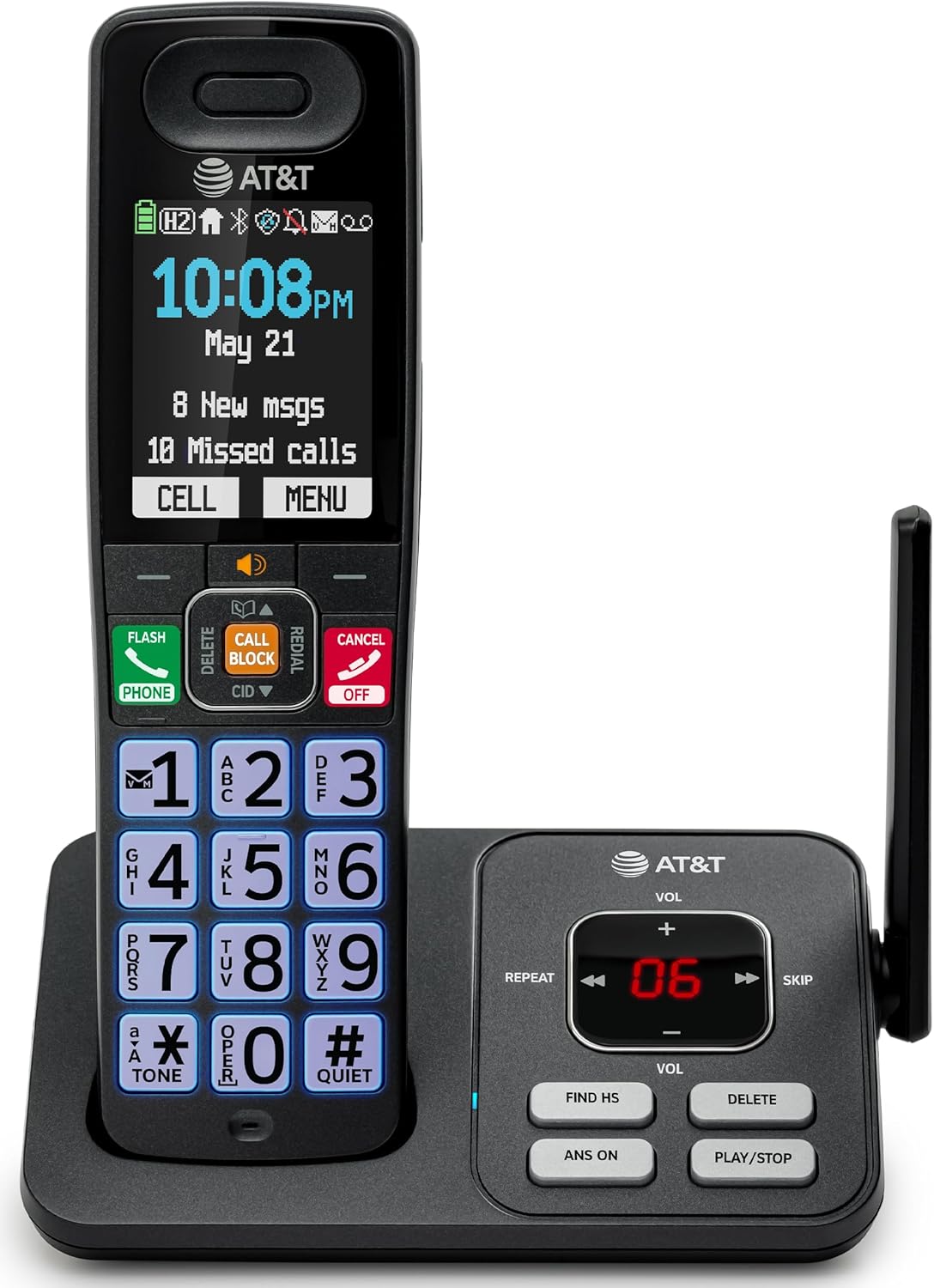
Image: The AT&T BL108 cordless phone base unit connected to a handset, showing its compact design.
2. Handset Battery Installation and Charging
Install the provided battery cells into the cordless handset. Place the handset on the base unit or charger to charge for at least 16 hours before initial use. A full charge ensures optimal battery performance.

Image: A cordless handset resting on its charging base, indicating it is ready for use or charging.
3. Set Date and Time
Follow the on-screen prompts on the handset to set the correct date and time. This is important for accurate call logging and answering machine timestamps.
4. Bluetooth Connect to Cell Setup
To pair your smartphone with the BL108 system:
- On the handset, navigate to the Bluetooth menu.
- Enable Bluetooth on your smartphone and set it to discoverable mode.
- Select your smartphone from the list of available devices on the handset and confirm pairing.
This feature allows you to make and receive mobile calls through your cordless handset, extending your mobile phone's range within your home.

Image: A visual representation of the phone's Bluetooth Connect to Cell feature, showing a handset on a nightstand connected wirelessly to a smartphone.
Operating Instructions
Making and Receiving Calls
- To make a call: Dial the number and press the PHONE button.
- To answer a call: Press the PHONE button when the phone rings.
- To end a call: Press the CANCEL button or place the handset back on the base/charger.
Smart Call Blocker
The Smart Call Blocker automatically screens robocalls. To manually block a number during or after a call, press the CALL BLOCK button on the handset. The block directory can store up to 1,000 entries.

Image: The handset displaying the "Smart Call Block" screen with a prominent "CALL BLOCK" button highlighted, demonstrating the call blocking feature.
Digital Answering Machine
The integrated answering machine records up to 22 minutes of messages. Access messages via the handset or the base unit controls (PLAY/STOP, REPEAT, SKIP).

Image: The handset displaying "Answering Sys" with a message icon, and the base unit showing message count, illustrating the answering machine feature.
Caller ID Announce
When a call comes in, the handset will announce the caller's name (if available in your phonebook or Caller ID service). This allows for screening calls without picking up the handset.

Image: The handset displaying a caller's name and number, with a speech bubble indicating "Call from Johnson," demonstrating the Caller ID Announce feature.
Phonebook Directory
Store up to 1500 names and numbers in the phonebook. Use the navigation buttons to access and manage your contacts.

Image: The handset displaying the "Phonebook" menu with a list of contacts, illustrating the phonebook directory feature.
Full-Duplex Handset Speakerphone
Activate the speakerphone function during a call to allow both parties to speak and be heard simultaneously, providing a hands-free conversation experience.

Image: A person using the handset's speakerphone function while working on a laptop, with speech bubbles indicating a two-way conversation.
Quiet Mode
Activate Quiet Mode to silence all handset and base ringers for a set period, allowing for undisturbed time. Calls will still be recorded by the answering machine.

Image: The handset displaying "Quiet mode on" with a bell icon crossed out, indicating the phone is in quiet mode, suitable for nighttime use.
Intercom Between Handsets
If you have multiple handsets, you can use them as an intercom system to communicate between rooms or transfer calls.

Image: Two handsets, one on its base and one on a charger, with arrows indicating communication between them, demonstrating the intercom feature.
Maintenance
- Cleaning: Wipe the phone and base unit with a soft, damp cloth. Do not use cleaning sprays or harsh chemicals.
- Battery Care: Replace batteries when the handset indicates low battery. Use only the specified battery type.
Troubleshooting
| Problem | Solution |
|---|---|
| No dial tone. | Ensure the telephone line cord is securely connected to both the base unit and the wall jack. Check if the power adapter is properly connected. |
| Cannot make or receive calls. | Check the phone line connection. Ensure the handset battery is charged. If using Connect to Cell, verify your smartphone is paired and within range. |
| Poor sound quality. | Move closer to the base unit. Avoid placing the phone near other electronic devices that may cause interference. |
| Handset battery does not charge. | Ensure the handset is correctly placed on the charging cradle. Clean the charging contacts on both the handset and base unit. |
| Smart Call Blocker not working. | Ensure the feature is enabled in the phone settings. Verify your Caller ID service is active. |
Specifications
- Brand: AT&T
- Model Number: BL108
- Telephone Type: Cordless
- Technology: DECT 6.0
- Display: 2.4-inch Color Backlit Display
- Answering System: Digital, up to 22 minutes recording time
- Call Blocker: Smart Call Blocker, up to 1,000 entries
- Bluetooth: Connect to Cell for smartphone pairing
- Dimensions (L x W x H): 5.63 x 2.99 x 7.4 inches (14.3 x 7.6 x 18.8 cm)
- Power Source: Corded Electric
- Phone Standby Time: 6 days
- Caller ID: Yes
- Material: Plastic

Image: A diagram showing the dimensions of the AT&T BL108 cordless phone handset and base unit.
Warranty
This product comes with a 1-Year limited warranty. Please refer to the warranty card included in your package for full details and terms.
Support
For further assistance, please consult the full user manual or visit the AT&T support website. Keep your purchase receipt as proof of purchase for warranty claims.


