
1. Introduction
The MyPet Petyard Protect Bundle provides a safe and comfortable enclosure for your small to medium-sized pets, suitable for both indoor and outdoor environments. This bundle includes a 6-panel pet yard with a convenient pet door and a SecureMat for added comfort and floor protection. This manual will guide you through the assembly, operation, and maintenance of your Petyard Protect Bundle.

Image 1.1: The MyPet Petyard Protect Bundle, showing a puppy comfortably contained within the enclosure on the SecureMat.
2. What's in the Box
Carefully unpack all components and verify that you have received the following items:
- 6-Panel Petyard (pre-assembled with dual self-locking hinges)
- SecureMat (Graphite color)
- 12 Skid-Resistant Pads
- Carrying Strap
- Instruction Manual (this document)
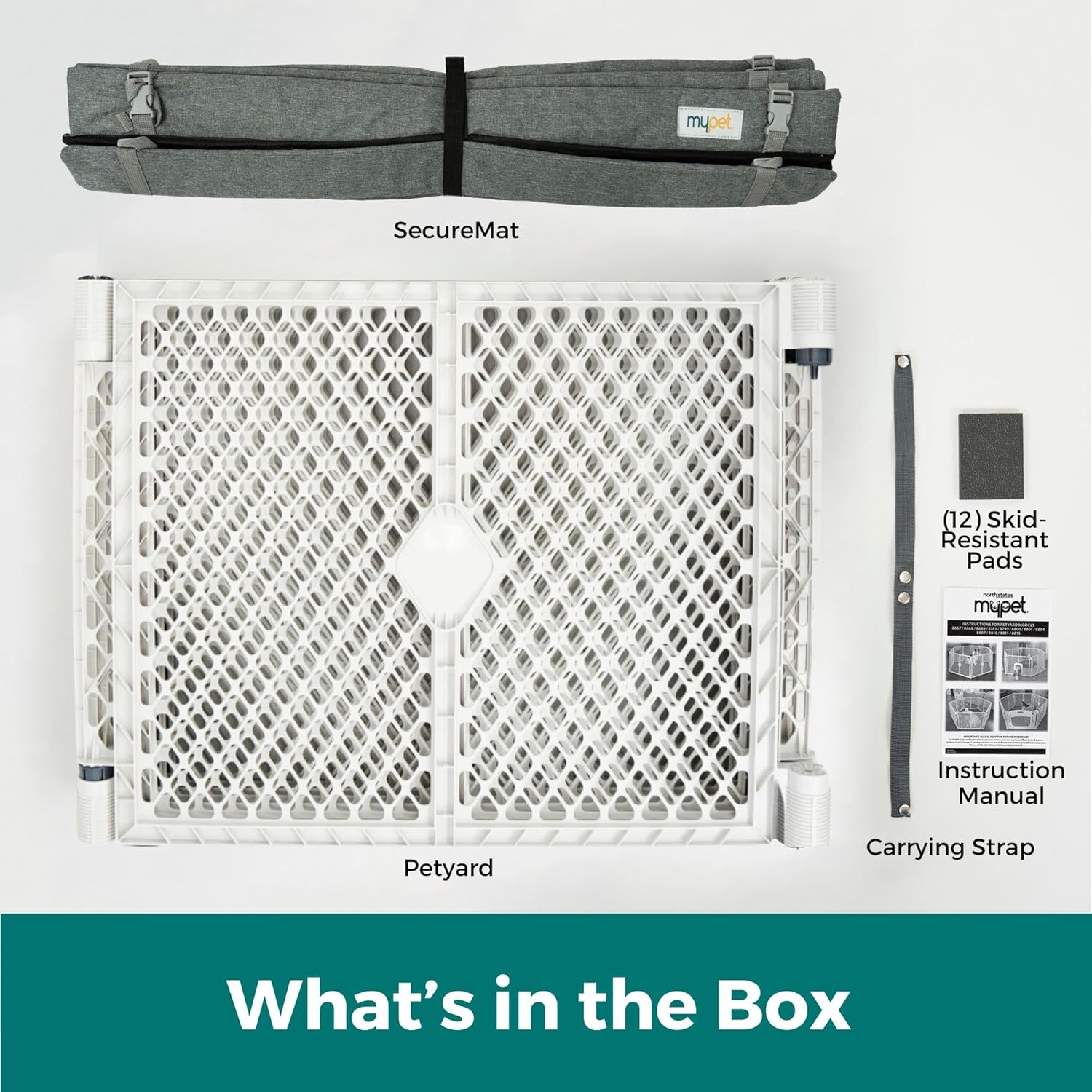
Image 2.1: All components included in the MyPet Petyard Protect Bundle: the folded petyard, SecureMat, skid-resistant pads, carrying strap, and instruction manual.
3. Setup Instructions
The Petyard is designed for quick and easy assembly without the need for tools.
- Unfold the Petyard: Place the folded petyard on a flat surface. Gently pull the panels apart to expand the enclosure into your desired shape (e.g., hexagonal). The dual self-locking hinges will click securely into place automatically.
- Connect Panels (if necessary): If you need to connect or disconnect panels, simply push down on the hinge mechanism to release the lock, then pull or push the panels as needed. Ensure all hinges are securely locked before use.
- Attach SecureMat: Lay the SecureMat flat inside the petyard. Align the edges of the mat with the base of the petyard panels. Use the 12 quick-release buckles located around the perimeter of the SecureMat to fasten it securely to the bottom of the petyard panels. This prevents the mat from shifting.
- Apply Skid-Resistant Pads: For use on hard floors, attach the included skid-resistant pads to the bottom of the petyard feet to prevent sliding and protect your surfaces.

Image 3.1: The quick-spring connect hinges allow for easy and secure panel connection by simply pushing down.

Image 3.2: The 12 quick-release buckles ensure the SecureMat is firmly attached to the petyard, preventing movement.
4. Operating Instructions
The Petyard Protect Bundle is designed for versatile use and pet convenience.
- Pet Door Operation: The integrated pet door (9.5” x 8”) can swing freely, allowing your pet to enter and exit the enclosure as desired. To contain your pet, the small door can be locked. Refer to the door mechanism for specific locking instructions.
- Indoor/Outdoor Use: The Petyard Protect Bundle is suitable for both indoor and outdoor use. Its UV-resistant plastic ensures durability when used outdoors.
- Portability: For travel or storage, the petyard and SecureMat fold compactly. Use the included carrying strap to transport the bundle easily.

Image 4.1: A puppy demonstrates the easy pass-through feature of the pet door, which can also be locked for containment.

Image 4.2: The Petyard Protect Bundle is shown in an outdoor setting, highlighting its versatility for various environments.
5. Maintenance
Proper maintenance will extend the life of your Petyard Protect Bundle.
- Petyard Cleaning: The plastic panels can be wiped clean with a damp cloth and mild soap. Rinse thoroughly and allow to air dry. Avoid harsh chemicals or abrasive cleaners.
- SecureMat Cleaning: The SecureMat is machine washable for easy cleanup of spills or accidents. Wash on a gentle cycle with cold water and mild detergent. Tumble dry on low heat or air dry. Do not bleach or iron.

Image 5.1: The SecureMat is machine washable, making cleanup simple and convenient.
6. Troubleshooting
If you encounter any issues with your MyPet Petyard Protect Bundle, refer to the following common solutions:
- Petyard Panels Not Locking: Ensure the panels are fully extended and aligned. Push down firmly on the hinge mechanism until you hear a click. Check for any obstructions in the hinge.
- SecureMat Shifting: Verify that all 12 quick-release buckles are securely fastened to the petyard panels. Adjust the mat's position if necessary to ensure even tension.
- Petyard Sliding on Hard Floors: Ensure the skid-resistant pads are properly attached to the bottom of each petyard foot. If pads are worn, replace them.
- Pet Door Not Functioning: Check for any debris or obstructions around the pet door hinges or locking mechanism. Ensure the door is properly seated in its frame.
7. Specifications
| Feature | Detail |
|---|---|
| Model Number | 7932 |
| Product Dimensions (L x W x H) | 66" x 2" x 26" (assembled) |
| Item Weight | 22 Pounds |
| Material | Plastic (Petyard), Polyester Fabric and PVC Plastic Buckles (SecureMat) |
| Color | Light Gray/Graphite |
| Dog Breed Size | Small to Medium |
| Indoor/Outdoor Usage | Yes |
| Pet Door Dimensions | 9.5" x 8" |
| Assembly Required | Yes (minimal) |

Image 7.1: Visual representation of the Petyard dimensions: 5.5 ft wide (corner to corner), 26 inches tall panels, and 32 inches wide each panel.
8. Warranty
The MyPet Petyard Protect Bundle (Model 7932) comes with a 6-month limited warranty from the date of purchase. This warranty covers manufacturing defects under normal use. It does not cover damage resulting from misuse, abuse, accidents, alterations, or normal wear and tear. Please retain your proof of purchase for warranty claims.
9. Support
For further assistance, questions, or to report any issues not covered in this manual, please contact MyPet customer support:
- Website: Visit the official MyPet website for FAQs and support resources.
- Contact Form: Use the contact form available on the MyPet website for email inquiries.
- Phone: Refer to the product packaging or MyPet website for customer service phone numbers.
When contacting support, please have your product model number (7932) and proof of purchase readily available.