
1. Product Overview
The PECRON E3800 LFP is a portable power station designed to provide reliable electricity for various applications, including home backup, camping, RV use, and commercial needs. It features a durable LiFePO4 battery, multiple output ports, and versatile charging options.
Key Features:
- Battery Capacity: 3840Wh LiFePO4 battery, expandable up to 53.76kWh with additional units.
- AC Output: 4200W rated power (100V~120V pure sine wave) with 4 AC outlets and 1 TT30-R RV-ready outlet.
- Output Ports: Total of 14 output ports including AC, DC (XT60, Cigar Port, 5525), USB-A, and USB-C.
- Fast Charging: AC charging up to 3200W (1.4 hours to 100%) and solar charging up to 3000W.
- UPS Function: Uninterruptible Power Supply with 8-20ms switchover time for critical devices.
- Smart Control: LCD touchscreen display and WiFi/Bluetooth app connectivity for remote monitoring and control.
- Durability: LiFePO4 battery retains 80% capacity after 3500+ charge cycles, offering a long lifespan.
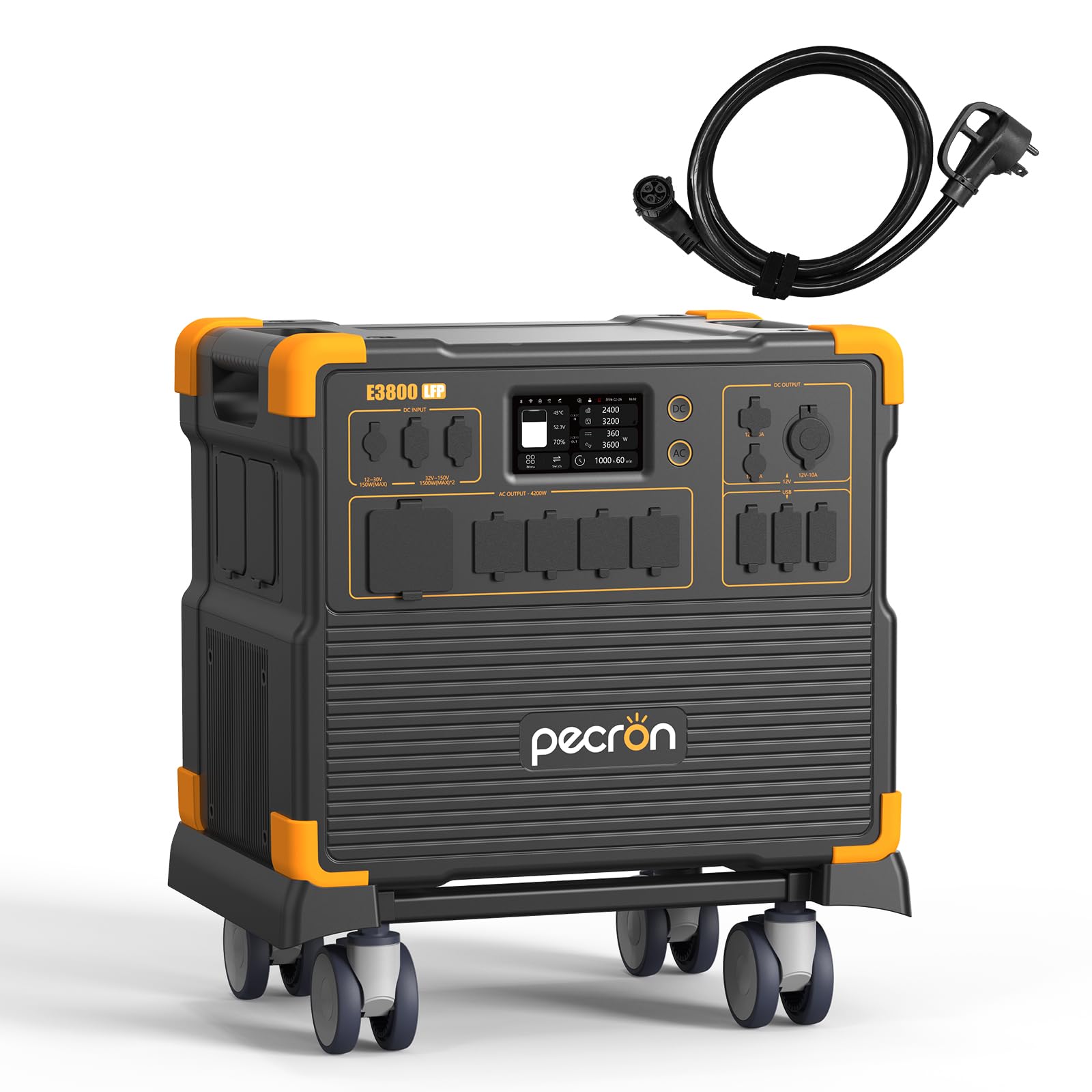
Image 1.1: The PECRON E3800 LFP Portable Power Station, showcasing its compact design and multiple output ports.
2. Safety Instructions
Read all safety warnings and instructions carefully before using this product. Failure to follow these instructions may result in electric shock, fire, or serious injury.
- Do not disassemble, repair, or modify the unit.
- Avoid exposure to rain or moisture.
- Keep away from open flames or high temperatures.
- Ensure proper ventilation during use to prevent overheating.
- Do not use if the unit or cables are damaged.
- Keep out of reach of children and pets.
- Dispose of the product according to local regulations.
- The unit features built-in protections against overcurrent, overvoltage, short-circuit, overtemperature, and low-temperature conditions.
3. Setup Guide
3.1 Unboxing and Initial Inspection
- Carefully remove the power station and all accessories from the packaging.
- Inspect the unit for any signs of damage. If damaged, do not use and contact customer support.
- Verify all included components are present: PECRON E3800 LFP portable power station, 15A AC cable, 30A AC cable, Single port XT60 to MC4 solar charging cable, Parallel dual port XT60 to MC4 solar charging cable, Car Charging Cable, Slotted Screwdriver, Accessory Pouch, User Instruction.
3.2 Initial Charging
It is recommended to fully charge the power station before first use.
- Connect the provided AC charging cable (either 15A or 30A) to the AC input port on the power station and then to a wall outlet.
- The LCD screen will indicate charging status. A full charge using the 30A AC cable takes approximately 1.4 hours.
4. Operating Instructions
4.1 Turning On/Off
- To turn on the unit, press and hold the main power button for a few seconds until the LCD screen illuminates.
- To turn off the unit, press and hold the main power button again until the screen turns off.
4.2 Using Output Ports
The E3800 LFP features 14 output ports to power various devices.

Image 4.1: Overview of the 14 output ports available on the PECRON E3800 LFP.
- AC Outlets: Press the AC power button to activate the 4 AC outlets and 1 TT30-R RV-ready outlet. Connect your devices (up to 4200W total).
- DC Outputs: Press the DC power button to activate the XT60, Cigar Port, and 5525 DC outputs.
- USB Ports: The USB-A and USB-C ports are typically active when the unit is on. Connect your USB-powered devices.
4.3 Charging Methods
The E3800 LFP supports multiple charging inputs:
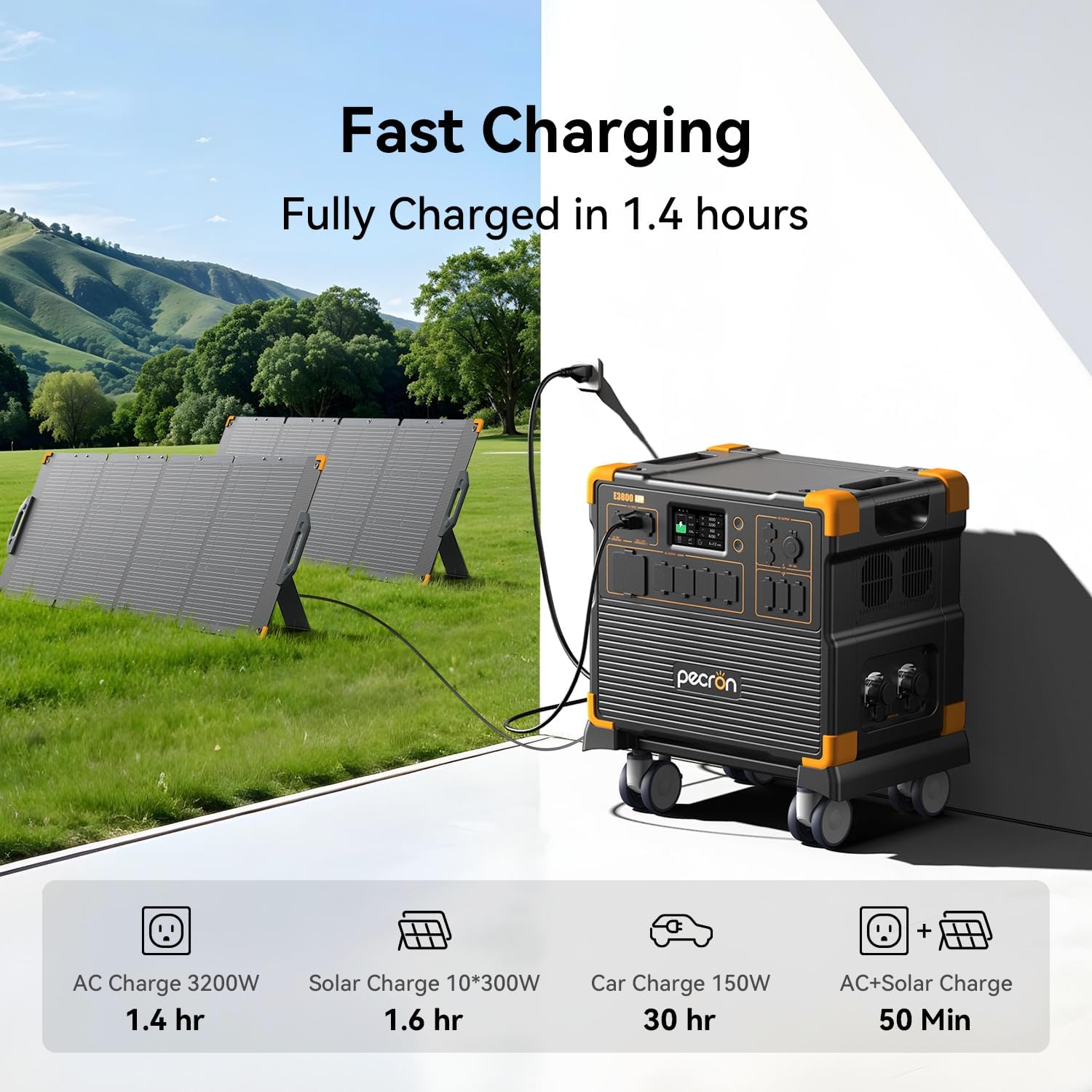
Image 4.2: Visual representation of the various fast charging methods for the power station.
- AC Charging: Connect the AC cable to a wall outlet. Max 3200W (30A cable) or 1800W (15A cable).
- Solar Charging: Connect solar panels (not included) to the solar input port using the provided XT60 to MC4 cables. Supports up to 3000W solar input (VOC <150V).
- Car Charging: Use the included car charging cable to charge from your vehicle's 12V outlet.
- Pass-Through Charging: The unit supports charging while simultaneously powering devices.
4.4 Uninterruptible Power Supply (UPS) Function
When connected to an AC wall outlet, the E3800 LFP can function as a UPS. In case of a power outage, it automatically switches to battery power within 8-20 milliseconds, protecting connected devices from data loss or interruption.
- Connect the power station to a wall outlet via the AC input.
- Connect your critical devices (e.g., computers, medical equipment) to the AC output ports of the power station.
- The UPS function supports loads up to 3600W (with 30A cable) or 1800W (with 15A cable).
4.5 Smart Control via App
Download the PECRON app to monitor and control your power station remotely via WiFi or Bluetooth.
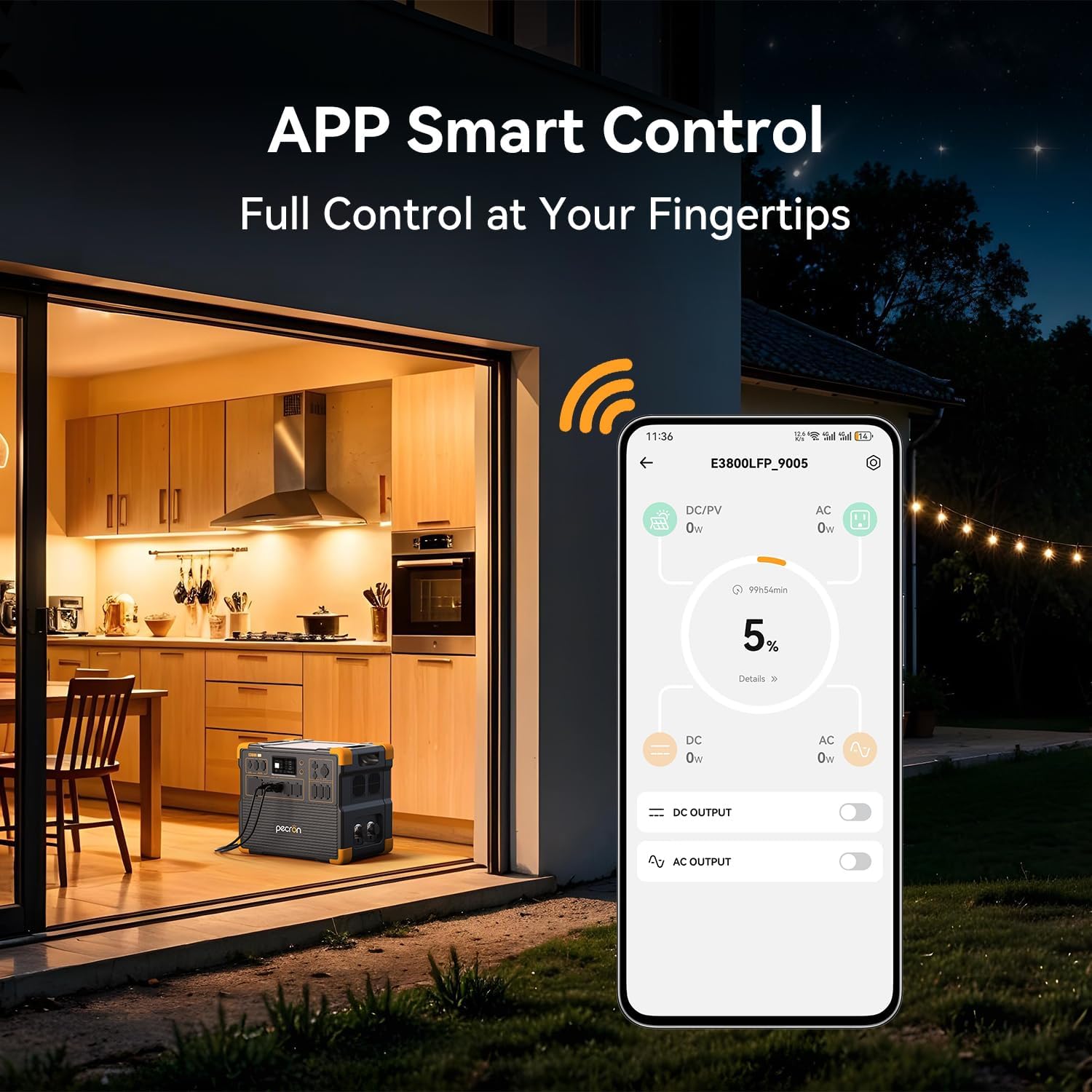
Image 4.3: The PECRON app interface demonstrating remote control and monitoring capabilities.
- Search for the PECRON app on your smartphone's app store.
- Follow the in-app instructions to connect your E3800 LFP unit.
- Monitor battery level, input/output power, remaining runtime, and control various settings.
4.6 Expanding Capacity and Output
The E3800 LFP can be expanded for increased capacity and higher voltage output.
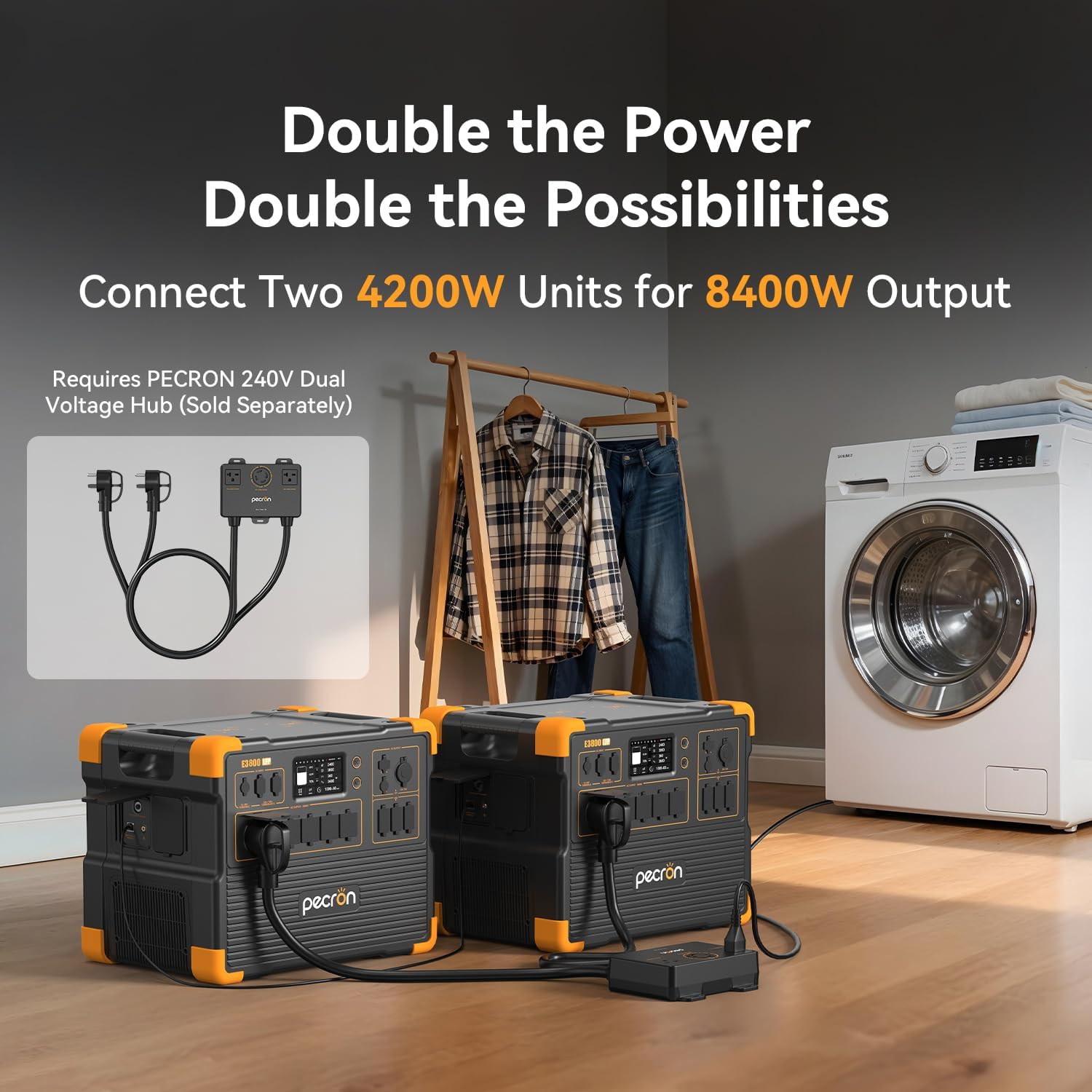
Image 4.4: Two PECRON E3800 LFP units connected via a 240V Dual Voltage Hub for increased power output.
- Extra Batteries: Connect additional PECRON extra batteries (sold separately) to expand the total energy storage up to 53.76kWh.
- 240V Dual Voltage Hub: Connect two E3800 LFP units using a PECRON 240V Dual Voltage Hub (sold separately) to achieve 8400W output and 240V capability.
5. Maintenance
5.1 General Care
- Clean the exterior of the unit with a dry, soft cloth. Do not use abrasive cleaners or solvents.
- Ensure all ports are free of dust and debris.
- Avoid dropping the unit or subjecting it to strong impacts.
5.2 Battery Maintenance
- For optimal battery life, store the unit in a cool, dry place away from direct sunlight.
- If storing for extended periods, charge the battery to approximately 50-80% every 3-6 months.
- The LiFePO4 battery is designed for over 3500 full charge-discharge cycles, maintaining 80% of its original capacity.
6. Troubleshooting
If you encounter issues with your PECRON E3800 LFP, refer to the following common solutions:
| Problem | Possible Cause | Solution |
|---|---|---|
| Unit does not turn on | Battery is depleted; Power button not pressed correctly | Charge the unit; Press and hold the power button for a few seconds. |
| AC outlets not working | AC output not activated; Overload protection triggered | Press the AC power button; Reduce connected load; Restart the unit. |
| Slow charging | Using lower wattage charger/cable; Environmental factors | Ensure using 30A AC cable for fastest charging; Optimize solar panel angle; Charge in moderate temperatures. |
| App connection issues | Bluetooth/WiFi off; Unit out of range; App not updated | Ensure Bluetooth/WiFi is on; Move closer to the unit; Update the app. |
If the problem persists, please contact PECRON customer support.
7. Specifications
| Feature | Detail |
|---|---|
| Brand | pecron |
| Model Number | E3800LFP+AC |
| Battery Type | LiFePO4 |
| Battery Capacity | 3840Wh |
| Max Expandable Capacity | 53.76kWh |
| AC Output Wattage | 4200W (Running), 8400W (Peak with 2 units) |
| Voltage | 120 Volts (Single Unit), 240 Volts (with 2 units and Hub) |
| AC Charging Input | 3200W max (with 30A cable), 1800W (with 15A cable) |
| Solar Charging Input | 3000W max (VOC <150V) |
| UPS Function | 8-20ms switchover, up to 3600W load |
| Item Weight | 87.3 Pounds |
| Item Dimensions (L x W x H) | 17.5" x 12.1" x 14.7" |
| Included Components | PECRON E3800 LFP portable power station, 15A AC cable, 30A AC cable, Single port XT60 to MC4 solar charging cable, Parallel dual port XT60 to MC4 solar charging cable, Car Charging Cable, Slotted Screwdriver, Accessory Pouch, User Instruction |
8. Warranty and Support
8.1 Warranty Information
The PECRON E3800 LFP Portable Power Station comes with a 3+2 year service time. Please refer to the official PECRON website or your purchase documentation for detailed warranty terms and conditions.
8.2 Customer Support
For technical assistance, troubleshooting not covered in this manual, or warranty claims, please contact PECRON customer support through their official website or the contact information provided with your purchase.


