
1. Introduction
The Teendow T800 Pro Wireless Dog Fence System is designed to provide a safe and adjustable boundary for your dog. This system combines a wireless fence, a training collar with remote control, and bark control features. It is suitable for various outdoor environments, offering flexibility and control over your pet's movement.
2. Safety Guidelines
Please read and understand all instructions before using this product. Failure to follow these guidelines may result in injury to your pet or damage to the device.
- This system is intended for dogs only. Do not use it on other animals or for purposes not specified in this manual.
- The collar should not be worn for more than 12 consecutive hours to prevent skin irritation.
- Regularly check your dog's neck for any signs of irritation or sores. If irritation occurs, discontinue use and consult a veterinarian.
- Ensure the collar is fitted correctly, snug enough for contact points to touch the skin, but not so tight as to restrict breathing.
- Do not allow children to play with the system.
- Avoid using the system near strong electromagnetic interference sources.
- The system is IPX7 waterproof, but ensure the charging port is sealed before exposure to water.
3. Package Contents
Verify that all items are present in your package:
- Remote Transmitter (1)
- Receiver Collar (1)
- Type-C Charging Cable (1)
- Short Contact Points (2)
- Long Contact Points (2)
- Test Light (1)
- Wrist Strap (1)
- Product Manual (1)
- Quick Operation Guide (1)
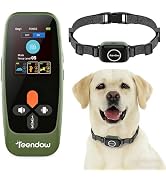
Image: Contents of the Teendow T800 Pro Wireless Dog Fence System package, including the remote, collar, charging cable, contact points, test light, wrist strap, and manuals.
4. Device Overview
The system consists of a remote transmitter and a receiver collar. The remote features an HD display for clear visibility of settings and status.

Image: The Teendow T800 Pro remote control and receiver collar, highlighting the HD display on the remote and the design of the collar.
4.1 Remote Transmitter
- HD Display: Shows battery level, signal strength, and current mode.
- Control Buttons: For adjusting fence perimeter, training modes (vibration, beep, static), and bark control sensitivity.
- Security Lock: Prevents accidental changes to settings.
4.2 Receiver Collar
- Contact Points: Deliver static correction. Choose short or long points based on your dog's coat length.
- Adjustable Strap: Fits neck sizes from 7.8 to 22 inches.
- IPX7 Waterproof: Suitable for use in rain or while swimming.
5. Charging the Devices
Both the remote transmitter and receiver collar are rechargeable via the provided Type-C charging cable.
- Connect the Type-C cable to the charging port on each device.
- Plug the other end into a standard USB power adapter (not included).
- A full charge typically takes approximately 2 hours.
- The devices offer long standby times, up to 185 days for the collar.

Image: Illustration of the Teendow T800 Pro remote and collar being charged with a Type-C cable, emphasizing quick charge time and long standby battery life.
6. Setup Guide
6.1 Fitting the Receiver Collar
- Select the appropriate contact points (short for short-haired dogs, long for long-haired dogs) and screw them onto the receiver.
- Place the collar around your dog's neck so that the contact points are underneath, touching the skin.
- Adjust the strap to be snug, allowing one finger to fit comfortably between the strap and your dog's neck. The collar should not be loose, as this can reduce effectiveness and cause rubbing.
6.2 Establishing the Wireless Fence Boundary
The Teendow T800 Pro allows for an adjustable perimeter up to 200 meters (approximately 650 feet) in an open area.
- Turn on the remote transmitter and the receiver collar.
- Select the 'Fence' mode on the remote.
- Adjust the fence level (perimeter distance) using the remote's controls. Start with a smaller perimeter and gradually increase it as needed.
- Walk the perimeter with your dog to establish the boundary. The collar will emit a warning beep as your dog approaches the boundary, followed by vibration or static correction if they cross it.

Image: A dog and owner interacting within a defined wireless fence boundary in an open field, illustrating the system's function.
7. Operating Instructions
7.1 Training Modes
The remote offers three training modes: Vibration, Beep, and Static Correction. Each mode has adjustable intensity levels from 1 to 8.
- Beep Mode: Emits an audible tone. Useful for initial warnings or positive reinforcement.
- Vibration Mode: Provides a gentle vibration. Can be used as a warning or mild correction.
- Static Correction Mode: Delivers a static pulse. Used for more firm correction when other modes are ineffective. The static correction can be locked to prevent accidental activation.
7.2 Bark Control
The receiver collar includes an integrated bark control feature with adjustable sensitivity levels (1-5).
- Activate bark control via the remote.
- Adjust the sensitivity level to detect your dog's barking without false triggers.
- When barking is detected, the collar will automatically apply a correction (beep, vibration, or static, depending on settings) to discourage excessive barking.

Image: A dog wearing the Teendow T800 Pro collar, illustrating its use in training scenarios.
8. Training Your Dog
Effective training requires patience and consistency. Introduce your dog to the system gradually.
- Initial Acclimation: Allow your dog to wear the collar for a few hours without activating any features, so they get used to it.
- Boundary Introduction: Walk your dog on a leash around the established wireless boundary. When the collar emits a warning beep, gently guide your dog away from the boundary.
- Correction Association: If your dog attempts to cross the boundary, allow the collar to deliver a vibration or low-level static correction. Immediately redirect your dog back into the safe zone and offer praise.
- Consistency: Conduct short, frequent training sessions. Always end on a positive note.
- Supervision: Always supervise your dog during the initial training phases.
9. Maintenance
9.1 Cleaning
- Wipe the remote and collar with a damp cloth as needed.
- Ensure contact points are clean for proper function.
9.2 Waterproofing
The receiver collar is IPX7 waterproof, meaning it can withstand immersion in water up to 1 meter for 30 minutes. This makes it suitable for use in rain, puddles, or during swimming.

Image: A dog swimming, demonstrating the IPX7 waterproof capability of the Teendow T800 Pro collar.
- Always ensure the charging port cover on the collar is securely closed before exposing it to water.
- The remote transmitter is not waterproof; avoid exposing it to water.
10. Troubleshooting
If you encounter issues with your Teendow T800 Pro system, refer to the following common problems and solutions:
| Problem | Possible Cause | Solution |
|---|---|---|
| Collar not responding to remote. | Low battery on collar or remote; devices not paired; out of range. | Charge both devices; re-pair the collar with the remote; ensure devices are within operational range. |
| Wireless fence boundary is inconsistent or not working. | Interference from metal objects or electronics; low battery; incorrect fence level setting. | Move away from large metal structures; ensure devices are fully charged; adjust fence level on remote. |
| Bark control is not effective or triggers falsely. | Incorrect sensitivity setting; collar fit is too loose. | Adjust bark control sensitivity on the remote; ensure collar is snug on your dog's neck. |
| No static correction. | Contact points not touching skin; static level too low; test light not used. | Ensure proper collar fit and contact point length; increase static level; use the test light to verify function. |
11. Specifications
- Model: T800 Pro
- Brand: Teendow
- Item Weight: 13.1 ounces
- Package Dimensions: 6.1 x 4.96 x 2.6 inches
- Wireless Fence Range: Up to 200m (approx. 650ft) in open areas
- Collar Waterproof Rating: IPX7
- Battery Life: Up to 185 days standby (collar), 2-hour quick charge
- Training Modes: Beep, Vibration (Levels 1-8), Static Correction (Levels 1-8)
- Bark Control: Adjustable Sensitivity (Levels 1-5)
- Collar Fit: 7.8 - 22 inches neck circumference
12. Product Videos
For visual guidance on setting up and operating your Teendow T800 Pro Wireless Dog Fence System, please refer to the official product videos below.
Teendow T800 Pro Wireless Dog Fence Overview
Video: An overview of the Teendow T800 Pro Wireless Dog Fence system, demonstrating its features and basic operation. Duration: 1 minute 43 seconds.
Teendow T800 Pro Electronic Fence Setup and Use
Video: Detailed instructions on setting up and using the Teendow T800 Pro Electronic Fence, covering various functions. Duration: 3 minutes 45 seconds.
13. Warranty and Support
For warranty information or technical support, please refer to the contact details provided with your product packaging or visit the official Teendow website. Keep your purchase receipt as proof of purchase.