
Introduction
This manual provides detailed instructions for the assembly, operation, and maintenance of your Brabrety Queen Size Murphy Bed with Desk and Storage. This innovative furniture piece is designed to maximize space efficiency, offering a comfortable sleeping area, a functional workspace, and ample storage solutions. Please read all instructions carefully before beginning assembly and retain this manual for future reference.

Image: The Brabrety Queen Size Murphy Bed in its unfolded state, showcasing the bed frame and surrounding storage units. This image provides an overall view of the product when ready for use as a bed.
Setup and Assembly
Assembly of your Brabrety Murphy Bed requires careful attention to detail. It is recommended that two adults perform the assembly. Ensure all parts are present before beginning. A detailed assembly instruction guide and all necessary tools are included with your purchase.
Required Tools (Included)
- Hex Key
- Screwdriver
- Wrench
Assembly Steps Overview
- Unpack and Identify Components: Carefully unpack all boxes and lay out components on a clean, soft surface to prevent scratches. Refer to the included parts list to identify each piece.
- Assemble Side Storage Units: Begin by assembling the two side shelving units and cabinets. These units provide the structural support for the main bed mechanism.
- Install Main Bed Frame Mechanism: Attach the main bed frame mechanism to the assembled side units. Ensure all connections are secure and aligned according to the detailed guide.
- Attach Bed Slats and Support: Secure the wooden bed slats to the bed frame. The reinforced bed frame is designed for heavy-duty support.
- Integrate Desk and Drawers: Install the built-in desk and any associated drawers or pull-out components.
- Connect Electrical Components: If your model includes a built-in USB charging station or lighting, connect these components as per the electrical diagram in your detailed guide.
- Final Adjustments and Safety Check: Once assembled, perform a thorough check of all screws, bolts, and connections to ensure they are tight and secure. Test the folding mechanism to ensure smooth operation.

Image: A detailed diagram showing the overall dimensions of the Brabrety Queen Size Murphy Bed, including length, width, and height measurements in inches. This helps in planning placement and understanding the product's footprint.

Image: The Brabrety Queen Size Murphy Bed frame in its fully unfolded position, showing the wooden slats and the mechanism that allows it to extend from the wall unit. This view is crucial for understanding the bed's structure.
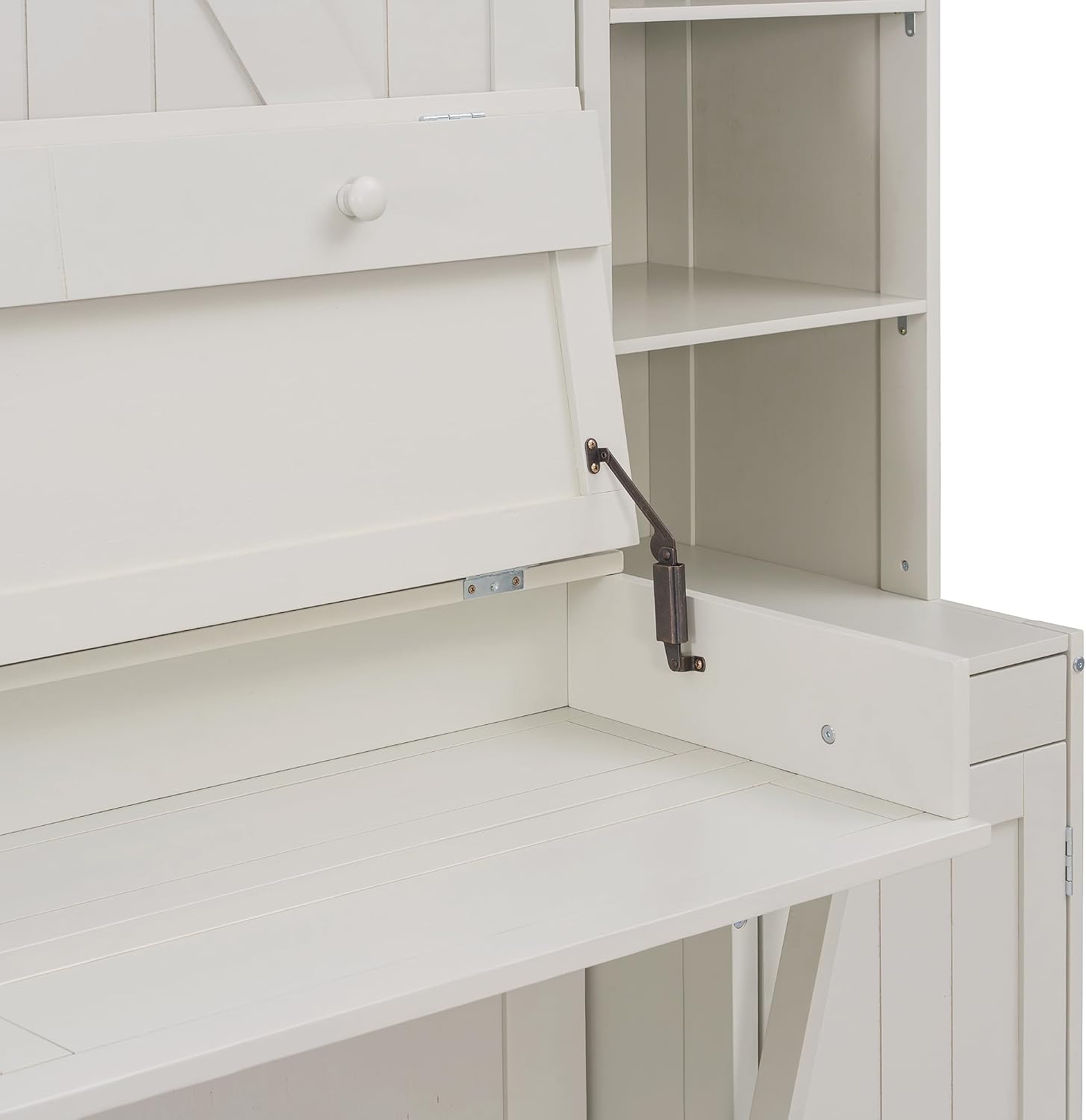
Image: A close-up view of the desk mechanism on the Brabrety Murphy Bed, highlighting the hinges and support structure that allow the desk to fold down from the main unit. This detail is important for assembly and operation.

Image: An interior view of one of the side cabinets of the Brabrety Murphy Bed, showing the shelving and internal space available for storage. This illustrates the storage capacity and design.
Operating Instructions
The Brabrety Murphy Bed is designed for easy conversion between bed and desk modes. Always ensure the area around the bed is clear before operating the mechanism.
Converting to Bed Mode
- Clear the Desk: Remove all items from the desk surface. The desk will fold away as the bed is lowered.
- Unlock Bed Mechanism: Locate and disengage any safety latches or locks that secure the bed in the upright position.
- Lower the Bed: Gently pull the bed frame downwards from the top. The hydraulic or spring mechanism will assist in a smooth, controlled descent until the bed is fully extended and resting on its support legs.
- Ensure Stability: Confirm that the bed's support legs are fully extended and stable on the floor before use.
Converting to Desk Mode
- Remove Bedding: Remove pillows and bedding from the bed surface.
- Lift the Bed: Grasp the bed frame and gently lift it upwards. The mechanism will assist in raising the bed back into its vertical position.
- Engage Safety Latches: Once the bed is fully upright, engage all safety latches or locks to secure it in the folded position.
- Extend Desk: The desk surface will automatically extend or can be manually pulled down into its working position.
Using Storage and USB Charging Station
- Side Cabinets and Shelving: Utilize the open shelving units and side cabinets for organizing books, decor, and personal items.
- USB Charging Station: Plug electronic devices into the built-in USB charging station located on the desk or within a side unit (depending on model) to power up while working or resting.

Image: The Brabrety Queen Size Murphy Bed fully unfolded and dressed with bedding, ready for use. The surrounding shelving units are visible, demonstrating the integrated storage.

Image: The Brabrety Queen Size Murphy Bed in its folded position, with the integrated desk extended and ready for use. The barn-door style cabinet fronts are visible, along with the side storage.
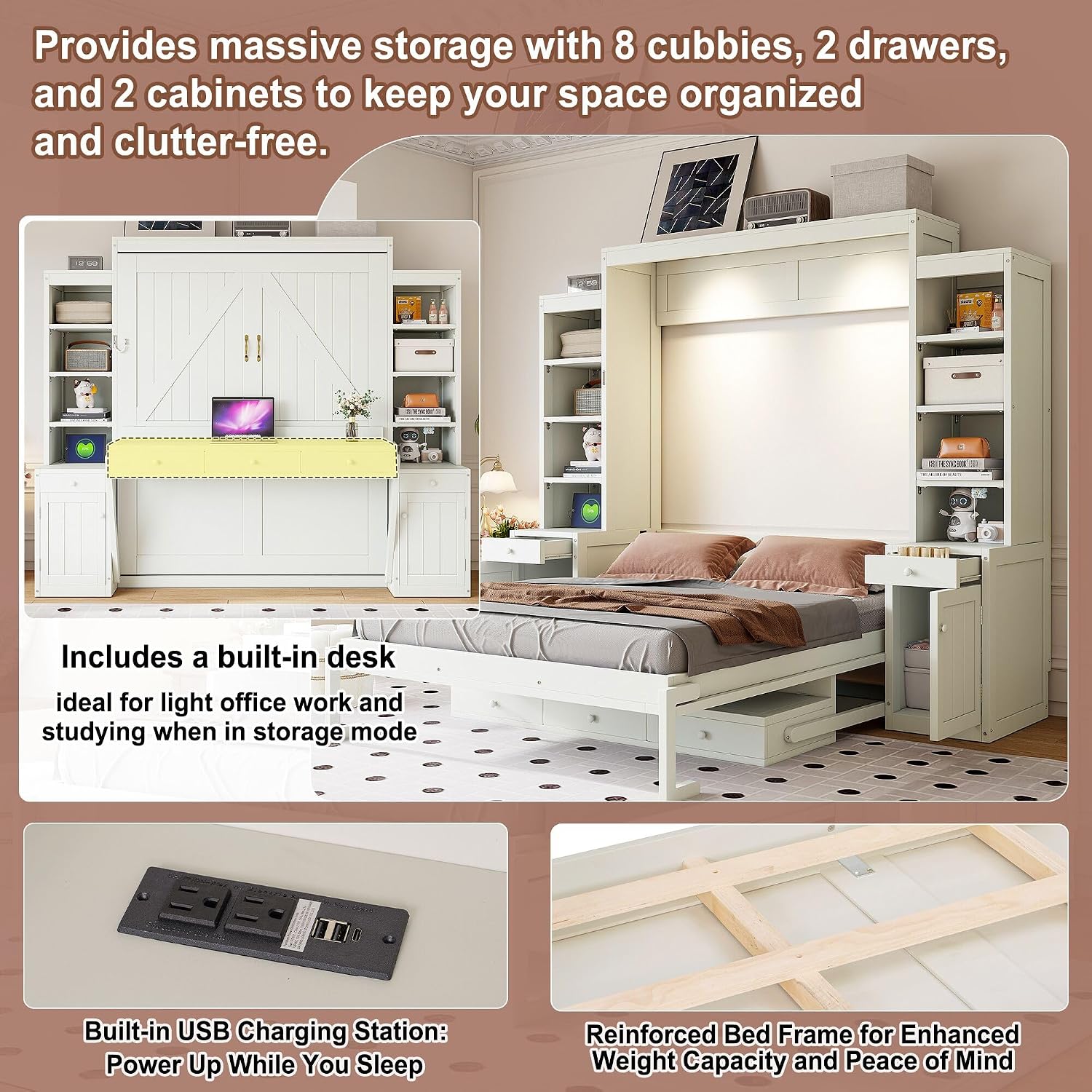
Image: A composite image highlighting key features of the Brabrety Murphy Bed: ample storage cubbies, the built-in desk, the USB charging station, and the reinforced bed frame. This visually explains the product's multi-functionality.
Maintenance
Proper maintenance will ensure the longevity and optimal performance of your Brabrety Murphy Bed.
- Cleaning: Wipe surfaces with a soft, damp cloth. Avoid harsh chemicals or abrasive cleaners that can damage the finish.
- Mechanism Check: Periodically inspect the folding mechanism, hinges, and support legs for any signs of wear or loosening. Tighten any loose screws or bolts as needed.
- Lubrication: If the folding mechanism becomes stiff, apply a small amount of silicone-based lubricant to the moving parts. Do not use oil-based lubricants as they can attract dust.
- Weight Limit: Adhere strictly to the maximum weight recommendation of 600 pounds for the bed. Overloading can damage the frame and mechanism.
- Environmental Conditions: Avoid placing the bed in direct sunlight or near heat sources, as this can cause wood to warp or fade. Maintain a stable room temperature and humidity.
Troubleshooting
If you encounter issues with your Brabrety Murphy Bed, refer to the following common problems and solutions:
| Problem | Possible Cause | Solution |
|---|---|---|
| Bed difficult to fold/unfold | Mechanism stiff or obstructed; loose connections. | Check for obstructions. Apply silicone lubricant to moving parts. Ensure all assembly screws are tight. |
| Bed feels unstable | Support legs not fully extended; loose frame connections. | Ensure support legs are locked into place. Re-tighten all frame assembly bolts. Ensure bed is on a level surface. |
| Desk does not extend/retract smoothly | Hinges stiff or obstructed. | Clear any debris. Lubricate hinges with silicone spray. |
| USB charging station not working | Not plugged into power outlet; faulty connection. | Ensure the bed's power cord is securely plugged into a functional wall outlet. Check all internal connections if accessible. |
Specifications
| Feature | Detail |
|---|---|
| Size | Queen |
| Special Feature | Desk & Storage, Drawers |
| Color | White#b |
| Product Dimensions | 101.1"L x 87.6"W x 88.6"H |
| Brand | Brabrety |
| Included Components | Murphy Bed |
| Finish Type | Polished |
| Weight Limit | 600 Pounds |
| Item Weight | 361.4 Pounds |
| Age Range (Description) | Adult |
| Assembly Required | Yes |
| Form Factor | Murphy Bed |
| Frame Size | 87.6 Inches |
| Manufacturer | Brabrety |
| Assembly Instructions Description | Included |
| Style | Modern |
| Frame Material | MDF+Pine Wood |
Important Safety Note: Do not use this bed with infants or young children. Maximum weight recommendation: 600 pounds.
Warranty Information
Specific warranty details for your Brabrety Murphy Bed are typically provided with your purchase documentation. Please refer to the warranty card or contact the seller for information regarding coverage, terms, and conditions. Generally, products are covered against manufacturing defects for a limited period from the date of purchase.
Customer Support
If you have any questions regarding the assembly, operation, or maintenance of your Brabrety Queen Size Murphy Bed, or if you require assistance with missing or damaged parts, please contact customer service. Refer to your purchase invoice or the seller's contact information for the most direct support. When contacting support, please have your model number (Murphy Bed) and purchase date available.
For general inquiries, you may visit the Brabrety brand page on Amazon: Brabrety on Amazon