
Introduction
Thank you for choosing the Boytond YYK-526 Bluetooth 5.4 Single Ear Headset. This manual provides detailed instructions for setting up, operating, and maintaining your headset to ensure optimal performance and a seamless user experience. Please read this manual thoroughly before using the product.
Product Overview
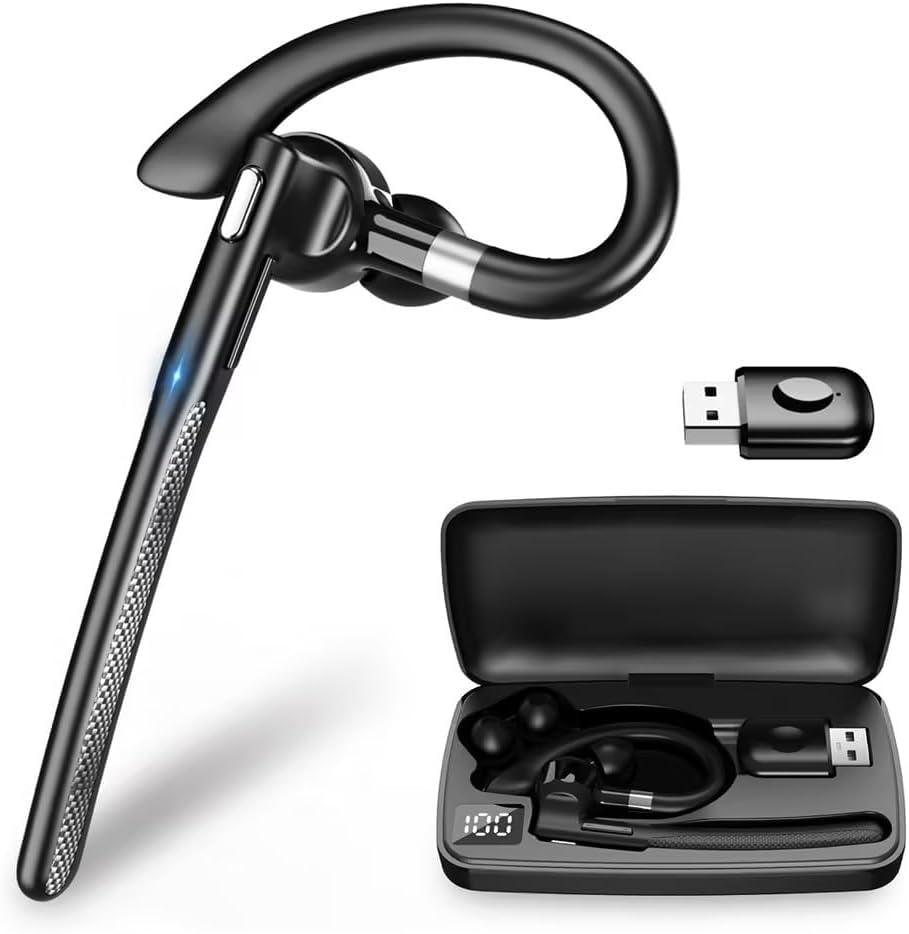
The Boytond YYK-526 is a versatile Bluetooth headset designed for clear communication and extended use. Key features include:
- Bluetooth 5.4 Technology: Provides a stable, fast, and low-power connection.
- Ultra-long Battery Life: Up to 10-12 hours of talk/music playback on a single charge, with a 500mAh charging case providing 5-7 full recharges for a total of up to 100 hours.
- CVC8.0 Noise Cancelling: Equipped with a unidirectional microphone and CVC8.0 noise cancelling to accurately pick up your voice and block ambient noise for clear calls.
- Mute Function: Allows you to mute your microphone during calls for privacy.
- Automatic Pairing: Simplifies connection after the initial setup.
- Ergonomic Ear-hook Design: Ensures a comfortable and secure fit for extended wear.
- Multi-function Button: Easy control for music playback, call management, and voice assistant activation.
- Wide Compatibility: Supports various Bluetooth-enabled devices including PCs, tablets, and smartphones.


Setup Instructions
1. Charging the Headset
Before first use, fully charge the headset and its charging case.
- Place the headset into the charging case.
- Connect the charging case to a USB power source using the provided cable.
- The LED display on the charging case will indicate the battery level. A full charge takes approximately 1.5 hours.

2. Pairing with Your Device
The headset supports automatic pairing after the initial setup.
- Take the headset out of the charging case. It will automatically enter pairing mode.
- On your smartphone, tablet, or PC, enable Bluetooth.
- Search for available devices and select "YYK-526" from the list.
- Once connected, the headset will indicate a successful pairing.
- For subsequent uses, the headset will automatically connect to the last paired device when taken out of the case.
Operating Instructions
1. Power On/Off
- Power On: Take the headset out of the charging case. It will power on automatically.
- Power Off: Place the headset back into the charging case. It will power off automatically.
2. Call Management
Use the Multi-function Button (MFB) on the headset for call control:
- Answer Call: Press the MFB once.
- End Call: Press the MFB once during a call.
- Reject Call: Press and hold the MFB for 2 seconds.
- Redial Last Number: Double-press the MFB.
- Mute/Unmute Microphone: During a call, press the MFB once to mute your voice. Press again to unmute.

3. Music Playback
Use the MFB for music control:
- Play/Pause: Press the MFB once.
4. Voice Assistant (Siri)
Activate your device's voice assistant:
- Activate Siri/Voice Assistant: Press and hold the MFB for 2 seconds (when not on a call).
5. Wearing the Headset
The ergonomic ear-hook design ensures a comfortable and secure fit. Adjust the ear-hook to fit snugly around your ear. The package includes different sizes of ear tips (S/M/L) to find your best fit.


Maintenance
To ensure the longevity and optimal performance of your Boytond YYK-526 headset, follow these maintenance guidelines:
- Cleaning: Regularly wipe the headset and charging case with a soft, dry cloth. Avoid using harsh chemicals or abrasive materials.
- Storage: Store the headset in its charging case when not in use to protect it from dust and damage. Keep it in a cool, dry place away from extreme temperatures.
- Avoid Water: The headset is not waterproof. Avoid exposure to water, rain, or excessive moisture.
- Charging: Use only the provided charging cable and a compatible USB power source.
Troubleshooting
If you encounter any issues with your headset, refer to the following common problems and solutions:
| Problem | Solution |
|---|---|
| Headset does not power on. | Ensure the headset is charged. Place it in the charging case and connect the case to power. |
| Cannot pair with device. | Make sure Bluetooth is enabled on your device. Ensure the headset is in pairing mode (out of the case). Forget previous pairings on your device and try again. |
| No sound or poor sound quality. | Check the volume level on both the headset and your connected device. Ensure the headset is within the 10M transmission range of your device. Re-pair the headset. |
| Microphone not working. | Ensure the microphone is not muted. Check privacy settings on your device to allow the headset access to the microphone. |
| Headset disconnects frequently. | Ensure the headset is fully charged. Stay within the 10M Bluetooth range. Avoid obstacles between the headset and your device. |
Specifications
Detailed technical specifications for the Boytond YYK-526 Bluetooth Headset:
| Feature | Detail |
|---|---|
| Model Name | YYK-526 |
| Brand | Boytond |
| Connectivity Technology | Wireless (Bluetooth 5.4) |
| Wireless Communication Technology | Bluetooth |
| Noise Control | Adaptive Noise Cancelling (CVC8.0) |
| Frequency Response | 2.4 GHz |
| Ear Placement | Over-Ear |
| Headphone Form Factor | Over-Ear |
| Impedance | 13 Ohms |
| Control Method | Push Button |
| Battery Life (Headset) | Approx. 10-12 hours (talk/music) |
| Charging Case Capacity | 500mAh (provides 5-7 full recharges) |
| Charging Time | Approx. 1.5 hours |
| Transmission Distance | Up to 10 meters (without obstacles) |
| Included Components | Instruction Manual, Charging Case, USB Cable, Ear Tips (S/M/L) |
| Product Dimensions | 14.5 x 7.8 x 2.7 cm; 100 g (Package) |
Warranty and Support
This product is a wireless device that complies with relevant technical standards. For warranty information or technical support, please refer to the contact details provided with your purchase documentation or visit the official Boytond website. Keep your purchase receipt as proof of purchase.
Product Video
An official product video demonstrating the features and usage of the Boytond YYK-526 Bluetooth Headset.