
1. Introduction
This manual provides instructions for the setup, operation, and maintenance of your Coospider 20 Gallon Glass Fish Tank. This aquarium kit is designed to provide a stable and healthy environment for aquatic life with features such as 3-color LED lighting, a quiet 3-in-1 filter pump, and real-time temperature monitoring.
Important Safety Note: Long-distance shipping may cause product damage. If you receive a package and find the product inside damaged or suspect damage, do not open the package directly to avoid accidental injury. Please check the information on the package for further instructions.
2. Package Contents
- Glass Fish Tank (20 Gallon) x 1
- Quiet 3-in-1 Filter Pump x 1
- Removable Lid with 3-Color LED Lights and Temperature Sensor x 1
3. Setup Instructions
Follow these steps to set up your Coospider 20 Gallon Glass Fish Tank:
- Unpacking: Carefully remove all components from the packaging. Inspect the tank and accessories for any damage.
- Placement: Choose a stable, level surface away from direct sunlight and heat sources. Ensure the surface can support the weight of a full aquarium (approximately 200 lbs for a 20-gallon tank with water and decorations).
- Rinsing: Rinse the glass tank, filter pump, and any decorations with clean water. Do not use soap or detergents.
- Install Filter Pump: Position the quiet 3-in-1 filter pump inside the tank according to the diagram. Ensure it is securely attached to the tank wall using suction cups if provided.
- Add Substrate and Decorations: Add your chosen substrate (gravel, sand) and decorations. Rinse them thoroughly before placing them in the tank.
- Fill with Water: Slowly fill the tank with dechlorinated water. Leave about 1 inch of space from the top rim.
- Install Removable Lid: Carefully place the removable lid onto the tank. When installing and removing the lid, keep it at a 90-degree angle to the fish tank to prevent damage. Ensure the temperature sensor is submerged in the water for accurate readings.
- Connect Power: Plug in the filter pump and LED lights. Ensure all connections are secure and away from water.

Image: The Coospider 20 Gallon Glass Fish Tank with its removable lid installed, preventing fish from jumping out and reducing water evaporation. This image shows the tank fully set up with aquatic plants and fish.
Video: This video demonstrates the setup and features of the Coospider Fish Tank, including the installation of components and an overview of its updated design.
4. Operating Instructions
4.1. LED Lighting
The aquarium features 3-color LED lighting modes to enhance aesthetics and support plant photosynthesis. Short press the button on the lid to switch between the following lighting modes:
- Natural Light Mode: Provides a balanced light spectrum.
- Warm Light Mode: Emits a warmer tone.
- Cold Light Mode: Emits a cooler, blue-ish tone.
- Three-color Cycle Mode: Cycles through all three colors.
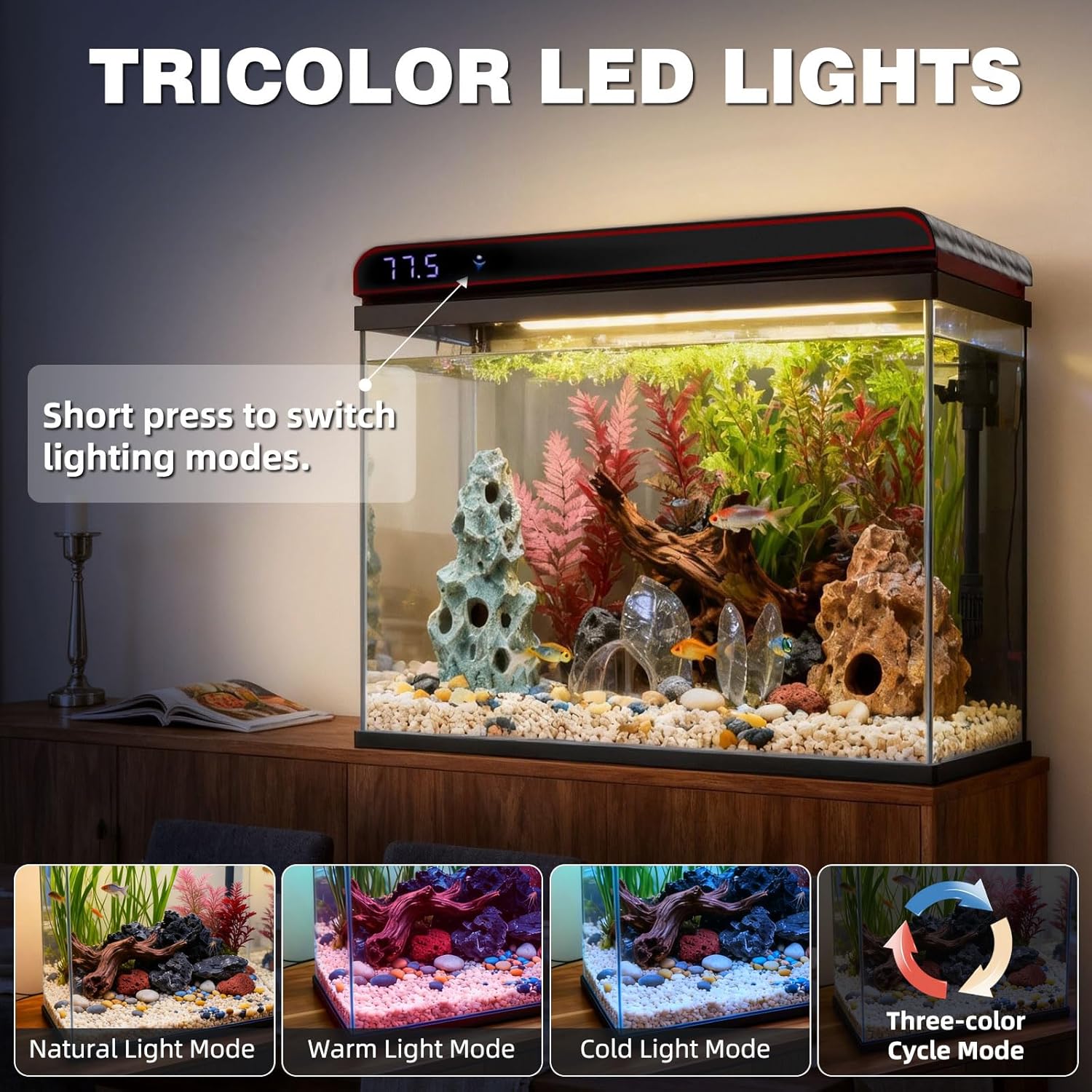
Image: The Coospider 20 Gallon Glass Fish Tank showcasing its tricolor LED lights. The image illustrates the different lighting modes: Natural, Warm, Cold, and a Three-color Cycle, with an arrow pointing to the button for switching modes.
4.2. Temperature Monitoring
A built-in real-time water temperature sensor displays the current water temperature in Fahrenheit (°F) on the lid. This helps maintain a stable environment for sensitive aquatic species. Ensure the temperature detector is fully submerged in water for accurate readings.

Image: The Coospider 20 Gallon Glass Fish Tank displaying its temperature monitoring feature. A digital display on the lid shows the water temperature, with an illustration of the submerged temperature sensor.
4.3. Filtration System
The integrated quiet 3-in-1 pump provides filtration, oxygenation, and wave-making functions. This system helps maintain clean and hygienic water quality. For enhanced filtration, especially if you are not satisfied with the simple filtration effect, consider using it in conjunction with an additional filter and a sterilizing lamp.

Image: The Coospider 20 Gallon Glass Fish Tank illustrating its self-cleaning circulation system. Arrows show water flow, and insets detail the filtering, wave-making, and oxygenating functions of the 3-in-1 pump.
5. Maintenance
Regular maintenance is crucial for a healthy aquatic environment. Refer to the table below for recommended cleaning and maintenance tasks:

Image: A detailed table outlining the cleaning and maintenance schedule for 5, 10, and 20-gallon Coospider fish tanks. It specifies tasks, frequency (daily, weekly, monthly), actions, and notes for each task.
| Task | Frequency | Action | Notes |
|---|---|---|---|
| LED duration | Daily | 8-12 hrs | Control algae |
| Water change | Daily | 6 Gallons (30%) | Strict 30% |
| Clean filter sponge | Weekly | Use the water in the fish tank to clean and squeeze. | Must clean, no tap water |
| Wipe lid + LED | Weekly | Dry microfiber cloth wiping | Prevent scratches |
| Water pump filter basket | Weekly | Disassemble and flush | Power off |
| Test water | Weekly | pH 6.5-7.5 Ammonia <0.25 ppm | Add bacteria if abnormal |
| Clean airstone | Monthly | Soak in vinegar 5 min, rinse thoroughly | Prevent fish gasping |
| Replace carbon | Monthly | Change the activated carbon | — |
| Water pump inner impeller | Monthly | Disassemble, rinse, and dry. | — |
Weekly routine (15 min): Power off & unplug pump → Water change → Clean sponge → Wipe lid+LED → Test water.
6. Troubleshooting
If you encounter issues with your Coospider fish tank, refer to the following common problems and solutions:
- Pump not working:
- Ensure the pump is fully submerged and properly connected to a power source.
- Check for blockages in the impeller or intake. Disassemble and clean the water pump inner impeller monthly as part of routine maintenance.
- Verify that the power outlet is functional.
- Inaccurate Temperature Readings:
- Ensure the temperature detector is fully submerged in the water.
- Avoid placing the tank near direct heat sources or cold drafts that could affect readings.
- Excessive Algae Growth:
- Reduce LED lighting duration to 8-12 hours daily.
- Perform regular water changes (30% daily for 20-gallon tank).
- Clean the tank and decorations weekly.
- Cloudy Water:
- Ensure the filter sponge is clean and not clogged. Clean it weekly using tank water.
- Perform a partial water change.
- Test water parameters (Ammonia, Nitrite, Nitrate). Add beneficial bacteria if needed.
If problems persist, please refer to the contact information on the product package for customer support.
7. Specifications
| Feature | Detail |
|---|---|
| Brand | COOSPIDER |
| Model Number | T500B-20G-UP-NEW |
| Tank Volume | 20 Gallons |
| Material | Ultra-clear Glass |
| Product Dimensions (L x W x H) | 20"L x 12"W x 18.5"H |
| Item Weight | 15 pounds |
| Special Features | Temperature Monitoring, 3-Color LED Lights, Quiet 3-in-1 Filter Pump, Removable Flip-Top Lid |
| Included Components | Fish tank*1, Pump*1 |

Image: A diagram showing the dimensions of Coospider fish tanks in 5, 10, and 20-gallon sizes. The 20-gallon tank is highlighted with its length (20.00 in), width (12 in), and height (18.5 in).
8. Warranty and Support
Warranty: For any product issues, please refer to the information provided on the product package. The manufacturer is committed to responding to inquiries within 48 hours.
Returns: This product is eligible for a refund or replacement within 30 days of purchase, subject to the retailer's return policy.
Customer Support: If you encounter any problems or have questions, please check the information on the product package for contact details. You can also visit the official COOSPIDER store for more information: COOSPIDER Store.