
Introduction
The Gueray G-906 is a versatile portable CD player designed for home use, featuring Bluetooth 5.0 connectivity, built-in HiFi speakers, FM radio, and multiple playback options including TF card, USB flash drive, and 3.5mm audio input. This manual provides detailed instructions for setting up and operating your device.
What's in the Box
- CD Player (1 Pack)
- Type C Cable (1 Pack)
- Remote control (1 Pack)
- User Manual (1 Pack)
- 5V-1.5A USB adapter (1 Pack)
Product Overview
Familiarize yourself with the components and controls of your Gueray G-906 CD Player.

Figure 1: Multifunctional CD Player highlighting various features.
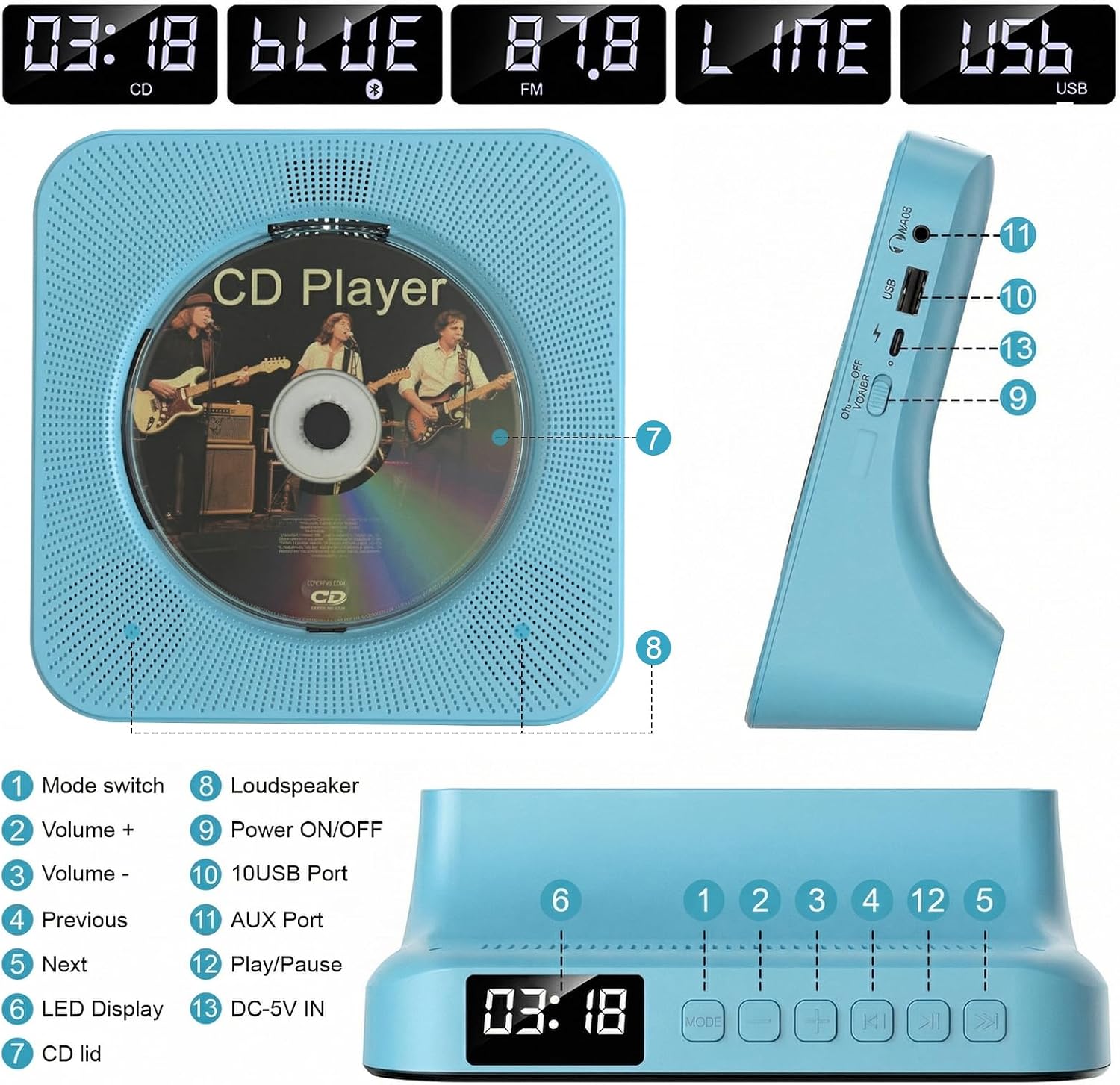
Figure 2: Detailed view of the CD player's controls and ports, including Mode, Volume, Skip, Play/Pause buttons, Loudspeaker, USB Port, AUX Port, DC-5V IN, and Power switch.

Figure 3: The CD player features a transparent dust cover to protect the CD mechanism.
Setup
- Power Connection: Connect the provided Type-C cable to the DC-5V IN port on the side of the CD player. Plug the USB-A end of the cable into the 5V-1.5A USB adapter, then plug the adapter into a power outlet.
- Placement: Place the CD player on a stable, flat surface. The desktop design with rubber feet ensures stability and prevents surface damage.
- Power On: Slide the ON/OFF Power switch on the side of the unit to the 'ON' position. The LED display will illuminate.
- Insert CD: Press the small button at the bottom of the CD cover to open it. Carefully place a CD (CD, CD-G, MP3, WMA compatible) onto the spindle, ensuring it clicks into place. Close the CD cover by pressing the button again.
Operating Instructions
1. CD Playback
- Ensure a CD is properly inserted as described in the Setup section.
- The player will automatically detect the CD and begin playback. The LED display will show the track number and elapsed time.
- Use the Play/Pause button (►▮▮) on the top panel or remote to pause/resume playback.
- Use the Previous (◀◀) and Next (►►) buttons to skip tracks.
- Press the Repeat button on the remote to cycle through repeat modes (e.g., repeat one, repeat all).
2. Bluetooth Mode
The Gueray G-906 functions as both a Bluetooth receiver and transmitter.

Figure 4: Bluetooth functionality, allowing connection to smartphones/tablets (receiver) or Bluetooth headphones/speakers (transmitter).
- Press the MODE button on the unit or remote until 'BLUE' appears on the LED display.
- Bluetooth Receiver: On your smartphone or tablet, search for 'Gueray CD Player' in your Bluetooth settings and pair. The CD player will now act as a speaker for your device.
- Bluetooth Transmitter: To transmit audio from the CD player to Bluetooth headphones or speakers, ensure your headphones/speakers are in pairing mode. The CD player will automatically search and connect.
3. FM Radio

Figure 5: FM Radio function with a wide frequency range of 76MHz-108MHz.
- Press the MODE button until 'FM' appears on the LED display.
- Use the Previous (◀◀) and Next (►►) buttons to manually tune to a station.
- Press and hold the Previous (◀◀) or Next (►►) buttons to auto-scan for the next available station.
4. USB Flash Drive / TF Card Playback

Figure 6: USB Flash Playback and AUX Mode connections.
- Insert a USB flash drive into the USB port or a TF card into the designated slot (if available).
- Press the MODE button until 'USB' or 'TF' appears. The player will automatically detect and play MP3 files.
- Use the playback controls (Play/Pause, Previous, Next) as you would for CD playback.
5. AUX Mode
- Connect an external audio device (e.g., smartphone, laptop) to the AUX port using a 3.5mm audio cable.
- Press the MODE button until 'LINE' appears on the LED display.
- Audio from the connected device will now play through the CD player's speakers.
6. Remote Control

Figure 7: The remote control allows full functionality from a distance, including power, mode selection, volume, and playback controls.
The included remote control provides full functionality for the CD player. It allows you to power on/off, switch modes (USB, FM, CD, Bluetooth), adjust volume, skip tracks, repeat songs, and set a sleep timer.
7. Sleep Timer
Use the sleep timer function on the remote control to set the player to automatically turn off after a specified duration.
Maintenance
- Keep the CD player clean by wiping it with a soft, dry cloth.
- Ensure the dust cover is closed when not in use to prevent dust and debris from entering the CD mechanism.
- Handle CDs by their edges to avoid fingerprints and scratches, which can affect playback quality.
Troubleshooting
- No Power: Ensure the power cable is securely connected to both the player and the power adapter, and the adapter is plugged into a working outlet. Check the ON/OFF switch.
- CD Not Playing: Verify the CD is inserted correctly and is clean. Ensure the player is in CD mode.
- No Sound: Check the volume level on the player and any connected external devices. Ensure the correct mode (CD, Bluetooth, FM, USB, AUX) is selected.
- Bluetooth Connection Issues: Ensure the player is in Bluetooth mode and your external device's Bluetooth is enabled and in pairing mode. Try restarting both devices.
- Poor Radio Reception: Adjust the player's position to improve signal reception.
Specifications
| Brand | Gueray |
| Model Number | G-906 |
| Color | Blue |
| Connectivity Technology | Bluetooth |
| Special Features | Anti-Skip Protection, Built-In Radio, CD-R/RW Compatible, Dustproof, Programmable Memory |
| Supported Audio Format | WAV |
| Connector Type | 3.5mm Jack |
| Number Of Discs | 1 |
| MP3 Player | Yes |
Official Product Video
Video 1: Official demonstration of the Gueray CD Player's features and operation by LOUYUA.
Warranty & Support
This Gueray CD Player comes with a 6-month warranty.
For further support, please visit the official Gueray Store: Gueray Store on Amazon
