
Introduction
Thank you for choosing the PGYTECH OnePro Ultralight Camera Backpack 20L. This manual provides detailed instructions on the features, setup, operation, and maintenance of your new backpack. Designed for photographers and outdoor enthusiasts, this backpack offers a lightweight yet robust solution for carrying your essential gear.
A front view of the PGYTECH OnePro Ultralight Camera Backpack 20L in black, showcasing its sleek design and external features.
Key Features
Lightweight Design
Constructed with a high-strength nylon blend, the OnePro Ultralight 20L backpack weighs approximately 1.3 kg (2.87 lbs), offering significant weight reduction for comfortable long-duration wear.

The backpack features splash-resistant, lightweight, and durable fabric, ideal for outdoor use.
Professional Carrying System
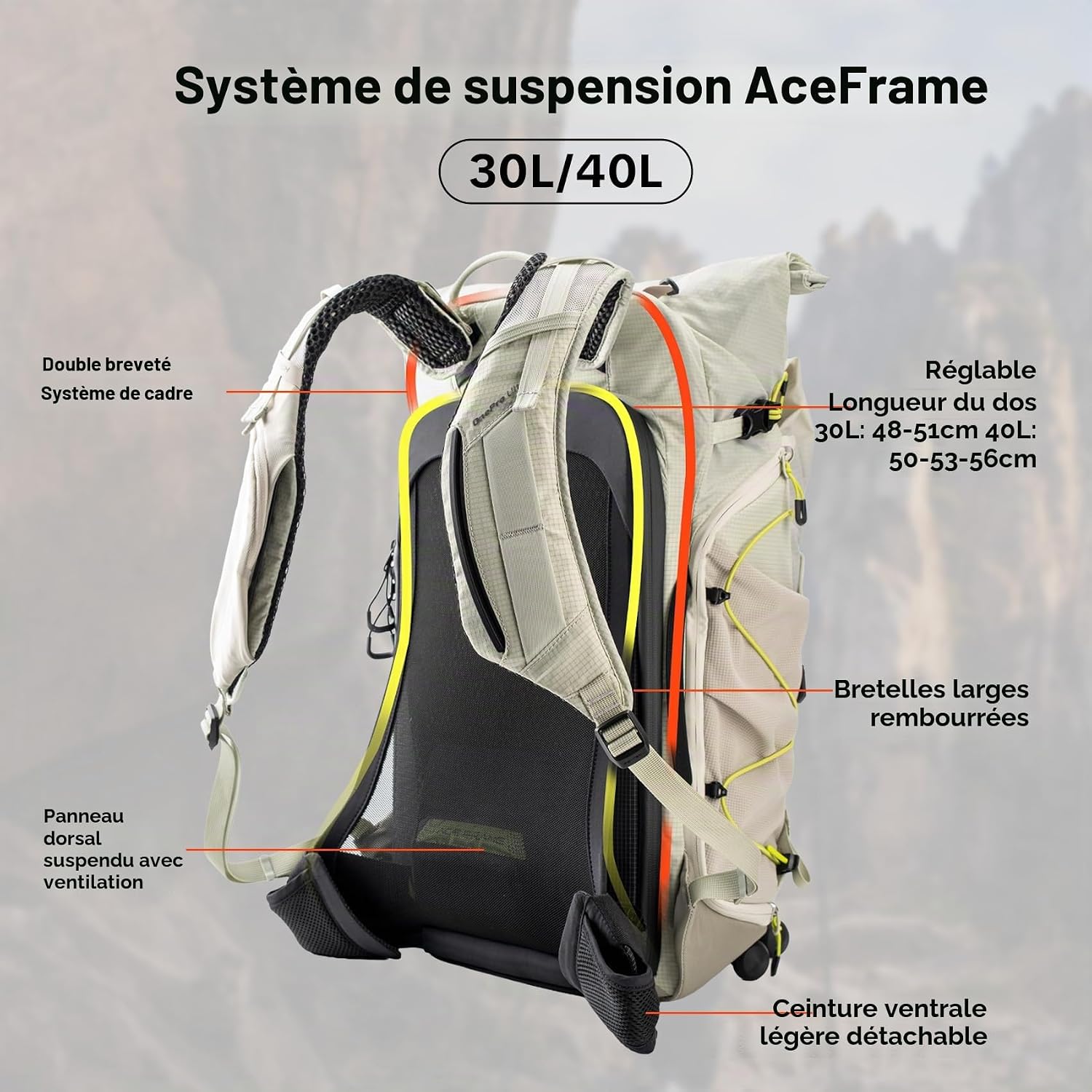
The 20L model utilizes an AirFoam metallic frame, effectively distributing weight and reducing shoulder pressure. The suspended back panel provides support and enhanced breathability, while wider, thicker padded shoulder straps further reduce pressure during prolonged use.

This image illustrates the different suspension systems for the 20L and 30L/40L models. The 20L features an AirFoam Metallic Frame System with a breathable back panel and wide padded shoulder straps.

The adjustable chest strap stabilizes the backpack to minimize sway, ensuring a more stable and less fatiguing walk.
Expandable Storage
The front kangaroo-style expansion pocket can be closed to store a stabilizer or hydration pack, or left open for extended storage. The rolltop section includes a foldable extension for additional gear.

The backpack features a front mesh pocket for power banks and small items, and two external side pockets suitable for water bottles, tripods, etc.
Quick Access & Organization
Access your camera in seconds via the left-side access window without removing the backpack. The full 180° clamshell rear opening provides a clear view for easy organization and storage of all your equipment. The internal compartment can be configured with removable dividers to hold up to 1 camera + 5 lenses, or 1 camera + 1 lens + Mavic Mini Combo.

Quick side access allows users to retrieve their camera in seconds without removing the backpack, ensuring instant capture of moments.

The backpack's 180-degree clamshell opening provides a clear view and easy access to all camera equipment, including multiple lenses and accessories.

This image highlights the internal features: a foldable inner compartment, an elastic shoulder strap phone pocket with zipper, and a dedicated laptop compartment. The 20L model fits a 14-inch laptop.
Durability & Protection
The backpack is made from 100% nylon, offering water resistance. It includes water-resistant YKK zippers for added protection. The 20L model does not include a rain cover, but the material itself provides good protection against splashes.

This image highlights the backpack's refined details: a hidden pocket for indicators, side and top carry handles, and water-resistant YKK zippers.
Setup and Configuration
Internal Dividers
The backpack comes with removable dividers that allow you to customize the internal layout to fit your specific camera gear and accessories. These dividers attach securely with hook-and-loop fasteners.
- Open the main rear compartment of the backpack.
- Arrange the padded dividers to create compartments that snugly fit your camera body, lenses, and other equipment.
- Ensure all gear is securely held in place to prevent movement during transport.
- The internal compartment can be removed entirely to convert the backpack into a general-purpose daypack.

This image demonstrates the versatility of the removable internal dividers. The backpack can be configured for 'Image Creation Mode' (2 cameras + 3 lenses), 'Photography Hiking Mode' (1 camera + 2 lenses), or 'Leisure Hiking Mode' (daily essentials + clothes).
Carrying System Adjustment
Adjust the shoulder straps and chest strap for optimal comfort and weight distribution.
- Shoulder Straps: Loosen or tighten the straps to ensure the backpack sits comfortably on your back, with the weight evenly distributed across your shoulders.
- Chest Strap: Fasten the adjustable chest strap across your sternum and adjust its height and tension to stabilize the backpack and prevent swaying.
Operating Instructions
Wearing the Backpack
- Place the backpack on your back, ensuring the shoulder straps are comfortably positioned.
- Adjust the shoulder straps to achieve a snug fit.
- Fasten and adjust the chest strap for added stability, especially during active movement.

This image provides a visual size comparison of the 20L, 30L, and 40L PGYTECH OnePro Ultralight backpacks when worn by individuals of varying heights (165cm, 175cm, 185cm), helping users choose the perfect size.
Accessing Your Gear
- Side Access: To quickly retrieve your camera, swing the backpack to your front or side, and use the zippered side access panel.
- Rear Access: For full access to all compartments and for organizing gear, lay the backpack down and open the 180° clamshell rear panel.
Utilizing Expansion Features
- Front Pocket: Use the front kangaroo pocket for items requiring quick access or for expanding storage capacity.
- Rolltop Extension: Unroll and extend the top section to accommodate larger items or increase overall volume.
Using Attachment Points
The backpack features multiple external attachment points for various accessories:
- Camera Clips: Attach quick-release camera clips to the shoulder straps for immediate camera access.
- Trekking Poles: Secure trekking poles using the designated loops and straps.
- Tripods: Utilize the side pockets and compression straps to securely carry a tripod.

The backpack offers multiple attachment points for various accessories: a quick camera clip, trekking poles, and tripods, ensuring easy access and secure transport.
Maintenance
To ensure the longevity and performance of your PGYTECH OnePro Ultralight Camera Backpack, follow these simple maintenance guidelines:
- Cleaning: Wipe the backpack with a damp cloth to remove dirt and stains. Do not machine wash or tumble dry.
- Drying: Allow the backpack to air dry completely in a well-ventilated area, away from direct sunlight or heat sources.
- Storage: Store the backpack in a cool, dry place when not in use.
- Zippers: Periodically check zippers for smooth operation. If they become stiff, apply a small amount of zipper lubricant.
Troubleshooting
If you encounter any issues with your PGYTECH OnePro Ultralight Camera Backpack, please refer to the following common solutions:
- Discomfort during wear: Re-adjust shoulder straps, chest strap, and ensure the internal load is evenly distributed.
- Difficulty with zippers: Ensure no fabric is caught in the zipper. If stiff, clean and apply a zipper lubricant.
- Limited space: Utilize the expandable front pocket and rolltop extension for additional capacity. Reconfigure internal dividers for optimal use of space.
For further assistance, please contact PGYTECH customer support.
Specifications
| Feature | Detail |
|---|---|
| Model Number | P-CB-417 |
| Capacity | 20 Liters |
| Dimensions (D x W x H) | 45 x 28 x 14.5 cm (17.72 x 11.02 x 5.71 inches) |
| Weight | 1.3 kg (2.87 lbs) |
| Material | 100% Nylon |
| Water Resistance Level | Splash-resistant |
| Laptop Compartment | Fits up to 14-inch laptop |
| Number of Pockets | 5 |
| Number of Compartments | 4 |
| Care Instructions | Wipe with a damp cloth |
| Country of Origin | China |
Warranty and Support
PGYTECH products are manufactured to high-quality standards. For information regarding warranty coverage, product registration, or technical support, please visit the official PGYTECH website or contact their customer service directly. Please retain your proof of purchase for any warranty claims.
For additional resources and product information, you may visit the PGYTECH Brand Store on Amazon.