
Product Overview
The SoundPEATS Air6 HS earbuds offer a premium audio experience with Hi-Res Audio certification and LDAC support. Featuring 13mm dynamic drivers, extended battery life, and advanced call noise reduction, these lightweight earbuds are designed for comfort and performance in various environments.

Image: SoundPEATS Air6 HS earbuds and their charging case.

Image: Certification for Hi-Res Audio and LDAC support, indicating high-fidelity sound.

Image: Diagram illustrating the triple magnet 13mm dynamic driver for superior sound quality.

Image: Diagram of the Bluetooth 6.0 chip, highlighting improved connectivity and power efficiency.
Video: Official product video showcasing the features and design of the SoundPEATS Air6 HS earbuds.
Package Contents
- SoundPEATS Air6 HS Earbuds
- Charging Case
- USB-C Charging Cable
- User Manual

Image: The SoundPEATS Air6 HS earbuds, charging case, and USB-C charging cable included in the package.
Setup
Charging the Case and Earbuds
Before first use, fully charge the charging case and earbuds. Connect the USB-C cable to the charging port on the case and a power source. The indicator light on the case will show the charging status.

Image: The SoundPEATS Air6 HS charging case with earbuds inside, showing the charging indicator light.
Pairing with Your Device
- Open the charging case. The earbuds will automatically enter pairing mode.
- On your device (smartphone, tablet, etc.), enable Bluetooth.
- Search for "SoundPEATS Air6 HS" in the Bluetooth device list and select it to connect.
- A voice prompt will confirm successful connection.

Image: SoundPEATS Air6 HS earbuds removed from the charging case, ready for Bluetooth pairing.
Operating Instructions
Touch Controls
| Function | Action |
|---|---|
| Play/Pause | Double tap either earbud |
| Volume Up | Tap right earbud once |
| Volume Down | Tap left earbud once |
| Next Track | Press and hold right earbud for 1.5s |
| Previous Track | Press and hold left earbud for 1.5s |
| Answer/End Call | Double tap either earbud |
| Reject Call | Press and hold either earbud for 1.5s |
| Activate Voice Assistant | Triple tap right earbud |
| Game Mode On/Off | Triple tap left earbud |
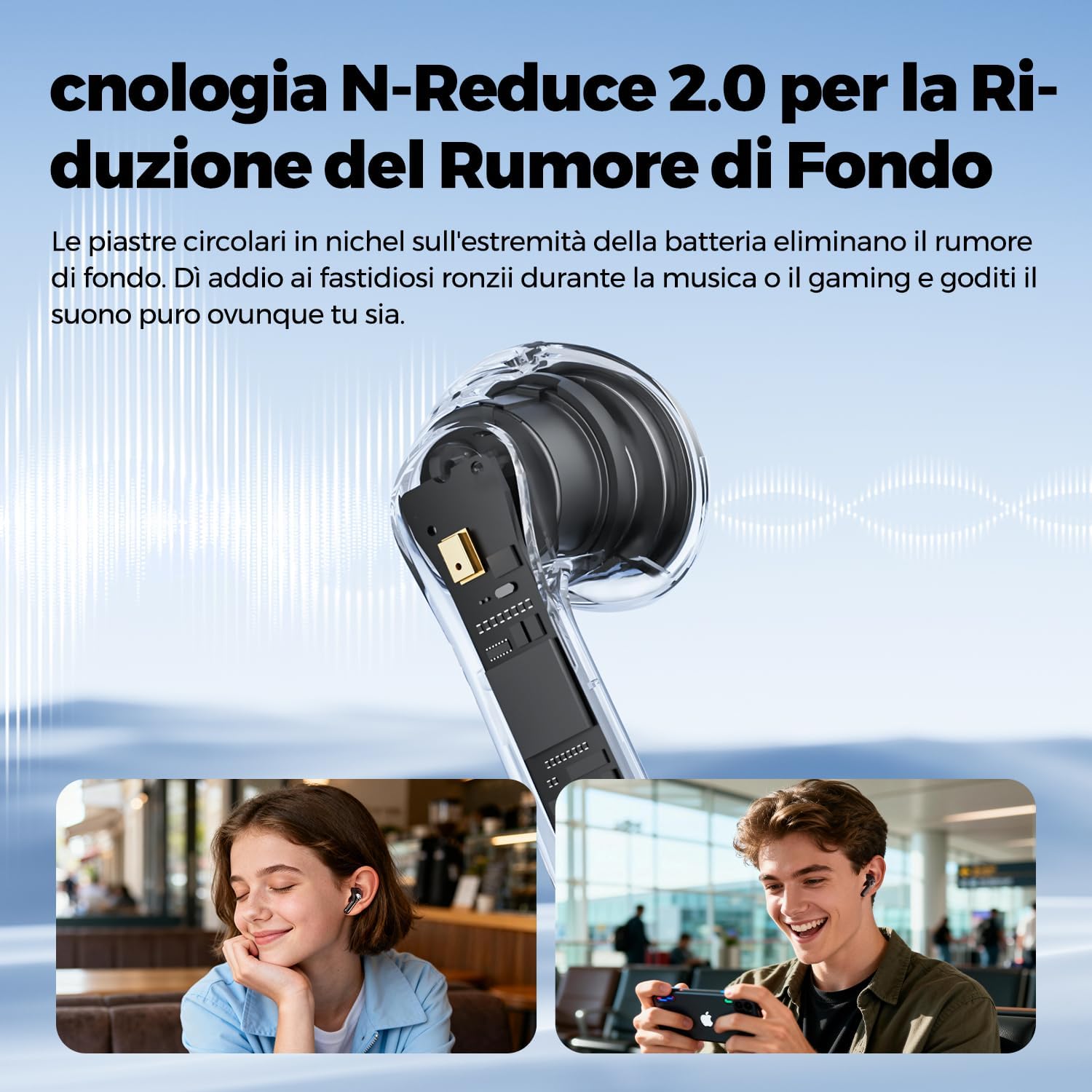
Image: A close-up of the SoundPEATS Air6 HS earbud in an ear, illustrating the touch control area.
Call Management
The earbuds feature 2MIC ENC technology with N-Reduce 2.0 algorithm for clear calls by isolating your voice from background noise. This ensures your voice is heard clearly even in noisy environments.

Image: Illustration of the 4-microphone system with AI enhancement for clear calls, showing noise reduction.
SoundPEATS App
Download the official SoundPEATS App to unlock additional features and customization options. The app allows you to:
- Personalize the equalizer settings.
- Use the "Find My Earbuds" function in case of misplacement.
- Activate smart drainage to expel water from the drivers.
- Manage other settings and firmware updates.

Image: Screenshot of the SoundPEATS mobile application interface, showing various control options for the earbuds.
Maintenance
Cleaning
Regularly clean the earbuds and charging case with a soft, dry cloth. Avoid using harsh chemicals or abrasive materials. Ensure the charging contacts are free of dust and debris to maintain optimal performance.
Water Resistance (IPX5)
The SoundPEATS Air6 HS earbuds are IPX5 water-resistant, meaning they can withstand sweat and light rain. They are not suitable for swimming, showering, or submersion in water. Always ensure the earbuds are dry before placing them back in the charging case to prevent damage.

Image: SoundPEATS Air6 HS earbuds with water droplets, illustrating their IPX5 water resistance.
Troubleshooting
Connection Issues
- Ensure both earbuds are charged.
- Turn off and on your device's Bluetooth.
- Forget "SoundPEATS Air6 HS" from your device's Bluetooth list and re-pair.
- If issues persist, try resetting the earbuds. Refer to the SoundPEATS App or official website for specific reset instructions.
Sound Quality Problems
- Check for debris in the earbud nozzles and clean them if necessary.
- Ensure the earbuds are properly seated in your ears for optimal sound delivery.
- Verify the audio source quality and try playing different audio files.
- If experiencing instability with LDAC, consider disabling it in the SoundPEATS App, as it requires a strong and stable connection.
Charging Problems
- Ensure the USB-C cable and power adapter are working correctly.
- Check if the charging contacts on both the earbuds and the case are clean and free from obstruction.
- Make sure the earbuds are correctly placed in the charging case.
Specifications
| Feature | Detail |
|---|---|
| Brand | SoundPEATS |
| Model Name | Air6 HS |
| Form Factor | Semi-in-ear |
| Bluetooth Version | 6.0 |
| Audio Codec Support | Hi-Res Audio, LDAC |
| Driver Size | 13mm Dynamic Driver |
| Frequency Response | 20 Hz - 40,000 Hz |
| Impedance | 22 Ohm |
| Battery Life (Earbuds) | Up to 9 hours (single charge) |
| Total Battery Life (with Case) | Up to 45 hours |
| Quick Charge | 10 minutes charge for 3 hours playback |
| Microphones | 2MIC ENC (Environmental Noise Cancellation) |
| Water Resistance Rating | IPX5 |
| Weight (per earbud) | Approx. 4g |
| Control Method | Touch |
| Compatible Devices | Mobile phones, Tablets, Laptops, Televisions, Smart speakers |

Image: Close-up view of the SoundPEATS Air6 HS earbuds, highlighting their design and compact size.
Warranty and Support
The SoundPEATS Air6 HS earbuds come with a 2-year product warranty. For technical support, warranty claims, or further assistance, please visit the official SoundPEATS website or contact their customer service.
Official SoundPEATS Website: www.soundpeats.com
Important Safety Information
- Do not expose earbuds to extreme temperatures or direct sunlight.
- Avoid dropping or applying excessive force to the earbuds and charging case.
- Keep out of reach of children and pets to prevent accidental ingestion or damage.
- Do not disassemble, repair, or modify the product yourself. Contact authorized service personnel for any repairs.
- Use only certified charging cables and adapters to prevent damage and ensure safety.
- Avoid listening at high volume levels for extended periods to prevent hearing damage.
- Do not use the earbuds in situations where you need to hear your surroundings, such as driving or cycling, for your safety.


