
1. Introduction
Thank you for choosing the Yomile AD10 4-in-1 Cordless Handheld Vacuum Cleaner. This versatile device combines powerful vacuuming, blowing, air pumping, and inflating functions, making it an essential tool for your home, car, and travel needs. Designed with a high-efficiency brushless motor and a washable HEPA filter, the AD10 ensures thorough cleaning and lasting performance. Please read this manual carefully before use to ensure proper operation and maintenance.
2. Package Contents
Upon unpacking, please ensure all the following items are present:
- Yomile AD10 Main Unit
- Flat Suction Nozzle
- Long Blowing Nozzle
- Flat Brush
- Round Brush
- Electrostatic Brush
- Trumpet Nozzle
- Small Nozzle
- Large Nozzle
- Inflation Nozzle
- USB-C Charging Cable
- Storage Case
- User Manual

Image: Yomile AD10 vacuum cleaner with all 9 accessories neatly arranged, including various nozzles and brushes, alongside its compact storage case.
3. Product Features
- 4-in-1 Multifunctionality: This portable device serves as a vacuum cleaner, air blower, air pump, and inflator, offering comprehensive cleaning and utility for various tasks.
- High-Efficiency Brushless Motor: Equipped with an advanced brushless motor, it achieves up to 250,000 RPM, delivering a powerful suction of 27,000 PA. It features 3 adjustable suction/blowing modes: 9000 PA, 18000 PA, and 27000 PA.
- Long-Lasting Rechargeable Battery: The integrated 9000mAh battery provides up to 45 minutes of operation. It supports fast charging via a USB-C port, fully charging in 3-4 hours. The battery level is conveniently displayed on the handle.
- Compact and Portable Design: Small, lightweight, and cordless, this device is easy to handle and store. The included storage case allows for convenient transport and organization of all accessories.
- One-Click Dust Emptying & Washable HEPA Filter: Designed for easy maintenance, the dust bin can be emptied with a single click. The high-efficiency HEPA filter is removable, washable, and reusable, protecting the motor and extending the vacuum's lifespan.
- 9 Multifunction Accessories: A wide range of accessories ensures versatility for cleaning various surfaces and reaching tight spaces in your home, car, or office.

Image: Product specifications and features display for the Yomile AD10 portable vacuum cleaner, detailing charging time, suction power, and other key metrics.

Image: Technical product image showing specifications of a high-efficiency brushless motor, including 135W, 250,000 RPM, and 27,000 PA.
4. Setup
4.1 Charging the Device
- Locate the USB-C charging port at the base of the handle.
- Connect the provided USB-C cable to the device and a suitable power source (car charger, power bank, laptop, or wall adapter).
- The battery indicator on the handle will show charging status. A full charge typically takes 3-4 hours.

Image: The Yomile AD10 vacuum cleaner connected to a USB-C charging cable, indicating the charging process.
4.2 Attaching Accessories
The Yomile AD10 is designed for easy attachment and detachment of its various accessories. Simply align the desired nozzle or brush with the suction or blowing port and twist gently until it locks into place.

Image: Instructional image sequence illustrating product installation steps, showing various tools and hands performing assembly actions.
5. Operating Instructions
5.1 Powering On/Off and Adjusting Modes
- To power on, press and hold the power button on the handle.
- To adjust the suction/blowing power, briefly press the power button to cycle through the 3 available modes (9000 PA, 18000 PA, 27000 PA). The current mode will be indicated on the display.
- To power off, press and hold the power button again.
5.2 Vacuuming Function
Attach the desired suction nozzle (e.g., Flat Suction Nozzle or Flat Brush) to the front port of the device. Use it to clean:
- Car interiors (seats, floor mats, crevices)
- Household surfaces (sofas, carpets, pet hair)
- Small debris, crumbs, and dust

Image: The Yomile AD10 vacuum cleaner effectively removing debris from car seats.

Image: Various accessories of the Yomile AD10 in action, cleaning different surfaces and demonstrating its versatility.
5.3 Blowing Function
Attach the Long Blowing Nozzle to the rear port of the device. Use it to:
- Clean dust from computer keyboards, electronics, and delicate surfaces.
- Clear debris from tight corners and vents.
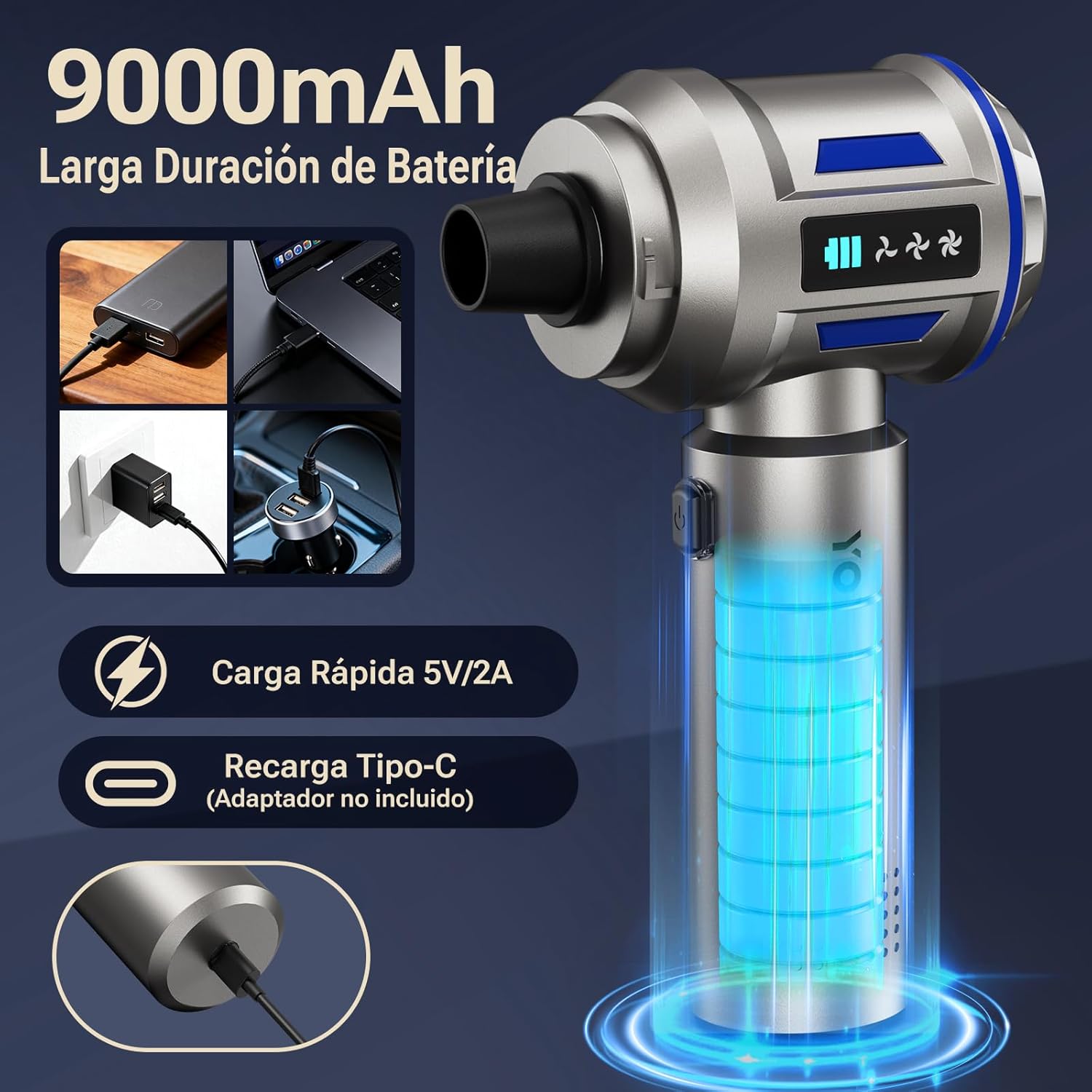
Image: The Yomile AD10 used as a blower to clean a computer keyboard, effectively dislodging dust and crumbs.

Image: Detailed instruction diagrams illustrating how to use the air blower and vacuum cleaner functions with various accessories.
5.4 Inflating Function
Attach the appropriate Inflation Nozzle to the rear port. Use it to quickly inflate items such as:
- Swimming rings
- Balloons
- Small air mattresses

Image: The Yomile AD10 inflating a balloon, showcasing its versatile air pump feature.
5.5 Vacuum Compression Function
Use the appropriate nozzle to compress air from storage bags, helping to save space for clothing and other items.
6. Maintenance
6.1 Emptying the Dust Bin
- Ensure the device is powered off.
- Press the one-click dust emptying button to release the bottom cover of the dust bin.
- Empty the collected debris into a trash receptacle.

Image: The Yomile AD10 with its dust bin opened, showing the one-click emptying feature.
6.2 Cleaning the HEPA Filter
- Separate the main unit from the dust bin.
- Remove the HEPA filter from the dust bin.
- Rinse the filter and dust bin under running water.
- Ensure the filter and dust bin are completely dry before reassembling and reusing the device. This is crucial for maintaining optimal performance.

Image: A five-step diagram illustrating the process of cleaning the vacuum filter and dust bin.
7. Troubleshooting
If you encounter any issues with your Yomile AD10, please refer to the following common problems and solutions:
| Problem | Possible Cause | Solution |
|---|---|---|
| Device does not turn on | Low battery; Power button not pressed correctly | Charge the device fully; Press and hold the power button for 2-3 seconds |
| Weak suction/blowing power | Dust bin full; Filter clogged; Incorrect mode selected | Empty the dust bin; Clean the HEPA filter; Select a higher power mode |
| Battery not charging | Charging cable or adapter faulty; Port connection loose | Check cable and adapter; Ensure secure connection; Try a different charging source |
| Unusual noise during operation | Obstruction in nozzle or main unit; Filter improperly installed | Check for and remove any obstructions; Reinstall the HEPA filter correctly |
If the problem persists after trying these solutions, please contact customer support for further assistance.
8. Specifications
- Brand: Yomile
- Model Name: AD10
- Motor Type: Brushless
- Suction Power: 27,000 PA (Max)
- Motor Speed: Up to 250,000 RPM
- Power Levels: 3 (9000 PA, 18000 PA, 27000 PA)
- Battery Capacity: 9000mAh
- Runtime: Up to 45 minutes (depending on mode)
- Charging Time: 3-4 hours
- Charging Port: USB-C
- Filter Type: HEPA (Washable)
- Dust Bin Capacity: 200 ml
- Weight: 1 Kilogram
- Dimensions (LxWxH): 10L x 10l x 10H mm (approximate, as per product data)
- Color: Blue
- Power Source: Battery Powered
- Cordless: Yes
- Recommended Surfaces: All floor types
- Recommended Product Uses: Car, Home
- Country of Origin: China
- UPC: 684514186063
9. Warranty and Support
9.1 Warranty Information
The Yomile AD10 4-in-1 Cordless Handheld Vacuum Cleaner comes with a 1-year manufacturer's warranty from the date of purchase. This warranty covers defects in materials and workmanship under normal use. It does not cover damage caused by misuse, accidents, unauthorized modifications, or normal wear and tear.
9.2 Customer Support
For any questions, technical assistance, or warranty claims, please contact Yomile customer support through the retailer where you purchased the product. Please have your purchase receipt and product model number (AD10) ready when contacting support.