
1. Product Overview
The Furitek NanoModo 2026 Control System is an integrated brushless upgrade designed for the Redcat ASCENT-32 micro crawler. This system combines the NanoPython Brushless Electronic Speed Controller (ESC), the NanoKomodo high-torque brushless motor, and the Furitek Gripor V2 4-Channel Transmitter/Receiver (TX/RX) system. It provides enhanced smoothness, precision, and compact power for your RC crawler.
A key feature of the NanoModo Control System is its integrated servo controller circuit, which ensures full compatibility with the stock ASCENT-32 servo without requiring modifications, simplifying installation.
Key Components:
- NanoPython ESC: Brushless Electronic Speed Controller with built-in wireless tuning.
- NanoKomodo Brushless Motor: High-torque motor optimized for the ASCENT-32.
- Gripor V2 4-Channel TX/RX System: 2.4 GHz radio system for precise control.

Image 1.1: The Furitek NanoModo 2026 Control System, showing the Gripor V2 transmitter, NanoPython ESC, NanoKomodo motor, and receiver, positioned next to a Redcat ASCENT-32 chassis.
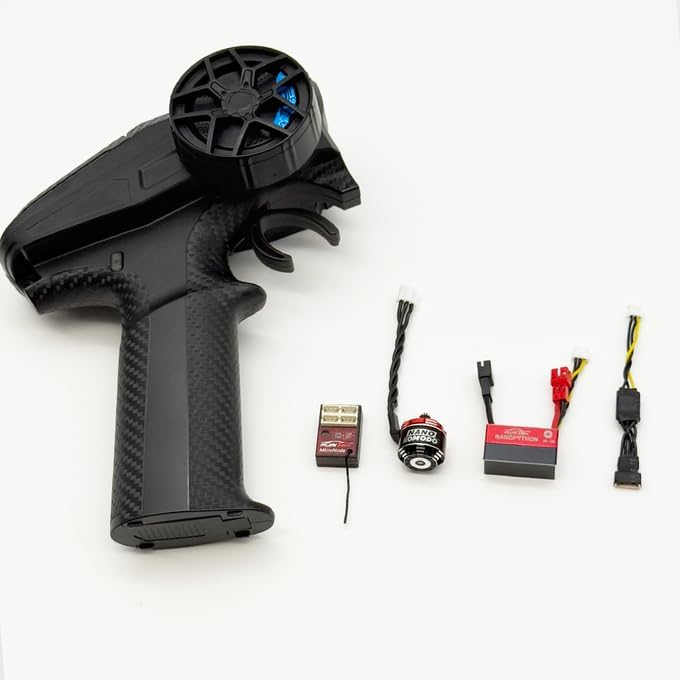
Image 1.2: Individual components of the NanoModo system, including the transmitter, ESC, motor, and receiver, ready for installation.
2. Setup and Installation
The NanoModo Control System is designed for plug-and-play installation into the Redcat ASCENT-32. Follow these steps for proper setup:
2.1. Power Requirements
- The system requires a 2S to 3S LiPo battery for operation.
- The system is not compatible with the stock 1S battery of the ASCENT-32.
- Ensure your LiPo battery is fully charged before use.
2.2. Component Installation
- Remove Existing Electronics: Carefully remove the stock ESC, motor, and receiver from your Redcat ASCENT-32 chassis.
- Install NanoKomodo Motor: Mount the NanoKomodo brushless motor into the motor mount of your ASCENT-32. Ensure proper gear mesh.
- Install NanoPython ESC: Secure the NanoPython ESC within the chassis. Its compact design is optimized for a clean fit.
- Connect Motor to ESC: Connect the NanoKomodo motor wires to the NanoPython ESC.
- Connect Receiver: Connect the Gripor V2 receiver to the NanoPython ESC.
- Connect Stock Servo: The NanoModo system includes an integrated servo controller. Connect the stock ASCENT-32 servo directly to the designated servo port on the NanoPython ESC. No additional modifications are required.
- Connect Battery: Connect your 2S or 3S LiPo battery to the NanoPython ESC.
- Secure Wiring: Route and secure all wiring to prevent interference with moving parts and maintain a clean setup.
2.3. Transmitter and Receiver Binding
The Gripor V2 TX/RX system typically comes pre-bound. If re-binding is necessary, refer to the specific instructions provided with the Gripor V2 transmitter for the binding procedure. Generally, this involves powering on the receiver in bind mode and then the transmitter while holding the bind button.
2.4. FuriCar App Installation
Download the FuriCar App from the iOS App Store or Google Play Store onto your smartphone. This app is essential for wireless tuning, telemetry, and firmware updates for the NanoPython ESC.
3. Operation
Once installed and powered, the NanoModo Control System provides precise control over your Redcat ASCENT-32.
3.1. Basic Control
- Transmitter Power: Turn on the Gripor V2 transmitter first.
- Vehicle Power: Connect the LiPo battery to the ESC. The ESC will power on.
- Steering: Use the steering wheel on the Gripor V2 transmitter for directional control.
- Throttle: Use the throttle trigger for forward and reverse movement. The advanced FOC technology ensures smooth startup and linear throttle response.
- Auxiliary Channels: The Gripor V2 is a 4-channel system. Utilize the additional channels for controlling accessories or advanced functions if your ASCENT-32 is equipped.
- Power Off: Always disconnect the battery from the ESC first, then turn off the transmitter.
3.2. App-Based Tuning and Telemetry
The NanoPython ESC features a built-in wireless module for connection to the FuriCar App. This allows for real-time adjustments and monitoring:
- Connect to App: Open the FuriCar App on your smartphone and connect to the NanoPython ESC via Bluetooth.
- Parameter Adjustment: Adjust various ESC parameters such as throttle curve, drag brake, motor type (brushed/brushless), and more.
- Telemetry: Monitor real-time data from the ESC, which can include battery voltage, motor RPM, and temperature (if supported by sensors).
- Firmware Updates: The app facilitates wireless firmware updates for the ESC, ensuring you have the latest features and performance enhancements.
4. Maintenance
Regular maintenance ensures the longevity and optimal performance of your NanoModo Control System.
- Cleaning: Keep the ESC, motor, and receiver free from dirt, dust, and moisture. Use a soft brush or compressed air for cleaning. Avoid using solvents.
- Connections: Periodically check all electrical connections for tightness and signs of wear. Ensure wires are not pinched or frayed.
- Battery Care: Follow manufacturer guidelines for LiPo battery charging, discharging, and storage. Never overcharge or over-discharge LiPo batteries. Store them in a safe, cool place.
- Firmware: Regularly check the FuriCar App for available firmware updates for the NanoPython ESC. Keeping the firmware updated can improve performance and address potential issues.
- Motor Inspection: Inspect the NanoKomodo motor for any debris in the cooling vents or signs of bearing wear.
- Transmitter Care: Keep the Gripor V2 transmitter clean and store it in a dry place. Replace transmitter batteries as needed.
5. Troubleshooting
This section addresses common issues you might encounter with the NanoModo Control System.
5.1. No Power to Vehicle
- Check Battery: Ensure the LiPo battery is fully charged and properly connected to the ESC. Verify it is a 2S or 3S LiPo.
- ESC Switch: Confirm the ESC power switch is in the "ON" position.
- Connections: Inspect all power connections for secure fit and no damage.
5.2. No Response from Motor or Servo
- Transmitter On: Ensure the Gripor V2 transmitter is powered on and its batteries are charged.
- Binding: Verify that the transmitter and receiver are properly bound. Re-bind if necessary.
- Connections: Check motor and servo connections to the ESC.
- ESC Status: Observe any LED indicators on the ESC for error codes or status.
- App Check: Use the FuriCar App to check ESC settings and ensure the motor type (brushed/brushless) is correctly configured.
5.3. Intermittent Control or Loss of Signal
- Range: Ensure you are within the operational range of the Gripor V2 system.
- Interference: Avoid operating near strong sources of radio interference.
- Antenna: Check the receiver antenna for damage and ensure it is properly positioned.
- Battery Voltage: Low battery voltage in either the transmitter or vehicle can cause signal issues.
5.4. FuriCar App Connectivity Issues
- Bluetooth: Ensure Bluetooth is enabled on your smartphone and the ESC is powered on.
- App Permissions: Verify the FuriCar App has necessary Bluetooth permissions.
- Restart: Try restarting both the app and the ESC.
- Proximity: Keep your smartphone close to the ESC during connection.
6. Specifications
Detailed technical specifications for the components of the Furitek NanoModo Control System.
6.1. NanoPython ESC

Image 6.1: The NanoPython ESC, highlighting its compact design and key specifications.
| Feature | Specification |
|---|---|
| Input Voltage | 2–3 S LiPo |
| Continuous Current | 20 A |
| Burst Current | 50 A |
| BEC Output | 5.5 V / 7.4 V, 5 A |
| Motor Type | Brushed / Brushless (switchable via app) |
| Wireless Tuning | Built-in via FuriCar App |
6.2. NanoKomodo Brushless Motor

Image 6.2: The NanoKomodo Brushless Motor, showing its compact size and design.
| Feature | Specification |
|---|---|
| KV Rating | 3800 KV (optimized for ASCENT-32) |
| Design | 12-pole high-torque |
| Shaft Dimensions | 1.5 × 6 mm |
| Weight | 10 g |
6.3. Furitek Gripor V2 4CH TX/RX System

Image 6.3: The Gripor V2 4-Channel Transmitter and its compact receiver.
| Feature | Specification |
|---|---|
| Frequency | 2.4 GHz |
| Channels | 4-channel digital radio system |
| Transmitter | Compact ergonomic design for micro/mini crawlers |
| Control Response | Smooth linear throttle and steering |
| Programmability | Programmable channels and endpoints |
| Receiver | Lightweight, optimized for ASCENT-32 |
| Compatibility | Plug-and-play with NanoPython ESC |
7. Warranty Information
Specific warranty details for Furitek products may vary by region and retailer. Please retain your proof of purchase. For the most accurate and up-to-date warranty information, refer to the official Furitek website or contact your authorized dealer.
Note: This product is not intended for use by children.
8. Customer Support
For technical assistance, product inquiries, or support, please utilize the following resources:
- Official Furitek Website: Visit www.furitek.com for product information, FAQs, and contact options.
- FuriCar App: The FuriCar App provides access to firmware updates and tuning options.
- Authorized Dealers: Contact the retailer from whom you purchased the product for local support.