
1. Introduction
Thank you for choosing the RLQA Band2 Fitness Tracker Smart Watch. This device is designed to help you monitor your health and fitness activities, providing convenient access to notifications and various health metrics. This manual provides essential information for setting up, operating, maintaining, and troubleshooting your new smart watch. Please read it carefully before use.
2. What's in the Box
Upon unpacking your RLQA Band2 Fitness Tracker Smart Watch, please ensure all items listed below are present:
- RLQA Band2 Fitness Tracker Smart Watch
- Charging Cable
- User Manual (this document)
3. Setup Guide
3.1 Charging the Device
Before initial use, fully charge your RLQA Band2 Smart Watch. Connect the provided charging cable to the charging port on the back of the watch and plug the USB end into a standard USB power adapter (not included) or a computer's USB port. A full charge typically takes approximately 2 hours.
3.2 App Installation and Pairing
The RLQA Band2 Smart Watch requires a companion application to unlock its full functionality and synchronize data with your smartphone. The watch is compatible with both Android and iOS devices.
- Download the App: Search for the official RLQA companion app in your smartphone's app store (Google Play Store for Android, Apple App Store for iOS).
- Create an Account: Open the app and follow the on-screen instructions to create a new user account or log in if you already have one.
- Enable Bluetooth: Ensure Bluetooth is enabled on your smartphone.
- Pair the Device: In the app, navigate to the device pairing section. Select 'Add Device' or a similar option. The app will search for nearby RLQA Band2 devices. Select your watch from the list to initiate pairing.
- Confirm Pairing: A pairing request may appear on your watch screen. Confirm the pairing on both your watch and smartphone.
Once paired, the watch will synchronize time and data with your phone, and you can customize settings through the app.
4. Operating Instructions
4.1 Basic Navigation
The RLQA Band2 features a 1.47-inch HD curved touchscreen for intuitive interaction. Swipe up, down, left, or right to navigate through menus and functions. Tap to select an option or confirm an action.
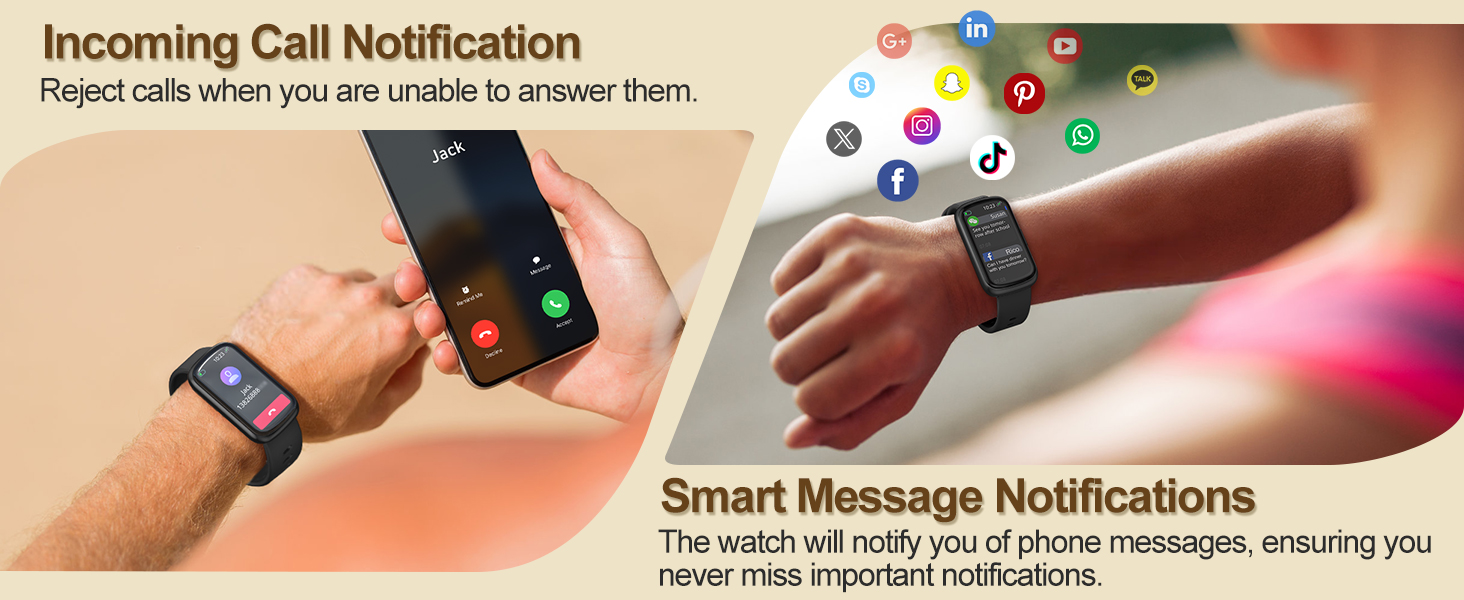
Image: The RLQA Band2 Smart Watch with its 1.47-inch HD curved touchscreen displaying time, date, and activity metrics.
4.2 Activity Tracking
The watch continuously tracks your daily activities, including steps taken, distance covered, and calories burned. View your progress directly on the watch or in the companion app for detailed analysis.
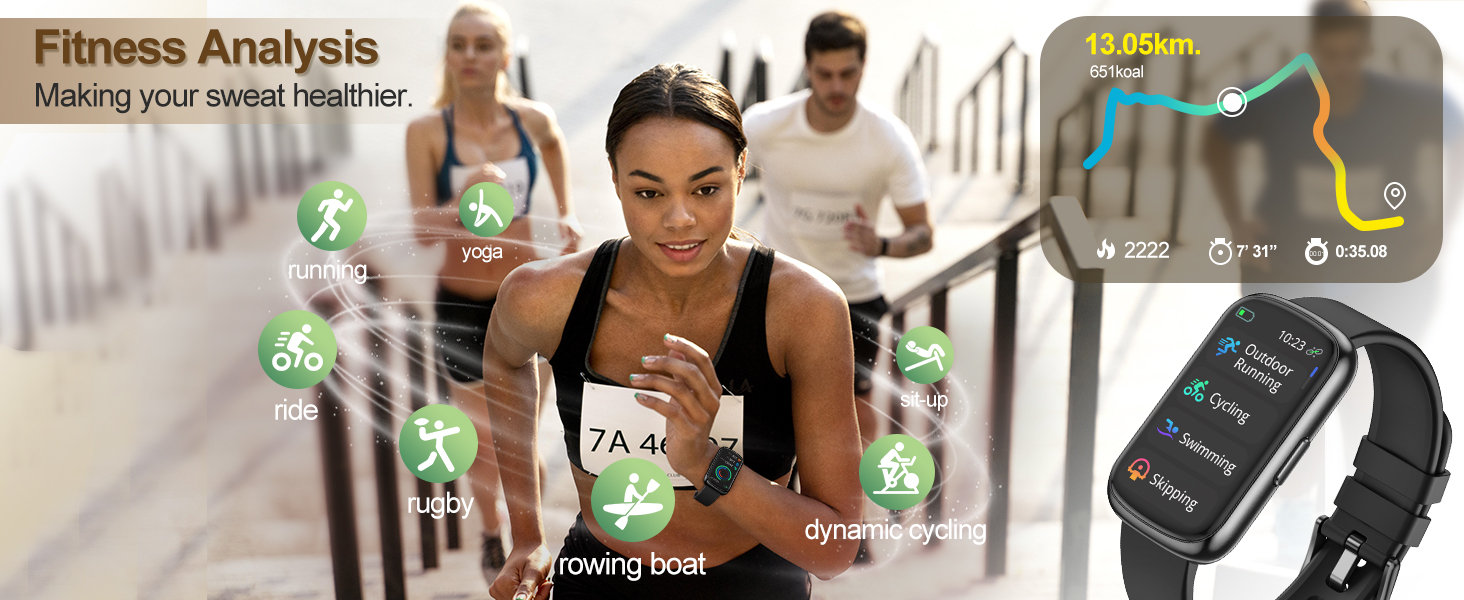
Image: Individuals performing different exercises, illustrating the watch's fitness analysis capabilities for activities like running, yoga, and cycling.
4.3 Heart Rate Monitoring
The RLQA Band2 monitors your heart rate 24/7. Access real-time heart rate data on your watch and review historical trends in the app to understand your cardiovascular health.

Image: A user wearing the smart watch during a basketball game, showing the heart rate tracking feature and a graph of heart rate data.
4.4 Blood Oxygen Monitoring (SpO2)
Measure your blood oxygen saturation (SpO2) level anytime, anywhere. This feature provides insights into your respiratory health. Consult the app for detailed readings and historical data.
Image: A person outdoors with the smart watch, demonstrating the blood oxygen tracking feature and a graph showing SpO2 levels over time.
4.5 Sleep Tracking
The watch automatically monitors your sleep patterns, providing data analysis on sleep stages (deep sleep, light sleep, REM), duration, and quality. Review your sleep data in the app to improve your sleep habits.

Image: A woman sleeping while wearing the smart watch, with an overlay showing detailed sleep data analysis including sleep stages and duration.
4.6 Smart Notifications
Receive incoming call alerts and message notifications directly on your wrist. You can reject calls from the watch when unable to answer. Customize which app notifications you receive through the companion app.

Image: A user's hand holding a smartphone with an incoming call, while the smart watch on the other wrist displays the call, and various app icons for message notifications.
4.7 Sports Modes
The RLQA Band2 supports multiple sports modes, including running, yoga, cycling, rugby, rowing, dynamic cycling, sit-ups, swimming, and skipping. Select the appropriate mode before starting your workout for accurate tracking of activity-specific metrics.
4.8 Water Resistance
With an IP68 waterproof rating, the RLQA Band2 is designed to withstand everyday water exposure. This includes activities such as swimming, washing hands, and sweating. It is not recommended for hot showers, saunas, or diving.

Image: The RLQA Band2 Smart Watch partially submerged in water, demonstrating its IP68 waterproof rating, alongside a person fishing with the watch on their wrist.
4.9 Additional Features
Explore other useful features such as sedentary reminders, female menstrual cycle tracking, weather forecasts, music control, camera control, and a 'Find My Phone' function, all accessible via the watch or companion app.
5. Maintenance
Proper maintenance ensures the longevity and optimal performance of your RLQA Band2 Smart Watch.
- Cleaning: Regularly clean the watch screen and strap with a soft, dry cloth. If necessary, use a slightly damp cloth for the strap, then dry thoroughly. Avoid harsh chemicals or abrasive materials.
- Charging: Use only the provided charging cable. Avoid exposing the charging contacts to water or sweat to prevent corrosion.
- Storage: Store the watch in a cool, dry place when not in use. Avoid extreme temperatures.
- Water Resistance: While IP68 rated, avoid prolonged submersion in water, hot water, or exposure to high-pressure water jets. Ensure the watch is dry before charging.
6. Troubleshooting
If you encounter issues with your RLQA Band2 Smart Watch, refer to the following common solutions:
- Watch not turning on: Ensure the watch is fully charged. Connect it to the charging cable and allow it to charge for at least 30 minutes before attempting to power it on again.
- Unable to pair with smartphone:
- Ensure Bluetooth is enabled on your smartphone.
- Make sure the watch is within Bluetooth range of your phone.
- Restart both your smartphone and the watch.
- Check if the companion app is updated to the latest version.
- If previously paired, try unpairing the device from your phone's Bluetooth settings and then re-pairing through the app.
- Inaccurate health data (Heart Rate, SpO2, Sleep):
- Ensure the watch is worn snugly on your wrist, about one finger's width above the wrist bone.
- Keep the sensor on the back of the watch clean and free from debris.
- Avoid excessive movement during measurements.
- Notifications not received:
- Verify that the watch is successfully paired with your phone.
- Check notification settings within the companion app to ensure desired apps are enabled.
- Ensure your phone's notification permissions are granted to the companion app.
- Make sure your phone is not in 'Do Not Disturb' mode.
- Short battery life:
- Reduce screen brightness.
- Disable continuous heart rate monitoring if not needed 24/7.
- Limit the number of app notifications.
- Ensure the watch is fully charged each time.
If these steps do not resolve your issue, please contact customer support.
7. Specifications
Below are the technical specifications for the RLQA Band2 Fitness Tracker Smart Watch:
| Feature | Specification |
|---|---|
| Model Name | Band2 |
| Brand | RLQA |
| Operating System Compatibility | Android & iOS |
| Screen Size | 1.47 Inches |
| Display Type | TFT |
| Human Interface Input | Touchscreen |
| Connectivity Technology | Bluetooth |
| Wireless Communication Standard | Bluetooth |
| Battery Capacity | 200 Milliamp Hours |
| Battery Average Life | 7 days |
| Battery Charge Time | 2 Hours |
| Water Resistance Level | Waterproof (IP68) |
| Water Resistance Depth | 1.5 Meters |
| Band Material Type | Silicone |
| Item Weight | 92 Grams |
| Item Dimensions | 10.83 x 2.95 x 0.68 inches |
| Special Features | Activity Tracker, Calorie Consumption, Sedentary Reminder, Female Menstrual Cycle, Heart Rate Monitor, Blood Oxygen Monitor, Sleep Tracker, Pedometer, Weather Forecast, Music/Camera Control, Messages Notification |
8. Warranty and Support
8.1 Product Warranty
The RLQA Band2 Fitness Tracker Smart Watch comes with a 1-Year Limited Warranty from the date of purchase. This warranty covers manufacturing defects and workmanship under normal use. It does not cover damage caused by misuse, accidents, unauthorized modifications, or failure to follow the instructions in this manual. Please retain your proof of purchase for warranty claims.
8.2 Customer Support
For any questions, technical assistance, or warranty inquiries, please contact RLQA customer support. Our team is available to provide quick responses and support.

Image: A visual representation of RLQA's commitment to high-quality service, including a 1-year warranty, 24/7 quick response, and efficient delivery.