
Introduction
Thank you for choosing the fishkeeper LED Aquarium Plant Light. This manual provides detailed instructions for the safe installation, operation, and maintenance of your new aquarium light. Please read this manual thoroughly before use and retain it for future reference.
Safety Information
- Always unplug the light from the power outlet before performing any maintenance, cleaning, or when placing hands in the aquarium water.
- Ensure the power cord and controller are kept dry. Do not immerse the light, controller, or power adapter in water.
- This product is designed for indoor use only.
- Do not operate the light if it has a damaged cord or plug, or if it is malfunctioning or has been dropped.
- Keep out of reach of children.
- Ensure the light is securely mounted on the aquarium to prevent accidental falls into the water.
- The light is waterproof, but the controller and power adapter are not.
Package Contents
The package includes:
- fishkeeper LED Aquarium Plant Light
- Controller with LED display
- Power Adapter
- Adjustable Mounting Brackets
- Instruction Manual
Product Overview
The fishkeeper LED Aquarium Plant Light is designed to provide optimal lighting for aquatic plants and enhance the visual appeal of your fish tank. It features a full spectrum output, multiple operating modes, and a user-friendly controller.
Key Features:
- 24/7 Mode: Simulates natural daylight cycles with gradual sunrise, daylight, and sunset.
- Programmable Timer: Allows precise minute-level customization for on/off schedules.
- 5 Nature Weather Modes: Includes Sunny, Cloudy, Lightning, Sunrise, and Sunset scenes.
- Adjustable Colors & Brightness: 8 single colors + 1 full spectrum light + 1 auto-gradient mode, with 10 brightness levels (10%-100%).
- Memory Function: Retains settings after a power outage.
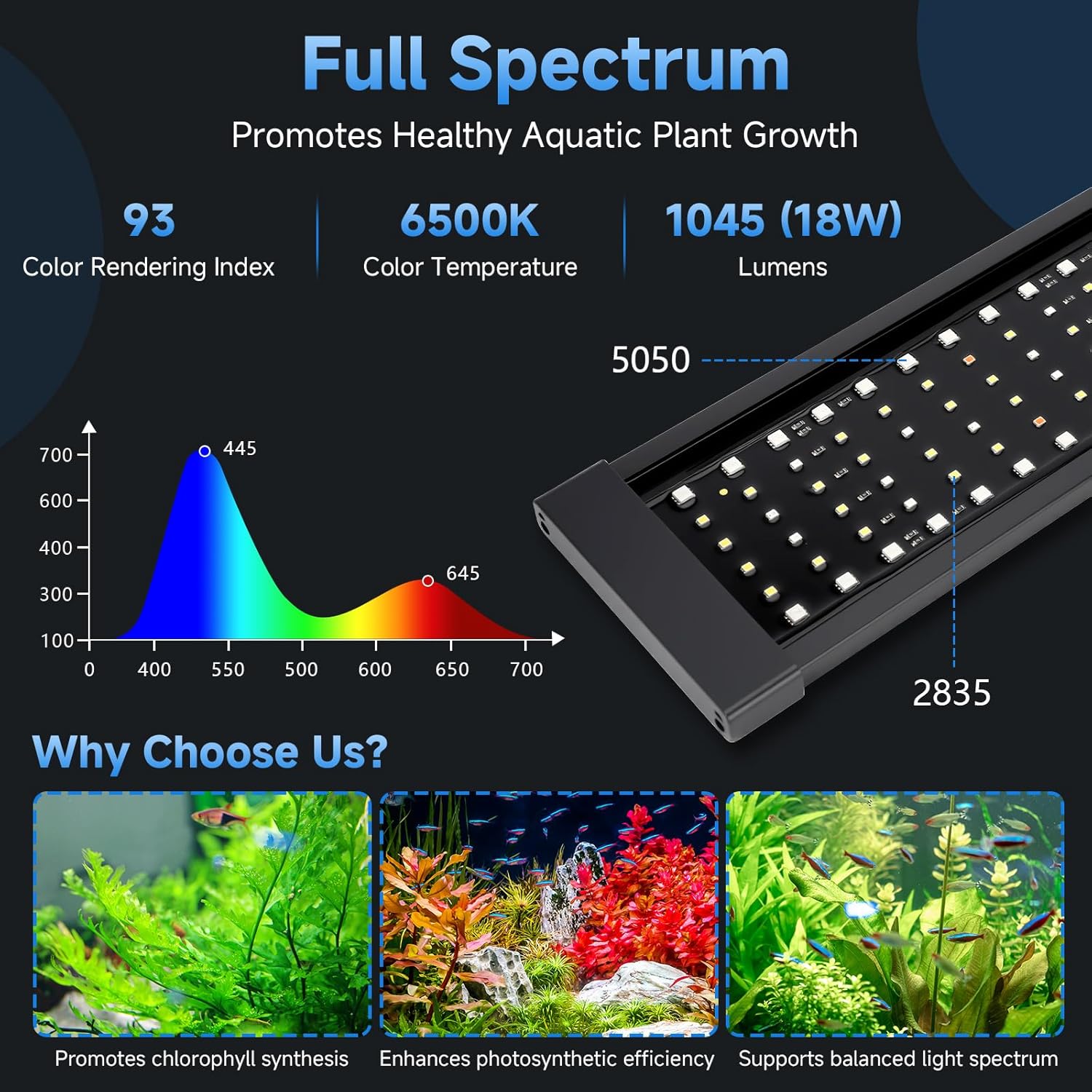
- Full Spectrum Output: Promotes healthy aquatic plant growth with a Color Rendering Index of 93 and Color Temperature of 6500K.
Controller Function Introduction:
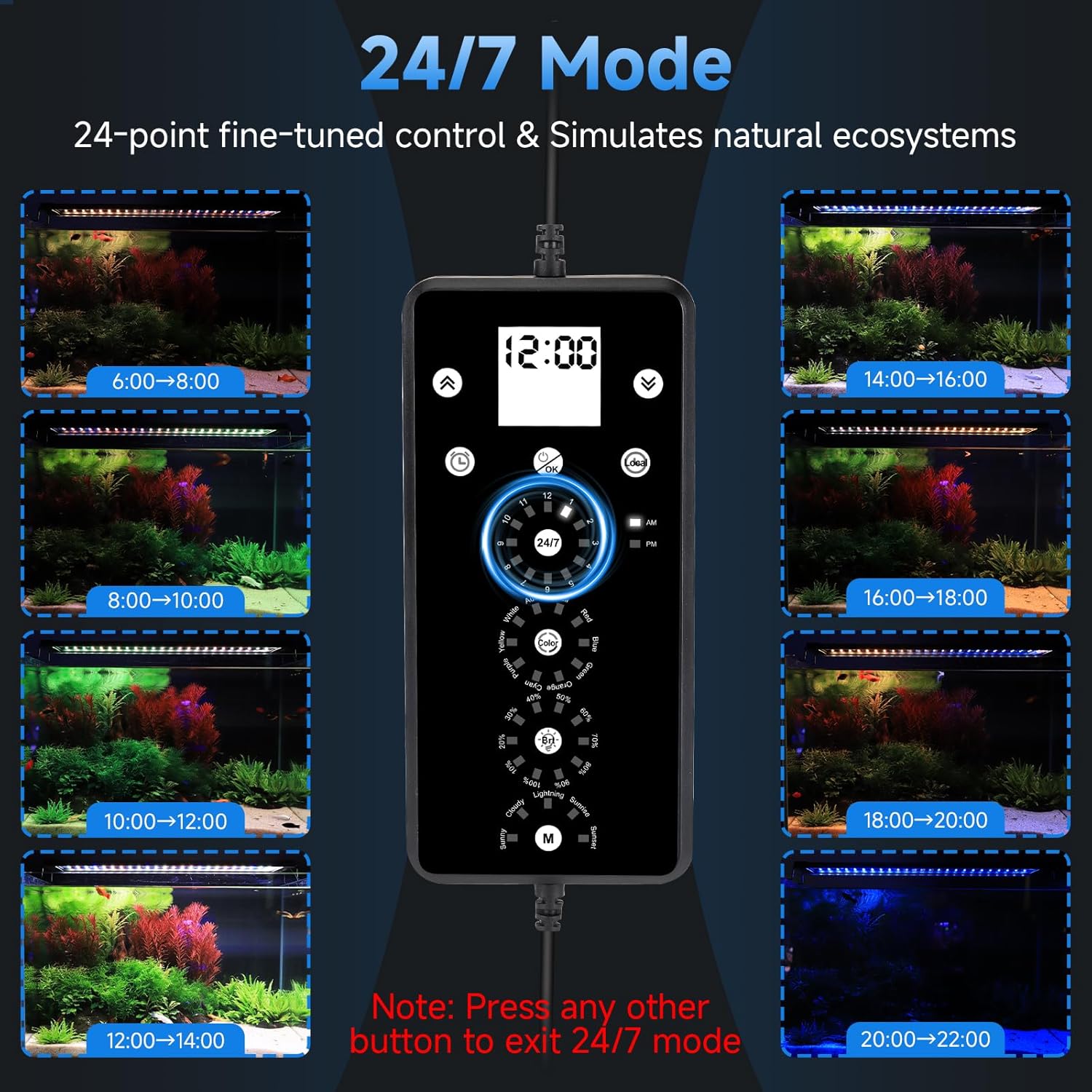
The controller allows you to manage all light settings. Refer to the diagram below for button functions.

Setup
- Unpack: Carefully remove all components from the packaging.
- Mounting: Insert the adjustable mounting brackets into the ends of the light fixture. Place the light securely on top of your aquarium. The brackets can be extended to fit tanks from 12 to 18 inches.
- Connect: Connect the light fixture to the controller, and then connect the power adapter to the controller. Plug the power adapter into a suitable electrical outlet.
- Initial Power On: The light will power on. Proceed to set the local time and desired operating modes.


Operating Instructions
1. Setting Local Time:
It is crucial to set the correct local time for accurate timer and 24/7 mode operation.
- Press and hold the Local Time Button (
 ) to enter local time setting. The hour display will flash.
 - Use the + Button (
 ) and - Button () to adjust the hour.
 - Briefly press the Local Time Button again to switch to minute setting. The minute display will flash.
- Use the + Button and - Button to adjust the minute.
- Press the Power/Confirm Button () to save the time.
2. 24/7 Mode:
The 24/7 mode simulates a natural day-night cycle, automatically adjusting light intensity and color throughout the day. The default setting turns on at 6:00 AM and off at 11:00 PM.
- Press and hold the 24/7 Mode Button () to activate the 24/7 mode. The light will synchronize with the controller's local time.
- Briefly press the 24/7 Mode Button to preview the light modes for each time point.
- To exit 24/7 mode, press any other button on the controller.
Video 1: This video demonstrates the 5 preset weather modes and the programmable weather timer function of the fishkeeper LED Aquarium Plant Light, showing how the light transitions between different natural lighting conditions.
3. Programmable Timer:
Set custom on/off times for your light with minute-level precision.
- Press and hold the Timer Button () to enter timer setting. The 'ON' hour will flash.
- Use the + Button and - Button to set the 'ON' hour.
- Briefly press the Timer Button to switch to 'ON' minute setting. Use the + Button and - Button to set the 'ON' minute.
- Briefly press the Timer Button to switch to 'OFF' hour setting. Use the + Button and - Button to set the 'OFF' hour.
- Briefly press the Timer Button to switch to 'OFF' minute setting. Use the + Button and - Button to set the 'OFF' minute.
- Press the Power/Confirm Button to save the timer settings.


Video 2: This video demonstrates how to set custom on/off times for the fishkeeper LED Aquarium Plant Light, guiding users through the timer programming process.
4. 5 Nature Weather Modes:
The light offers 5 dynamic scene modes to mimic natural weather conditions. By default, scenes run from 6:00 AM to 11:00 PM, but you can customize these times.
- Briefly press the Scene Mode Button () to cycle through the 5 weather modes: Sunny, Cloudy, Lightning, Sunrise, and Sunset.
- To exit a scene mode, press and hold the Scene Mode Button or briefly press the Color Mode Button or 24/7 Mode Button.

5. Adjustable Colors & Brightness:
Customize the light's color and intensity to suit your preferences or specific plant needs.
- Briefly press the Color Mode Button () to cycle through 8 single colors (Red, Blue, Cyan, Yellow, Purple, Orange, Green, White), 1 full spectrum light, and 1 auto-gradient mode.
- Briefly press the Brightness Button () to adjust brightness. There are 10 levels from 10% to 100%. Note: Brightness cannot be adjusted in auto-gradient mode.


Video 3: This video illustrates the adjustable color modes and 10 brightness levels of the fishkeeper LED Aquarium Plant Light, showcasing the customization options for aquarium lighting.
6. Power-Off Memory Function:
The controller is equipped with a memory function. In the event of a power outage, it retains your programmed settings and the local time continues to update. When power is restored, the light will resume operation according to the last saved settings without requiring reprogramming.

Maintenance
- Cleaning: Regularly wipe the light fixture with a soft, damp cloth to remove dust and water spots. Ensure the light is unplugged before cleaning. Do not use abrasive cleaners or solvents.
- Controller Battery Replacement: If the controller's memory function ceases to work, the internal battery may need replacement. Use a small screwdriver to open the battery cover on the back of the controller, remove the old battery, and insert a new one with the printed side facing up. Refer to Figure 12 for visual guidance.
- Power Cord Inspection: Periodically inspect the power cord and plug for any signs of damage. If damaged, discontinue use and contact customer support.
Troubleshooting
| Problem | Possible Cause | Solution |
|---|---|---|
| Light does not turn on. | No power, loose connection, faulty adapter. | Check power outlet, ensure all connections are secure. Try a different outlet. |
| Timer not working correctly. | Incorrect local time setting, incorrect timer programming. | Verify local time is set accurately. Re-program the timer following instructions in Section 3.1 and 3.2. |
| Memory function lost after power outage. | Controller battery depleted. | Replace the controller battery as described in the Maintenance section. |
| Brightness cannot be adjusted. | Light is in auto-gradient mode or 24/7 mode. | Exit auto-gradient mode or 24/7 mode to adjust brightness manually. |
Specifications
| Feature | Detail |
|---|---|
| Model Number | FK097-18W |
| Wattage | 18 watts |
| Applicable Fish Tank Size | 12-18 inches |
| Light Source Type | LED |
| Color Rendering Index (CRI) | 93 |
| Color Temperature | 6500K |
| Lumens | 1045 |
| Material | Aluminum |
| Power Source | Corded Electric |
| Waterproof | Yes (Light fixture only) |
| Additional Features | Full Spectrum, Memory Function |
Warranty and Support
Warranty:
This fishkeeper LED Aquarium Plant Light comes with a 2-year manufacturer's warranty from the date of purchase. This warranty covers defects in materials and workmanship under normal use. It does not cover damage caused by misuse, accident, unauthorized modification, or improper installation.
Customer Support:
For technical assistance, troubleshooting, or warranty claims, please contact fishkeeper customer support through the retailer where the product was purchased or visit the official fishkeeper website for contact information.